Everything so far gets your app running on Kubernetes. This final lesson is about running it safely and observably in production, and then tying the whole course together by deploying a realistic application. The uncomfortable truth to start with: Kubernetes is open by default. Out of the box, any pod can talk to any other pod, service accounts have more access than they need, and pods can run as root. Production security is a set of controls you deliberately add. Here are the ones that matter most.
Security: Defence in Layers
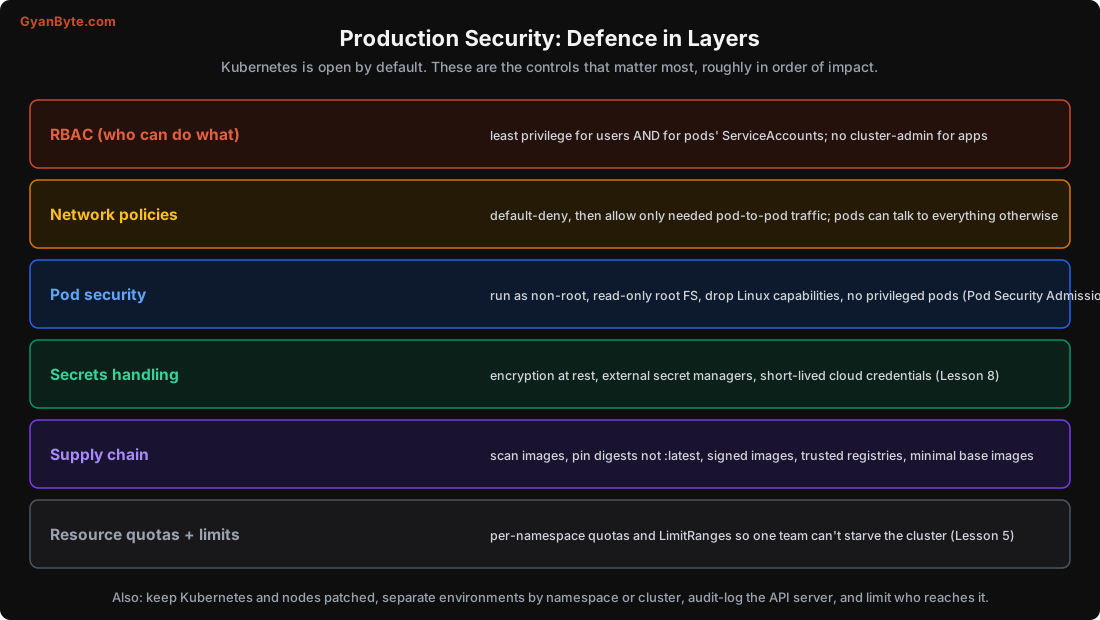
RBAC (Role-Based Access Control) governs who can do what. Apply least privilege to both humans and pods:
- Humans: developers get read access and deploy rights to their namespaces, not
cluster-admin. Reserve admin for a few people. - Pods: every pod runs as a ServiceAccount. By default it may have more API access than it needs. Give each workload a dedicated ServiceAccount with only the permissions it actually requires (often none). A compromised pod with a powerful ServiceAccount can take over the cluster.
Network policies. Remember from Lesson 7 that all pods can talk to all pods by default. A NetworkPolicy restricts this. The pattern: default-deny, then allow only the connections each service needs.
apiVersion: networking.k8s.io/v1
kind: NetworkPolicy
metadata: {name: api-allow}
spec:
  podSelector: {matchLabels: {app: api}}
  policyTypes: [Ingress]
  ingress:
  - from: [{podSelector: {matchLabels: {app: web}}}]    # only 'web' may reach 'api'
    ports: [{port: 8080}]
This limits the blast radius: if one pod is compromised, it can’t freely reach the database and every other service. (NetworkPolicies need a CNI that enforces them, Calico, Cilium, most managed clusters.)
Pod security. Harden the pods themselves via their securityContext, and enforce it cluster-wide with Pod Security Admission:
- Run as non-root (
runAsNonRoot: true). - Read-only root filesystem (
readOnlyRootFilesystem: true), write only to mounted volumes. - Drop Linux capabilities, add back only what’s needed.
- No privileged containers, no host network/PID/mounts unless truly required.
Secrets handling (Lesson 8): encryption at rest, external secret managers, short-lived cloud credentials (IRSA/Workload Identity). Don’t rely on base64.
Supply chain: your running code is only as trustworthy as the images you run. Scan images for vulnerabilities in CI (Trivy, Grype), pin image digests (image@sha256:...) rather than mutable tags like :latest (so the image can’t change under you), use trusted registries, prefer minimal base images (distroless, Alpine) to shrink the attack surface, and consider image signing (Cosign) with admission control that only runs signed images.
Resource quotas and limits (Lesson 5): per-namespace ResourceQuota and LimitRange so one team or one runaway Deployment can’t starve the whole cluster. This is both a stability and a fairness control in a shared cluster.
And the baseline hygiene: keep Kubernetes and nodes patched (CVEs are frequent), separate environments by namespace or, better, separate clusters, audit-log the API server, and limit who can reach the API server (private endpoints, VPN).
Observability: Know What’s Happening
You can’t operate what you can’t see. Three sources, and the “golden signals” to watch:
- Metrics: collect with Prometheus (or a managed equivalent), visualise with Grafana. Watch the four golden signals per service: latency (p50/p95/p99), traffic (requests/sec), errors (error rate), saturation (how full your resources are, CPU/memory vs requests, pod counts, queue depth). Also cluster-level: node pressure, pod restarts, pending pods, HPA activity. (These map directly onto the distributed-systems observability in that course’s lesson.)
- Logs: ship pod logs to a central store (Loki, Elasticsearch, a cloud logging service).
kubectl logsis fine for one pod, but you need aggregation to debug across many pods and to keep logs after a pod dies. Use structured logs with correlation/trace IDs. - Events:
kubectl get eventsandkubectl describeare your first stop when something’s wrong, they show what the scheduler, kubelet and controllers actually did (why a pod is Pending, why it was OOM-killed, why an image pull failed). This is often the fastest path to the cause.
Set alerts on symptoms users feel (error rate up, latency up, requests failing), not just causes (CPU high). A few reliable alerts beat a wall of noisy ones.
Capstone: Deploying a Real App
Let’s put all twelve lessons together. The system: a backend for a typical Indian SaaS product, an API, background workers, fronted by HTTPS, with a database.
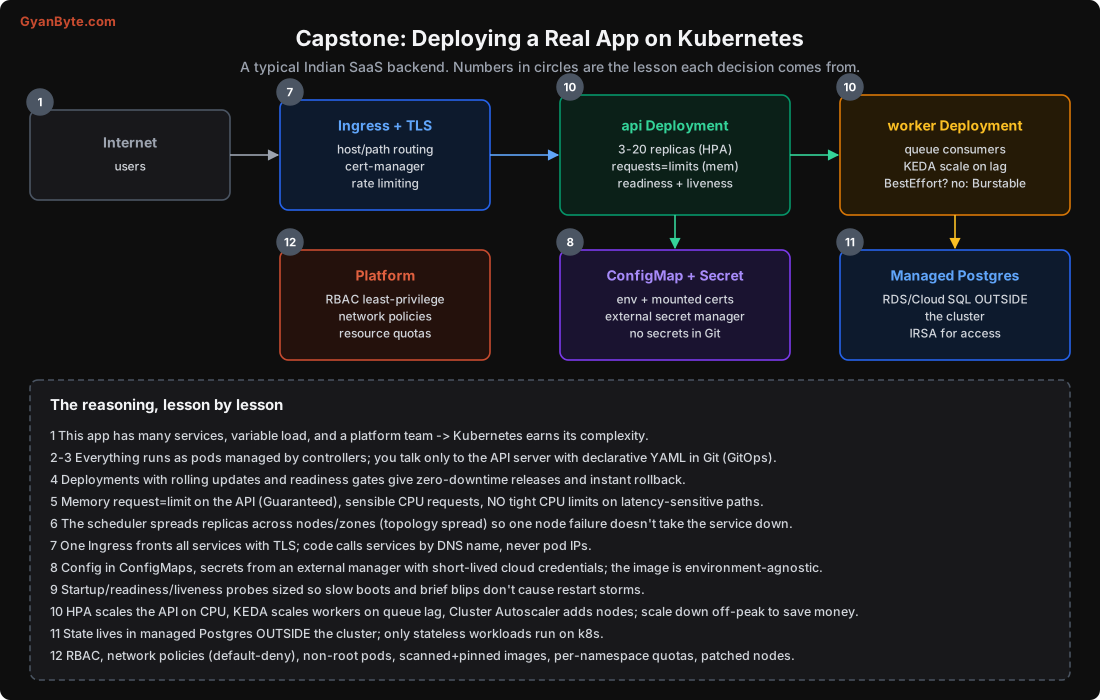
Walking it, lesson by lesson:
- Lesson 1: this app has many services, variable load, and a platform team, Kubernetes earns its complexity (and we use a managed cluster so the cloud runs the control plane).
- Lessons 2-3: everything runs as pods managed by controllers; all desired state is declarative YAML in Git (GitOps), and we talk only to the API server.
- Lesson 4: the API and workers are Deployments with rolling updates and readiness gates, giving zero-downtime releases and instant rollback.
- Lesson 5: memory request = limit on the API (Guaranteed, survives node pressure), sensible CPU requests, no tight CPU limits on the latency-sensitive API path; per-namespace quotas.
- Lesson 6: replicas spread across nodes and zones (topology spread), so one node or zone failure doesn’t take the service down.
- Lesson 7: one Ingress with TLS (cert-manager) fronts all HTTP services; internal calls use Service DNS names, never pod IPs.
- Lesson 8: config in ConfigMaps, secrets from an external secret manager with short-lived cloud credentials; the image is environment-agnostic, no secrets in Git.
- Lesson 9: startup/readiness/liveness probes sized so slow boots and brief blips don’t cause restart storms; liveness checks only self, readiness checks dependencies. PodDisruptionBudgets protect availability during node drains.
- Lesson 10: HPA scales the API on CPU/requests, KEDA scales workers on queue lag, the Cluster Autoscaler adds nodes; everything scales down off-peak to save money.
- Lesson 11: state lives in a managed Postgres outside the cluster; only stateless workloads run on Kubernetes.
- Lesson 12: RBAC least-privilege, network policies (default-deny), non-root pods with read-only filesystems, scanned and digest-pinned images, per-namespace resource quotas, patched nodes, and centralised metrics/logs with alerts on user-facing symptoms.
Is it a lot? Yes, but you build up to it: start with a Deployment, a Service and an Ingress; add probes and resources; add config and secrets; add autoscaling; lock down security. Each piece traces to a concrete need from an earlier lesson, and the order of the lessons is roughly the order you’d adopt them.
Pitfalls to Avoid
- Relying on Kubernetes defaults for security. It’s open by default; RBAC, network policies and pod security are opt-in.
- Powerful ServiceAccounts on app pods. A compromised pod then owns the cluster. Least privilege.
- No network policies. Any pod can reach your database and every service. Default-deny, then allow.
- Running as root with a writable filesystem. Harden pods; enforce with Pod Security Admission.
- Mutable image tags (
:latest). Pin digests so the running code can’t change under you; scan images. - No resource quotas in a shared cluster. One team can starve everyone.
- Alerting on causes, not symptoms. Alert on errors and latency users feel; use
kubectl eventsto find the cause. - Not patching Kubernetes and nodes. CVEs are frequent; stay current.
Quick Recap
- Kubernetes is open by default; production security is controls you add: RBAC, network policies (default-deny), pod security, secrets, supply chain, resource quotas.
- Give pods’ ServiceAccounts least privilege, restrict pod-to-pod traffic, run non-root with read-only filesystems, pin and scan images.
- Observe with metrics (the four golden signals), aggregated logs, and
kubectl events; alert on symptoms users feel. - The capstone applied every lesson: Deployments with probes and sensible resources, Ingress + TLS, injected config/secrets, HPA + autoscaler, managed database outside the cluster, locked-down platform.
Course Wrap-Up
If you remember only a handful of things:
- Kubernetes is a control loop. Declare desired state; controllers drive reality to match, forever. Everything else follows.
- The pod is the unit; you manage pods through controllers (Deployment, StatefulSet, Job), never bare pods.
- Requests schedule, limits cap. Over memory = OOM kill; over CPU = throttle. Set memory request=limit, be careful with CPU limits.
- Readiness gates traffic; it’s the mechanism behind zero-downtime deploys and load balancing. Always set it.
- Liveness must not depend on the world, or a dependency blip restarts every pod.
- Spread replicas across zones, keep state in a managed database, and lock down an otherwise-open cluster.
Running services on Kubernetes well isn’t about memorising YAML. It’s the control-loop idea plus a handful of concrete behaviours, many of which (OOM kills, CPU throttling, eviction order, the HPA formula, readiness gating) you’ve now seen measured or simulated rather than just asserted. Set up a local cluster (kind, k3d or minikube), deploy something real, break it on purpose, and watch the loop heal it. That’s how this stops being theory.