One of Kubernetes’s biggest draws is automatic scaling: handle a traffic spike without paging anyone, and shrink back down overnight to save money. But “autoscaling” isn’t one thing, there are three different autoscalers doing three different jobs, and people constantly confuse them (or configure two that fight each other). This lesson sorts them out, with the actual HPA formula so you can predict what it’ll do, and the one combination that covers most production needs.
The Horizontal Pod Autoscaler: One Formula
The HPA is the one you’ll use most. It watches a metric (usually CPU utilisation) and adds or removes pod replicas of a Deployment to keep that metric near a target. It runs on a single formula:
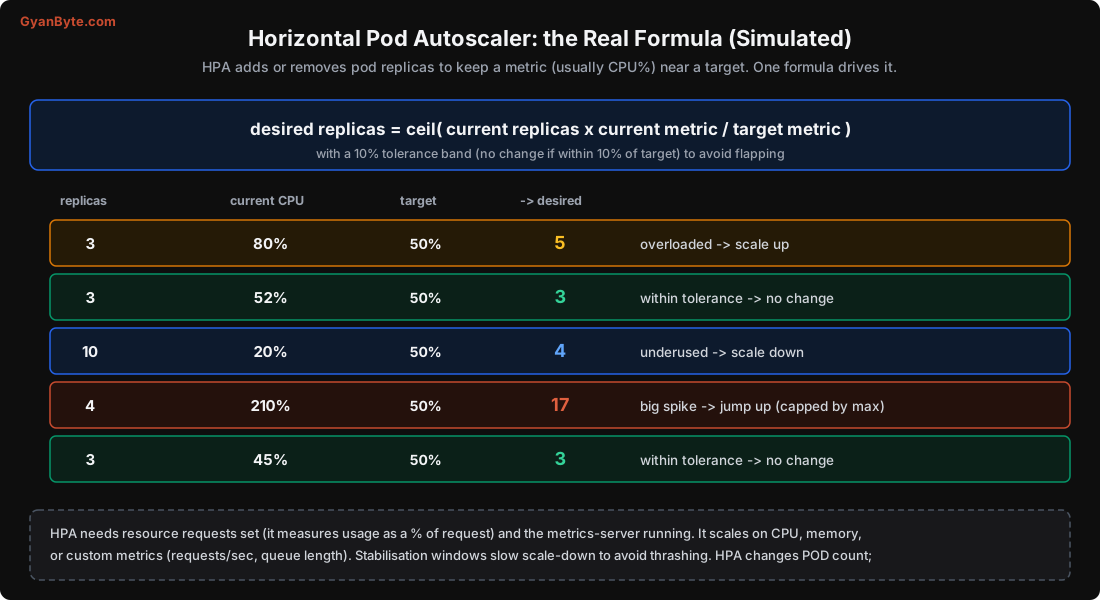
desired replicas = ceil( current replicas × current metric / target metric )with a 10% tolerance band (no change if the metric is within 10% of target, to avoid flapping). I simulated it:
3 replicas, CPU 80% vs target 50%  ->  ceil(3 × 80/50) = 5   (scale up)
3 replicas, CPU 52% vs target 50%  ->  no change (within 10% tolerance)
10 replicas, CPU 20% vs target 50% ->  ceil(10 × 20/50) = 4  (scale down)
4 replicas, CPU 210% vs target 50% ->  ceil(4 × 210/50) = 17 (big spike, capped by maxReplicas)
3 replicas, CPU 45% vs target 50%  ->  no change (within tolerance)
The logic is intuitive once you see it: if you’re running at double the target, you need double the pods; at 40% of target, you can get by with 40% of the pods. The ceil and tolerance band keep it from thrashing on small fluctuations. The HPA object:
apiVersion: autoscaling/v2
kind: HorizontalPodAutoscaler
metadata: {name: api}
spec:
  scaleTargetRef: {apiVersion: apps/v1, kind: Deployment, name: api}
  minReplicas: 3
  maxReplicas: 20
  metrics:
  - type: Resource
    resource: {name: cpu, target: {type: Utilization, averageUtilization: 50}}
Two requirements that trip people up:
- Resource requests must be set (Lesson 5). HPA measures CPU “utilisation” as a percentage of the pod’s CPU request. No request, no percentage, no scaling.
- metrics-server must be running to provide the usage data. On managed clusters it’s often preinstalled; verify with
kubectl top pods.
HPA scales on CPU, memory, or custom metrics (requests per second, queue length, see KEDA below). It also has stabilisation windows: scale-down is deliberately slow (default 5-minute window) so a brief dip doesn’t remove pods you’ll need again in a minute; scale-up is faster, to react to spikes. Set minReplicas to your resilient baseline (at least 2-3) and maxReplicas to a sane ceiling (so a bug or attack can’t scale you into a huge bill).
Three Autoscalers, Three Jobs
HPA adds pods, but pods need nodes to run on, and pods need the right size. Three autoscalers cover these, and they stack:
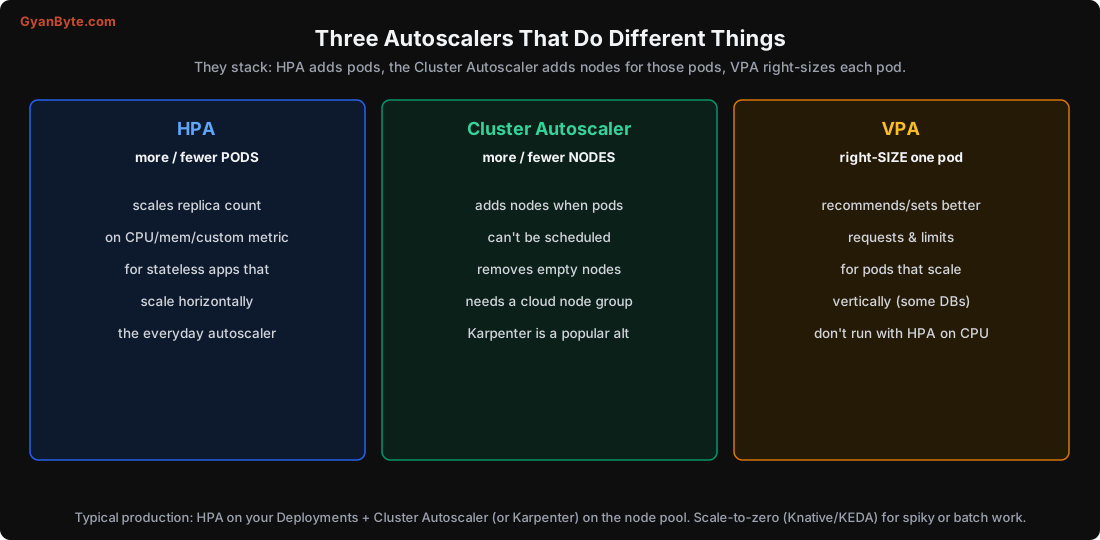
- Horizontal Pod Autoscaler (HPA): more/fewer pods. For stateless apps that scale horizontally. The everyday autoscaler.
- Cluster Autoscaler (or Karpenter): more/fewer nodes. When HPA adds pods but there’s no room, pods go Pending (Lesson 6); the Cluster Autoscaler notices and adds a node from your cloud node group. When nodes sit empty, it removes them to save money. Karpenter (AWS, now broader) is a popular modern alternative that provisions right-sized nodes faster and more flexibly.
- Vertical Pod Autoscaler (VPA): right-sizes one pod’s requests/limits based on observed usage. For workloads that scale vertically rather than horizontally (some databases, singletons). Don’t run VPA and HPA on the same CPU metric, they fight (HPA adds pods to lower per-pod CPU, VPA shrinks the pod, oscillation). VPA is also useful just in “recommendation” mode to right-size your requests.
The combination that covers most production needs: HPA on your Deployments + Cluster Autoscaler (or Karpenter) on the node pool. HPA reacts to load by changing pod count; the node autoscaler provides or removes the machines those pods need. Together they scale your service up for a spike and shrink the whole thing (pods and nodes) off-peak, which is where the cost savings come from.
Scaling on What Matters: Custom Metrics and KEDA
CPU is a crude proxy for load. Often a better signal is a business metric: requests per second, queue length, messages lagging in Kafka, p95 latency. HPA supports custom and external metrics, but the most popular tool for this is KEDA (Kubernetes Event-Driven Autoscaling):
- KEDA scales Deployments on dozens of event sources: queue depth (SQS, RabbitMQ, Kafka consumer lag), database query results, Prometheus metrics, cron schedules, and more.
- It can scale to zero: run no pods when there’s no work, and spin up when a message arrives. Great for workers and spiky or batch workloads (it saves money when idle, at the cost of a cold start on the first request).
For a worker consuming a queue, scaling on queue lag (how far behind the consumer is) is far better than CPU, it reacts to the actual backlog. This is how you keep a queue drained under bursty load without overprovisioning.
Scale-to-Zero and Cold Starts
Scaling to zero (via KEDA or Knative) is appealing for cost: pay nothing when idle. But the first request after scaling from zero pays a cold start, pulling the image, starting the container, passing the startup probe (Lesson 9), seconds to tens of seconds. That’s fine for async workers and dev environments, but bad for user-facing latency-sensitive services. For those, keep a warm minimum (minReplicas ≥ 1, usually more). Match the strategy to the workload: scale-to-zero for batch/async, a warm floor for interactive.
Scaling Statefully Is Harder
Everything above assumes stateless pods that scale horizontally (Lesson 3). Stateful workloads (databases) don’t scale by just adding replicas, adding a database pod means replication, data distribution and failover, which the database must handle (Lesson 11). Don’t point an HPA at a StatefulSet database expecting magic. Scale stateful systems the way that system supports (read replicas, sharding), usually through its Operator, not a generic autoscaler.
Pitfalls to Avoid
- HPA without resource requests. It measures usage as a % of request; no request means it can’t scale.
- No metrics-server. HPA has no data. Check
kubectl top podsworks. - Running VPA and HPA on the same CPU metric. They oscillate against each other.
- HPA without a Cluster Autoscaler. Pods scale up, then sit Pending with nowhere to run.
- No maxReplicas ceiling. A bug or attack can scale you into a massive bill.
- Scale-to-zero for latency-sensitive services. Cold starts hurt; keep a warm minimum.
- Scaling on CPU when queue lag is the real signal. Use KEDA/custom metrics for workers.
- Pointing an HPA at a stateful database expecting it to scale like a stateless app.
Quick Recap
- HPA scales pods on one formula: desired = ceil(current × metric/target), with a 10% tolerance band. Simulated 80% vs 50% target on 3 pods → 5.
- HPA needs resource requests and metrics-server; set min (≥2-3) and max (a safe ceiling).
- Three autoscalers stack: HPA (pods), Cluster Autoscaler/Karpenter (nodes), VPA (pod size, not with HPA on CPU).
- KEDA scales on event metrics (queue lag, requests/sec) and can scale to zero; mind cold starts for interactive services.
- Typical production: HPA + Cluster Autoscaler, scaling down off-peak to save money; stateful systems scale differently.
Next lesson: the workloads the stateless model doesn’t fit, databases and other stateful systems. Volumes, PersistentVolumeClaims, StatefulSets, and the honest advice about running data systems on Kubernetes.