Kubernetes self-heals, it restarts crashed containers and replaces pods on dead nodes. But a process can be running and still be useless: stuck in a deadlock, not yet finished booting, or temporarily unable to serve because a dependency is down. Kubernetes can’t know any of this unless you tell it how to check. That’s what probes are for, and getting them right is the difference between a service that heals gracefully and one that either ignores broken pods or restarts itself into the ground. The most common probe mistakes cause real outages, so this lesson is worth reading carefully.
Three Probes, Three Questions
There are three probe types, and the key to using them well is knowing that each answers a different question:
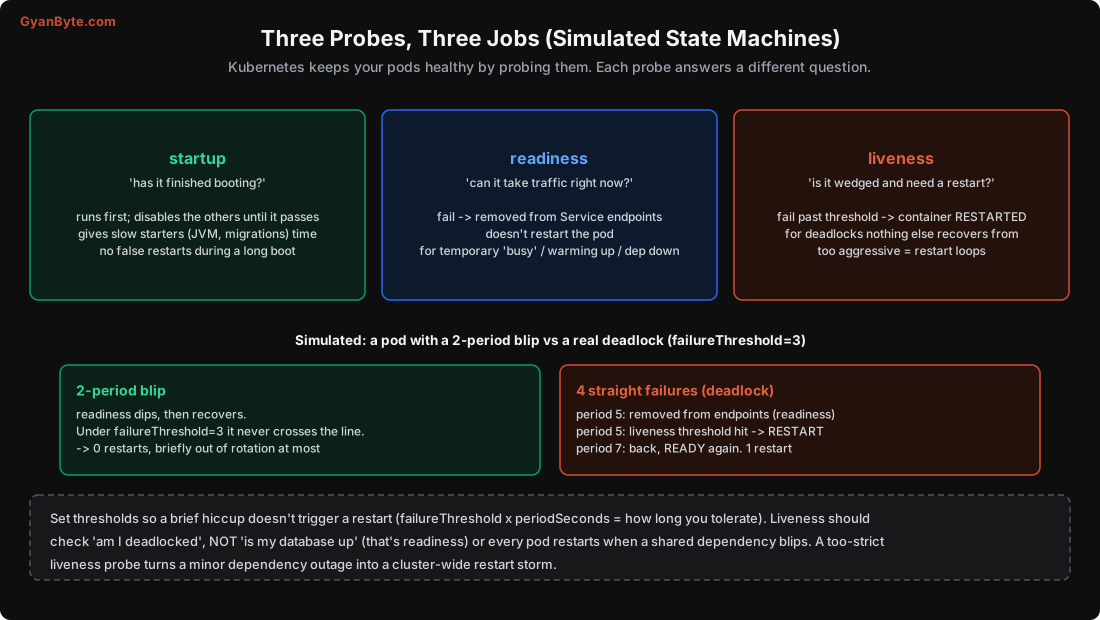
Startup probe asks “has it finished booting?” It runs first and disables the other two until it passes. This protects slow starters, a JVM app, a service that runs migrations on boot, something that takes 60 seconds to be ready. Without a startup probe, a liveness probe might kill the pod before it ever finishes booting, giving you an infinite boot-kill loop. Give slow starters a generous startup probe (high failureThreshold × periodSeconds), then the liveness probe takes over with tighter timing.
Readiness probe asks “can it take traffic right now?” If it fails, the pod is removed from the Service’s endpoints (Lesson 7), so it stops receiving traffic, but the pod is not restarted. Use it for temporary conditions: still warming a cache, a dependency is briefly unavailable, the pod is overloaded. When it recovers, it’s added back to rotation. This is the probe that makes rolling updates and load balancing work (Lessons 4, 7).
Liveness probe asks “is it wedged and does it need a restart?” If it fails past the threshold, Kubernetes restarts the container. Use it only for unrecoverable states, a deadlock, a hung event loop, something a restart actually fixes. A liveness probe is a big hammer; use it sparingly.
Simulated: A Blip vs a Deadlock
I simulated the probe state machines with a failureThreshold of 3 (fail 3 times in a row before acting):
2-period blip:   readiness dips for 2 periods, recovers. Never crosses threshold 3.
                 -> 0 restarts, briefly out of rotation at most.

4 straight fails (deadlock):
   period 5: readiness threshold hit -> removed from Service endpoints
   period 5: liveness threshold hit  -> container RESTARTED
   period 7: healthy again -> READY, back in rotation.   1 restart.
The point: a brief hiccup should not cause a restart. The failureThreshold (combined with periodSeconds) defines how long you tolerate failure before acting. failureThreshold: 3, periodSeconds: 5 means “15 seconds of continuous failure before I act.” Set these so that a 2-second GC pause or a momentary blip doesn’t trigger anything, but a real hang does. Too twitchy and you get unnecessary restarts; too slow and a genuinely dead pod lingers.
The Classic Liveness Mistake (That Causes Outages)
Here’s the mistake I’ve seen take down whole services, and it’s worth the whole lesson on its own: a liveness probe that checks a shared dependency.
Suppose your liveness probe hits /healthz, and /healthz checks “can I reach the database?“. Now the database has a brief blip. Every pod’s liveness probe fails. Kubernetes restarts every pod at once. But restarting doesn’t fix a database problem, so the new pods also fail their liveness probes, and restart again. A minor, recoverable dependency blip becomes a cluster-wide restart storm that turns a small problem into a major outage.
The rule:
- Liveness should check only “is THIS pod itself wedged?”, a simple check that the process and its event loop are responsive, with no external dependencies. Often a trivial endpoint that just returns 200 if the server can respond at all.
- Readiness is where you check dependencies. If the database is down, readiness fails, the pod is pulled from rotation (so it doesn’t serve errors), but it is not restarted, and when the database recovers, the pod is readded. No restart storm, graceful degradation.
Put differently: readiness can depend on the world; liveness must not. This one distinction prevents a surprising number of outages.
Writing Good Probes
A realistic probe set:
startupProbe:                        # protect a slow boot
  httpGet: {path: /healthz, port: 8080}
  periodSeconds: 5
  failureThreshold: 30               # up to 150s to boot before giving up
readinessProbe:                      # gate traffic; may check dependencies
  httpGet: {path: /ready, port: 8080}
  periodSeconds: 5
  failureThreshold: 3
livenessProbe:                       # restart only if wedged; NO external deps
  httpGet: {path: /healthz, port: 8080}
  periodSeconds: 10
  failureThreshold: 3
Guidelines:
- Probes can be HTTP, TCP (can I open a connection?), or exec (run a command in the container, exit 0 = pass). HTTP is most common for web services.
- Make probe endpoints cheap and fast. They run constantly; a heavy
/healthzwastes resources and can itself time out under load. - Readiness and liveness usually hit different endpoints:
/ready(checks dependencies, for traffic) and/healthz(checks only self, for restart). - Set timeouts and thresholds against reality: measure how long your app really takes to boot and respond, don’t guess.
Keeping Enough Pods Up: PodDisruptionBudget
Self-healing handles unplanned disruptions (crashes, node failures). For planned ones, draining a node for maintenance or an upgrade, you use a PodDisruptionBudget (PDB) to ensure enough replicas stay up:
apiVersion: policy/v1
kind: PodDisruptionBudget
metadata: {name: api-pdb}
spec:
  minAvailable: 2                    # (or maxUnavailable: 1)
  selector: {matchLabels: {app: api}}
When someone drains a node (kubectl drain), Kubernetes evicts its pods, but the PDB blocks evictions that would drop below minAvailable. So a rolling node upgrade across the cluster proceeds one node at a time, waiting for replacement pods to come up elsewhere and become ready before draining the next. Without a PDB, a node drain (or an aggressive cluster autoscaler, Lesson 10) could evict all your replicas at once. For any service you care about, set a PDB. (It only helps if you have more than one replica, another reason never to run a single replica.)
Pitfalls to Avoid
- A liveness probe that checks a dependency (database). A dependency blip restarts every pod, a restart storm. Check dependencies in readiness only.
- No readiness probe. Traffic goes to pods that can’t serve; rolling updates and load balancing break (Lessons 4, 7).
- No startup probe for slow starters. Liveness kills the pod before it finishes booting, a boot-kill loop.
- Thresholds too twitchy. A brief blip triggers restarts. Size
failureThreshold × periodSecondsto tolerate normal hiccups. - Heavy probe endpoints. They run constantly; keep them cheap or they add load and time out.
- Same endpoint for liveness and readiness when liveness then inherits dependency checks. Separate them.
- No PodDisruptionBudget. A node drain or autoscaler can evict all replicas at once.
Quick Recap
- Three probes: startup (“booted?”), readiness (“can take traffic now?”), liveness (“wedged, needs restart?”).
- Readiness failing removes a pod from endpoints (no restart); liveness failing restarts the container.
- Simulated: a 2-period blip survived (0 restarts), 4 straight failures removed-from-endpoints then restarted. Set thresholds to tolerate hiccups.
- The classic outage: a liveness probe checking a shared dependency restarts every pod at once. Liveness must not depend on the world; readiness can.
- Use a PodDisruptionBudget so planned node drains keep enough replicas up.
Next lesson: scaling automatically, the HPA formula for adding pods, the Cluster Autoscaler for adding nodes, and how they work together to handle load and save money.