A classic mistake: a team bakes the database URL and the API key straight into their container image. Now the same image can’t run in staging and production (different database), so they build separate images per environment, which means the image you tested isn’t the image you ship. And the API key is sitting in the image layers, extractable by anyone who can pull it. Both problems have the same fix: keep configuration out of the image, and inject it at runtime. This lesson is how Kubernetes does that, and how to handle the secret part without fooling yourself about security.
The Principle: One Image, Many Environments
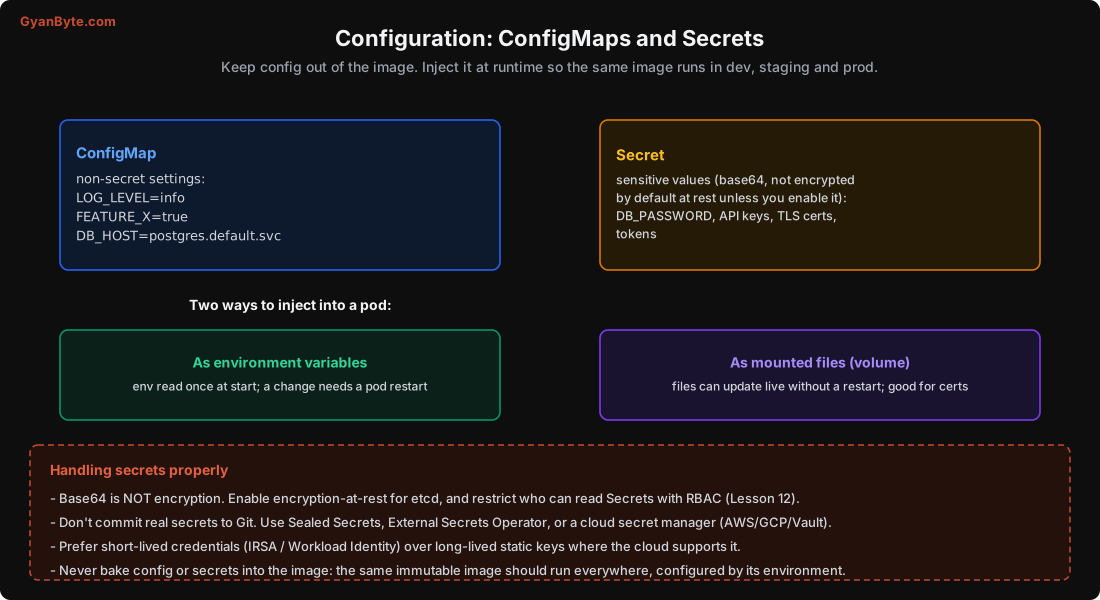
A core idea (from the “twelve-factor app” philosophy): your container image should be immutable and environment-agnostic. The exact same image, the one you built and tested, runs in dev, staging and production. What differs between environments is only the configuration injected at runtime: which database, which log level, which feature flags, which credentials.
This gives you: the image you tested is the image you ship; no rebuild to change a setting; and secrets aren’t embedded in a distributable artifact. Kubernetes provides two objects for this, ConfigMap for non-secret config and Secret for sensitive values.
ConfigMaps
A ConfigMap holds non-secret configuration as key-value pairs (or whole config files):
apiVersion: v1
kind: ConfigMap
metadata: {name: api-config}
data:
  LOG_LEVEL: "info"
  FEATURE_CHECKOUT_V2: "true"
  DB_HOST: "postgres.default.svc"
  config.yaml: |
    cache:
      ttl: 300
      maxEntries: 10000
Use it for anything that isn’t sensitive: log levels, feature flags, service hostnames, tuning parameters, non-secret config files. It keeps these out of the image and lets you change them per environment.
Secrets
A Secret is the same idea for sensitive values, passwords, API keys, tokens, TLS certificates:
apiVersion: v1
kind: Secret
metadata: {name: api-secrets}
type: Opaque
data:
  DB_PASSWORD: c3VwZXJzZWNyZXQ=      # base64 of "supersecret"
And here’s the thing you must internalise: that base64 is not encryption. It’s just encoding, trivially reversible with base64 -d. By default, a Secret is stored in etcd in plain form (base64), readable by anyone who can read Secrets via the API or access etcd. The only things that make a Secret more protected than a ConfigMap by default are convention and some access defaults, not cryptography. Treating base64 as security is one of the most common and dangerous Kubernetes misconceptions. We’ll fix it below.
Two Ways to Inject: Env Vars vs Files
Whether it’s a ConfigMap or a Secret, you inject it into a pod in one of two ways, and the difference matters for updates:
As environment variables:
containers:
- name: api
  envFrom:
  - configMapRef: {name: api-config}
  - secretRef:    {name: api-secrets}
  # or individual keys:
  env:
  - name: DB_PASSWORD
    valueFrom: {secretKeyRef: {name: api-secrets, key: DB_PASSWORD}}
Environment variables are read once at container start. If you change the ConfigMap or Secret, running pods don’t see the change until they restart. So an env-var config change needs a kubectl rollout restart.
As mounted files (a volume):
containers:
- name: api
  volumeMounts:
  - {name: config, mountPath: /etc/config}
volumes:
- name: config
  configMap: {name: api-config}      # or secret: {secretName: ...}
Mounted files can update live: when the ConfigMap or Secret changes, the mounted files are updated (after a short delay), without a restart, if your app re-reads them. This is ideal for TLS certificates (so cert rotation doesn’t need a restart) and config your app can hot-reload. (Note: files injected via subPath don’t auto-update; mount the whole volume for live updates.)
Rule of thumb: env vars for simple settings (and accept a restart to change them), mounted files for things that should update without a restart (certs, hot-reloadable config).
Handling Secrets Properly
Since base64 isn’t security, here’s how to actually protect secrets:
- Enable encryption at rest for etcd. Managed services often do this (sometimes with a cloud KMS key); verify it’s on. This encrypts Secret data in etcd so a disk or backup leak doesn’t expose them.
- Restrict access with RBAC (Lesson 12). Who can
getSecrets should be tightly limited, far fewer people and ServiceAccounts than can read ConfigMaps. A pod should only mount the secrets it needs. - Never commit real secrets to Git. This is the big one, because GitOps pushes you to put manifests in Git, and a Secret manifest has the value in it. Solutions:
- Sealed Secrets (Bitnami): you commit an encrypted SealedSecret that only the cluster can decrypt.
- External Secrets Operator: Secrets are pulled from a real secret manager (AWS Secrets Manager, GCP Secret Manager, HashiCorp Vault, Azure Key Vault) at runtime; Git holds only a reference.
- A cloud secret manager directly, with the CSI secrets-store driver mounting them.
- Prefer short-lived credentials over static keys. Instead of a long-lived AWS access key sitting in a Secret, use IRSA (IAM Roles for Service Accounts) on EKS or Workload Identity on GKE: the pod assumes a cloud role and gets temporary, auto-rotating credentials, nothing static to leak. This is the modern best practice, and it eliminates a whole class of “a key got leaked” incidents.
- Rotate secrets regularly, and make rotation possible without downtime (mounted files help here).
Don’t Over-Configure, Either
A balancing note: not everything needs to be configurable. Too many config knobs is its own problem, more ways to misconfigure, more to test, more drift between environments. Make configurable the things that genuinely differ between environments or that you need to change without a deploy (feature flags, log level, scaling parameters, external endpoints). Keep genuinely constant behaviour in code. And keep your config in version control (as ConfigMap manifests in Git), so changes are reviewed and auditable, config is part of your system, not a thing people edit live and forget.
Pitfalls to Avoid
- Baking config or secrets into the image. The same image should run everywhere; config is injected at runtime.
- Thinking a Secret is encrypted. Base64 is encoding, not encryption. Enable encryption at rest and restrict RBAC.
- Committing real secrets to Git. Use Sealed Secrets, External Secrets Operator, or a cloud secret manager.
- Expecting env-var config to update live. Env vars are read at start; changing them needs a pod restart.
- Long-lived static cloud keys in Secrets. Use IRSA / Workload Identity for short-lived, auto-rotating credentials.
- Letting every pod read every Secret. Scope access to only the secrets each workload needs.
- Over-configuring. Too many knobs means more misconfiguration; make configurable only what truly varies.
Quick Recap
- Keep config and secrets out of the image; inject at runtime so one tested image runs in every environment.
- ConfigMaps hold non-secret settings; Secrets hold sensitive values, but base64 is NOT encryption.
- Inject as env vars (read at start, change needs a restart) or mounted files (can update live, good for certs).
- Protect secrets: encryption at rest, tight RBAC, no real secrets in Git (Sealed Secrets / External Secrets / cloud manager), and short-lived credentials (IRSA/Workload Identity).
- Keep config in version control, and don’t make everything configurable.
Next lesson: how Kubernetes keeps your pods healthy, the three kinds of probe, what each is for, and how to set them so a brief hiccup doesn’t turn into a restart storm.