Pods are ephemeral. They’re created and destroyed constantly, by rolling updates, crashes, scaling, node failures, and each new pod gets a new IP address. So how does anything reliably talk to your service when the pods behind it keep changing? You never address a pod directly. You address a Service, which gives a stable identity in front of a moving set of pods. This lesson is about that networking layer, and it’s also where zero-downtime deploys actually happen.
The Service: A Stable Front for Moving Pods
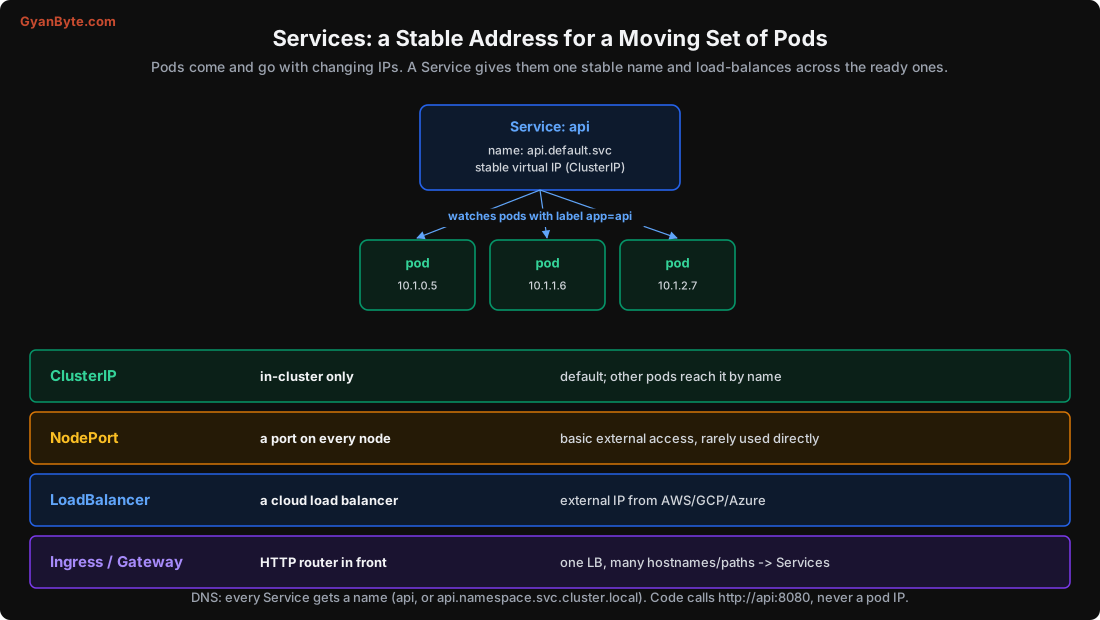
A Service is a stable name and virtual IP that load-balances across a set of pods selected by labels:
apiVersion: v1
kind: Service
metadata: {name: api}
spec:
  selector: {app: api}       # this Service fronts all pods labelled app=api
  ports:
  - port: 8080               # the Service's port
    targetPort: 8080         # the pods' container port
The Service continuously watches which pods match app=api and are ready, and keeps a list of their IPs (its Endpoints). Traffic to the Service is spread across that list. Pods come and go; the Service’s name and virtual IP stay constant. Your code calls http://api:8080 and never knows or cares which pods exist right now.
The matching happens by labels, the same loose-coupling idea as everywhere in Kubernetes: the Service doesn’t reference pods by name, it selects them by label, so any pod with the right label automatically joins the Service.
Cluster DNS: Services Have Names
Every Service gets a DNS name from the cluster’s DNS (CoreDNS). Within the same namespace, you reach it by its short name:
http://api:8080                              # same namespace
http://api.payments:8080                     # api Service in the payments namespace
http://api.payments.svc.cluster.local:8080   # fully qualified
This is service discovery made trivial: no service registry to run, no config of IP addresses. Your app’s config just says DB_HOST=postgres, and DNS resolves it to the Service’s virtual IP, which load-balances to a ready database pod. This is a big part of why Kubernetes networking feels magical once it works.
How Load Balancing Works, and Why Readiness Matters
kube-proxy (Lesson 2) runs on every node and programs the kernel’s networking (iptables rules, or IPVS) so that a connection to the Service’s virtual IP is redirected to one of the ready endpoint pods. With iptables it’s effectively random per connection; with IPVS you can choose round-robin and other algorithms. Either way, connections spread across the pods.
The critical detail: only READY pods are in the endpoint list. A pod is added to the Service’s endpoints when its readiness probe (Lesson 9) passes, and removed the moment it fails. I simulated what that means for traffic:
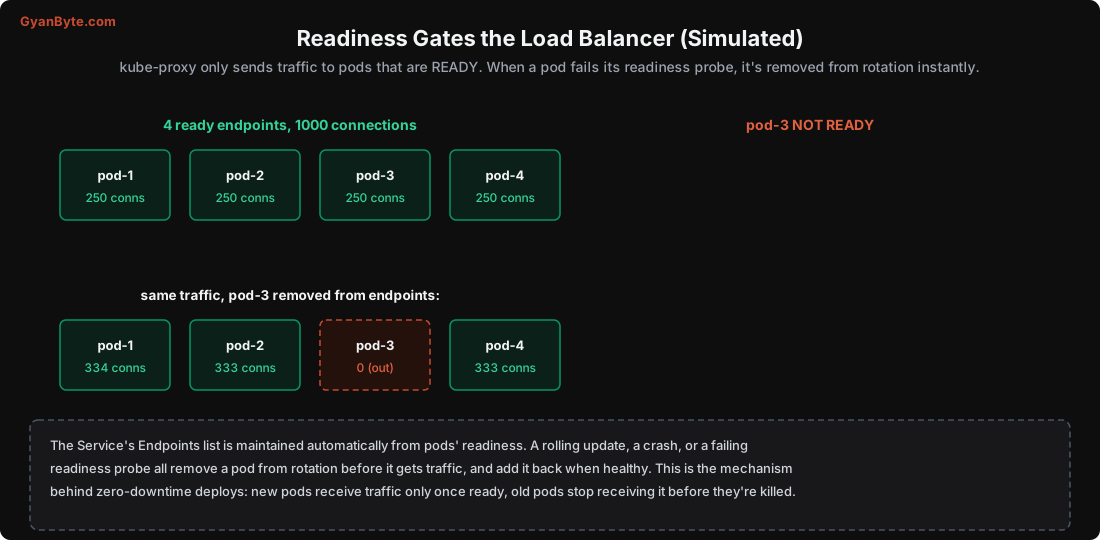
4 ready endpoints, 1000 connections:   250 / 250 / 250 / 250
pod-3 goes NOT READY:                   334 / 333 /  0  / 333
When pod-3 failed readiness, it was removed from rotation and the traffic rebalanced across the remaining three, instantly, without dropping connections to it. This is the mechanism behind zero-downtime deploys (Lesson 4): during a rolling update, a new pod is added to the endpoints only once it’s ready, and an old pod is removed from the endpoints before it’s terminated. Traffic only ever goes to pods that can serve it. Readiness isn’t just a health signal; it’s the switch that controls whether a pod receives traffic at all.
The Service Types
Services come in types that control where the Service is reachable from:
- ClusterIP (default): reachable only inside the cluster. This is what you use for service-to-service communication. Your database Service, your internal API, all ClusterIP.
- NodePort: opens a fixed port on every node, forwarding to the Service. Basic external access, but rarely used directly in production (high ports, no load balancer). Mostly a building block.
- LoadBalancer: asks the cloud (AWS/GCP/Azure) to provision a real external load balancer with a public IP that forwards to the Service. This is how you expose something to the internet, but each LoadBalancer Service = one cloud load balancer = one bill.
- Headless (a special case,
clusterIP: None): no virtual IP; DNS returns the pods’ individual IPs. Used by StatefulSets (Lesson 11) where clients need to reach specific pods (db-0,db-1).
For exposing many HTTP services to the internet, you don’t want a cloud load balancer per service. That’s what Ingress is for.
Ingress: One Entry Point, Many Services
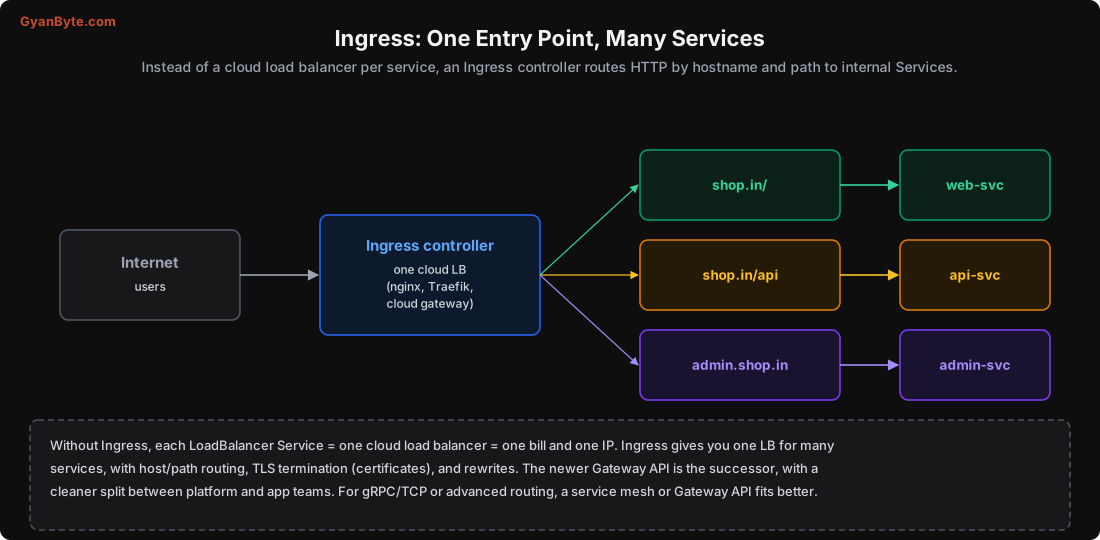
An Ingress is a set of HTTP routing rules, and an Ingress controller (nginx, Traefik, or a cloud gateway) is the actual proxy that implements them. One Ingress controller, behind one cloud load balancer, routes to many internal Services by hostname and path:
apiVersion: networking.k8s.io/v1
kind: Ingress
metadata: {name: shop}
spec:
  tls: [{hosts: [shop.in], secretName: shop-tls}]   # TLS termination
  rules:
  - host: shop.in
    http:
      paths:
      - {path: /,    pathType: Prefix, backend: {service: {name: web-svc,   port: {number: 80}}}}
      - {path: /api, pathType: Prefix, backend: {service: {name: api-svc,   port: {number: 80}}}}
This gives you one load balancer (one bill, one IP) for all your HTTP services, plus TLS termination (certificates, usually automated with cert-manager), path/host routing, and rewrites. It’s how you’d put shop.in, shop.in/api and admin.shop.in behind a single entry point.
The newer Gateway API is the successor to Ingress, with a cleaner model that separates the platform team’s concerns (the gateway) from app teams’ routing. For non-HTTP traffic (gRPC streaming, raw TCP) or advanced routing and traffic policies, a service mesh (Istio, Linkerd) or the Gateway API fits better than classic Ingress.
A Note on Network Policies
By default, any pod can talk to any other pod in the cluster, there’s no network isolation out of the box. In production you restrict this with NetworkPolicies (Lesson 12): default-deny, then allow only the connections each service actually needs (the frontend may reach the API, the API may reach the database, nothing else). This limits the blast radius if one pod is compromised. It’s a security control, but it lives in the networking layer, so it’s worth knowing it exists here.
Pitfalls to Avoid
- Addressing pods by IP. Pod IPs change constantly; always use the Service name.
- No readiness probe. Without it, traffic goes to pods that aren’t ready, breaking zero-downtime deploys (Lesson 9).
- A LoadBalancer Service per HTTP app. That’s a cloud load balancer (and bill) each; use one Ingress instead.
- Forgetting cross-namespace DNS. From another namespace, use
service.namespace, not justservice. - Expecting network isolation by default. All pods can talk to all pods until you add NetworkPolicies.
- Using Ingress for raw TCP/gRPC streaming. Ingress is HTTP-focused; use Gateway API or a mesh for the rest.
- Not checking endpoints when a Service seems broken.
kubectl get endpoints <svc>shows if any ready pods are behind it.
Quick Recap
- Pods have changing IPs, so you address a Service: a stable name (via cluster DNS) and virtual IP over a set of pods selected by label.
- kube-proxy load-balances across the Service’s ready endpoints; readiness is the switch that adds/removes a pod from rotation (simulated rebalance was instant).
- That readiness-gated endpoint list is the mechanism behind zero-downtime deploys.
- Types: ClusterIP (internal, default), NodePort (node port), LoadBalancer (cloud LB), Headless (per-pod DNS).
- Ingress (or the Gateway API) fronts many Services with one load balancer, host/path routing and TLS.
Next lesson: keeping configuration and secrets out of your image, so the same image runs in every environment, with ConfigMaps, Secrets, and how to handle secrets properly.