When you create a pod, something has to decide which machine it runs on. That’s the scheduler’s job, and it does it surprisingly thoughtfully: for every pending pod, it evaluates every node, throws out the ones that can’t work, scores the rest, and picks the best. Understanding this is practical, not academic: it’s how you make sure your three API replicas don’t all land on the same node (and all die together when it reboots), and how you reserve expensive GPU nodes for the workloads that need them.
Two Phases: Filter, Then Score
The scheduler watches for pods with no node assigned (from Lesson 2’s flow) and, for each one, runs two phases:
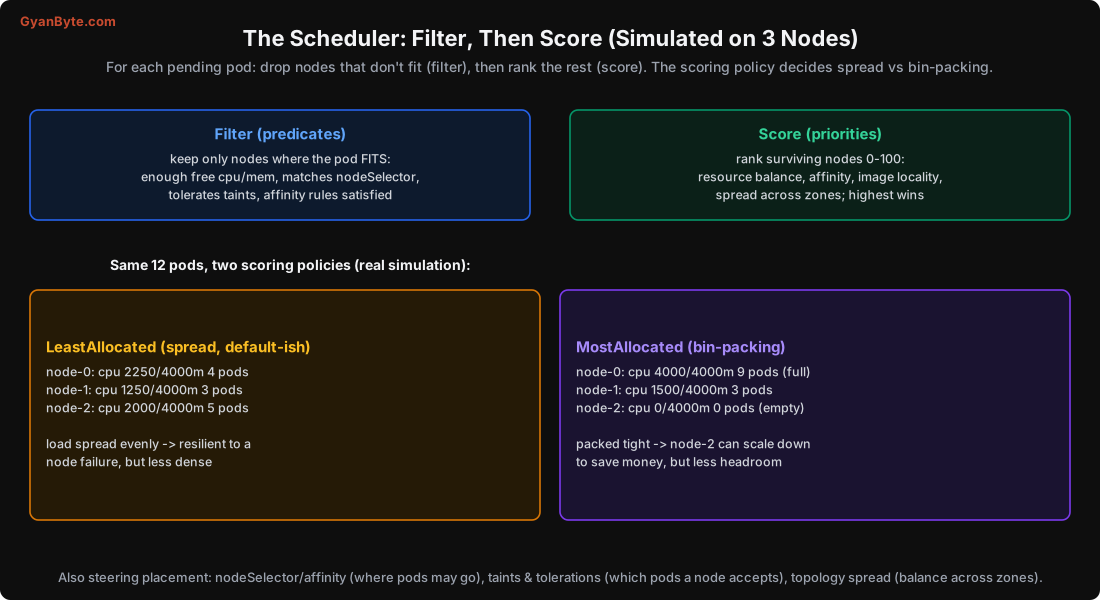
Filter (predicates): drop every node where the pod cannot run. A node is filtered out if it doesn’t have enough free resources for the pod’s requests (Lesson 5), doesn’t match the pod’s nodeSelector, has a taint the pod doesn’t tolerate, or fails an affinity rule. What’s left is the set of feasible nodes. If none survive, the pod stays Pending (and kubectl describe pod tells you why, e.g. “0/5 nodes available: insufficient memory”).
Score (priorities): rank the surviving nodes from 0 to 100 using several scoring plugins, resource balance, affinity preferences, image locality (a node that already has the image scores higher), spread across zones, and more. The highest-scoring node wins (ties broken randomly). Then the pod is bound to that node.
Note that filtering is driven by requests, not actual usage. A node with plenty of free memory in reality but all of it reserved by other pods’ requests is full as far as the scheduler is concerned. This is why setting good requests (Lesson 5) matters so much: they’re the currency of scheduling.
Spread vs Bin-Packing (Real Simulation)
The scoring policy decides how densely pods pack. I simulated 12 pods on 3 nodes under two common policies:
LeastAllocated (spread):          MostAllocated (bin-packing):
  node-0: 2250m  4 pods             node-0: 4000m  9 pods (full)
  node-1: 1250m  3 pods             node-1: 1500m  3 pods
node-2: 2000m 5 pods node-2: 0m 0 pods (empty)- LeastAllocated prefers emptier nodes, so pods spread out. The load is balanced and the cluster is resilient: losing one node loses only a third of the pods. The cost is lower density, you may run more nodes than strictly necessary.
- MostAllocated prefers fuller nodes, so pods bin-pack. One node filled up and one was left completely empty. That empty node can be scaled down (Lesson 10) to save money. The cost is less headroom and bigger blast radius if a packed node fails.
Neither is “right”, it’s a cost-vs-resilience trade-off. The default behaviour leans toward balance; cost-focused setups (and node autoscalers like Karpenter) lean toward bin-packing so empty nodes can be removed. The important thing is to know which behaviour you have and whether it matches your goals.
Steering Placement
Most of the time the scheduler’s defaults are fine. When you need to control placement, you have four tools:
nodeSelector and node affinity
Restrict a pod to nodes with certain labels. Simple version:
spec:
  nodeSelector:
    disktype: ssd          # only schedule on nodes labelled disktype=ssd
Node affinity is the richer version: requiredDuringScheduling (hard rule, like nodeSelector) and preferredDuringScheduling (soft preference, score boost). Use it for “must run on GPU nodes” or “prefer the ap-south-1a zone”.
Pod affinity and anti-affinity
Place pods relative to other pods. Anti-affinity is the one you’ll use most: “don’t put two of my replicas on the same node”:
affinity:
  podAntiAffinity:
    preferredDuringSchedulingIgnoredDuringExecution:
    - weight: 100
      podAffinityTerm:
        labelSelector: {matchLabels: {app: api}}
        topologyKey: kubernetes.io/hostname    # one per node
This stops all your replicas landing on one node (and all dying together when it reboots). Affinity (co-location) is rarer: “put the cache pod on the same node as the app for low latency.”
Taints and tolerations
A taint on a node repels pods: by default, no pod will schedule there. A pod with a matching toleration is allowed. This is the inverse of affinity, the node controls who may come, not the pod choosing. Uses:
- Reserve expensive nodes: taint GPU nodes
nvidia.com/gpu=true:NoSchedule, so only pods that tolerate it (your ML workloads) land there, and ordinary pods don’t waste the GPU node. - Dedicated nodes for a team or workload type.
- Kubernetes itself taints control-plane nodes (so your pods don’t run there) and taints nodes that are NotReady or under pressure (so new pods avoid them).
Topology spread constraints
The modern, declarative way to spread replicas evenly across failure domains (nodes, zones):
topologySpreadConstraints:
- maxSkew: 1
  topologyKey: topology.kubernetes.io/zone
  whenUnsatisfiable: DoNotSchedule
  labelSelector: {matchLabels: {app: api}}
This says “keep the number of app=api pods in each zone within 1 of each other.” Spread across zones means a whole zone can fail and your service survives, the single most important production placement rule.
The Production Default: Spread Across Zones
If you take one thing from this lesson for production: make sure your replicas are spread across nodes and (ideally) availability zones. A Deployment with 3 replicas all on one node is only as reliable as that node. All in one zone, and a zonal outage takes you down. Use topology spread constraints (or pod anti-affinity) so that:
- No single node failure takes more than one replica.
- No single zone failure takes more than a fraction of your replicas.
Many managed platforms do some of this by default, but verify it; kubectl get pods -o wide shows which node each pod is on, and you can check the zones. Combined with the readiness-gated rolling updates from Lesson 4, this is what gives you genuine high availability.
Pitfalls to Avoid
- Letting all replicas land on one node. One reboot = full outage. Use anti-affinity or topology spread.
- Not spreading across zones. A zonal outage takes you down. Spread by
topology.kubernetes.io/zone. - Forgetting scheduling uses requests, not actual usage. Bad requests cause bad placement and “Pending” pods.
- Over-constraining placement. Too many hard rules leave pods unschedulable (Pending forever). Prefer soft preferences.
- GPU/expensive nodes without taints. Ordinary pods waste them; taint the nodes and tolerate on the right pods.
- Not reading
kubectl describe podwhen a pod is Pending. It states exactly why no node fit. - Assuming bin-packing or spread without checking. Know your scoring behaviour; it’s a cost-vs-resilience choice.
Quick Recap
- The scheduler filters out nodes that don’t fit (by requests, labels, taints, affinity), then scores the rest and picks the best.
- Scoring policy sets density: simulated, LeastAllocated spread 12 pods evenly (resilient), MostAllocated bin-packed them (one node empty, cheaper).
- Steer placement with nodeSelector/affinity (which nodes), pod anti-affinity + topology spread (spread replicas), taints/tolerations (reserve nodes).
- The key production rule: spread a Deployment’s replicas across nodes and zones so one failure doesn’t take them all.
- Pending pods are a scheduling failure;
kubectl describe podtells you exactly why.
Next lesson: how traffic actually reaches your pods. Services give a stable address for a moving set of pods, kube-proxy load-balances across the ready ones, and Ingress routes HTTP from outside.