Two of the most consequential numbers in a Kubernetes manifest are requests and limits, and they’re also the most misunderstood. Get them wrong and pods get killed mysteriously, nodes get overcommitted, or your service throttles for no visible reason. The good news: these aren’t abstract Kubernetes concepts, they map directly onto Linux kernel features (cgroups) that I can, and did, measure for real with plain Docker containers. So this lesson has actual experiments, not just claims.
Requests vs Limits: Two Different Jobs
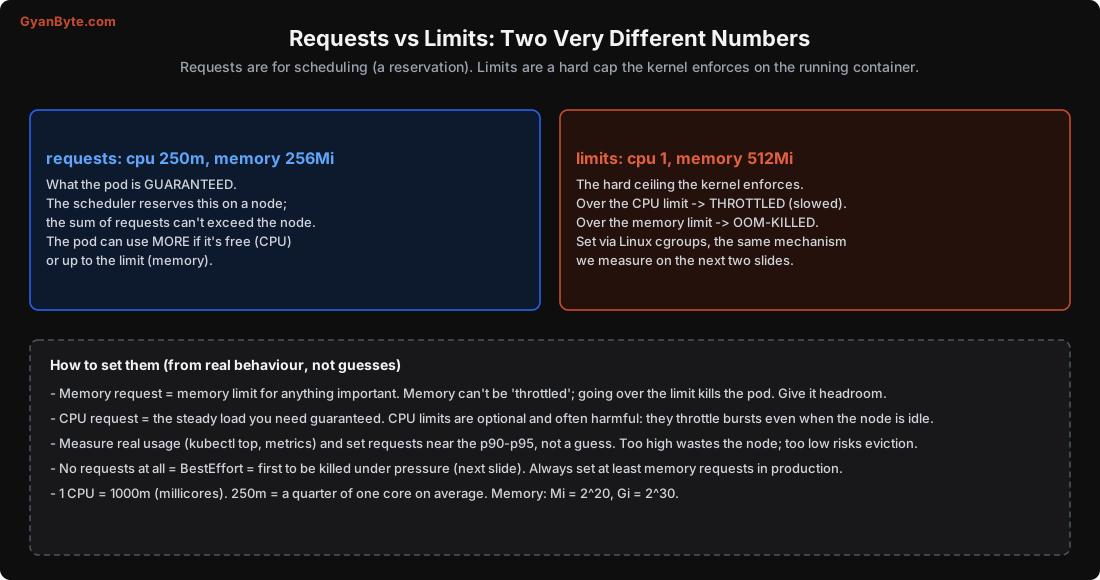
Requests are for scheduling. When the scheduler (Lesson 6) places a pod, it finds a node with enough unreserved capacity for the pod’s requests, and reserves it. The sum of all pods’ requests on a node can’t exceed the node’s capacity. A request is a guarantee: the pod is promised at least this much. It can use more if it’s free (CPU) or up to its limit (memory).
Limits are a hard ceiling the kernel enforces on the running container, via Linux cgroups. They’re about what the container may consume at most. And crucially, CPU and memory behave completely differently when you hit the limit:
- Over the CPU limit → throttled (the kernel slows the container down). Work still completes, just slower.
- Over the memory limit → OOM-killed (the kernel kills the process instantly). No slowdown, no error, the process just dies.
Let’s see both for real.
A Memory Limit Is an OOM Kill (Real Test)
I ran a container with --memory=64m (Docker’s memory limit uses the exact same cgroup mechanism as a Kubernetes memory limit) and had it allocate 10 MB at a time:
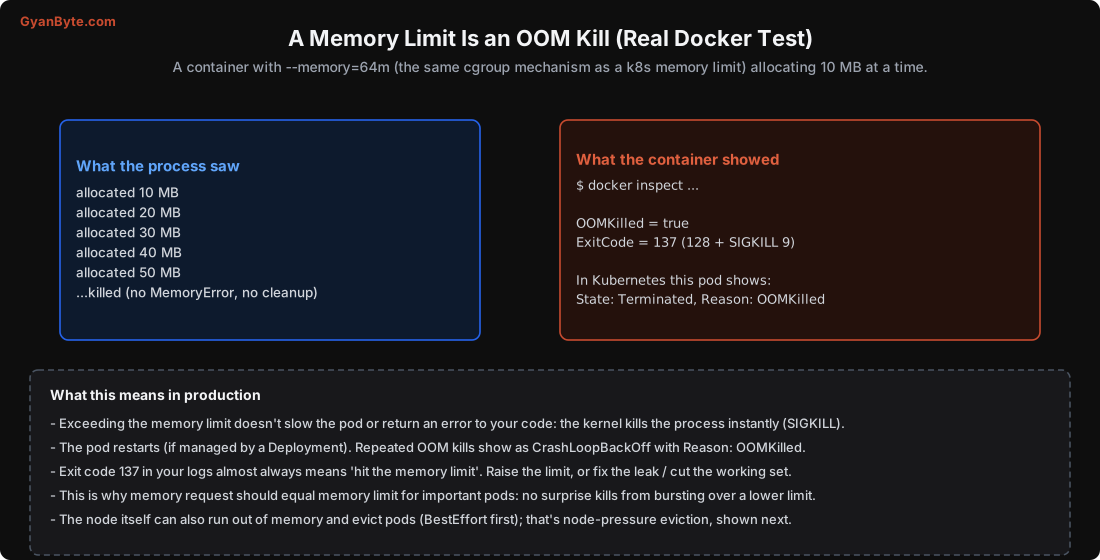
what the process printed:  allocated 10 MB ... 50 MB ... (killed)
docker inspect:            OOMKilled = true    ExitCode = 137
The process was killed at once when it crossed the limit. No MemoryError was raised in the code, no chance to clean up, the kernel sent SIGKILL. The container exited with code 137 (128 + signal 9), and the OOMKilled flag was set. In Kubernetes, that same pod shows State: Terminated, Reason: OOMKilled, and if it’s managed by a Deployment it restarts; repeated OOM kills show as CrashLoopBackOff.
The practical takeaways:
- Exit code 137 in your logs almost always means “hit the memory limit.” Either raise the limit, fix a memory leak, or reduce the working set.
- Because memory can’t be “throttled”, there’s no graceful degradation, you’re either under the limit or dead. So give memory headroom, and set the memory request equal to the memory limit for anything important, so there’s no gap to burst into and get killed.
A CPU Limit Is Throttling (Real Test)
I ran the same fixed CPU-bound loop (summing 30 million numbers) under different --cpus limits and timed it:
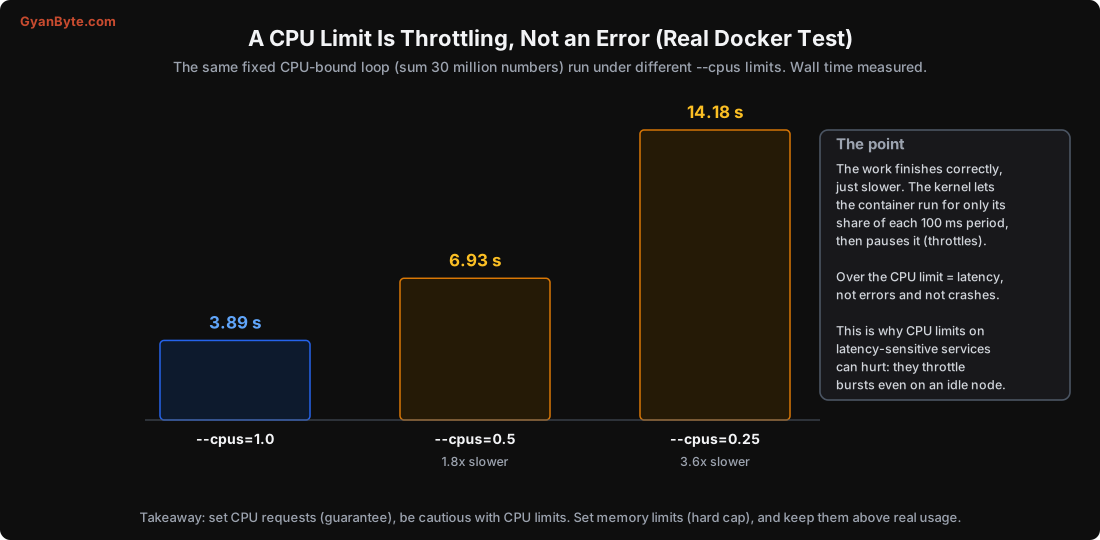
--cpus=1.0:   3.89 s
--cpus=0.5:   6.93 s   (1.8x slower)
--cpus=0.25: 14.18 s   (3.6x slower)
The work completed correctly every time, just proportionally slower. The kernel enforces a CPU limit by letting the container run for only its share of each scheduling period (100 ms by default), then pausing it, “throttling”. Over the CPU limit means latency, not errors and not crashes.
This leads to a subtle but important recommendation: be cautious with CPU limits, especially on latency-sensitive services. A CPU limit throttles your container even when the node has idle CPU to spare. A request-only pod can burst into spare capacity when it needs to; a limited one can’t. Many production setups set CPU requests (to guarantee a baseline and inform scheduling) but no CPU limits, so pods can use spare CPU during bursts. Set memory limits (the hard, safe cap) but think twice before setting tight CPU limits.
How to Set These Numbers
Putting the two experiments together:
- Memory request = memory limit for important pods. Memory can’t be throttled; a gap just means a surprise OOM kill when you burst into it. Size it above your real peak usage with headroom.
- CPU request = the steady load you need guaranteed. CPU limit: often omit it on latency-sensitive paths so pods can burst; set it where you truly need to cap a noisy neighbour.
- Measure, don’t guess. Use
kubectl top podsand your metrics to see real usage, and set requests near the p90–p95 of real memory and CPU. Too high wastes the node (fewer pods fit); too low risks eviction and poor scheduling. - Always set at least memory requests in production. A pod with nothing set is BestEffort, the first to be killed under pressure (next section).
Units: CPU is in millicores, 1000m = 1 full core, 250m = a quarter core on average. Memory is in bytes with binary suffixes: Mi = 2²⁰, Gi = 2³⁰ (note Mi ≠ MB).
QoS Classes and Eviction Order
Requests and limits also determine a pod’s Quality of Service class, which decides the order the kubelet evicts pods when a node itself runs low on memory (node-pressure eviction, separate from a pod hitting its own limit):
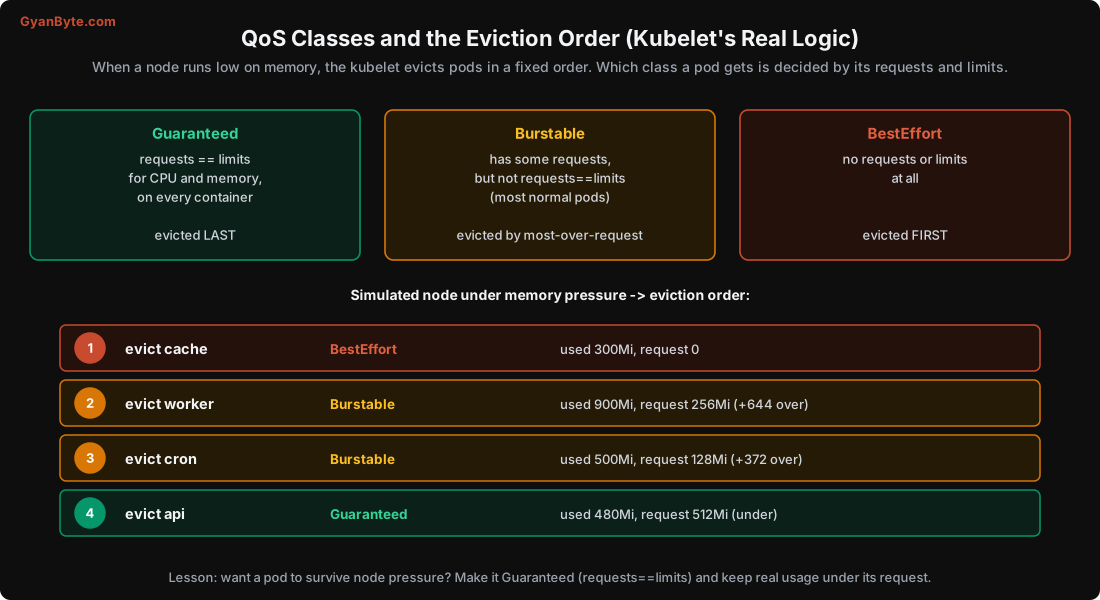
- Guaranteed: every container has
requests == limitsfor both CPU and memory. Evicted last. Use this for your most important pods. - Burstable: has some requests but not
requests == limits. Most normal pods. Evicted in the middle, ranked by how far over their memory request they are. - BestEffort: no requests or limits at all. Evicted first.
I simulated the kubelet’s real eviction logic on a node under memory pressure:
1. evict cache   (BestEffort)  used 300Mi, request 0        -> killed first
2. evict worker  (Burstable)   used 900Mi, request 256Mi    (+644 over request)
3. evict cron    (Burstable)   used 500Mi, request 128Mi    (+372 over request)
4. evict api     (Guaranteed)  used 480Mi, request 512Mi    (under request) -> killed last
The kubelet kills BestEffort pods first, then Burstable pods by how far they’ve exceeded their memory request, and Guaranteed pods last. So if you want a pod to survive node pressure, make it Guaranteed (requests == limits) and keep its real usage under its request. A pod with no requests set is the first thing thrown overboard, another reason to always set them.
Namespace-Level Controls
In a shared cluster, you don’t want one team’s pods to starve everyone else’s. Two tools:
- ResourceQuota: caps the total requests/limits (and object counts) a namespace may use. “Team A gets at most 50 CPU and 100 GiB of requests.”
- LimitRange: sets default and min/max requests/limits for pods in a namespace, so a pod that forgets to set them gets sensible defaults instead of becoming BestEffort.
These are how platform teams keep a multi-tenant cluster fair and prevent one runaway Deployment from consuming the whole cluster (Lesson 12).
Pitfalls to Avoid
- Confusing requests and limits. Requests reserve and schedule; limits cap and are enforced by the kernel.
- A memory limit higher than the request on important pods. Bursting into the gap gets you OOM-killed (exit 137).
- Tight CPU limits on latency-sensitive services. They throttle even on idle nodes; often omit CPU limits, keep requests.
- No requests at all. BestEffort pods are evicted first under node pressure.
- Guessing the numbers. Measure real usage (
kubectl top, metrics) and set requests near p90–p95. - Not recognising exit 137 / OOMKilled / CrashLoopBackOff as “hit the memory limit.”
- No ResourceQuota/LimitRange in a shared cluster. One team can consume everything.
Quick Recap
- Requests are a scheduling reservation (a guarantee); limits are a hard cap the kernel enforces.
- Real test: over the memory limit = instant OOM kill (exit 137, OOMKilled=true), no error. Set memory request = limit for important pods.
- Real test: over the CPU limit = throttling (3.89s → 14.18s, 3.6x slower), work still completes. Be cautious with CPU limits; keep requests.
- QoS class comes from requests/limits: Guaranteed evicted last, BestEffort first. Simulated eviction matched that order.
- Always set at least memory requests; use ResourceQuota/LimitRange to keep a shared cluster fair.
Next lesson: how the scheduler decides which node each pod lands on, and how to steer that decision with spread, bin-packing, affinity and taints.