The Deployment is the object you’ll create more than any other. It’s how you run a normal stateless service, an API, a web app, a worker, and get Kubernetes’s best features almost for free: self-healing, scaling, zero-downtime updates, and instant rollback. This lesson is about how it works underneath, because understanding the Deployment → ReplicaSet → Pod chain is what lets you debug a stuck rollout instead of staring at it.
Deployment, ReplicaSet, Pod
You declare a Deployment; it does the rest through two layers:
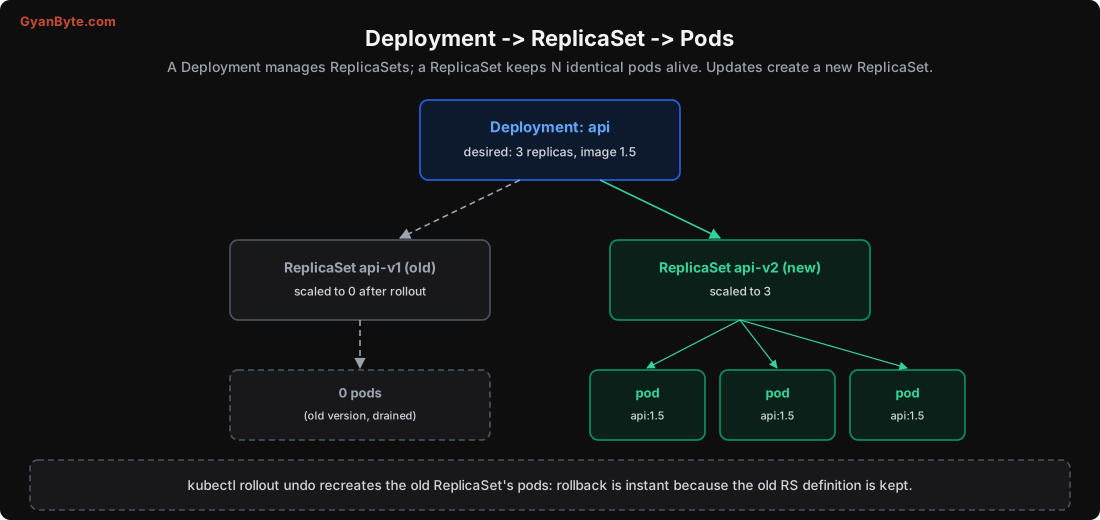
- A Deployment holds your desired state: how many replicas, which image, the pod template, the update strategy.
- It creates and manages ReplicaSets. A ReplicaSet has one job: keep exactly N identical pods running. If one dies, it makes another; if there are too many, it deletes some.
- The ReplicaSet creates and manages the Pods.
Why the extra layer? Because updates create a new ReplicaSet. When you change the image, the Deployment doesn’t edit the existing pods; it creates a new ReplicaSet for the new version and gradually scales it up while scaling the old one down. The old ReplicaSet sticks around (scaled to 0), which is exactly what makes rollback instant: the old version’s full definition is still there.
You’ll see all three in kubectl get deploy,rs,pods. Most of the time you only touch the Deployment; the ReplicaSets are managed for you.
The Deployment YAML
Here’s a realistic Deployment, with the fields that matter:
apiVersion: apps/v1
kind: Deployment
metadata:
  name: api
spec:
  replicas: 3                      # desired number of pods
  selector:
    matchLabels: {app: api}        # which pods this Deployment owns (must match template labels)
  strategy:
    type: RollingUpdate
    rollingUpdate:
      maxSurge: 25%                 # how many EXTRA pods may exist during an update
      maxUnavailable: 25%          # how many pods may be DOWN during an update
  template:                        # the pod template: everything below describes each pod
    metadata:
      labels: {app: api}
    spec:
      containers:
      - name: api
        image: myregistry/api:1.5
        ports: [{containerPort: 8080}]
        resources:                 # Lesson 5
          requests: {cpu: 250m, memory: 256Mi}
          limits:   {cpu: "1",  memory: 512Mi}
        readinessProbe:            # Lesson 9: gates the rollout
          httpGet: {path: /healthz, port: 8080}
          periodSeconds: 5
          failureThreshold: 3
The selector must match the template’s labels, that’s how the Deployment knows which pods are “its”. Everything under template.spec is the pod spec from Lesson 3. To change the app, you change this file (usually just the image tag) and kubectl apply it.
Rolling Updates: Zero Downtime by Construction
When you apply a new image, the default RollingUpdate strategy replaces pods gradually, never taking the whole service down. Two settings control the pace:
- maxUnavailable: how many pods may be unavailable during the update. Lower = safer (more capacity kept), slower.
- maxSurge: how many extra pods may be created above the desired count. Higher = faster, uses more resources briefly.
I simulated a 10-replica rollout with both set to 25% (so 3 extra allowed, 2 may be down):
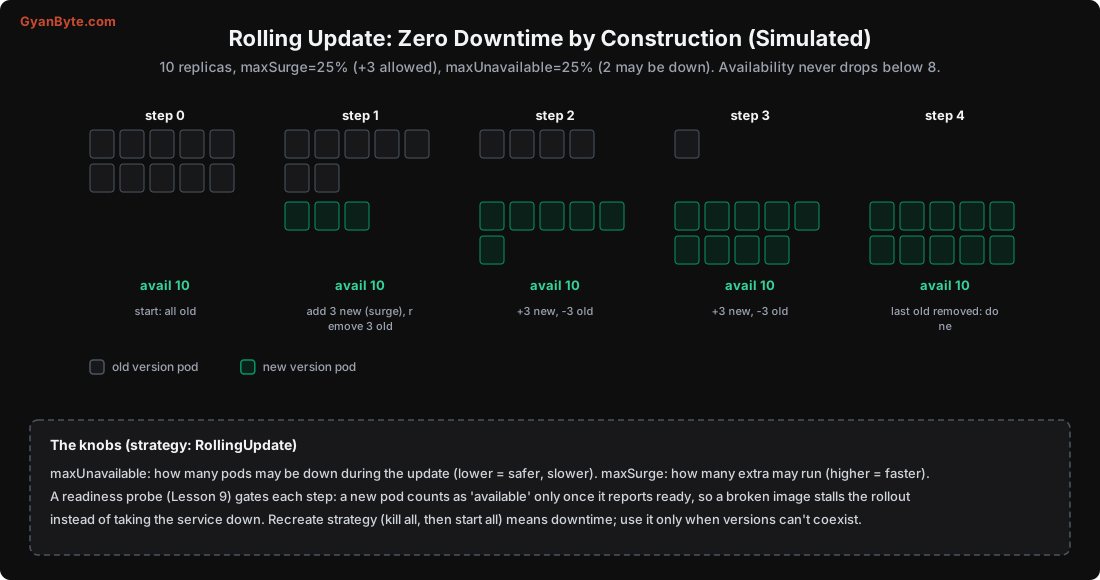
step 0: 10 old,  0 new   available 10
step 1:  7 old,  3 new   available 10
step 2:  4 old,  6 new   available 10
step 3:  1 old,  9 new   available 10
step 4:  0 old, 10 new   available 10 (done)
Availability stayed at 10 the whole time (and never would have dropped below 8, the maxUnavailable floor). The old version keeps serving until the new version is up and ready. New and old briefly run at the same time, which means your versions must be able to coexist, old and new pods both serving traffic, and the database schema compatible with both. (That’s the expand-and-contract idea from the Database Internals migrations lesson.)
If versions genuinely can’t coexist, the Recreate strategy kills all old pods then starts new ones, but that means downtime. Avoid it unless you must.
The Readiness Probe Gates Everything
Here’s the piece that makes rolling updates safe rather than dangerous: a new pod counts as “available” only when its readiness probe passes (Lesson 9). So the rollout proceeds one healthy step at a time. If you ship a broken image, the new pods never become ready, so:
- The old pods are not removed (availability is protected).
- The rollout stalls instead of taking the service down.
kubectl rollout statusshows it stuck, and you roll back.
Without a readiness probe, Kubernetes considers a pod “available” as soon as its container starts, even if the app inside is crashing or not yet listening. Then a bad deploy replaces all your good pods with broken ones and you have an outage. Always set a readiness probe on a Deployment that takes traffic. It’s the single most important field for safe deploys.
Instant Rollback
Because the old ReplicaSet is kept (scaled to 0), rolling back is immediate, Kubernetes just scales the old ReplicaSet back up and the new one down:
kubectl rollout status deploy/api        # watch a rollout
kubectl rollout history deploy/api       # see past revisions
kubectl rollout undo deploy/api          # roll back to the previous revision
kubectl rollout undo deploy/api --to-revision=5
kubectl rollout restart deploy/api       # restart all pods (new pods, same spec)
kubectl rollout undo recreates the previous version’s pods from the retained ReplicaSet. No image rebuild, no redeploy pipeline, seconds, not minutes. This safety net is a big reason Deployments are so pleasant: a bad release is one command away from undone. (Keep in mind rollback reverts the pods, not external state like a database migration; design migrations to be backward-compatible.)
Scaling
Scaling a Deployment is just changing the replica count:
kubectl scale deploy/api --replicas=5     # imperative, quick
# or edit replicas: 5 in the YAML and apply (declarative, preferred in GitOps)
The ReplicaSet controller creates or removes pods to match. In Lesson 10, the Horizontal Pod Autoscaler does this automatically based on load. A couple of production rules: run more than one replica (a single replica means downtime on any restart, node failure or deploy), and spread replicas across nodes and zones (Lesson 6) so one failure doesn’t take them all.
Pitfalls to Avoid
- No readiness probe on a Deployment. A broken deploy then replaces healthy pods with broken ones, causing an outage.
- Running a single replica in production. Any restart or node failure is downtime. Use at least 2-3.
- Assuming old and new versions won’t overlap. They do during a rollout; make versions and schemas coexist.
- Using
Recreatecasually. It means downtime; only for versions that truly can’t run side by side. - Forgetting rollback reverts pods, not data. A database migration isn’t undone by
rollout undo; keep migrations backward-compatible. kubectl edit/scalein production without updating Git. Your Git state and cluster state drift; prefer declarative apply.- Mismatched selector and template labels. The Deployment won’t own its pods and behaves strangely.
Quick Recap
- A Deployment manages ReplicaSets, which keep N identical pods alive; an update creates a new ReplicaSet.
- RollingUpdate replaces pods gradually: simulated 10-replica rollout kept availability at 10, never below the maxUnavailable floor.
- maxSurge/maxUnavailable tune speed vs safety; old and new versions overlap, so they must coexist.
- A readiness probe gates each step, so a broken image stalls the rollout instead of causing an outage. Always set one.
- Rollback is instant because the old ReplicaSet is kept;
kubectl rollout undoscales it back up.
Next lesson: the numbers that decide where pods run and whether they survive, requests and limits, with real experiments showing an OOM kill and CPU throttling.