Beginners often expect the basic unit of Kubernetes to be the container. It isn’t, it’s the pod. This trips people up until they see why, and then a lot of Kubernetes behaviour suddenly makes sense: why two containers can share localhost, why they always land on the same machine, why scaling means “more pods” not “more containers”. Let’s build the right mental model of a pod, and then see why you’ll rarely create one by hand.
What a Pod Is
A pod is one or more containers that are treated as a single unit. The containers in a pod:
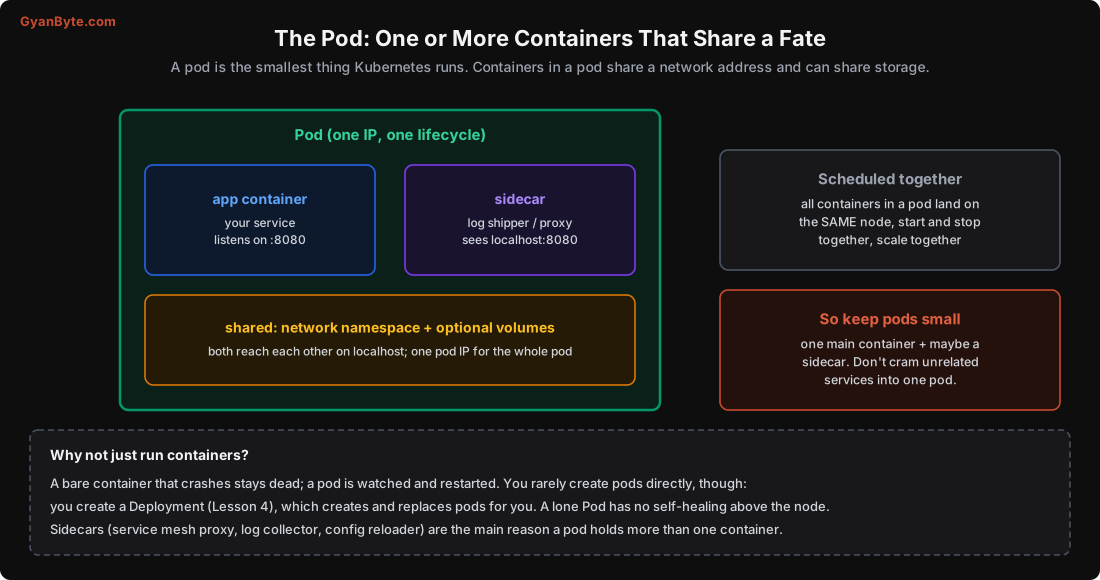
- Share one network address. The pod gets a single IP. Containers in it reach each other on
localhostand share ports (so two containers in a pod can’t both use port 8080). To the rest of the cluster, the whole pod is one network endpoint. - Can share storage. Volumes defined on the pod can be mounted into multiple containers, so they can share files.
- Share a lifecycle. They’re scheduled onto the same node, started together, and stopped together. They live and die as a unit.
Because they share a fate, containers in a pod should be tightly coupled, things that genuinely belong together on the same machine. Most pods have exactly one container: your service. The pod is just the wrapper Kubernetes schedules and heals.
When a Pod Has More Than One Container: Sidecars
The reason to put a second container in a pod is the sidecar pattern: a helper container that supports the main one and benefits from sharing its network and storage. Common sidecars:
- A service-mesh proxy (Istio’s Envoy, Linkerd) that intercepts the pod’s traffic for mTLS, retries and metrics.
- A log shipper that reads the app’s log files (shared volume) and sends them off.
- A config reloader that watches for config changes and signals the app.
- An init container (a special case): runs to completion before the main containers start, for setup like running database migrations or waiting for a dependency.
Kubernetes even has first-class sidecar containers (a special kind of init container that keeps running) so the mesh proxy starts before and stops after your app. But the rule stands: a sidecar supports the main container. Don’t put two unrelated services (your API and your separate billing service) in one pod just to save pods, they’d be forced onto the same node, scaled together, and killed together, which is almost never what you want. If two things scale or fail independently, they belong in separate pods.
Why You Rarely Create Pods Directly
You can create a bare Pod, but you almost never should. A lone Pod has a critical weakness: no self-healing above the node level. The kubelet will restart a crashed container within the pod, but if the whole pod is deleted, or its node dies, nothing recreates it. There’s no controller watching to keep it alive. It also has no rolling updates, no scaling, no rollout history.
Instead, you create a controller that manages pods for you, the control loop from Lesson 1. You declare “I want 3 of these pods”, and the controller creates them, replaces any that die, and reschedules them if a node fails. You describe the pods you want via a template inside the controller, and the controller does the rest.
So in practice, “creating pods” means creating a Deployment (or similar), which creates the pods. Bare pods are for quick debugging only (kubectl run -it debug --image=busybox --rm).
Which Workload Controller?
Different work behaves differently, so Kubernetes has several controllers. Picking the right one is mostly about how the workload behaves:
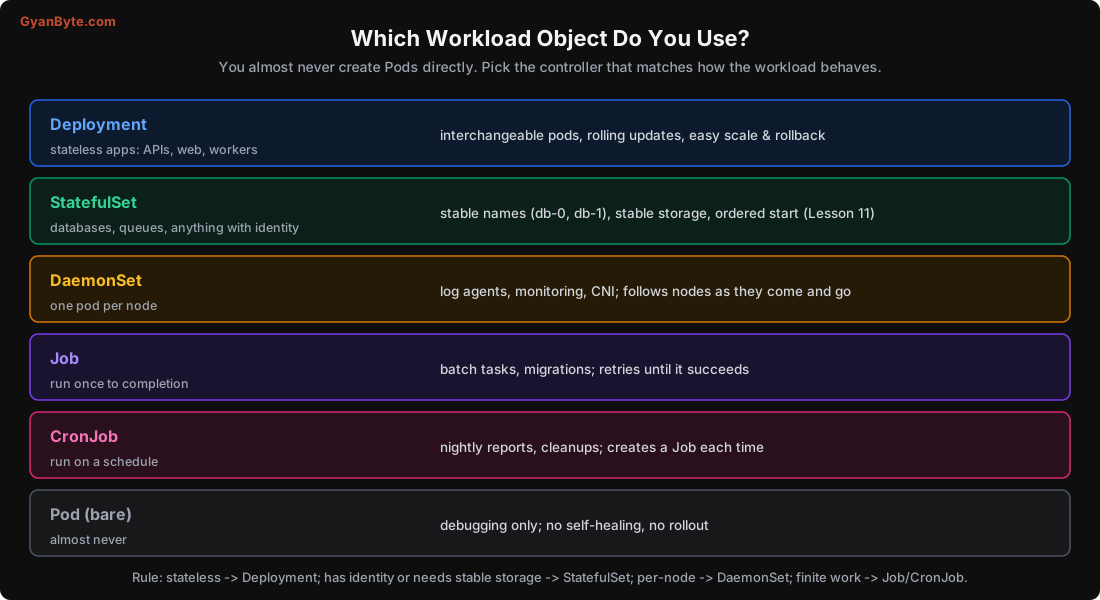
- Deployment (Lesson 4): for stateless apps, APIs, web servers, workers. Pods are interchangeable: any pod can serve any request, and a dead one is replaced by a fresh blank one. Gives rolling updates, easy scaling and rollback. This is what you’ll use most.
- StatefulSet (Lesson 11): for workloads with identity and state, databases, Kafka, ZooKeeper. Each pod gets a stable name (
db-0,db-1), keeps its own storage, and starts/stops in order. A replacementdb-1reattachesdb-1’s disk. - DaemonSet: for one pod per node, log collectors, monitoring agents, the network plugin. As nodes are added or removed, the DaemonSet adds or removes a pod to match.
- Job: for run-once work that must complete, a data migration, a batch computation. It retries until it succeeds, then stops.
- CronJob: for scheduled work, a nightly report, a cleanup task. It creates a Job on a schedule (like cron).
The quick rule: stateless → Deployment; needs stable identity or storage → StatefulSet; one per node → DaemonSet; finite task → Job; scheduled task → CronJob.
The Pod Lifecycle, Briefly
A pod moves through phases you’ll see in kubectl get pods:
- Pending: created but not yet running, waiting to be scheduled, or pulling the image.
- Running: scheduled to a node, containers started. (Being “Running” doesn’t mean “ready to serve”, that’s what readiness probes are for, Lesson 9.)
- Succeeded / Failed: for Jobs, the containers finished (0 exit = Succeeded, non-zero = Failed).
- CrashLoopBackOff (a status you’ll see often): the container keeps crashing and restarting, with Kubernetes waiting longer between attempts. It almost always means a bug, a missing config, or hitting a limit (Lesson 5).
kubectl logsandkubectl describetell you why.
When you delete a pod (or a rolling update replaces it), Kubernetes sends it a termination signal and gives it a grace period to shut down cleanly (terminationGracePeriodSeconds, default 30) before forcing it. Your app should handle that signal, finish in-flight requests, and exit, important for zero-downtime deploys (Lesson 4).
Pitfalls to Avoid
- Thinking the container is the unit. The pod is; it’s what gets scheduled, healed and scaled.
- Putting unrelated services in one pod. They’d share a node, scale together and die together. Use separate pods.
- Creating bare Pods in production. No self-healing above the node, no rollout. Use a controller.
- Expecting two containers in a pod to use the same port. They share the network namespace; ports can’t collide.
- Using a Deployment for a database. Stateful systems need a StatefulSet’s stable identity and storage (Lesson 11).
- Treating “Running” as “ready.” A pod can be Running but not yet able to serve; that’s readiness (Lesson 9).
- Ignoring graceful shutdown. Not handling the termination signal drops in-flight requests during deploys.
Quick Recap
- A pod is one or more containers sharing a network address and lifecycle, scheduled together on one node.
- Most pods have one container; a second is a sidecar (proxy, log shipper, config reloader) that supports the main one.
- You rarely create pods directly, a bare Pod has no self-healing above the node. Use a controller.
- Deployment for stateless, StatefulSet for identity/storage, DaemonSet for per-node, Job/CronJob for finite/scheduled work.
- Watch for CrashLoopBackOff (a crashing container) and handle graceful shutdown for zero-downtime deploys.
Next lesson: the controller you’ll use most. Deployments, how they manage ReplicaSets to give zero-downtime rolling updates, and how rollback is instant.