In the last lesson, the control loop was abstract: “controllers watch and reconcile.” Now let’s make it concrete. What are these controllers, where do they run, and how does a command you type become a container running on some machine? Knowing the pieces turns “Kubernetes did something” into “I know exactly which component did what”, which is the difference between guessing and debugging.
Two Halves: Control Plane and Nodes
A cluster is a set of machines split into two roles:
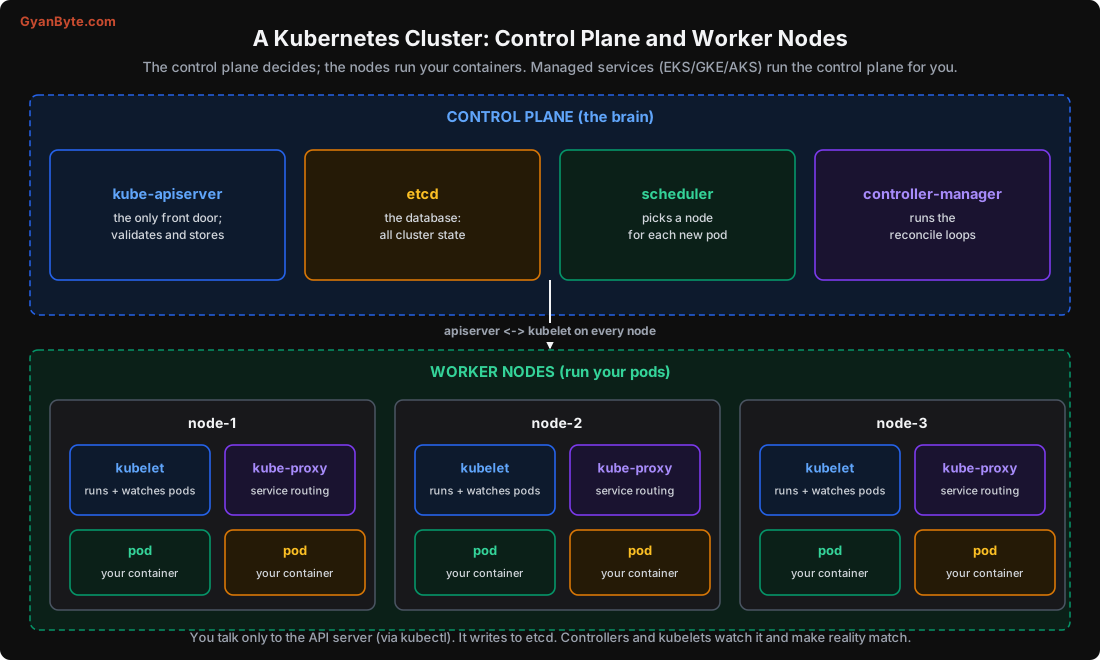
The control plane is the brain. It makes decisions and stores the cluster’s desired and actual state. The worker nodes are the muscle: they run your containers. In a managed service (EKS/GKE/AKS), the cloud runs the control plane; you manage the nodes and workloads. In a self-run cluster, you run both.
The Control-Plane Components
kube-apiserver is the heart of everything. It’s the only component anyone talks to, you, kubectl, every controller, every kubelet. It exposes the Kubernetes API (a REST API over HTTP). Its jobs: authenticate and authorise every request, validate objects, and read/write them to etcd. If the API server is down, you can’t change anything (though existing pods keep running). Think of it as the front desk that every request, human or machine, must go through.
etcd is the database. It’s a distributed, consistent key-value store (built on the Raft consensus algorithm, covered in the Distributed Systems course) that holds all cluster state: every Deployment, Pod, Service, ConfigMap, Secret, their desired and actual status. It’s the single source of truth. If you lose etcd without a backup, you lose the cluster’s state. This is why etcd backups matter, and why managed services running it for you is such a relief.
kube-scheduler watches for pods that have been created but not yet assigned to a node, and picks a node for each one (Lesson 6). It doesn’t start the pod; it just writes “this pod goes on node-2” back to the API server. That’s its whole job: matchmaking pods to nodes.
kube-controller-manager runs the controllers, the reconcile loops from Lesson 1. The Deployment controller, ReplicaSet controller, Node controller, Job controller and many more all run here. Each watches its kind of object and works to make actual match desired. This is where most of the “self-healing” lives.
(There’s also a cloud-controller-manager that talks to your cloud provider, to create load balancers, attach disks, and manage nodes.)
The Node Components
Every worker node runs three things:
kubelet is the node’s agent. It watches the API server for pods assigned to its node, and makes them real: it tells the container runtime to pull images and start containers, runs the health probes (Lesson 9), and reports each pod’s status back to the API server. It’s the kubelet that actually brings pods to life; the control plane only decides.
kube-proxy handles Service networking (Lesson 7). It programs the node’s networking (iptables or IPVS rules) so that traffic to a Service’s virtual IP is load-balanced across the Service’s healthy pods. It’s why http://api:8080 reaches a real pod.
The container runtime (usually containerd) is the software that actually runs containers, pulling images and managing their lifecycle. Kubernetes talks to it through a standard interface (the CRI). Docker as a runtime was removed in Kubernetes 1.24; containerd is now standard.
The Key Design: Everyone Watches the API Server
Here’s the architectural idea that makes Kubernetes resilient, and it surprises people: the components never call each other directly. The scheduler doesn’t call the kubelet. The Deployment controller doesn’t call the scheduler. Instead, every component watches the API server and reacts to changes.
- The scheduler watches for unscheduled pods and assigns them (writing back to the API server).
- The kubelet watches for pods assigned to its node and starts them.
- Controllers watch their objects and reconcile.
This is a loosely coupled, event-driven design. No component needs to know another’s address or whether it’s up right now. A controller can crash and restart, and when it comes back, it just re-reads the current state from the API server and carries on, no lost commands, no broken handshakes. It’s the same “watch and reconcile” loop from Lesson 1, applied to the components themselves. This is a big part of why Kubernetes survives partial failures so gracefully.
What One kubectl apply Actually Does
Let’s trace the full chain. You run kubectl apply -f deploy.yaml for a Deployment that wants 3 replicas:
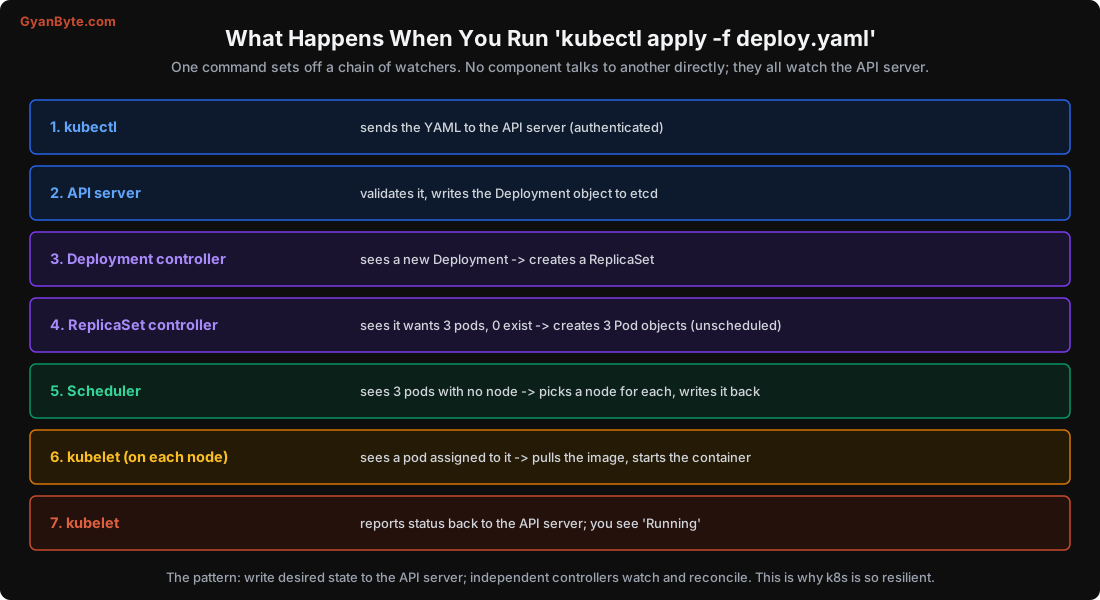
- kubectl sends the YAML to the API server over HTTPS, authenticated as you.
- API server authenticates, authorises (RBAC, Lesson 12), validates the object, and writes the Deployment to etcd. It replies “created” to kubectl, this is why
kubectl applyreturns fast, before anything is actually running. - Deployment controller (watching) sees a new Deployment and creates a ReplicaSet object.
- ReplicaSet controller (watching) sees a ReplicaSet wanting 3 pods with 0 existing, and creates 3 Pod objects, each unscheduled (no node yet).
- Scheduler (watching) sees 3 pods with no node, picks a node for each (Lesson 6), and writes the assignment back.
- kubelet on each chosen node (watching) sees a pod assigned to it, tells containerd to pull the image and start the container.
- kubelet reports the pod’s status back to the API server; now
kubectl get podsshows Running.
Notice the pattern: at every step, a component writes desired state to the API server, and another component watches and reacts. No direct calls. This is the control loop (Lesson 1) operating at the level of the whole system. It’s also why, when something’s wrong, you debug by asking the API server: kubectl get, kubectl describe, kubectl get events, each tells you what some component observed or did.
How You Interact: kubectl and the API
You talk to the cluster through the API server, almost always via kubectl, which reads your kubeconfig (credentials and the cluster address) and turns commands into API calls. A few that you’ll live in:
kubectl get pods                      # list pods (actual state)
kubectl describe pod <name>           # detailed status + recent events (why it's not Running)
kubectl get events --sort-by=.lastTimestamp   # what components recently did
kubectl apply -f deploy.yaml          # set desired state
kubectl logs <pod>                    # container logs
kubectl get deploy,rs,pods            # the Deployment -> ReplicaSet -> Pod chain (Lesson 4)
A useful trick (real, client-side) is generating manifests instead of writing them from scratch:
kubectl create deployment web --image=nginx:1.27 --replicas=3 --dry-run=client -o yamlThis prints a valid Deployment YAML without touching a cluster, a good way to learn the shape of objects and to scaffold manifests you then edit.
Pitfalls to Avoid
- Thinking components call each other. They watch the API server; debugging means asking the API server too.
- Ignoring etcd backups on a self-run cluster. Lose etcd, lose the cluster’s state.
- Panicking when
kubectl applyreturns instantly. It only recorded desired state; watchget/describefor actual progress. - Running your own control plane without a strong reason. Managed services run it correctly for you.
- Not using
describeandevents. They tell you exactly what each component observed and did, your first debugging stop. - Expecting Docker-the-daemon on nodes. The runtime is containerd (CRI); Docker-as-runtime was removed in 1.24.
Quick Recap
- A cluster is a control plane (brain) plus worker nodes (run pods).
- Control plane: API server (the only front door), etcd (all state), scheduler (pod-to-node), controller-manager (reconcile loops).
- Nodes: kubelet (runs/watches pods), kube-proxy (Service routing), containerd (runs containers).
- Components don’t call each other; they all watch the API server and react, which makes the system loosely coupled and resilient.
kubectl applywrites desired state to the API server; controllers, scheduler and kubelets then make it real, each by watching.
Next lesson: the smallest thing Kubernetes actually runs, the pod, why it can hold more than one container, and why you rarely create one directly.