When I teach Kubernetes, I don’t start with kubectl or YAML. I start with one sentence, because everything else follows from it:
You tell Kubernetes what you want, and it continuously works to make reality match.
That’s it. That’s the whole thing. Pods, Deployments, Services, autoscalers, every object you’ll meet is a variation on “here’s the state I want; keep it true.” Once this clicks, Kubernetes stops being a bag of commands to memorise and becomes a single idea applied over and over.
The Control Loop
Traditional deployment is imperative: you give a sequence of commands. “SSH to server 1, pull the new image, stop the old container, start the new one, repeat on server 2…” If a server reboots, or a container crashes at 3 AM, nothing brings it back unless you wrote and ran more commands. You’re responsible for every step and every recovery.
Kubernetes is declarative. You describe the end state: “I want 3 copies of api:1.4 running.” Then a controller, a small program running a loop, does this forever:
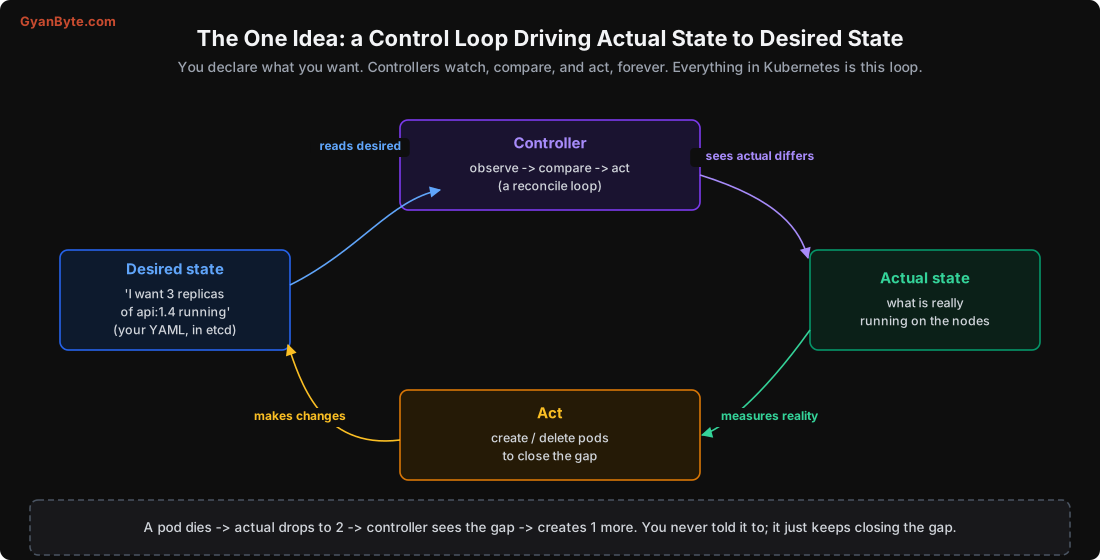
- Observe the actual state: how many copies are really running?
- Compare with the desired state: I want 3, I see 2.
- Act to close the gap: create 1 more.
- Repeat, forever.
This loop is why Kubernetes self-heals. A pod crashes, the actual count drops to 2, the controller notices on its next pass and creates a replacement. A whole node dies, its pods vanish, controllers reschedule them elsewhere. You never wrote “if a pod dies, make a new one”; you only ever said “I want 3”, and the loop keeps that true. The same mechanism handles scaling (change 3 to 5 and two more appear), rolling updates (change the image and pods are replaced gradually), and almost everything else.
The practical shift in mindset: you stop issuing commands and start editing desired state. You don’t “restart the service”; you describe the service you want and let the loop converge. Your deployment process becomes “change the YAML in Git, apply it”, and the cluster figures out the steps. This is also why GitOps (keeping all your desired state in Git) fits Kubernetes so naturally.
What Kubernetes Actually Does For You
Underneath that one idea, Kubernetes bundles the things you’d otherwise build by hand to run containers across many machines:
- Scheduling: given a container to run and a fleet of machines, pick a good machine for it (Lesson 6).
- Self-healing: restart crashed containers, replace pods on dead nodes, keep the declared count alive (Lessons 4, 9).
- Rolling updates and rollback: ship a new version gradually, with no downtime, and undo instantly if it’s bad (Lesson 4).
- Scaling: add or remove copies by hand or automatically based on load (Lesson 10).
- Service discovery and load balancing: a stable name for a changing set of pods, traffic spread across the healthy ones (Lesson 7).
- Configuration and secrets: inject settings at runtime so one image runs everywhere (Lesson 8).
- Resource management: pack containers onto machines efficiently, with guarantees and limits (Lesson 5).
It does not do these for you: write your app, make your database highly available (that’s the database’s job, Lesson 11), secure your cluster automatically (it’s open by default, Lesson 12), or make a badly-designed system scale. It’s an orchestration layer, not magic.
Do You Actually Need It?
This is the most important question in the course, and the one most often skipped. Kubernetes solves real problems, and it adds real complexity: a learning curve, operational overhead, more moving parts, and a new category of things that can go wrong. Adopting it “because everyone does” is how teams end up spending more time running Kubernetes than building their product.
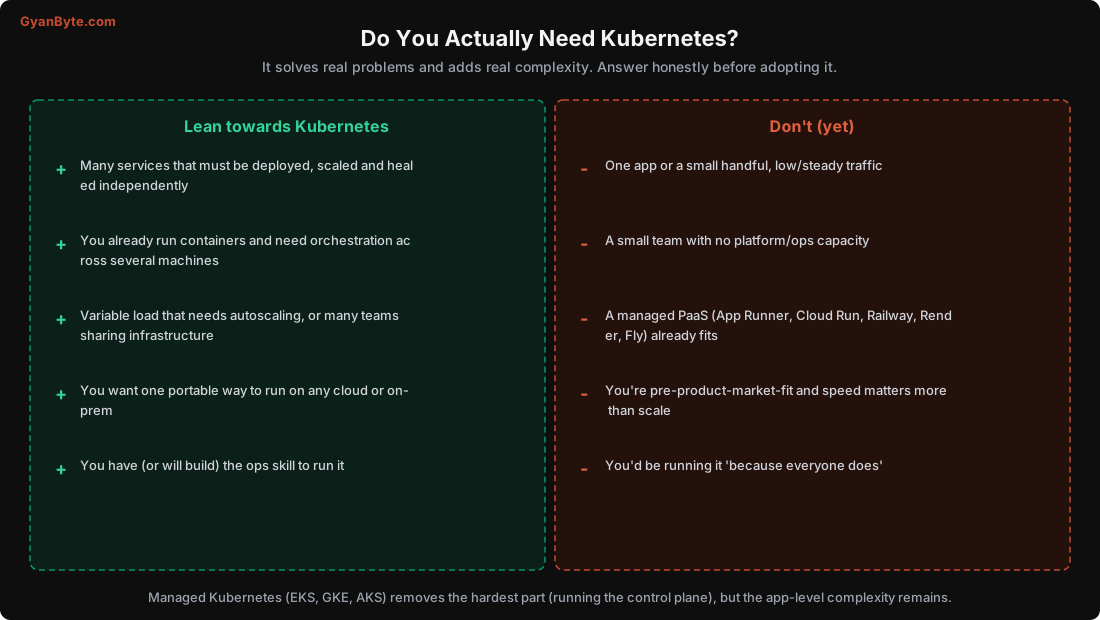
Lean towards Kubernetes when:
- You run many services that need to be deployed, scaled and healed independently.
- You already run containers and need to orchestrate them across several machines.
- You have variable load that benefits from autoscaling, or many teams sharing infrastructure.
- You want portability: one way to run on any cloud or on-prem.
- You have, or will build, the operational skill to run it.
Don’t (yet) when:
- You have one app or a small handful, with low and steady traffic.
- You’re a small team with no platform or ops capacity to spare.
- A managed PaaS (AWS App Runner, Google Cloud Run, Railway, Render, Fly.io) already fits. These run containers for you with far less to learn.
- You’re early-stage and shipping speed matters more than scale.
A good heuristic: if you can comfortably run your system on a PaaS or a few VMs, do that. Reach for Kubernetes when the number of services, the scaling needs, or the team structure makes the orchestration genuinely worth the overhead. You can always move later; many successful products ran on a PaaS for years first.
Managed Kubernetes: What It Removes
If you do adopt Kubernetes, use a managed service: Amazon EKS, Google GKE, Azure AKS, DigitalOcean Kubernetes, or similar. These run the control plane (the API server, etcd, scheduler, controllers, Lesson 2) for you: the hardest, most critical part to operate correctly. etcd backups, control-plane upgrades, high availability of the API server, all handled.
What managed Kubernetes does not remove is the application-level complexity: you still write the manifests, set resource requests, configure probes, manage secrets, handle networking and security, and understand why a pod is stuck. That’s exactly what this course teaches. Running the control plane yourself (with kubeadm, kops, or the hard way) is a specialised job; don’t do it unless you must. Managing your workloads on top is the job of every backend engineer who ships to Kubernetes, and it’s very learnable.
A Note on the Ecosystem
Kubernetes is the core, but production clusters use an ecosystem around it: an Ingress controller or Gateway for HTTP (Lesson 7), cert-manager for TLS certificates, a metrics stack (Prometheus/Grafana) for observability, an autoscaler for nodes (Lesson 10), Helm or Kustomize for packaging manifests, maybe a service mesh (Istio, Linkerd) for advanced networking, and Operators for stateful systems (Lesson 11). Don’t try to adopt all of it at once. Start with the core (Deployments, Services, config, probes), add pieces as you actually need them. This course focuses on the core, with pointers to the ecosystem where it matters.
Pitfalls to Avoid
- Learning Kubernetes as commands and YAML keys instead of the control-loop idea. The idea makes the rest easy.
- Thinking imperatively (“restart the service”) instead of editing desired state.
- Adopting Kubernetes “because everyone does.” Match the tool to the problem; a PaaS is often better.
- Running your own control plane when a managed service exists. Let the cloud run etcd and the API server.
- Expecting Kubernetes to make a bad architecture scale or a database highly available on its own.
- Adopting the whole ecosystem at once. Start with the core; add pieces when needed.
Quick Recap
- Kubernetes is a control loop: declare desired state, and controllers continuously drive actual state to match it.
- That loop is why it self-heals, scales and rolls out updates, you edit desired state, not run step-by-step commands.
- It solves orchestration across machines: scheduling, healing, rollouts, scaling, service discovery, config.
- Use it when you have many services, variable load, portability needs and ops capacity; use a PaaS when you don’t.
- Managed Kubernetes runs the control plane for you, but the application-level complexity is still yours to learn.
Next lesson: what a cluster is actually made of. The control plane and the worker nodes, and the chain of events that one kubectl apply sets off.