A few months back, a product manager from a lending startup in Gurugram called me. They had a requirement: “We want an AI agent that reads a loan applicant’s bank statement and decides if the salary credits are regular.” Their team had already spent three weeks on it. They had a planner agent, a parser agent, a validator agent, and a “critic” agent, all talking to each other through a framework I won’t name. It worked on about 70% of statements and each run cost around ₹14.
We replaced the whole thing in two days with one PDF-to-text step, one LLM call with a strict JSON schema, and fifteen lines of Python to check the salary dates. Accuracy went up to 94%. Cost dropped to under 80 paise per statement.
I am not telling this story to make fun of that team. I made the same mistake on my first project. The word “agent” is so loud right now that it pulls every AI problem towards it, even the ones that don’t need it. So before we write a single line of agent code in this course, let’s get clear on what an agent actually is, and more importantly, when you should not build one.
The One-Line Definition
Here is the definition I use with my team:
An agent is an LLM running in a loop, picking the next action from a set of tools, until it decides the job is done.
That is it. Three ingredients:
- A model that can request tool calls. Every serious provider supports this now. The model doesn’t run anything itself. It returns a structured “please call
search_orderswith these arguments” message. - Tools. Plain functions in your codebase: query a DB, call an API, read a file, send an email.
- A loop. Your code runs the requested tool, appends the result to the conversation, and calls the model again. Repeat until the model replies with a final answer instead of a tool call.
Everything else (memory, planning, multi-agent, reflection) is a variation on top of these three.
If your code calls the LLM once and shows the result, that is not an agent. If your code calls the LLM three times in a fixed order, that is not an agent either. That is a workflow, and frankly, it is usually the better design.
Workflow vs Agent: Who Owns the Control Flow?
This is the most important distinction in the whole course, so let me spend some time on it.
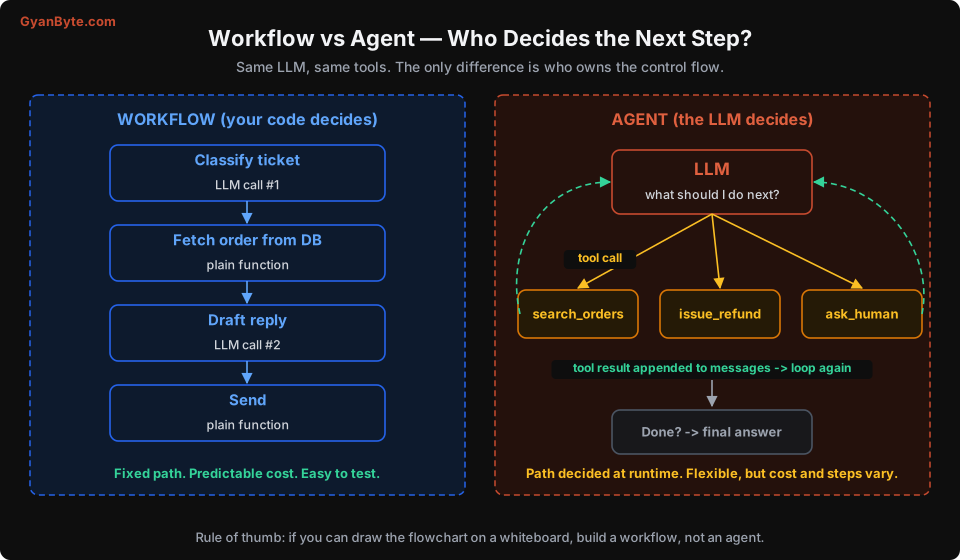
In a workflow, the developer writes the sequence. You might call an LLM to classify a ticket, then a normal function to fetch the order, then another LLM call to draft a reply. The LLM fills in the blanks, but it never decides what happens next. Your if/else does.
In an agent, the LLM owns the sequence. You hand it a goal and a toolbox. It may call search_orders once, or four times with different filters. It may decide to issue_refund, or decide it doesn’t have enough information and ask_human. You find out what it did after it is done.
Both use the same model and the same tools. The difference is purely about who decides the next step.
Here is the same support ticket handled both ways, in pseudo-Python:
# WORKFLOW: the code decides
def handle_ticket_workflow(ticket):
    category = llm_classify(ticket.text)            # LLM call 1
    if category == "refund":
        order = db.get_order(ticket.order_id)        # plain code
        if order.days_since_delivery > 7:
            return template("refund_window_closed")
        reply = llm_draft_reply(ticket, order)       # LLM call 2
        return reply
    elif category == "where_is_my_order":
        tracking = courier_api.track(ticket.order_id)
        return llm_draft_reply(ticket, tracking)
    return escalate_to_human(ticket)


# AGENT: the model decides
def handle_ticket_agent(ticket):
    return run_agent(
        goal=f"Resolve this customer ticket: {ticket.text}",
        tools=[search_orders, get_tracking, issue_refund, ask_human],
        max_steps=10,
    )
Look at the workflow version. It is boring. It is also predictable: exactly two LLM calls for a refund, cost known in advance, every branch testable with a unit test. When something goes wrong, you open the function and see exactly which branch ran.
The agent version is shorter and handles cases you never thought of. A customer who writes “my order came broken and also the second item never arrived” might get both problems solved in one go. That flexibility is real. But you pay for it in cost, latency, and predictability.
The Agency Spectrum
It helps to think of this as a dial, not a switch.
| Level | Pattern | Who decides steps | Typical LLM calls per task | Example |
|---|---|---|---|---|
| 0 | Single LLM call | Developer | 1 | Classify a ticket, extract invoice fields |
| 1 | Workflow (chain, router, parallel) | Developer | 2-5, fixed | Draft reply after DB lookup |
| 2 | Tool-using agent, narrow toolset | LLM, within tight limits | 3-15, variable | Order support agent with 4 tools |
| 3 | Autonomous agent, broad toolset | LLM | 10-100+ | Coding agent, research agent |
| 4 | Multi-agent system | Several LLMs | 50-500+ | Orchestrator with specialist sub-agents |
Each step up the dial roughly multiplies your cost, your latency, and the number of ways things can go wrong. In my experience, most business value today sits at levels 1 and 2. Level 3 is where coding agents and research agents live, and they are genuinely useful, but they are built by teams that have invested heavily in evals and sandboxing. Level 4 is where a lot of demos live.
A good habit: start one level lower than you think you need, measure, and move up only when you can point to specific failures that the higher level would fix.
Four Questions Before You Build an Agent
I keep these four questions on a sticky note. If the answer to any of them is “no”, I don’t build an agent.
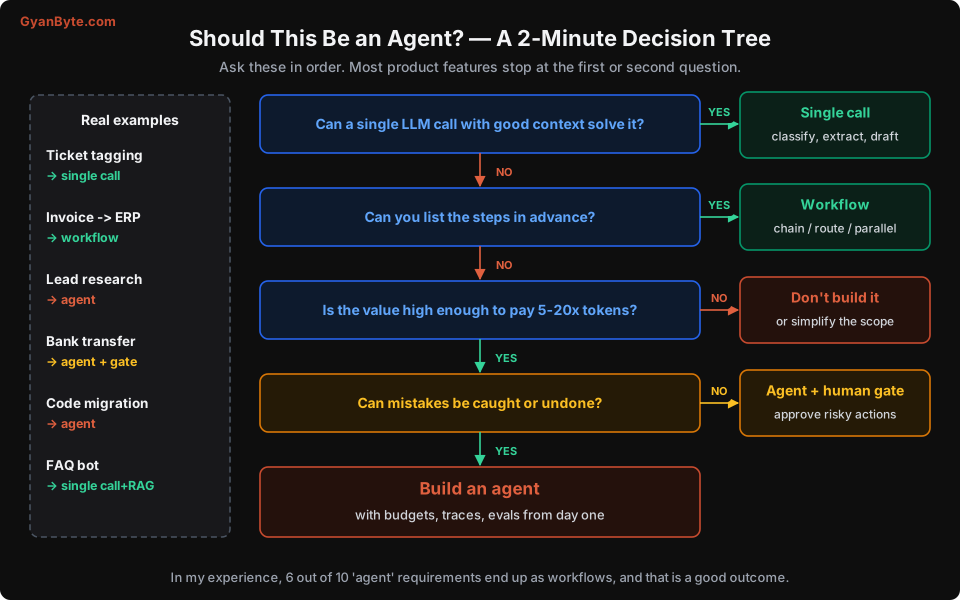
1. Can a single call with good context solve it?
You would be surprised how often the answer is yes. Modern models have huge context windows. If the information needed fits into the prompt, just put it there and ask. Retrieval plus one well-written call (classic RAG) handles most “chat with our docs” requirements. You don’t need an agent to answer “what is our leave policy”.
2. Can you write the steps down in advance?
Take a whiteboard and try to draw the flowchart. If you can draw it, and the branches are based on things your code can check (a status field, an amount, a category), build a workflow. Use the LLM only for the fuzzy parts: understanding free text, drafting language, extracting fields.
If the flowchart keeps growing new branches every time you look at a real example (“but what if the customer has two orders… and one is a replacement… and the replacement was shipped from a different warehouse”), that is a sign the path depends on what you discover along the way. That is agent territory.
3. Is the task valuable enough to pay for the loop?
An agent re-sends the entire conversation on every step. A 10-step agent run doesn’t cost 10x a single call. It often costs 20-40x, because the context keeps growing (we’ll do the maths in Lesson 6). For a task that saves a support executive 15 minutes, paying ₹5-10 per run is fine. For auto-tagging 2 lakh product listings, it is not.
4. Can mistakes be caught or undone?
Agents will make mistakes. Not “might”. Will. The question is what happens when they do.
- A research agent that summarises the wrong article: a human reads it, notices, no harm done.
- A coding agent that writes a buggy function: tests catch it, or code review does.
- An agent that sends money, deletes records, or emails customers: the mistake is out in the world.
If the mistake is cheap to catch and undo, go ahead. If not, you can still build the agent, but every irreversible action must go through a human approval step. We cover that pattern properly in Lesson 10.
Where Agents Genuinely Shine
I don’t want this lesson to sound like “never build agents”. There are problems where nothing else works as well. They tend to share a few traits:
- The path depends on intermediate results. Debugging a failing test, researching a company before a sales call, investigating why a payment failed. You don’t know step 3 until you see the output of step 2.
- The toolset is small but the combinations are many. Five tools can be combined in hundreds of orders. Writing a workflow for each combination is a losing game.
- There is a natural verifier. Code has tests. Data queries have row counts. Research has citations a human can click. Agents do much better when they (or you) can check their work.
- A human is already in the loop. Copilot-style agents where a person reviews the output before it goes anywhere are the safest place to start.
Some agents I have seen deliver real value in Indian companies:
- An internal “on-call buddy” that reads alerts, pulls logs and recent deploys, and posts a first-pass root-cause guess in the incident Slack channel. Humans still fix the issue, but they start with context instead of a blank screen.
- A GST reconciliation assistant that matches purchase invoices against GSTR-2B data, investigates mismatches by querying the ERP, and prepares a list for the accountant to approve.
- A sales research agent that, given a company name, looks at the website, recent news, and LinkedIn job posts, and prepares a one-page brief before a call.
Notice the pattern: a narrow goal, a handful of tools, and a human who reviews the output.
What a “Good” First Agent Looks Like
If you have decided you need an agent, here is the shape I recommend for a first production agent:
- One clear goal written in the system prompt. Not “be a helpful assistant”, but “resolve order-related support tickets for Acme Store”.
- 3 to 8 tools, each doing one thing well. More tools means more confusion.
- Read-only tools first. Let it search, look up, and draft. Add write actions later, behind approvals.
- A hard step limit (10-15 is plenty for most business tasks) and a token budget per run.
- A trace of every run stored somewhere you can search. You will need it on day two.
- An escape hatch: a tool like
escalate_to_humanthat the agent is encouraged to use when unsure.
We will build exactly this shape over the next few lessons.
Frameworks: Do You Need One?
Short answer: not to learn, and not always to ship.
The core agent loop is about 50 lines of code. We will write it in the next lesson. Frameworks like LangGraph, the OpenAI Agents SDK, Pydantic AI, or the Claude Agent SDK give you useful things on top: state persistence, streaming helpers, built-in tools, tracing integrations. They are worth considering once you know what you need.
What I have seen go wrong is teams picking a heavy framework on day one, then spending weeks fighting its abstractions when they need to do something slightly different (custom retry logic, a different memory strategy, a specific approval flow). When the framework’s defaults leak tokens or swallow errors, you can’t fix what you can’t see.
My rule: write the loop yourself first. If after a few weeks you find yourself re-implementing what a framework gives you for free, switch. You will choose much better at that point.
Pitfalls to Avoid
Let me collect the mistakes from this lesson in one place. You will see a section like this at the end of every lesson.
- Building an agent because the requirement said “agent”. Product managers use the word loosely. Translate the requirement into one of the five levels above before writing code.
- Jumping to multi-agent first. Multiple agents multiply cost and failure points. Get one agent working well before you split it.
- No baseline. Before building an agent, build the simplest thing (single call or workflow) and measure it. Otherwise you can’t prove the agent is better, and you will be asked.
- Giving write access on day one. Start read-only. Add write actions one by one, each with its own approval policy.
- Ignoring the cost of being wrong. “Works 90% of the time” is excellent for a draft generator and disastrous for a payments bot. Decide the acceptable error rate per action before you start.
- Assuming the agent will “figure it out”. A vague goal and a pile of tools gives you a vague, expensive agent. The more specific the goal and the tools, the better it behaves.
- Treating the demo as the product. An agent that works on the 10 examples you tried is a demo. Production means hundreds of edge cases you haven’t seen. Plan for evals (Lesson 8) from the start.
Quick Recap
- An agent is an LLM in a loop, choosing tools until it decides it is done.
- A workflow uses the same pieces, but your code decides the steps. Prefer workflows whenever the steps are known.
- Ask the four questions: single call enough? steps known? valuable enough? mistakes recoverable?
- Agents shine when the path depends on intermediate results, there is a verifier, and a human reviews the output.
- Start narrow, read-only, with step limits and traces.
In the next lesson, we stop talking and write the loop. No frameworks, about 120 lines of Python, and you will see exactly where every token goes.