The first time an agent bill really scared me was during a festive sale. We had a support agent for an e-commerce client handling “where is my order” and returns. In the normal month it cost about ₹60,000. During the sale week, traffic went up 4x, which we had planned for. The bill went up almost 11x.
Traffic wasn’t the problem. During the sale, courier delays meant conversations got longer and messier. Customers asked about multiple orders. The agent made more tool calls per conversation, each tool returned the full order history (unpaginated, of course), and every extra step re-sent all of it. Our cost per conversation had nearly tripled, and nobody was watching that number. We were watching total calls.
This lesson is about never being surprised like that.
The Unit That Matters: Cost Per Completed Task
Cost per API call is almost useless for agents. A run might make 3 calls or 30. What your business cares about is:
Cost per completed task = total spend on all runs ÷ number of tasks actually resolved
Notice “actually resolved”. If a cheaper configuration fails more often and those users come back and try again (or get escalated to a human), it isn’t cheaper. Always pair cost metrics with a success metric.
Why Agent Cost Grows Quadratically
We touched on this in Lesson 2. Let’s make it precise.
At step k, the model’s input is the system prompt, tool definitions, the user message, and everything from steps 1 to k-1. If each step adds roughly r tokens (tool call + tool result), the input at step k is about base + (k-1) × r. Summing over n steps:
total_input ≈ n × base + r × n(n-1)/2That second term is quadratic in n. Double the steps, and that part of the cost roughly quadruples.
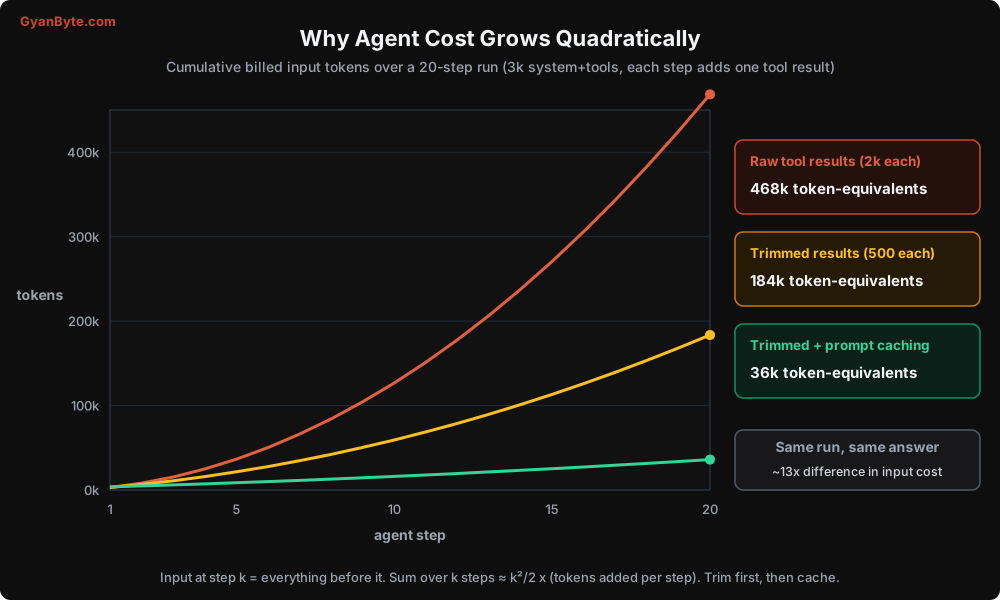
Three runs, same task, same answer:
- Red: each tool returns about 2,000 tokens. 468k input tokens by step 20.
- Amber: tools trimmed to about 500 tokens. 184k. Already 2.5x cheaper.
- Green: trimmed and prompt-cached. About 36k token-equivalents. Thirteen times cheaper than red.
This is why I say tool output design is cost design.
Estimate Before You Build
Do this maths on paper before writing code. It takes ten minutes and has saved more than one project from a bad surprise.
At the time of writing, the Claude API prices are roughly (per million tokens, input / output): Claude Opus 5.5 at $4 / $20, Claude Sonnet 5.5 at $2 / $10, and Claude Haiku 5.5 at $0.10 / $0.50. Cache reads cost a small fraction of the input price, and cache writes cost a little more than normal input. Prices change, so check the current pricing page, but the shape of the maths doesn’t.
Example: an order support agent.
- System prompt + tool definitions: 4,000 tokens
- Average run: 6 steps
- Each step adds about 1,000 tokens (tool call + trimmed result)
- Output per step: about 400 tokens (including thinking, which is billed as output)
input  = 6 × 4,000 + 1,000 × (6 × 5 / 2) = 24,000 + 15,000 = 39,000 tokens
output = 6 × 400 = 2,400 tokens

On Opus 5.5:   39k × $4/M + 2.4k × $20/M = $0.156 + $0.048 = $0.20  ≈ ₹18 per run
On Sonnet 5.5: 39k × $2/M + 2.4k × $10/M = $0.078 + $0.024 = $0.10  ≈ ₹9 per run
(I’m using ₹88 to the dollar.)
Now multiply by volume. 50,000 conversations a month at ₹18 is ₹9 lakh a month. That is a number that gets the CFO’s attention, and it is before retries, before longer festive-season conversations, before anyone adds “just one more tool”. Let’s bring it down.
The Six Levers
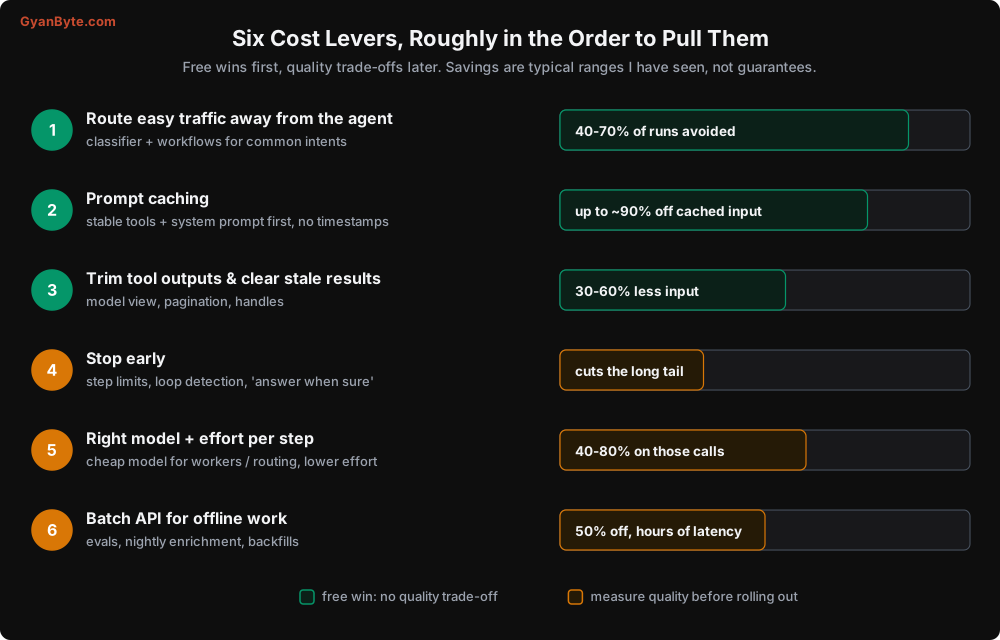
The first three are free wins: they don’t trade away quality. Do them first. The last three are trade-offs that need measurement.
Lever 1: Don’t run the agent at all
The cheapest agent run is the one that never happens. From Lesson 5: put a router in front. “Where is my order” with a valid order id doesn’t need an agent. It needs a DB lookup and a template, or one small LLM call to phrase the answer.
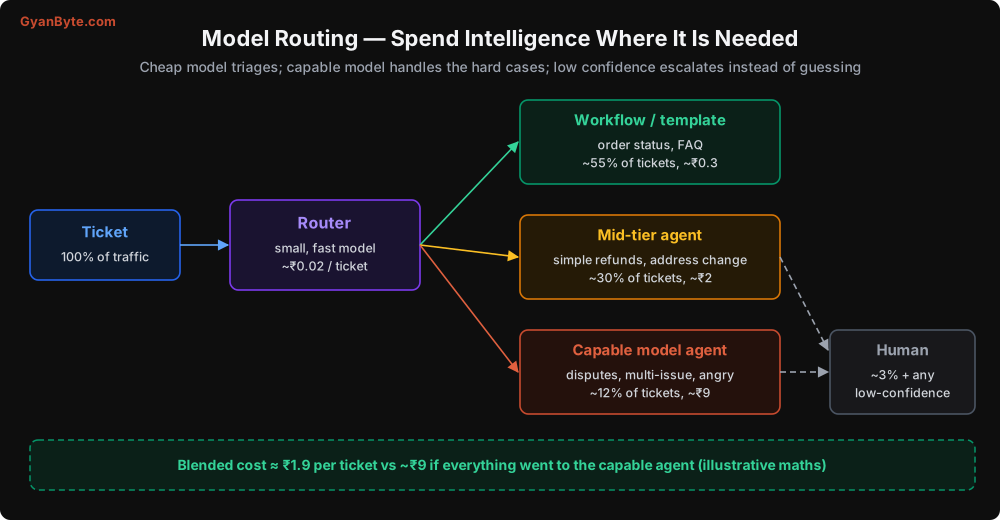
On most support workloads I’ve seen, more than half the traffic is a handful of simple intents. Routing them away cuts agent runs in half before you optimise anything else.
Lever 2: Prompt caching
Every step re-sends the system prompt, tool definitions, and the conversation so far. Prompt caching lets the provider reuse the already-processed prefix, and you pay a fraction of the normal input price for the cached part. On the Claude API, cache reads cost roughly 10% of the base input price (even less on some newer models), and writing to the cache costs about 1.25x for the default 5-minute lifetime.
Caching is a prefix match. The request is processed in order: tools, then system, then messages. Any byte that changes invalidates everything after it. So the rules are:
- Stable things first: tool definitions and system prompt never change within a deployment.
- No timestamps, request ids, or user names in the system prompt. Put per-request details in the user message.
- Deterministic tool order. If you build the tool list from a dict or a set, sort it.
- Append-only conversation. Don’t edit earlier messages every step (we discussed batching edits in Lesson 4).
In code, it’s a small change:
response = client.messages.create(
    model=MODEL,
    max_tokens=4096,
    tools=TOOLS,                                    # stable, sorted
    system=[{
        "type": "text",
        "text": SYSTEM,                             # no timestamps in here!
        "cache_control": {"type": "ephemeral"},     # cache tools + system
    }],
    cache_control={"type": "ephemeral"},            # also cache the growing conversation
    messages=messages,
)
The block-level cache_control on the system prompt caches the shared prefix that’s identical for every conversation. The top-level cache_control automatically places a breakpoint at the end of the conversation, so the next step in this run reads everything before it from cache.
Always verify it’s working. The response tells you:
u = response.usage
print("uncached input:", u.input_tokens)
print("cache write:   ", u.cache_creation_input_tokens)
print("cache read:    ", u.cache_read_input_tokens)
If cache_read_input_tokens stays at zero across steps, something in your prefix is changing. The usual culprit, in my experience, is a datetime.now() someone added to the system prompt “so the bot knows the date”. Put the date in the user message, at day granularity.
For our support agent example, caching brings Opus 5.5 from about ₹18 to about ₹9 per run. Same model, same quality.
Lever 3: Trim tool outputs and clear stale results
We covered the techniques in Lessons 3 and 4. Here is how to find the worst offenders. Log the token size of every tool result, then look at the distribution:
def log_tool_result_size(tool_name: str, content: str):
    # rough estimate is fine for monitoring: ~4 characters per token for English
    approx_tokens = len(content) // 4
    metrics.histogram("agent.tool_result_tokens", approx_tokens, tags={"tool": tool_name})
In almost every agent I’ve reviewed, one or two tools produce 80% of the tokens. Fix those first. (For exact counts, use the provider’s token counting endpoint; for monitoring, the rough estimate is enough. Note that Indian language text in Devanagari or other scripts usually takes more tokens per character than English, so estimate generously for Hindi or Tamil conversations.)
Lever 4: Stop early
Look at your step-count distribution. It’s usually a long tail: most runs finish in 3-6 steps, and a few go to 20+. Those few can be a big chunk of the bill, and they’re often failing anyway (looping, confused, stuck).
- Set step limits from the data: if 98% of successful runs finish in 8 steps, a limit of 12 loses almost nothing.
- Use the loop detection from Lesson 2.
- Tell the model in the system prompt to answer as soon as it has enough information, and that it’s fine to escalate. Models sometimes keep “double checking” because they think thoroughness is what you want.
Lever 5: The right model and effort for each step
Not every call in your system needs your most capable model. Some places where a smaller, cheaper model usually works fine:
- Routing and classification
- Summarising a fetched page (the
cheap_summarisefrom Lesson 4) - Sub-agents that extract facts from documents
- Compaction summaries
For the main agent loop, try the capable model at a lower effort setting before switching to a smaller model. Effort controls how much the model thinks and how many tokens it spends overall:
response = client.messages.create(
    model=MODEL,
    max_tokens=4096,
    output_config={"effort": "low"},   # low | medium | high | xhigh | max
    tools=TOOLS, system=SYSTEM_BLOCKS, messages=messages,
)
On simple, well-specified tasks, lower effort often holds quality while cutting output tokens and latency significantly. On hard reasoning, it doesn’t. You only find out by measuring on your own eval set (Lesson 8).
Two warnings about model cascades (cheap model first, capable model if it fails):
- Caches are per model. Switching models mid-conversation means the new model starts with a cold cache.
- Cost per completed task, not per call. A cheaper model that needs 3 extra steps or fails 15% more often might cost more overall.
Lever 6: Batch processing for offline work
Not every agent workload is interactive. Nightly enrichment of leads, re-scoring old tickets, running your eval suite: none of these need an answer in two seconds. The Message Batches API processes requests asynchronously at about half the price. Multi-step agents can still use it by submitting each “step” for all pending tasks as one batch, but in practice batching shines for single-call workflows and evals. If your evals run on every PR, batching them is an easy saving.
Budgets and Guardrails
Optimisation lowers the average. Budgets protect you from the tail. You need them at several levels:
| Level | Example limit | What happens when hit |
|---|---|---|
| Per run | ₹15 or 150k tokens | Stop gracefully, return partial result, flag for review |
| Per user per day | ₹100 | Polite message, route to human or ask to try later |
| Per tenant per month | as per their plan | Alert account manager, degrade to cheaper model |
| Global per hour | 3x normal hourly spend | Page on-call, optionally flip a kill switch |
Here’s a proper cost function including cache pricing, which you’ll use for the per-run budget:
from dataclasses import dataclass

@dataclass(frozen=True)
class Price:
    input: float          # USD per million tokens
    output: float
    cache_write: float
    cache_read: float

# Fill these from the current pricing page. Keep them in config, not code.
PRICES = {
    "claude-opus-5-5":   Price(input=4.00, output=20.00, cache_write=5.00, cache_read=0.20),
    "claude-sonnet-5-5": Price(input=2.00, output=10.00, cache_write=2.50, cache_read=0.20),
}
USD_TO_INR = 88.0

def cost_inr(model: str, usage) -> float:
    p = PRICES[model]
    usd = (
        usage.input_tokens * p.input
        + (usage.cache_creation_input_tokens or 0) * p.cache_write
        + (usage.cache_read_input_tokens or 0) * p.cache_read
        + usage.output_tokens * p.output
    ) / 1_000_000
    return usd * USD_TO_INR
And a budget object that the loop checks before each step:
class Budget:
    def __init__(self, limit_inr: float):
        self.limit = limit_inr
        self.spent = 0.0

    def add(self, model, usage):
        self.spent += cost_inr(model, usage)

    @property
    def remaining(self) -> float:
        return max(0.0, self.limit - self.spent)

    def can_afford_another_step(self, est_step_cost: float) -> bool:
        return self.remaining >= est_step_cost
est_step_cost can simply be the cost of the last step times 1.3 (since each step costs a bit more than the previous one). Checking before the call is the point. Checking after means you always overshoot.
Alerts that would have saved me
Going back to my festive-sale story, these are the alerts I set up afterwards, and still set up on every project:
- Cost per completed task, daily, with an alert if it moves more than 30% from the 7-day average.
- p95 steps per run. A jump means something’s making the agent work harder.
- p95 input tokens per step. A jump usually means a tool started returning more data.
- Cache hit ratio (
cache_read / (cache_read + input + cache_write)). A sudden drop means someone changed the prompt prefix. - Spend per tenant per hour, to catch one customer’s integration going rogue.
Also, use your provider’s console to set workspace spend limits as a hard ceiling. Your code’s budgets are the first line, the provider limit is the last.
A Realistic Optimisation Story
Putting it together for our 50,000-conversations-a-month support agent:
| Change | Cost per conversation | Monthly |
|---|---|---|
| Naive agent on Opus 5.5, untrimmed tools | ~₹30 | ~₹15 lakh |
| Trim tool outputs | ~₹18 | ~₹9 lakh |
| Add prompt caching | ~₹9 | ~₹4.5 lakh |
| Route ~55% of traffic to workflows | ~₹4.3 (blended) | ~₹2.2 lakh |
| Lower effort on routine steps, cheap model for summaries | ~₹3.2 (blended) | ~₹1.6 lakh |
These numbers are illustrative, but the shape is very typical: the first three rows are free and give you most of the savings. The last row needs an eval suite to make sure quality held.
Pitfalls to Avoid
- Tracking cost per call instead of cost per completed task. Agents make variable numbers of calls; only the per-task number is meaningful.
- Not doing the maths before building. Ten minutes with the formula tells you whether the idea is viable.
- Timestamps or per-request data in the system prompt. Silently kills caching. Verify cache reads in
usage. - Non-deterministic tool ordering. Same effect as above.
- Forgetting that thinking tokens are output tokens. At output prices, long reasoning on simple steps is expensive. Tune effort.
- Switching to a cheaper model without evals. If success rate drops, cost per completed task may go up.
- Budgets checked after the call. Check before, with an estimate.
- Only a global budget. You need per-run, per-user, and per-tenant limits, or one bad actor spends everyone’s money.
- Ignoring the long tail. The 2% of runs that go to 25 steps can be 20% of the bill. Look at the distribution, not the average.
- Forgetting non-English token counts. Hindi, Tamil, and other Indian scripts typically use more tokens per word than English. Estimate with real traffic.
Quick Recap
- Agent input cost grows roughly with the square of the step count.
- Measure cost per completed task, alongside success rate.
- Free wins first: routing, prompt caching, trimming tool outputs.
- Then trade-offs with evals: step limits, model and effort per step, batch for offline.
- Budgets at run, user, tenant, and global level. Check before spending. Alert on cost per task, steps, tokens per step, and cache hit ratio.
Next up: debugging. When an agent does something weird, how do you find out why? Traces, replays, and a field guide to the failure modes you’ll meet.