There’s a type of architecture diagram I’ve started to dread. It has a “CEO Agent” at the top, a “Manager Agent” for each department, and a dozen “Specialist Agents” underneath, all connected with arrows labelled “collaborates”. It looks impressive in a deck.
When I ask what problem it solves that a single agent with good tools couldn’t, the answer is usually some version of “it’s more modular”. And when I ask what it costs per run, nobody knows yet.
Multi-agent systems are genuinely useful for some problems. This lesson is about recognising which problems, and building them so they don’t fall apart. But we’ll start with the simpler patterns, because they solve most cases.
The Six Patterns
Everything you’ll see in agent architectures is a combination of these six.
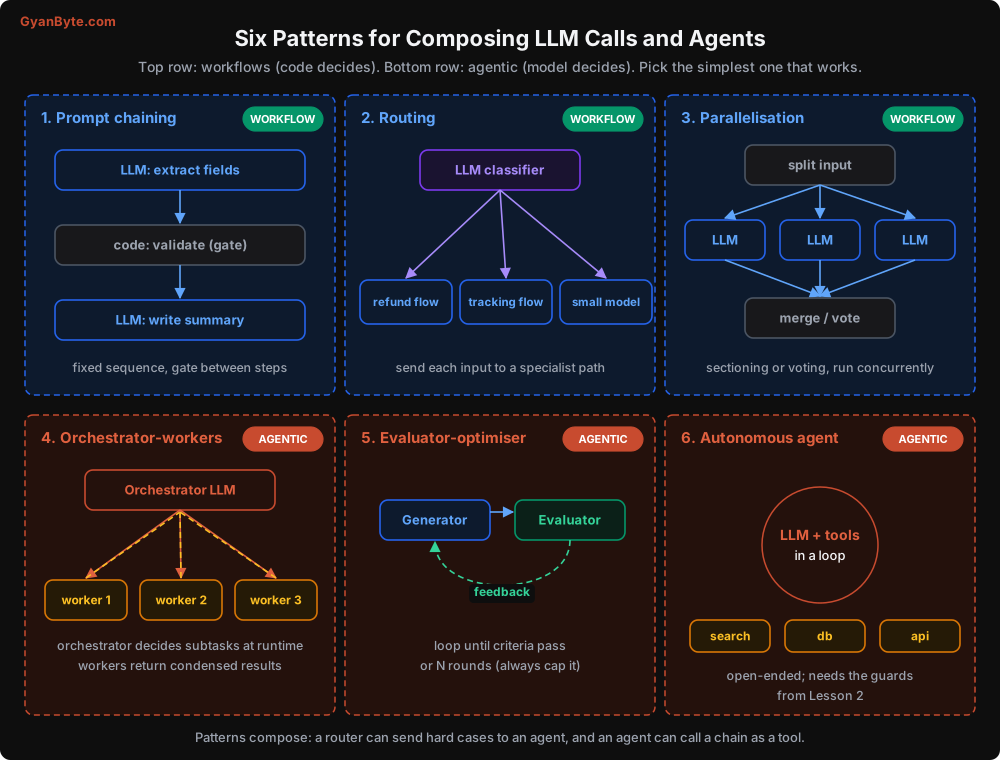
The top three are workflows: your code decides the path. The bottom three are agentic: the model decides. Let me go through them quickly with code, since you’ll combine them constantly.
1. Prompt chaining
Break a task into fixed steps, with a check in code between them.
def process_invoice(pdf_text: str) -> dict:
    fields = llm_extract(pdf_text)                  # step 1: LLM
    problems = validate_gstin_and_totals(fields)    # gate: plain code
    if problems:
        fields = llm_fix(pdf_text, fields, problems)  # step 2 only if needed
    return fields
The gate is the important bit. It catches errors early instead of letting them flow into later steps.
2. Routing
Classify the input, then send it down a specialised path. The classifier is a great place for a small, cheap model.
ROUTES = {
    "order_status": handle_order_status,     # workflow, no agent needed
    "refund": refund_agent.run,              # agent with refund tools
    "product_question": answer_from_kb,      # RAG, single call
    "other": escalate_to_human,
}

def route(ticket_text: str):
    label = classify(ticket_text, labels=list(ROUTES), model=SMALL_MODEL)
    return ROUTES.get(label, escalate_to_human)(ticket_text)
In most support setups I’ve worked on, routing sends 60-70% of traffic to cheap, simple paths. Only the messy remainder reaches a real agent. This one pattern often matters more for cost than any prompt optimisation.
3. Parallelisation
Split into independent pieces and run them at the same time. Two flavours: sectioning (different pieces of work) and voting (same question, several attempts, aggregate).
import asyncio
from anthropic import AsyncAnthropic

aclient = AsyncAnthropic()

async def review_contract(text: str) -> dict:
    checks = {
        "payment_terms": "List payment terms and any late-payment penalties.",
        "termination": "Summarise termination clauses and notice periods.",
        "liability": "Identify liability caps and indemnity clauses.",
        "jurisdiction": "Which courts and governing law apply?",
    }
    async def run(name, instruction):
        r = await aclient.messages.create(
            model=MODEL, max_tokens=1500,
            messages=[{"role": "user", "content": f"{instruction}\n\n<contract>{text}</contract>"}],
        )
        return name, r.content[0].text

    results = await asyncio.gather(*(run(n, i) for n, i in checks.items()))
    return dict(results)
If you put the contract first and the instruction second, all four calls share the same prefix and prompt caching can reuse it. Small detail, real savings. (Here I put it after for readability; Lesson 6 shows the cache-friendly ordering.)
4. Orchestrator-workers
An orchestrator agent breaks the task into subtasks at runtime and delegates each to a worker. We’ll build this properly below.
5. Evaluator-optimiser
One call generates, another critiques against explicit criteria, and the generator revises. Useful when you have clear quality criteria that are easier to check than to satisfy in one go: translations, SQL queries, marketing copy with brand rules.
def write_with_review(brief: str, max_rounds: int = 3) -> str:
    draft = generate(brief)
    for _ in range(max_rounds):
        verdict = evaluate(draft, criteria=BRAND_RULES)   # returns {"pass": bool, "issues": [...]}
        if verdict["pass"]:
            return draft
        draft = revise(draft, verdict["issues"])
    return draft   # best effort; flag for human review
Always cap the rounds. An evaluator that is stricter than the generator can satisfy will loop forever. I’ve seen an evaluator reject drafts for “not being concise enough” ten times in a row while the generator kept making them longer.
6. Autonomous agent
The loop from Lesson 2. The model plans and acts with tools until done.
Does the Agent Need an Explicit Plan?
Modern models plan reasonably well implicitly, especially with thinking enabled. For tasks under about 10 steps, I usually don’t add explicit planning.
For longer tasks, an explicit plan helps in three ways:
- The model stays on track. It can see what’s done and what’s left, even after compaction.
- You can see what it intends. A plan in the trace tells you why it did step 7.
- You can review the plan before execution. For high-stakes tasks, a human approves the plan, then the agent executes.
The plan-and-execute pattern looks like this:
def plan_and_execute(goal: str):
    plan = make_plan(goal)                          # one call: returns a list of steps
    if requires_approval(plan):
        plan = await_human_approval(plan)           # optional gate
    findings = []
    for step in plan.steps:
        result = run_agent(step.instruction, context=findings, max_steps=8)
        findings.append({"step": step.title, "result": result.answer})
        if result.status != "ok" or step.replan_after:
            plan = replan(goal, plan, findings)     # adjust remaining steps
    return synthesise(goal, findings)
The update_plan tool from Lesson 4 is the lightweight version: the agent maintains its own plan as it goes. Start with that. Move to a separate planner only if you need approval or a different model for planning.
Building Orchestrator-Workers Properly
Now the interesting one. Here’s when it genuinely helps:
- The task splits into independent subtasks (research 6 vendors, review 20 files, check 10 suppliers).
- Each subtask needs a lot of reading that would crowd a single context.
- You care about wall-clock time, and parallel workers cut it.
Sub-agents are just tools
The cleanest way to build this: a worker is a tool that the orchestrator calls. Inside the tool, you run a fresh agent loop with its own context, its own tools, and its own budget. The orchestrator only sees the worker’s final, condensed result.
DELEGATE_TOOL = {
    "name": "delegate_research",
    "description": (
        "Assign one focused research subtask to a sub-agent with web search. "
        "The sub-agent has no access to this conversation, so the brief must be "
        "self-contained: objective, what to look for, output format, and what is out "
        "of scope. Call several in the same turn to run them in parallel."
    ),
    "input_schema": {
        "type": "object",
        "properties": {
            "objective": {"type": "string"},
            "must_find": {"type": "array", "items": {"type": "string"},
                          "description": "Specific facts to return, e.g. 'INR price per user per month'"},
            "out_of_scope": {"type": "string"},
        },
        "required": ["objective", "must_find"],
    },
}

WORKER_SYSTEM = """You are a research sub-agent. Complete the brief using your tools, then reply
with ONLY a JSON object:
{"findings": {<each must_find item>: {"value": ..., "source_url": ..., "confidence": "high|medium|low"}},
 "notes": "anything important that doesn't fit",
 "gaps": ["must_find items you could not verify"]}
If you cannot verify a fact, put it in gaps. Never guess a number."""

async def delegate_research(objective: str, must_find: list[str], out_of_scope: str = "",
                            *, ctx) -> dict:
    brief = (f"Objective: {objective}\nReturn these facts: {must_find}\n"
             f"Out of scope: {out_of_scope or 'n/a'}")
    result = await run_agent_async(
        brief,
        system=WORKER_SYSTEM,
        tools=[WEB_SEARCH, FETCH_PAGE],     # workers get only what they need
        model=WORKER_MODEL,                 # often a cheaper model than the orchestrator
        max_steps=12,
        budget_inr=ctx.remaining_budget_inr / 4,   # never let one worker eat everything
        parent_run_id=ctx.run_id,           # for tracing (Lesson 7)
    )
    return parse_json_or_error(result.answer)
When the orchestrator calls delegate_research three times in one turn, your loop runs them concurrently:
tool_blocks = [b for b in response.content if b.type == "tool_use"]
results = await asyncio.gather(*(execute_tool_async(b, ctx) for b in tool_blocks))
messages.append({"role": "user", "content": list(results)})
Why the brief matters so much
The worker has no access to the orchestrator’s conversation. Whatever context the orchestrator doesn’t put in the brief is lost. This is the “telephone game” problem, and it’s the number one failure mode of multi-agent systems.
A vague brief like “research Zoho CRM” gets you a vague essay. A brief with an objective, a list of exact facts to return, and clear boundaries gets you something the orchestrator can actually compare. That’s why the tool schema forces must_find as a list. You are using the schema to make the orchestrator write a better brief.
The structured JSON return matters for the same reason, in the other direction. Six workers writing free-form essays give the orchestrator six differently shaped answers to reconcile, and that’s where “inconsistent criteria” bugs come from.
The Honest Cost of Multi-Agent
Here is a comparison of the same research task done both ways.
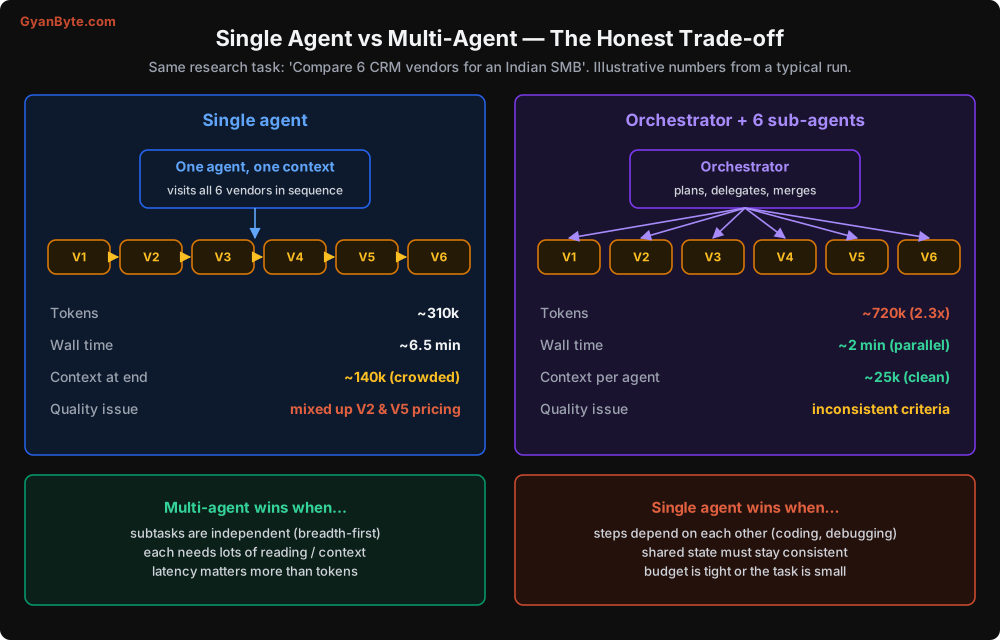
The pattern I’ve seen over and over:
- Multi-agent uses 2-5x more tokens. Each worker re-reads its own system prompt and tools, and the orchestrator re-reads all the worker outputs. Overhead adds up.
- It’s faster in wall-clock time because workers run in parallel.
- Each context is cleaner, so individual workers make fewer mix-up mistakes.
- But you get new failure modes: lost context in briefs, inconsistent criteria between workers, duplicated work, and much harder debugging.
So: use it when parallelism and clean contexts matter more than token cost. Research and broad analysis, yes. A coding task where every step depends on the previous one, almost never. Coding agents that work well tend to use a single main loop and spawn sub-agents only for isolated side-quests like “search the codebase for all usages of X and report back”.
Rules for Multi-Agent Systems That Don’t Fall Apart
These come from painful experience, mine and other people’s.
1. Single writer. Only one agent (usually the orchestrator, or a dedicated executor) is allowed to take actions with side effects. Workers read and report. If two agents can both send emails or modify a record, they will eventually both do it.
2. Workers can’t spawn workers (by default). Recursive delegation looks clever and produces exponential cost. If you must allow it, cap depth at 2 and pass the remaining budget down.
3. Budgets flow down. The orchestrator has a total budget. Each worker gets a slice. When the slice is gone, the worker returns what it has with a “gaps” list.
4. No agent-to-agent chit-chat. Patterns where agents “discuss” in a shared group chat until they agree are fun to watch and very hard to control. Prefer explicit hand-offs: a brief goes down, a structured result comes up.
5. Workers return structure, not prose. JSON with fields you defined, plus sources and confidence.
6. Trace the tree. Every worker run carries its parent run id. When the final answer is wrong, you need to find which worker gave the bad fact. More on this in Lesson 7.
7. Use cheaper models for workers where you can. Reading pages and extracting facts often doesn’t need your most capable model. The orchestrator, which plans and synthesises, benefits more from capability. Measure before deciding; sometimes a capable model at lower effort settings is the better trade.
A Quick Note on “Agent Teams” Frameworks
Frameworks that let you define a “Researcher”, “Writer”, and “Critic” with personas and have them collaborate are popular for demos. In production I have mostly seen them replaced by: one orchestrator with a few sub-agent tools, or a plain workflow. Personas don’t add capability. Clear briefs, the right tools, and structured hand-offs do.
That doesn’t mean frameworks are bad. LangGraph, for instance, is useful for modelling explicit state machines with LLM nodes, which is often exactly the workflow-plus-agent hybrid you want. Just choose based on the control flow you need, not on how human-like the agents sound.
Pitfalls to Avoid
- Starting with multi-agent. Begin with routing plus one agent. Split only when you can name the specific problem it solves.
- Vague briefs to sub-agents. Workers can’t see the parent conversation. Objective, exact facts to find, boundaries, output format.
- Free-form worker outputs. Use structured returns, or the orchestrator spends its effort reconciling formats.
- Multiple agents with write access. Keep a single writer for side effects.
- Unbounded recursion and loops. Cap delegation depth, worker steps, and evaluator rounds.
- No per-worker budget. One runaway worker can consume the whole run’s budget.
- Using multi-agent for tightly coupled tasks. Coding and debugging are usually better with one loop.
- Parallel calls that don’t share a cacheable prefix. Put shared content (the document, the instructions) first so parallel calls can reuse the cache.
- Not tracing parent-child relationships. You’ll never find which worker produced the bad fact.
Quick Recap
- Six patterns: chaining, routing, parallelisation (workflows), and orchestrator-workers, evaluator-optimiser, autonomous agent (agentic).
- Routing alone often removes most of the traffic from your expensive agent.
- Explicit plans help on long tasks and when humans need to approve the approach.
- Build sub-agents as tools with a strict brief, a structured return, their own tools and budget.
- Multi-agent costs 2-5x tokens; use it for independent, reading-heavy, latency-sensitive work.
Speaking of tokens: the next lesson is all about cost. Why agent bills grow quadratically, how to forecast them, and the levers that bring them down without hurting quality.