A support executive pinged me on a Saturday morning: “The bot told a customer their refund was processed. It wasn’t. Customer is very angry and has tweeted about it.”
At the time, our logging for that agent was what you’d have for any web service: request in, response out, and a few log.info lines in the tools. I could see the final reply. I could see get_refund_status had been called. I could not see what it returned, what the model was thinking, or why it said “processed”.
It took me about three hours to reconstruct the run by re-running the tools by hand. The answer turned out to be simple: get_refund_status returned {"status": "INITIATED", "processed_at": null}, and the model read “INITIATED” as done. A one-line fix to the tool output ("status": "initiated_not_yet_credited" plus an expected_credit_by date). Three hours to find it; two minutes to fix.
After that, I never shipped an agent without proper traces again. This lesson is about that setup, and about how to actually use it when things go wrong.
Why Normal Logging Isn’t Enough
Agents break the assumptions normal logging relies on:
- The interesting decisions happen inside the model. Your code just executes what it asks. You need the model’s inputs and outputs, not just your function calls.
- Behaviour is non-deterministic. The same input can take different paths on different runs. You can’t reproduce it by “just running it again”.
- Errors are often silent. The run “succeeds” (status 200, final answer returned) and the answer is wrong. No exception, no stack trace.
- Causes are far from symptoms. A bad tool output at step 2 causes a wrong answer at step 9.
So you need a record of every step, with enough detail to see exactly what the model saw.
The Trace: One Run, Many Spans
The structure that works is borrowed from distributed tracing:
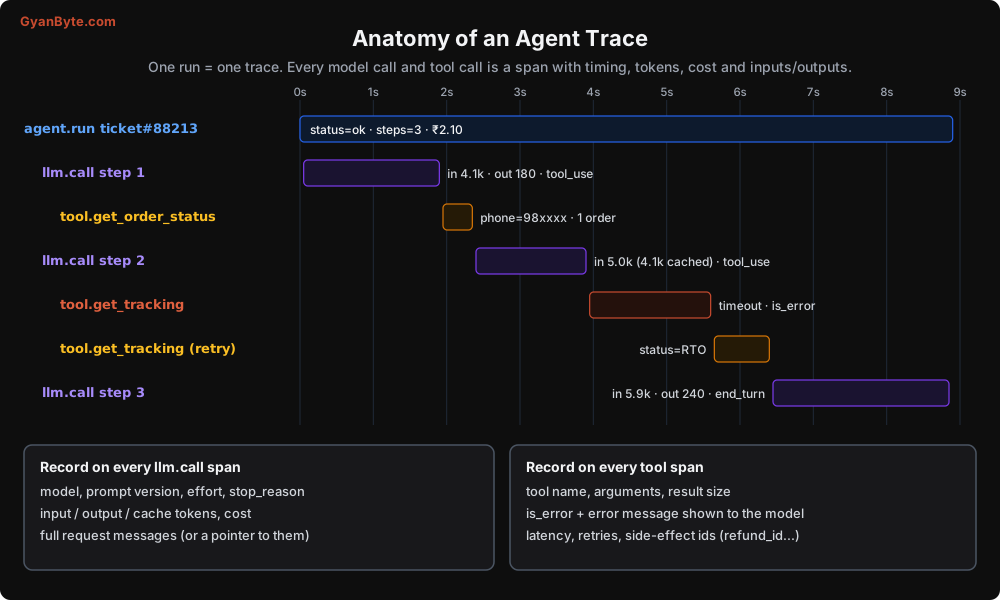
- One trace per agent run. Root span is the run itself, with the final status, step count, and total cost.
- One span per model call. Model, prompt version, effort setting, stop reason, token counts (input, output, cache read, cache write), cost, latency.
- One span per tool call. Tool name, arguments, result size, whether it errored, what the model was shown, latency, retries, and any side-effect ids (refund id, email message id).
- Sub-agent runs as child traces linked by parent run id (Lesson 5).
Look at the waterfall above: in one glance, you see that the slowest part was a tracking API timeout and a retry, not the model. Without the trace you’d probably blame the model for the slow response.
Instrumenting with OpenTelemetry
You can use a hosted LLM observability tool (Langfuse, LangSmith, Arize Phoenix, Helicone, Datadog and others all do this), or roll your own. Either way, I recommend emitting OpenTelemetry spans from your loop. OTel has semantic conventions for generative AI (gen_ai.* attributes), most of those tools accept OTel data, and you avoid locking your code to one vendor.
Here’s the loop from Lesson 2 with tracing added:
from opentelemetry import trace

tracer = trace.get_tracer("support-agent")
PROMPT_VERSION = "support-v14"

def run_agent(user_message: str, *, run_id: str, user_id: str, **limits) -> RunResult:
    with tracer.start_as_current_span("agent.run") as run_span:
        run_span.set_attribute("agent.run_id", run_id)
        run_span.set_attribute("agent.user_id_hash", hash_user(user_id))   # don't log raw ids
        run_span.set_attribute("agent.prompt_version", PROMPT_VERSION)
        result = _loop(user_message, run_id=run_id, **limits)
        run_span.set_attribute("agent.status", result.status)
        run_span.set_attribute("agent.steps", result.steps)
        run_span.set_attribute("agent.cost_inr", round(result.cost_inr, 3))
        return result


def call_model(messages, step: int, run_id: str):
    with tracer.start_as_current_span("llm.call") as span:
        span.set_attribute("gen_ai.operation.name", "chat")
        span.set_attribute("gen_ai.request.model", MODEL)
        span.set_attribute("agent.step", step)
        # Store full request payload separately; spans have size limits
        span.set_attribute("agent.request_ref", save_request_snapshot(run_id, step, messages))

        response = client.messages.create(model=MODEL, max_tokens=4096, system=SYSTEM_BLOCKS,
                                          tools=TOOLS, messages=messages)

        u = response.usage
        span.set_attribute("gen_ai.response.finish_reasons", [response.stop_reason])
        span.set_attribute("gen_ai.usage.input_tokens", u.input_tokens)
        span.set_attribute("gen_ai.usage.output_tokens", u.output_tokens)
        span.set_attribute("agent.cache_read_tokens", u.cache_read_input_tokens or 0)
        span.set_attribute("agent.cache_write_tokens", u.cache_creation_input_tokens or 0)
        span.set_attribute("agent.cost_inr", cost_inr(MODEL, u))
        span.set_attribute("agent.tool_calls",
                           [b.name for b in response.content if b.type == "tool_use"])
        return response


def execute_tool_traced(block, run_id: str):
    with tracer.start_as_current_span(f"tool.{block.name}") as span:
        span.set_attribute("agent.tool.args", redact(json.dumps(block.input)))
        result = execute_tool(block)                          # from Lesson 2
        span.set_attribute("agent.tool.is_error", bool(result.get("is_error")))
        span.set_attribute("agent.tool.result_chars", len(str(result["content"])))
        span.set_attribute("agent.tool.result_preview", redact(str(result["content"])[:500]))
        if result.get("is_error"):
            span.set_status(trace.Status(trace.StatusCode.ERROR))
        return result
A few decisions worth explaining:
save_request_snapshot writes the full messages list for that step to blob storage (S3, GCS, or a Postgres JSONB column) and returns a reference. Span attributes have size limits, and full requests can be hundreds of KB. You want the full thing available when debugging, but not stuffed into your tracing backend.
redact strips phone numbers, emails, card numbers, and anything else sensitive before it lands in logs. Your traces will contain customer conversations. Treat them like production data: access control, retention limits (I usually keep full payloads 30 days, aggregates longer), and redaction. In India, the DPDP Act applies to these logs just as much as to your main database.
PROMPT_VERSION goes on every span. When behaviour changes on Tuesday, the first question is “did we change the prompt?” Version your system prompt and tool definitions together, like code.
The Anthropic SDKs can also emit OpenTelemetry spans for API calls directly, which saves you some of the model-call instrumentation. Check the SDK docs for your language. You’ll still want your own spans for the run and the tools.
A Field Guide to Agent Failures
Once you have traces, you start seeing the same failure patterns again and again. Here are the eight I see most:
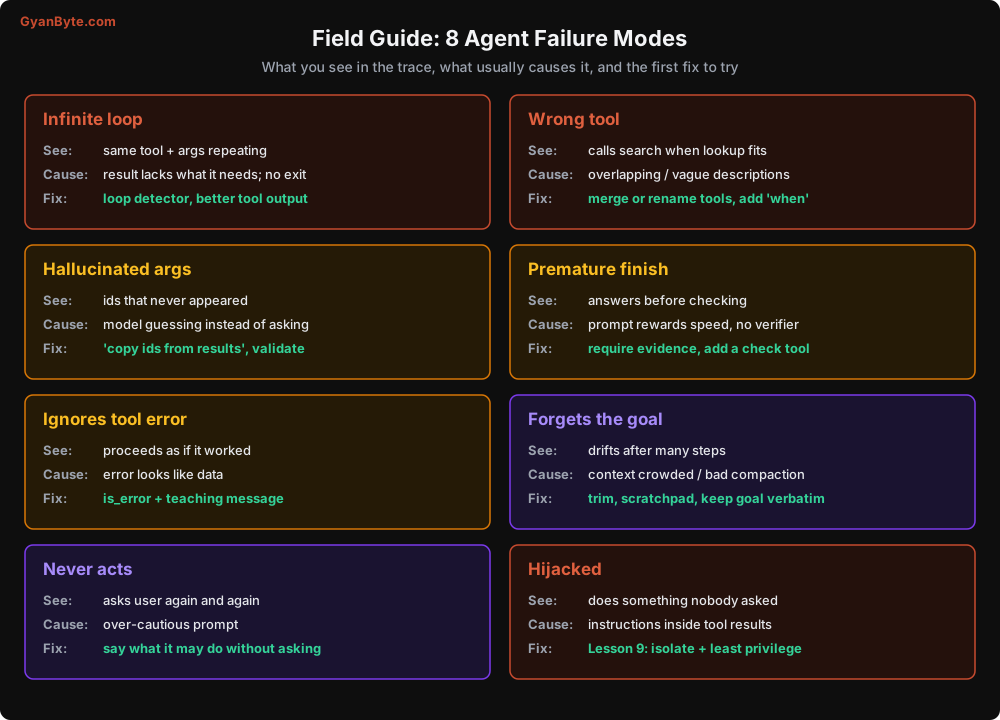
A few notes on the less obvious ones:
Hallucinated arguments. The model calls get_tracking(order_id="CP-1124") when the only order it has seen is CP-1123. This usually happens when the model expects a value to exist but hasn’t been given it. Fix the tool description (“use the order id exactly as returned by get_order_status”) and validate in the tool: if the id doesn’t belong to this customer, return a teaching error.
Premature finish. The model answers before verifying. Common when the system prompt over-emphasises speed or brevity. Asking the model to cite which tool result supports its answer (“base every factual claim on a tool result from this conversation”) helps a lot. So does a final check tool for high-stakes answers.
Never acts. The opposite problem. The agent keeps asking the user “Shall I check your order status?” instead of just checking. Usually caused by an over-cautious system prompt (“always confirm before taking any action”). Be explicit about which actions need confirmation (writes) and which don’t (reads).
Hijacked. The agent does something nobody asked for, and when you read the trace, there’s an instruction sitting in a tool result: an email body, a web page, a support ticket from a “customer”. This is prompt injection, and it gets a whole lesson (Lesson 9).
The Debugging Workflow
When a bad run is reported, here’s the process I follow. It’s simple, but having it written down stops me from jumping to “let me tweak the prompt” too early.
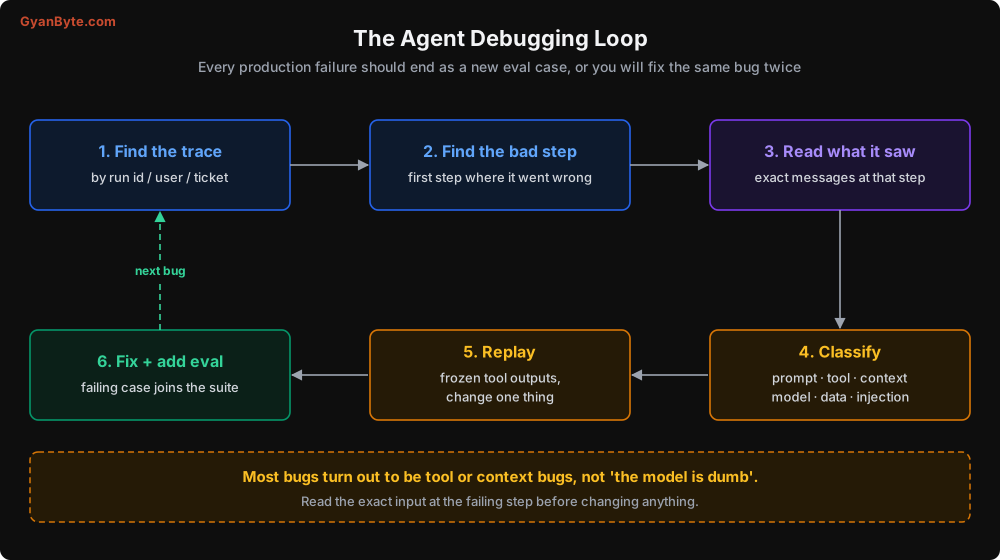
1. Find the trace
You need to get from “customer 98xxxx complained” to a run id quickly. Put the run id in your support tooling (as a hidden field on the ticket, for example), and index traces by user hash and conversation id.
2. Find the first bad step
Not the step where the wrong answer appeared. The first step where things went off track. In my refund story, the wrong answer was at step 3, but the cause was the tool output at step 2.
3. Read exactly what the model saw
Load the request snapshot for that step and read it as the model would: system prompt, tools, every message. Do this before forming a theory. Nine times out of ten, once you read the actual input, the model’s behaviour makes complete sense. The data was ambiguous, a tool result was truncated, or an instruction conflicted with another.
4. Classify the cause
| Cause | Typical evidence | Typical fix |
|---|---|---|
| Tool | Output ambiguous, too big, missing a field, misleading error | Change the tool output or description |
| Context | Key fact was cleared/compacted away, or buried in a huge context | Trim, scratchpad notes, fix compaction |
| Prompt | Instructions conflict, or don’t cover this case | Clarify the system prompt, add an example |
| Data | The underlying data was wrong | Not an agent bug; fix upstream |
| Model | Inputs were clear and correct, model still chose badly | Higher effort, more capable model, or a verifier |
| Injection | Instructions inside tool results | Lesson 9 |
In my experience, “tool” and “context” together are well over half of all cases. “Model” is genuinely the cause much less often than people assume.
5. Replay with frozen tool outputs
Now reproduce. Since the run is non-deterministic, you don’t re-run from scratch. You take the snapshot at the failing step and call the model again with the exact same messages, several times, to see how often it makes the bad choice. Then change one thing and repeat.
from collections import Counter

def replay_step(run_id: str, step: int, n: int = 10, *, system=None, tools=None) -> Counter:
    """Re-run the model at one step with the recorded inputs, n times."""
    snap = load_request_snapshot(run_id, step)
    outcomes = Counter()
    for _ in range(n):
        r = client.messages.create(
            model=snap["model"],
            max_tokens=4096,
            system=system or snap["system"],      # override to test a prompt fix
            tools=tools or snap["tools"],         # override to test a tool description fix
            messages=snap["messages"],
        )
        calls = [f"{b.name}({json.dumps(b.input, sort_keys=True)})"
                 for b in r.content if b.type == "tool_use"]
        text = "".join(b.text for b in r.content if b.type == "text")
        outcomes[" + ".join(calls) or "FINAL: " + text[:80]] += 1
    return outcomes

# Before the fix
print(replay_step("run_88213", step=3))
# Counter({'FINAL: Your refund has been processed...': 7, 'get_refund_status(...)': 3})

# Test the fix: patch the tool result inside the snapshot, then replay
This is incredibly useful. “It fails 7 out of 10 times with the old tool output and 0 out of 10 with the new one” is a real result. “I changed the prompt and tried once and it worked” is not.
For testing tool output fixes, write a small helper that loads the snapshot, replaces the content of a specific tool_result block with your new format, and replays. Since you are only changing your local copy of a recorded conversation for an experiment, this is fine. (In production code, remember the caching and history-editing cautions from Lesson 4.)
6. Fix and add an eval case
The fix goes in. And the failing conversation, with the expected correct behaviour, goes into your eval suite. Otherwise you’ll fix the same bug again in three months when someone changes the prompt. Lesson 8 covers this in detail.
A note on asking the model “why”
It’s tempting to ask the model to explain its choice. Enabling summarised thinking output (thinking={"type": "adaptive", "display": "summarized"} on models that support it) during debugging can give you useful hints about what the model was weighing. But treat explanations as hints, not truth. Models can produce plausible after-the-fact reasons. The replay experiment is the real evidence.
Production Monitoring
Debugging is reactive. Monitoring tells you something is wrong before a customer tweets about it. These are the dashboards I set up for every agent:
Outcome metrics
- Task success rate (however you define it: resolved without escalation, user thumbs-up, verified by a checker)
- Escalation-to-human rate
- User feedback rate and sentiment
- Repeat-contact rate (customer came back within 24 hours about the same thing; a strong signal of wrong answers)
Behaviour metrics
- Steps per run (p50, p95)
- Distribution of run status (ok / max_steps / budget / loop / timeout)
- Tool call counts and error rate per tool
- Distribution of first tool called (a sudden shift often means a description change broke routing)
Cost and latency
- Cost per completed task, tokens per step, cache hit ratio (Lesson 6)
- Time to first token and total run time (p50, p95)
- Latency per tool (often your slowest dependency isn’t the model)
Set alerts on changes, not just thresholds. A tool error rate going from 1% to 6% after a deploy is worth a page even though 6% sounds low.
The weekly trace reading ritual
Dashboards tell you that something changed. Only reading traces tells you what. Every week, my team pulls 20-30 random traces plus all traces with low user ratings, and two people read them together for an hour. Chai and traces.
It sounds old-fashioned, but almost every significant improvement we’ve made came from that hour: a tool returning confusing data, a common question the prompt didn’t cover, a new kind of request customers started making. You won’t find these in aggregate metrics.
Pitfalls to Avoid
- Logging only the final answer. You need every model call and tool call, with inputs and outputs.
- Not storing the exact messages per step. Reconstructing what the model saw from partial logs takes hours and is often wrong.
- Unredacted traces. Your traces contain customer data. Redact, restrict access, set retention.
- No prompt versioning. You can’t correlate behaviour changes with prompt changes if you don’t know which version ran.
- Debugging by “run it again and see”. Non-determinism makes single runs meaningless. Replay the failing step many times.
- Jumping straight to prompt edits. Read the input first. It’s usually a tool or context problem.
- Fixing without adding an eval case. The bug will come back.
- Monitoring only errors and latency. Agents fail silently. Track outcomes: success, escalation, repeat contacts.
- Missing parent-child links for sub-agents. You’ll see a wrong final answer and no way to find which worker caused it.
- Trusting the model’s explanations as ground truth. Useful hints, not evidence.
Quick Recap
- One trace per run; spans for every model call and tool call, with tokens, cost, stop reason, prompt version, and side-effect ids.
- Store full request snapshots per step, redacted and access-controlled.
- Debug by finding the first bad step, reading what the model saw, classifying, replaying N times with frozen inputs, and fixing one thing.
- Most bugs are tool or context bugs.
- Monitor outcomes, behaviour, cost, and latency. Read traces every week.
Fixing a bug is good. Knowing that your fix didn’t break five other things is better. Next lesson: evaluating agents.