In the last lesson I said an agent is “an LLM in a loop choosing tools”. Today we write that loop. No LangChain, no CrewAI, nothing hidden. Just the anthropic SDK and plain Python.
I want you to type this code out (or at least read every line), because almost every production bug I have debugged in agent systems lives in this loop. A framework will give you a nicer API, but the moment you see an agent spending ₹40 on a simple query, you need to know what is happening inside.
We will build a small support agent for an imaginary D2C store, “Chai Point Online” (any resemblance to real companies is accidental). It can look up orders, check courier tracking, and escalate to a human.
Setup
pip install anthropic
export ANTHROPIC_API_KEY="sk-ant-..."
That is all we need. Everything else is standard library.
Step 1: Define the Tools
A tool, from the model’s point of view, is just three things: a name, a description, and a JSON schema for its input. The model never sees your Python function. It sees this:
TOOLS = [
    {
        "name": "search_orders",
        "description": (
            "Find a customer's orders by their registered phone number. "
            "Returns up to 5 most recent orders with id, status, items and order date. "
            "Use this first when the customer has not given an order id."
        ),
        "input_schema": {
            "type": "object",
            "properties": {
                "phone": {
                    "type": "string",
                    "description": "10 digit Indian mobile number, no +91 prefix",
                }
            },
            "required": ["phone"],
        },
    },
    {
        "name": "get_tracking",
        "description": (
            "Get live courier tracking for one order. Returns courier name, "
            "current status, last location and expected delivery date."
        ),
        "input_schema": {
            "type": "object",
            "properties": {
                "order_id": {"type": "string", "description": "Order id like 'CP-1123'"}
            },
            "required": ["order_id"],
        },
    },
    {
        "name": "escalate_to_human",
        "description": (
            "Hand the conversation to a human support executive. Use this when the "
            "customer is angry, asks for a refund above Rs 2000, or when you are not "
            "sure what to do. Include a one-line summary for the executive."
        ),
        "input_schema": {
            "type": "object",
            "properties": {
                "summary": {"type": "string"},
                "priority": {"type": "string", "enum": ["low", "normal", "high"]},
            },
            "required": ["summary", "priority"],
        },
    },
]
Notice how much effort goes into the descriptions. The model decides which tool to call purely from these strings. “Use this first when the customer has not given an order id” is guidance that saves you a wasted step. We will go much deeper on tool design in Lesson 3.
Now the actual implementations. For this lesson they return fake data:
import json

FAKE_ORDERS = {
    "9876543210": [
        {"id": "CP-1123", "status": "shipped", "items": ["Masala Chai 500g"], "date": "2026-10-12"},
        {"id": "CP-1098", "status": "delivered", "items": ["Green Tea 250g"], "date": "2026-09-28"},
    ]
}

def search_orders(phone: str) -> dict:
    phone = phone.strip().removeprefix("+91")
    if len(phone) != 10 or not phone.isdigit():
        # Raise a clear error. The loop will send this text back to the model.
        raise ValueError(f"'{phone}' is not a valid 10 digit mobile number")
    return {"orders": FAKE_ORDERS.get(phone, [])}

def get_tracking(order_id: str) -> dict:
    if order_id == "CP-1123":
        return {"courier": "BlueDart", "status": "RTO initiated",
                "reason": "Customer not available, 3 attempts",
                "last_location": "Pune hub"}
    return {"error": f"No tracking found for {order_id}"}

def escalate_to_human(summary: str, priority: str) -> dict:
    # In real life: create a ticket in Freshdesk / Zendesk and return its id
    print(f"\n[ESCALATED - {priority}] {summary}\n")
    return {"ticket_id": "HD-55102", "eta": "within 2 working hours"}

REGISTRY = {
    "search_orders": search_orders,
    "get_tracking": get_tracking,
    "escalate_to_human": escalate_to_human,
}
Step 2: The Simplest Loop That Works
Here is the bare minimum. Read it slowly.
import anthropic

client = anthropic.Anthropic()
MODEL = "claude-opus-5-5"

SYSTEM = """You are the support assistant for Chai Point Online, an Indian tea store.
Help customers with order status and delivery issues using the tools provided.
Be warm and brief. Never invent order details; only use what tools return.
If you cannot resolve something, escalate to a human."""

def run_agent_v1(user_message: str) -> str:
    messages = [{"role": "user", "content": user_message}]

    while True:
        response = client.messages.create(
            model=MODEL,
            max_tokens=4096,
            system=SYSTEM,
            tools=TOOLS,
            messages=messages,
        )

        # 1. Always append the assistant turn, exactly as returned
        messages.append({"role": "assistant", "content": response.content})

        # 2. No tool requested? We're done.
        if response.stop_reason != "tool_use":
            return "".join(b.text for b in response.content if b.type == "text")

        # 3. Run every tool the model asked for
        results = []
        for block in response.content:
            if block.type == "tool_use":
                output = REGISTRY[block.name](**block.input)
                results.append({
                    "type": "tool_result",
                    "tool_use_id": block.id,
                    "content": json.dumps(output),
                })

        # 4. Send all results back in ONE user message, then loop
        messages.append({"role": "user", "content": results})
Try it:
print(run_agent_v1("Hi, my order hasn't come yet. My number is 9876543210"))You’ll typically see the model call search_orders, then get_tracking on CP-1123, see the RTO status, and reply something like “Your Masala Chai order is being returned to us because the courier couldn’t reach you after 3 attempts. Would you like me to raise a request to re-ship it?”
Two lines in that loop deserve special attention.
messages.append({"role": "assistant", "content": response.content}) appends the full content list, not just the text. The assistant turn contains tool_use blocks with ids, and possibly thinking blocks. The next request must include them unchanged, or the API rejects your tool_result (it won’t find the matching tool_use_id). I have seen people extract only the text here and then spend an hour on a confusing 400 error.
messages.append({"role": "user", "content": results}) sends all tool results together. Models often request two or three tools in one turn (say, tracking for two orders). If you send each result as a separate message, it works, but you quietly teach the model that parallel calls are awkward, and it stops making them. One message with all results is the correct shape.
What Actually Happens on Each Iteration
This diagram is worth staring at for a minute.
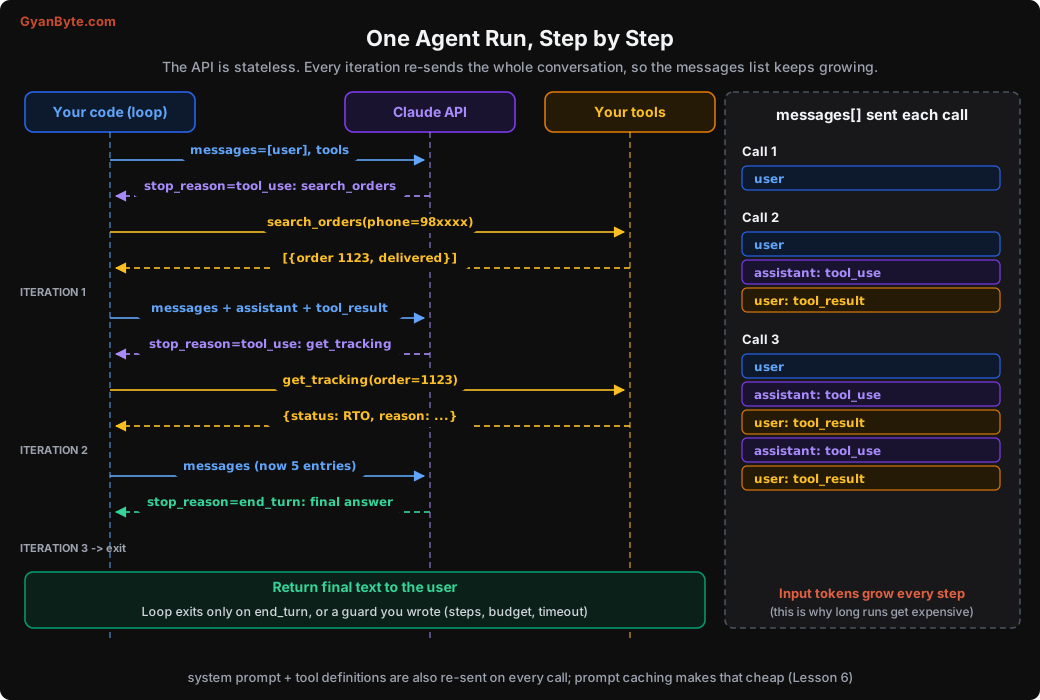
The API has no memory. On call 3, you send the original user message, both previous assistant turns, and both tool results, plus the system prompt and all tool definitions. Every single time.
So if your system prompt and tools are 2,000 tokens and each tool result is 1,500 tokens, the input for call 1 is about 2,100 tokens, call 2 is about 3,700, call 3 is about 5,300. Total input across the run is not 3 x 2,100. It’s the sum of a growing series. For long runs this grows roughly quadratically, and it is the single biggest reason agents surprise people on the bill. Keep this picture in your head; we come back to it in the cost lesson.
Step 3: Making It Production-Shaped
The v1 loop has exactly one exit: the model saying it is done. That is fine on your laptop. In production, it is dangerous. Here are the ways a real run can go wrong:
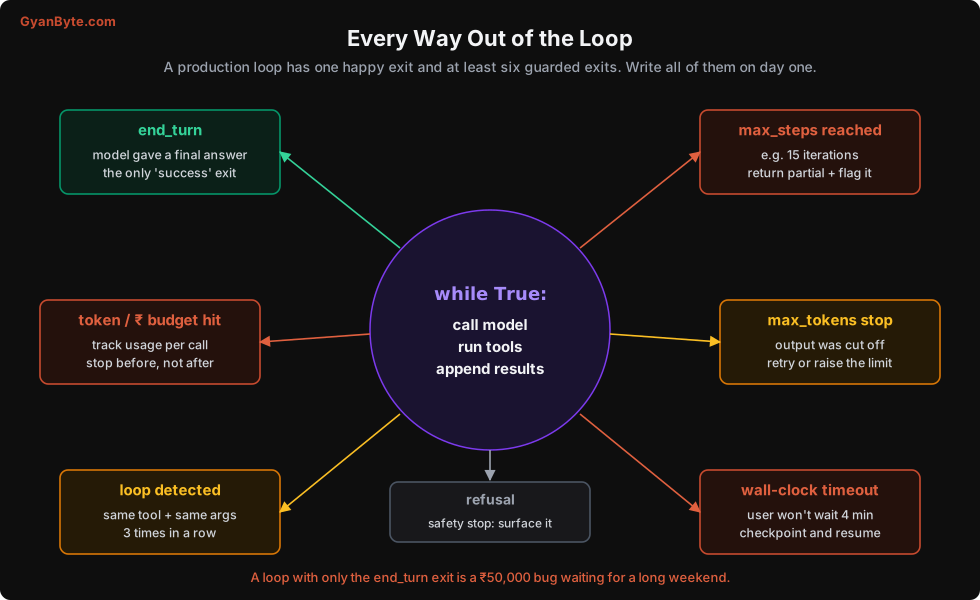
Let me add each guard, one at a time, and then show the full version.
Guard 1: Tool errors go back to the model, not up the stack
If search_orders raises because the customer typed their number with spaces, v1 crashes the whole run. Instead, catch it and tell the model. Models are surprisingly good at fixing their own mistakes when they get a clear error.
def execute_tool(block) -> dict:
    fn = REGISTRY.get(block.name)
    if fn is None:
        return {"type": "tool_result", "tool_use_id": block.id, "is_error": True,
                "content": f"Unknown tool '{block.name}'. Available: {list(REGISTRY)}"}
    try:
        output = fn(**block.input)
        return {"type": "tool_result", "tool_use_id": block.id,
                "content": json.dumps(output, default=str)}
    except TypeError as e:
        # wrong / missing arguments
        return {"type": "tool_result", "tool_use_id": block.id, "is_error": True,
                "content": f"Bad arguments for {block.name}: {e}"}
    except Exception as e:
        return {"type": "tool_result", "tool_use_id": block.id, "is_error": True,
                "content": f"{block.name} failed: {e}"}
is_error: True tells the model this result is a failure, not data. Never just drop a failed tool call. Every tool_use must get a matching tool_result, or the next request fails.
Guard 2: A step limit
Pick a number based on the task. For a support agent, 10 is generous. For a coding agent, maybe 50. Then, when you hit it, don’t just throw. Return what you have and mark the run as incomplete so a human can look at it.
Guard 3: A token budget (in rupees, if you like)
Every response carries a usage object. Add it up as you go, and stop before you cross the budget, not after.
# Prices per million tokens, check the current pricing page for your model
PRICE_IN, PRICE_OUT = 4.00, 20.00   # USD
USD_TO_INR = 88

def call_cost_inr(usage) -> float:
    usd = (usage.input_tokens * PRICE_IN + usage.output_tokens * PRICE_OUT) / 1_000_000
    return usd * USD_TO_INR
(We will refine this in Lesson 6 to include cache reads and writes, which are priced differently.)
Guard 4: Loop detection
The most common stuck pattern I see: the model calls the same tool with the same arguments again and again, because the result didn’t contain what it hoped for, and it “tries once more”. A simple fingerprint catches this.
def fingerprint(block) -> str:
    return f"{block.name}:{json.dumps(block.input, sort_keys=True)}"
If the same fingerprint shows up three times in a run, stop and escalate. You can be smarter (tell the model “you already tried this, the result was X”), but start simple.
Guard 5: Handle every stop reason
stop_reason is not just “tool_use” or “end_turn”. You also get:
max_tokens: the output was cut off. If it was cut mid tool call, the tool input is incomplete. Don’t run it.refusal: the model declined for safety reasons. Surface it, don’t retry blindly.pause_turn: used with server-side tools for long turns. Send the conversation back to let it continue.
Guard 6: Wall-clock timeout
Users won’t wait four minutes in a chat window. Set a deadline per run. For long background tasks, you’ll want checkpointing instead (Lesson 10), but for interactive agents a timeout plus a graceful message is enough.
The Full Production-Shaped Loop
Here it is, all together. About 120 lines including the result type.
import json
import time
from dataclasses import dataclass, field

import anthropic

client = anthropic.Anthropic()
MODEL = "claude-opus-5-5"


@dataclass
class RunResult:
    answer: str
    status: str                    # "ok" | "max_steps" | "budget" | "loop" | "timeout" | "refusal" | "truncated"
    steps: int = 0
    cost_inr: float = 0.0
    trace: list = field(default_factory=list)


def run_agent(user_message: str, *, max_steps: int = 10, budget_inr: float = 15.0,
              timeout_s: float = 90.0) -> RunResult:
    messages = [{"role": "user", "content": user_message}]
    seen: dict[str, int] = {}
    cost = 0.0
    started = time.monotonic()
    trace = []

    for step in range(1, max_steps + 1):
        if time.monotonic() - started > timeout_s:
            return RunResult("Sorry, this is taking longer than expected. "
                             "I've passed it to our team.", "timeout", step, cost, trace)

        response = client.messages.create(
            model=MODEL,
            max_tokens=4096,
            system=SYSTEM,
            tools=TOOLS,
            messages=messages,
        )
        cost += call_cost_inr(response.usage)
        trace.append({"step": step, "stop_reason": response.stop_reason,
                      "usage": response.usage.model_dump(),
                      "tools": [b.name for b in response.content if b.type == "tool_use"]})

        messages.append({"role": "assistant", "content": response.content})
        text = "".join(b.text for b in response.content if b.type == "text")

        if response.stop_reason == "end_turn":
            return RunResult(text, "ok", step, cost, trace)

        if response.stop_reason == "refusal":
            return RunResult("I can't help with that request.", "refusal", step, cost, trace)

        if response.stop_reason == "max_tokens":
            # Output was cut off; any tool_use block may be incomplete. Don't execute it.
            return RunResult(text or "Response was too long.", "truncated", step, cost, trace)

        if response.stop_reason == "pause_turn":
            continue   # server-side tool paused a long turn; just call again

        # stop_reason == "tool_use"
        if cost >= budget_inr:
            return RunResult("I've hit my limit on this one, handing to a human.",
                             "budget", step, cost, trace)

        results = []
        for block in response.content:
            if block.type != "tool_use":
                continue
            fp = fingerprint(block)
            seen[fp] = seen.get(fp, 0) + 1
            if seen[fp] >= 3:
                return RunResult("I seem to be going in circles, escalating to a human.",
                                 "loop", step, cost, trace)
            results.append(execute_tool(block))

        messages.append({"role": "user", "content": results})

    return RunResult("I couldn't finish this in time, handing over to our team.",
                     "max_steps", max_steps, cost, trace)
Run it and print the trace:
result = run_agent("Mera order kahan hai? Number 9876543210")
print(result.answer)
print(result.status, result.steps, f"₹{result.cost_inr:.2f}")
for t in result.trace:
    print(t["step"], t["stop_reason"], t["tools"], t["usage"]["input_tokens"])
Typical output:
Aapka Masala Chai order (CP-1123) courier ne wapas bhej diya hai...
ok 3 ₹1.84
1 tool_use ['search_orders'] 1187
2 tool_use ['get_tracking'] 1412
3 end_turn [] 1590
Yes, it handled the Hinglish without any special instruction. Modern models deal with code-mixed Indian languages well. But look at the input tokens column: it grows every step. That is the picture from the diagram, in real numbers.
What About the Tool Runner?
The Anthropic SDK has a beta helper called the tool runner (client.beta.messages.tool_runner). You decorate Python functions with @beta_tool, and the SDK runs the loop for you, including executing tools and appending results. It also supports per-turn hooks, so you can still add approval gates and logging.
For most new projects, using it is perfectly reasonable. I still wanted you to write the loop by hand once, because:
- When you debug, you need to know what the runner is doing on each turn.
- Your budget, loop detection, and timeout logic are business decisions. You’ll be plugging them into the runner’s hooks anyway, so understand them first.
- Many teams end up needing a custom loop eventually (durable execution, custom transport, very specific approval flows).
Things I Learnt the Hard Way
A few non-obvious things that bit me when I wrote my first loops:
Tool results are part of the prompt. Whatever your tool returns, the model reads it, and you pay for it on every following step. A tool that returns a 40 KB JSON blob of order history will make every subsequent call slow and expensive. Return only what the model needs. Trim fields. Paginate.
JSON-serialise carefully. datetime, Decimal, and UUID objects break json.dumps. Use default=str or proper serialisers. A tool that raises during serialisation after doing its work (like after sending an email) is a nasty bug, because the model thinks it failed and tries again.
Parse tool inputs, don’t string-match them. block.input is already a dict. Don’t do substring checks on a serialised version, since escaping can differ between models.
Don’t put the current time in the system prompt. It feels harmless (f"Today is {datetime.now()}"), but it changes the prefix on every call and kills prompt caching. Put the date at the day level, or pass it in the user message. More on this in Lesson 6.
Log the full messages list for failed runs. When a run fails at step 7, you need to see exactly what the model saw at step 7. The trace above is a start; Lesson 7 makes it proper.
Pitfalls to Avoid
- Only handling
end_turnandtool_use. Handlemax_tokens,refusal, andpause_turnexplicitly. Running a truncated tool call can execute garbage arguments. - Dropping failed tool calls. Every
tool_useid needs atool_result, even if it is an error. Otherwise the next API call fails. - Appending only the text of the assistant turn. Append
response.contentas-is, including tool_use and thinking blocks. - Sending parallel tool results as separate messages. Batch them into one user message.
- Letting exceptions in tools crash the run. Catch, return
is_error: Truewith a helpful message, and let the model recover. - No step limit, no budget, no timeout. These three lines of code are the cheapest insurance you will ever buy.
- Returning huge tool outputs. Every byte of tool output is re-sent on every later step. Trim aggressively.
- Checking the budget after spending it. Check before executing the next round of tools, and stop gracefully.
Quick Recap
- The loop: call model → if tool_use, run tools and append results → repeat → stop on final answer.
- The API is stateless. You re-send everything, so input tokens grow every step.
- Append the full assistant content, and return all tool results in one message.
- A production loop needs guarded exits: steps, budget, loop detection, timeout, truncation, refusal.
- Tool errors are information for the model, not exceptions for your stack.
Our loop works, but the tools are toy functions. In the next lesson, we look at what makes a tool easy or hard for a model to use, and why tool design probably matters more than your system prompt.