When an agent misbehaves, the first instinct is to fiddle with the system prompt. Add “IMPORTANT:”, add “ALWAYS”, add a few more examples. I did this for weeks on one project before a colleague looked at our tool list and said, “Bhai, I wouldn’t know which of these to call either.”
He was right. We had 23 tools. Four of them could fetch customer data in slightly different ways. Two had the same description. One took a parameter called q that accepted a mini query language only our team understood.
We cut it to 7 tools, rewrote every description, and the agent’s task success rate jumped from 61% to 84% without touching the system prompt. Since then, my rule is simple: fix the tools before you fix the prompt.
The Model’s View of Your Tool
Your Python function has type hints, docstrings, maybe tests. The model sees none of that. It sees exactly three things:
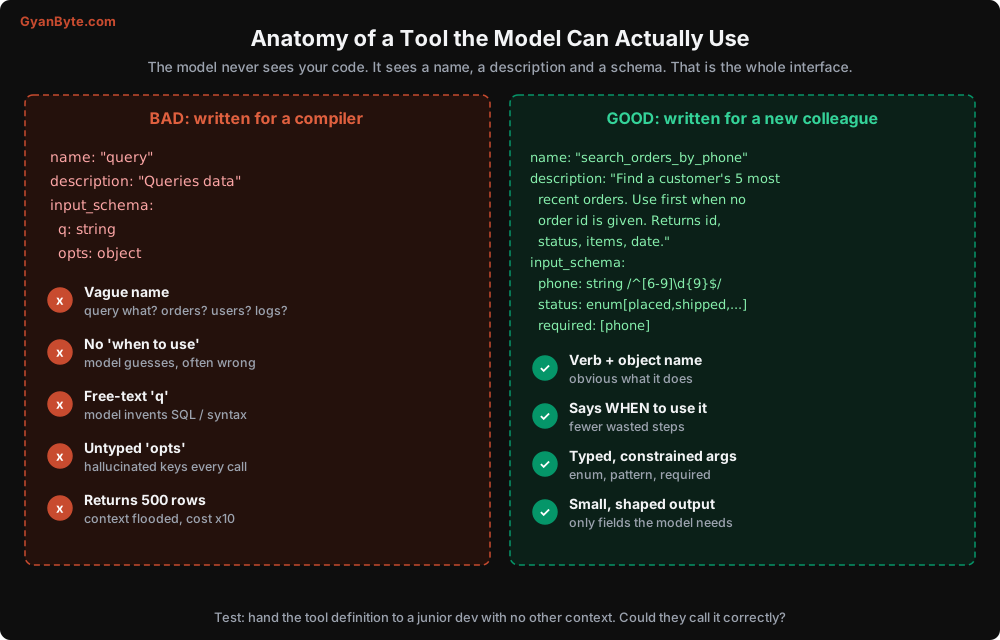
- The name. It is the first signal.
querytells it nothing.search_orders_by_phonetells it almost everything. - The description. This is where you explain what it does, when to use it, when not to, and what comes back.
- The input schema. Types, enums, required fields, formats. The tighter this is, the fewer creative mistakes the model makes.
A useful test I use in reviews: hand the tool definition, and only the definition, to a junior developer who has never seen the codebase. Can they call it correctly on the first try? If they need to ask a question, the model will need to guess. And models guess confidently.
Principle 1: Fewer, Task-Shaped Tools
The most common mistake is mirroring your REST API one-to-one. You have GET /customers/{id}, GET /customers/{id}/orders, GET /orders/{id}/items, GET /orders/{id}/shipments, so you create four tools.
Now, to answer “where is my order”, the agent has to chain four calls, each re-sending the growing context. Four chances to pick the wrong id. Four round trips of latency.
Instead, design tools around tasks the agent performs, not around your data model:
# API-shaped (4 tools, 4 calls to answer one question)
get_customer(customer_id)
list_orders(customer_id)
get_order_items(order_id)
get_shipments(order_id)

# Task-shaped (1 tool, 1 call)
get_order_status(phone_or_order_id)
# -> {order_id, items, status, courier, last_scan, expected_delivery, can_cancel}
The task-shaped tool does the joins in your code (fast, cheap, deterministic) and gives the model exactly what it needs to answer.
How many tools is too many? There is no magic number, and modern models handle dozens of tools reasonably. But in my experience, past 15-20 tools, selection accuracy starts dropping, and every tool definition costs input tokens on every call. If you genuinely need many tools, look at grouping them by sub-agent (Lesson 5) or at your provider’s tool search feature, which lets the model load tool definitions on demand instead of seeing all of them every time.
Principle 2: Descriptions That Say When, Not Just What
Compare these two descriptions for the same tool:
BAD:  "Cancels an order."

GOOD: "Cancel an order that has NOT shipped yet (status 'placed' or 'packed').
       For shipped orders, this will fail; use create_return_request instead.
       Cancellation refunds to the original payment method in 5-7 working days.
       Always confirm with the customer before calling this."
The good version answers the questions the model would otherwise guess:
- When should I use it? (status placed or packed)
- When should I NOT use it, and what should I use instead? (create_return_request)
- What are the side effects? (refund timeline)
- Any preconditions? (confirm with the customer)
Write descriptions in plain language. You don’t need “IMPORTANT” or capital letters. Modern models follow clear instructions well, and shouting at them tends to make them over-apply the rule in places you didn’t intend.
Principle 3: Constrain the Inputs
Every free-form string is an invitation to hallucinate. Narrow the input space with the schema:
{
    "name": "create_return_request",
    "description": "...",
    "strict": True,   # model output must validate exactly against this schema
    "input_schema": {
        "type": "object",
        "properties": {
            "order_id": {
                "type": "string",
                "description": "Order id exactly as returned by get_order_status, like CP-1123",
            },
            "reason": {
                "type": "string",
                "enum": ["damaged", "wrong_item", "not_as_described", "changed_mind"],
            },
            "items": {
                "type": "array",
                "items": {"type": "string"},
                "description": "SKU codes of items to return, at least one",
            },
            "customer_note": {"type": "string", "description": "Optional, under 500 characters"},
        },
        "required": ["order_id", "reason", "items"],
        "additionalProperties": False,
    },
}
A few things doing real work here:
enumfor anything with a fixed set of values. The model can’t invent a reason called “bad_quality” that your backend doesn’t understand."strict": TruewithadditionalProperties: Falsetells the API to guarantee the tool input matches your schema exactly. No surprise extra keys, no missing required fields, no wrong types.- Descriptions on properties, especially “exactly as returned by get_order_status”. This one line reduced id hallucinations noticeably in one of my agents.
- Formats in the description, checks in code. Strict mode supports types, enums, required fields and common string formats (date, email, uuid), but not every JSON Schema keyword. Things like regex patterns, length limits and minimum array sizes are better described in plain words and then enforced in your tool, with a teaching error if they fail.
Still validate on your side. Strict mode guarantees the shape, not the meaning. The order id can be perfectly well-formed and still belong to a different customer. (That one is a security issue, and we’ll come back to it in Lesson 9.)
Principle 4: Shape the Output
Remember from Lesson 2: every byte a tool returns is re-sent on every later step. Output design is cost design.
Return only what the model needs. Your orders table might have 60 columns. The model needs maybe 8. Map it explicitly:
def to_model_view(order) -> dict:
    return {
        "order_id": order.public_id,
        "status": order.status,
        "items": [f"{i.name} x{i.qty}" for i in order.items],
        "amount_inr": float(order.total),
        "ordered_on": order.created_at.date().isoformat(),
        "courier": order.shipment.courier if order.shipment else None,
        "expected_delivery": order.shipment.eta.isoformat() if order.shipment else None,
        "can_cancel": order.status in ("placed", "packed"),
    }
Notice can_cancel. Instead of making the model reason about which statuses allow cancellation, compute it. Anything your code can decide deterministically, decide in code. It is cheaper, faster, and never wrong.
Paginate and say so. If a search can return 300 rows, return the top 10 and a clear note:
return {
    "results": rows[:10],
    "total_matches": len(rows),
    "note": "Showing 10 of 312. Narrow down using the status or date_from filters.",
}
Without that note, the model assumes the 10 results are everything, and confidently tells the customer “you have 10 orders”.
Use human-readable values. "status": "out_for_delivery" beats "status": 4. "ordered_on": "2026-10-12" beats a Unix timestamp. The model will reason better and your traces will be easier to read.
Prefer stable, meaningful ids. If you return internal UUIDs, the model has to copy 36 random characters accurately. It usually does, but CP-1123 is easier to copy and easier for you to read in logs.
Principle 5: Errors That Teach
This one is underrated. When a tool fails, the error message becomes the model’s next prompt. So write it for the model.
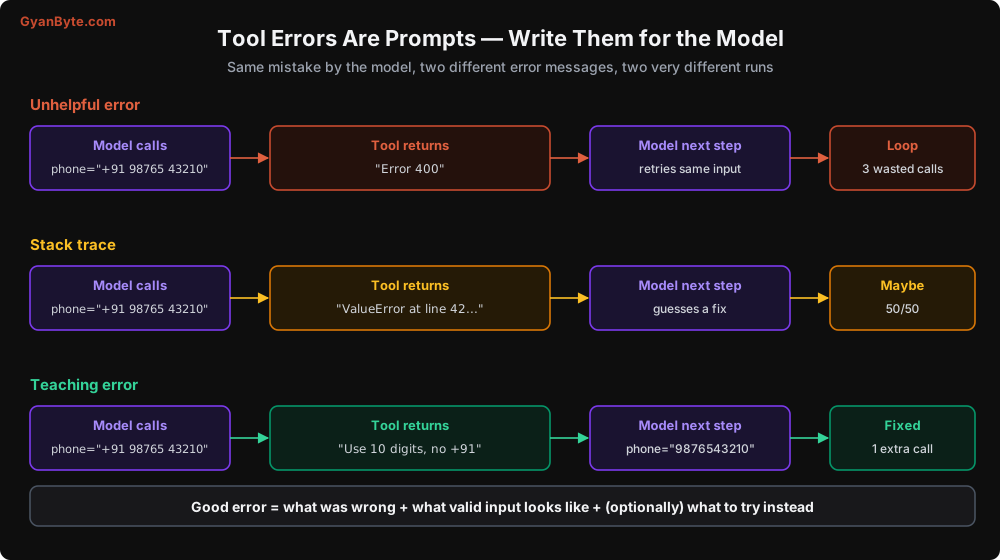
A good tool error has three parts: what was wrong, what valid input looks like, and optionally what to try instead.
class ToolError(Exception):
    """Raised by tools; message is shown to the model verbatim."""

def get_order_status(phone_or_order_id: str) -> dict:
    v = phone_or_order_id.strip().replace(" ", "").removeprefix("+91")
    if v.upper().startswith("CP-"):
        order = repo.find_by_public_id(v.upper())
        if not order:
            raise ToolError(
                f"No order with id {v.upper()}. Order ids look like CP-1123. "
                "If the customer is unsure, search by their phone number instead."
            )
        return to_model_view(order)
    if v.isdigit() and len(v) == 10:
        orders = repo.find_recent_by_phone(v, limit=5)
        if not orders:
            raise ToolError(
                "No orders for this phone number. Ask the customer if they used "
                "a different number or email at checkout."
            )
        return {"orders": [to_model_view(o) for o in orders]}
    raise ToolError(
        f"'{phone_or_order_id}' is neither a 10 digit mobile number nor an order id "
        "like CP-1123. Ask the customer for one of these."
    )
And in your loop’s execute_tool (from Lesson 2), show ToolError messages as-is, but hide internal exceptions:
def execute_tool(block) -> dict:
    try:
        output = REGISTRY[block.name](**block.input)
        return {"type": "tool_result", "tool_use_id": block.id,
                "content": json.dumps(output, default=str)}
    except ToolError as e:
        return {"type": "tool_result", "tool_use_id": block.id, "is_error": True,
                "content": str(e)}
    except Exception:
        log.exception("tool crashed", extra={"tool": block.name})
        return {"type": "tool_result", "tool_use_id": block.id, "is_error": True,
                "content": f"{block.name} is temporarily unavailable. Do not retry; "
                           "tell the customer we will follow up, or escalate."}
Two reasons to hide raw exceptions. First, stack traces confuse the model more than they help it. Second, they leak internals (table names, file paths, sometimes even connection strings) into a conversation that might be shown to a user or logged somewhere less secure.
Also notice the “Do not retry” hint for infrastructure failures. Without it, the model often retries the same call two or three times, burning tokens on an outage it can’t fix.
Principle 6: Write Tools Must Be Idempotent
Here is a scenario that actually happened on one project. The agent called issue_refund. The payment gateway took 31 seconds to respond. Our tool timeout was 30 seconds. The tool returned an error, the model said “let me try again”, and called issue_refund again. The customer got refunded twice. ₹4,200 each time.
Agents retry. Your loop retries. Your queue retries. Networks time out after the side effect has already happened. Any tool that changes state must be safe to call twice.
The standard fix is an idempotency key derived from the run, not from the model:
def issue_refund(order_id: str, amount_inr: float, *, ctx: RunContext) -> dict:
    # Key is based on the run and the business action, not on a random value.
    # The same agent run asking twice for the same refund gets the same result.
    key = f"refund:{ctx.run_id}:{order_id}:{amount_inr:.2f}"

    existing = refunds.get_by_idempotency_key(key)
    if existing:
        return {"refund_id": existing.id, "status": existing.status,
                "note": "This refund was already created earlier in this conversation."}

    refund = payments.create_refund(order_id, amount_inr, idempotency_key=key)
    refunds.save(refund, idempotency_key=key)
    return {"refund_id": refund.id, "status": refund.status}
Notice ctx is passed by your code, not by the model. The model doesn’t know or control the run id. We’ll use this RunContext pattern a lot: things like user identity, tenant id, and run id should come from your trusted code, never from model-generated arguments.
Principle 7: Classify Every Tool by Risk
Before a tool goes into production, put it in one of three buckets. This classification drives your approval policy (Lesson 10) and security review (Lesson 9).
| Class | Examples | Default policy |
|---|---|---|
| Read | get_order_status, search_kb, get_tracking | Auto-run. Log it. |
| Write, reversible | add_internal_note, create_draft_reply, tag_ticket | Auto-run with limits (rate, amount). |
| Write, irreversible or external | issue_refund, send_email, cancel_order, delete_* | Human approval, or tight rules (e.g. auto-approve refunds below ₹500). |
I like to put this metadata right next to the tool definition so nobody forgets:
@dataclass
class ToolSpec:
    name: str
    fn: Callable
    schema: dict
    risk: Literal["read", "write_reversible", "write_irreversible"]
    timeout_s: float = 10.0
    max_calls_per_run: int = 5
max_calls_per_run is a cheap guard that catches a lot of loops. No support conversation needs 6 refunds.
MCP: Tools as a Protocol
So far our tools are Python functions inside the agent process. That’s fine for one agent. But what happens when your support agent, your internal ops agent, and your developers’ coding assistant all need “look up a customer”? You end up writing the same tool three times, in three formats.
The Model Context Protocol (MCP) solves this. It is an open protocol that standardises how an AI application (the “host”) discovers and calls tools exposed by a separate process (the “server”).
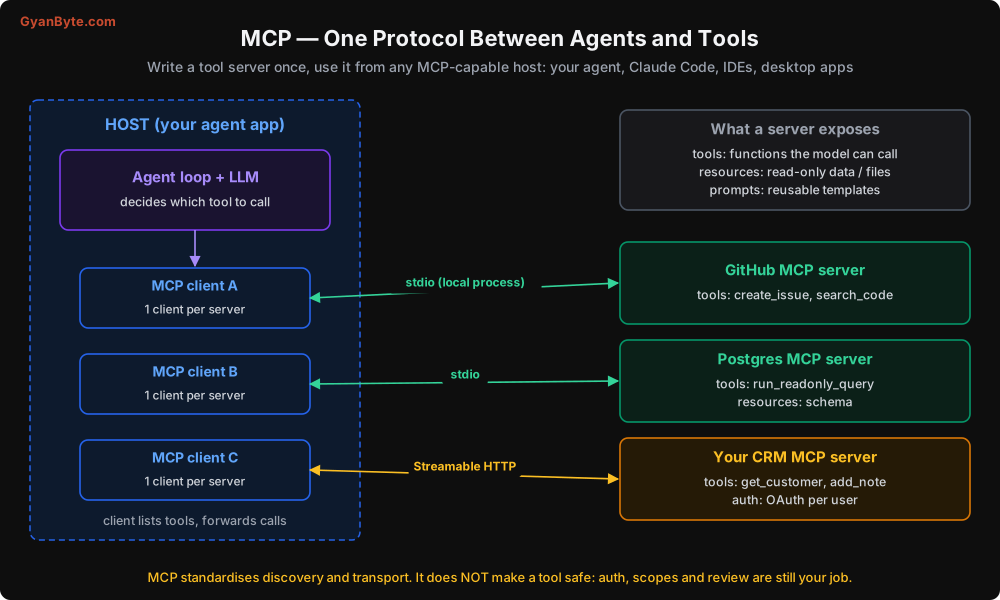
The pieces:
- Server: exposes tools (functions), resources (read-only data like files or schemas), and prompts (reusable templates).
- Host: your agent application. It contains one MCP client per connected server.
- Transport:
stdiofor local servers (the host launches the server as a subprocess) or Streamable HTTP for remote servers.
Writing a server with the official Python SDK is short:
# crm_server.py
from mcp.server.fastmcp import FastMCP

mcp = FastMCP("chai-point-crm")

@mcp.tool()
def get_customer(phone: str) -> dict:
    """Get a customer's profile and lifetime stats by 10 digit mobile number.
    Returns name, city, total_orders, lifetime_value_inr, and open_tickets."""
    customer = crm.find_by_phone(phone)
    if not customer:
        raise ValueError("No customer with this number. Check for typos or ask for email.")
    return {
        "name": customer.name,
        "city": customer.city,
        "total_orders": customer.order_count,
        "lifetime_value_inr": float(customer.ltv),
        "open_tickets": customer.open_ticket_count,
    }

if __name__ == "__main__":
    mcp.run()   # stdio by default
FastMCP builds the tool schema from your type hints and uses the docstring as the description. So the advice from this lesson applies directly: write the docstring for the model.
Your agent host then connects to this server, lists its tools, and passes them to the model along with any local tools. Most agent frameworks and the Claude API’s MCP connector handle the client side for you.
Where MCP helps, and where it doesn’t
MCP gives you reuse and a standard interface. Write the CRM tool once, use it from your agent, from Claude Code, from an IDE assistant.
MCP does not give you safety. A few things I have seen teams get wrong:
- Installing random third-party MCP servers. An MCP server is code running with whatever credentials you hand it. Its tool descriptions are also text that goes straight into your model’s context, which means a malicious server can inject instructions through a description. Treat third-party servers like any other dependency: review, pin versions, and prefer official ones.
- One god-token for everything. Teams give the GitHub MCP server an org-admin token “for convenience”. Now any prompt injection that reaches the agent can do anything on GitHub. Scope tokens to exactly what the agent needs.
- Exposing too many tools. Connecting five MCP servers can easily add 60+ tools to the context. Selection quality drops and every call costs more. Filter to the tools each agent actually needs.
Testing Your Tools
Tools need two kinds of tests.
Normal unit tests for the function itself: correct output shape, idempotency, error messages for bad input. Nothing special here.
Model-in-the-loop tests for the definition. Write 20-30 realistic user requests, run them through the agent, and check which tool it picked first and with what arguments.
CASES = [
    ("where is my order, 9876543210", "get_order_status", {"phone_or_order_id": "9876543210"}),
    ("cancel CP-1123 please", "cancel_order", {"order_id": "CP-1123"}),
    ("the tea packet was torn when it arrived", "get_order_status", None),  # needs lookup first
]

def first_tool_call(user_msg):
    r = client.messages.create(model=MODEL, max_tokens=1024, system=SYSTEM,
                               tools=TOOLS, messages=[{"role": "user", "content": user_msg}])
    return next((b for b in r.content if b.type == "tool_use"), None)

for msg, expected_tool, expected_args in CASES:
    call = first_tool_call(msg)
    ok = call and call.name == expected_tool and (
        expected_args is None or call.input == expected_args)
    print("PASS" if ok else "FAIL", msg, "->", call and (call.name, call.input))
Run these every time you change a tool name or description. It’s cheap (one call each) and catches regressions before your users do. Lesson 8 turns this into a proper eval suite.
Pitfalls to Avoid
- Mirroring your REST API as tools. Design for tasks, do the joins in code.
- Too many tools. Past 15-20, selection quality drops and token cost rises. Split by sub-agent or load on demand.
- Descriptions that only say “what”. Say when to use it, when not to, and what to use instead.
- Free-text parameters where an enum would do. Every free string is a hallucination opportunity.
- Returning raw database rows. Map to a small, readable model view. Compute booleans like
can_cancelin code. - Silent truncation. If you return 10 of 312, say so in the result.
- Raw stack traces as errors. Write errors that teach, and hide internal details.
- Non-idempotent write tools. The double refund is not a hypothetical. Use idempotency keys tied to the run.
- Letting the model supply identity. User id, tenant id, and run id come from your code, never from tool arguments.
- Trusting MCP servers blindly. They are code with credentials plus text in your context. Review, scope, pin.
Quick Recap
- The model only sees name, description, and schema. Write them for a smart new colleague.
- Fewer, task-shaped tools beat many API-shaped ones.
- Constrain inputs, shape outputs, and say when you truncate.
- Errors are prompts. Make them teach.
- Write tools must be idempotent and classified by risk.
- MCP gives you reuse across agents and hosts, not safety.
Next lesson: the context window. What goes into it on every step, why it fills up faster than you think, and how to give an agent memory without stuffing everything into the prompt.