At 4:10 PM on a Thursday, our cloud provider did a routine node rotation in the Kubernetes cluster. Pods were drained and rescheduled. For our web APIs, nobody noticed: requests in flight got retried, new ones went to new pods.
For our agent workers, it was a different story. About 40 agent runs were in progress, some of them 6-7 minutes into long research tasks. They all died. Some had already sent emails. When customers retried, the agents started from scratch and sent the emails again. A few runs had been waiting for a manager’s approval, and that state lived in memory, so the approvals the managers clicked later went nowhere.
None of this was exotic. It was just the normal unreliability of distributed systems meeting a component (the agent loop) that had been written like a script. This lesson is about writing it like a service instead.
What Fails, and How Often
In a production agent, expect all of these regularly:
- Model API errors: rate limits (429), overloaded errors, occasional 5xx, network timeouts. During peak hours, more often.
- Tool failures: your courier partner’s API is slow, the CRM returns 503, the payment gateway times out after charging.
- Process failures: deploys, autoscaling, node rotations, OOM kills, a worker hitting a bug.
- Human delays: an approval that takes 3 hours, a user who leaves and comes back tomorrow.
- Duplicate requests: user double-clicks “Submit”, or the frontend retries a request that actually succeeded.
The core idea: handle each failure at the lowest layer that can fix it.
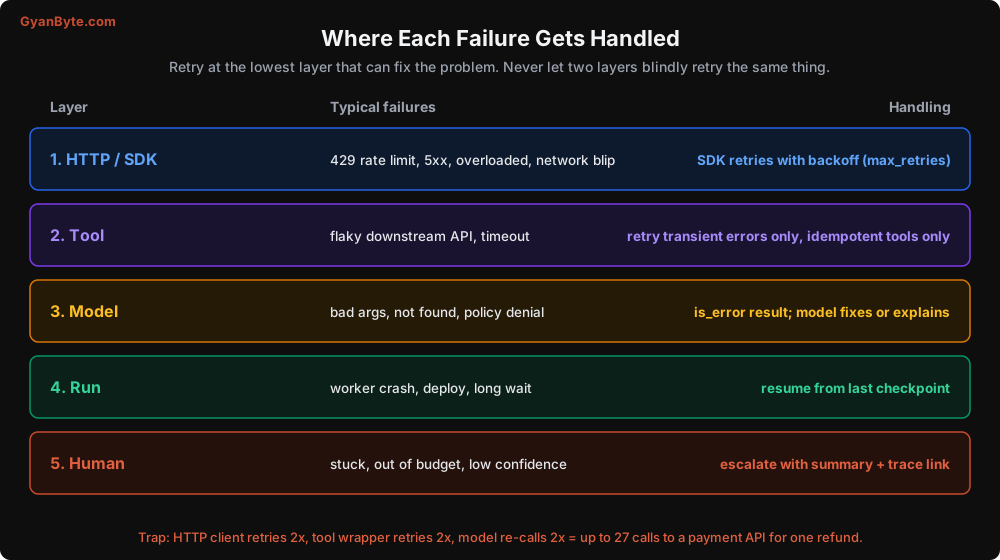
That warning at the bottom is real. When every layer retries “just to be safe”, the retries multiply. Three layers each retrying twice means up to 27 attempts on a payment API for a single refund. Decide explicitly which layer owns retries for each kind of failure.
Layer 1: Model API Errors
The Anthropic SDK already retries connection errors, 408, 409, 429, and 5xx responses with exponential backoff (2 retries by default). Configure it once, explicitly:
import anthropic

client = anthropic.Anthropic(
    max_retries=4,       # rate limits and overloads are common at peak
    timeout=120.0,       # seconds; per attempt
)
Two things to remember:
- Total time can be
timeout × (max_retries + 1). With the settings above, a single call could take 10 minutes in the worst case. Your run-level deadline should account for that, or you’ll have users staring at a spinner. - Use streaming for long outputs. Long responses over a non-streaming request are more likely to hit HTTP timeouts. Streaming also lets you show progress (more on that in Lesson 11).
If the API is still failing after retries, catch the specific error types and decide what to do:
try:
    response = call_model(messages)
except anthropic.RateLimitError:
    # We're over our limits even after backoff. Queue the run for later.
    return pause_run(run, reason="rate_limited", retry_after_s=60)
except anthropic.APIStatusError as e:
    if e.status_code >= 500:
        return pause_run(run, reason="provider_error", retry_after_s=30)
    raise   # 400s are bugs in our request; don't retry, fix the code
except anthropic.APIConnectionError:
    return pause_run(run, reason="network", retry_after_s=15)
Notice: a 400 (bad request) is never retried. It means your request is malformed, for example a tool_result without its tool_use. Retrying just burns time. Alert on it instead.
Some teams also configure a fallback model or provider for when the primary is overloaded. That can be worth it for critical flows, but test it with your eval suite. Prompts tuned for one model don’t always behave the same on another, and caches don’t carry over.
Layer 2: Tools
Tools talk to the rest of your infrastructure, which is usually less reliable than the model API.
Every tool gets a timeout. Without one, a hanging downstream call holds the whole run.
Retry only transient errors, only for idempotent tools. A read tool hitting a 503 can retry twice with backoff. A write tool should only retry if it uses an idempotency key that the downstream service honours.
Circuit breakers for flaky dependencies. If the courier API has failed 20 times in the last minute, stop calling it for a while and fail fast with a clear message. The model can then tell the customer “tracking is temporarily unavailable” instead of every run waiting 30 seconds for a timeout.
import time
import random

class CircuitOpen(Exception): ...

class Breaker:
    def __init__(self, fail_threshold=10, reset_after_s=60):
        self.fails, self.opened_at = 0, None
        self.fail_threshold, self.reset_after_s = fail_threshold, reset_after_s

    def call(self, fn, *args, **kwargs):
        if self.opened_at and time.monotonic() - self.opened_at < self.reset_after_s:
            raise CircuitOpen()
        try:
            result = fn(*args, **kwargs)
            self.fails, self.opened_at = 0, None
            return result
        except TransientError:
            self.fails += 1
            if self.fails >= self.fail_threshold:
                self.opened_at = time.monotonic()
            raise

courier_breaker = Breaker()

def get_tracking(order_id: str, *, ctx) -> dict:
    for attempt in range(3):
        try:
            return courier_breaker.call(courier_api.track, order_id, timeout=5)
        except CircuitOpen:
            break
        except TransientError:
            time.sleep(0.5 * 2 ** attempt + random.random() * 0.2)
    raise ToolError("Courier tracking is temporarily unavailable. Do not retry. "
                    "Tell the customer you'll share the update by SMS, or escalate.")
And note what this tool does not do: it doesn’t let the model also retry. The error message explicitly says “Do not retry”, so the retry responsibility stays in one layer.
Layer 3: The Model Handles Its Own Mistakes
Bad arguments, “not found”, policy denials: these go back to the model as is_error tool results with teaching messages (Lessons 2 and 3). The model fixes the arguments or explains the situation to the user. No retry logic needed in your code.
Layer 4: Durable Execution
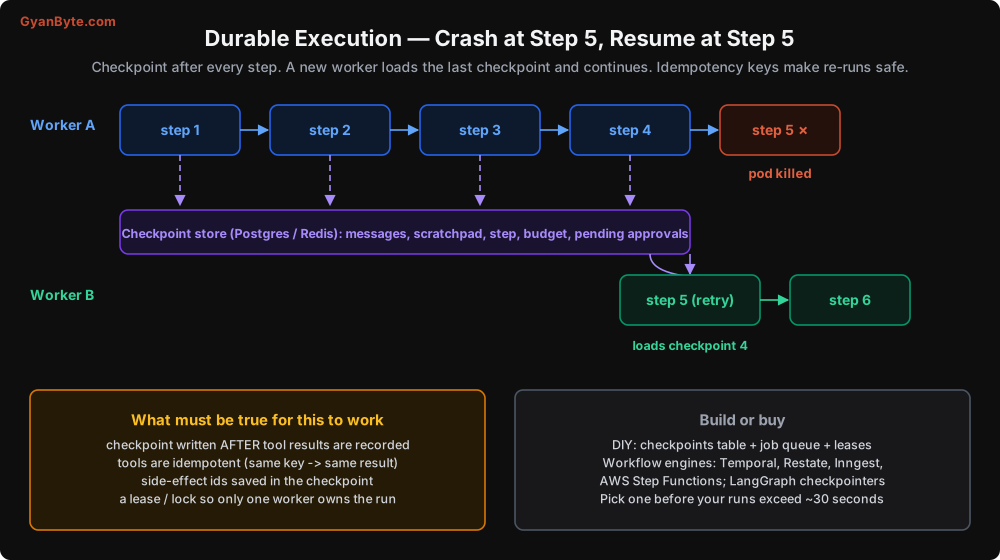
Here’s the big one. If your agent runs take longer than a few seconds, the process running them will die mid-run sometimes. The fix is to make the run state durable: checkpoint after every step, so any worker can pick it up and continue.
A minimal DIY version
You need a table and a few rules.
CREATE TABLE agent_runs (
    run_id           TEXT PRIMARY KEY,
    tenant_id        TEXT NOT NULL,
    user_id          TEXT NOT NULL,
    status           TEXT NOT NULL,        -- queued | running | waiting_approval | paused | done | failed
    step             INT  NOT NULL DEFAULT 0,
    messages         JSONB NOT NULL,       -- full conversation so far
    scratchpad       JSONB,
    spent_inr        NUMERIC(10,4) NOT NULL DEFAULT 0,
    side_effects     JSONB NOT NULL DEFAULT '[]',   -- refund ids, email ids, etc.
    lease_owner      TEXT,
    lease_expires_at TIMESTAMPTZ,
    resume_after     TIMESTAMPTZ,
    updated_at       TIMESTAMPTZ NOT NULL DEFAULT now()
);
The worker loop:
def work_on(run_id: str, worker_id: str):
    run = acquire_lease(run_id, worker_id, ttl_s=120)   # UPDATE ... WHERE lease expired; returns None if taken
    if run is None:
        return

    while run.status == "running":
        renew_lease(run, worker_id)

        response = call_model(run.messages)                   # may raise -> pause_run
        run.messages.append({"role": "assistant", "content": serialise(response.content)})
        run.spent_inr += cost_inr(MODEL, response.usage)

        if response.stop_reason != "tool_use":
            run.status = "done"
            save_checkpoint(run)
            break

        blocks = tool_use_blocks(response)
        decisions = [(b, policy_check(b.name, b.input, run.ctx, run)) for b in blocks]
        needs_human = [(b, d) for b, d in decisions if d.needs_approval]

        if needs_human:
            # Execute nothing from this turn yet; all results go back together later
            for b, d in needs_human:
                save_pending_approval(run, b, d.reason)
            run.status = "waiting_approval"
        else:
            results = [execute_or_deny(b, d, run) for b, d in decisions]  # idempotent tools,
            run.messages.append({"role": "user", "content": results})     # records side-effect ids
            run.step += 1

        save_checkpoint(run)    # one transaction: messages, step, spend, side effects

    release_lease(run, worker_id)
The rules that make it safe:
- Save the checkpoint after tool results are recorded, in one transaction. If you crash before saving, the step is redone. If you crash after, it’s not.
- Leases, not locks held forever. If a worker dies, its lease expires and another worker picks up the run. Renew the lease each step.
- Side-effect ids go in the checkpoint. If a refund was created, its id is part of the run state.
- Store content blocks exactly. Serialise the assistant content blocks (including tool_use ids and any thinking blocks) losslessly. If you only store the text, you can’t resume.
The idempotency subtlety on resume
Here’s a trap I fell into. Say the worker crashes after the model returned issue_refund and after the tool executed, but before the checkpoint was saved. Another worker resumes from the previous checkpoint and calls the model again. The model, seeing the same history, asks for issue_refund again, but with a new tool_use id.
If your idempotency key used the tool_use id, you’d refund twice. That’s why Lesson 3 used a business-level key: refund:{run_id}:{order_id}:{amount}. The same run asking for the same refund gets the same result, regardless of which model call asked for it. Design every write tool’s key this way.
Build or buy?
The DIY version above works and I’ve run it in production. But once you need timers (“resume this run in 4 hours”), signals (“approval arrived”), retries with backoff, and visibility into thousands of in-flight runs, a workflow engine starts to pay for itself. Temporal, Restate, Inngest, and AWS Step Functions all model this well, and agent frameworks like LangGraph have checkpointer abstractions for the same reason. The model call and each tool call become activities or steps with their own retry policies, and the engine handles durability.
My rule of thumb: if your typical run is under 30 seconds and has no human waits, a simple job queue plus checkpoints is enough. If runs are long, involve waiting for humans, or you have thousands in flight, use an engine.
Layer 5: Humans
Humans appear in two roles: as approvers of risky actions, and as the escalation path when the agent can’t finish.
Approval flows that actually work
The bad pattern: the agent’s HTTP request blocks while it waits for a manager to click “approve” in Slack. The request times out after 60 seconds, the state is lost, and the approval that arrives an hour later has nowhere to go.
The good pattern: pause, persist, notify, resume.
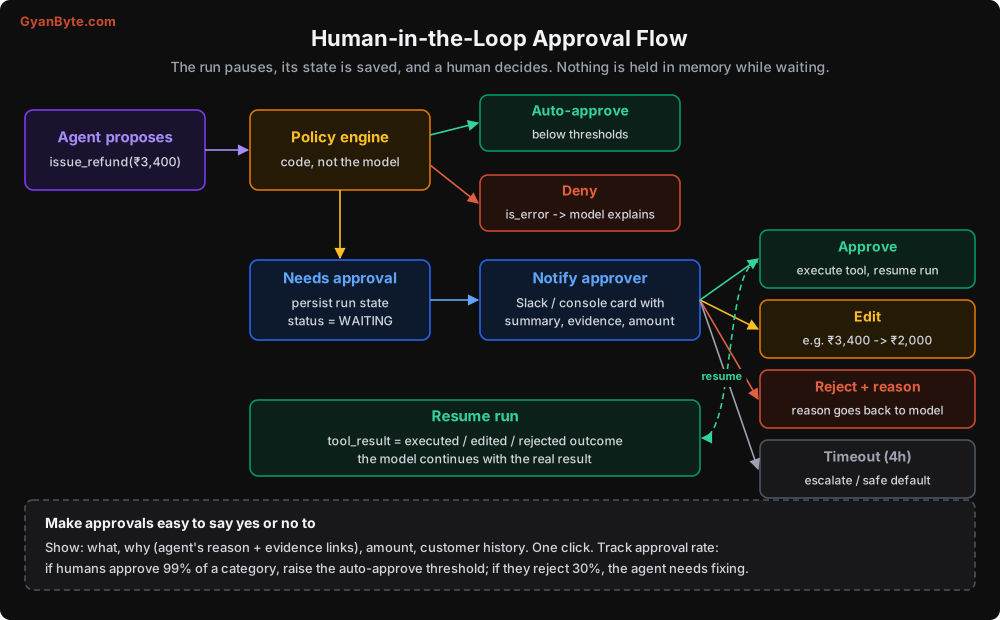
When the policy engine says “needs approval”:
def save_pending_approval(run, block, reason: str):
    approval_id = db.approvals.insert({
        "run_id": run.run_id,
        "tool_use_id": block.id,
        "tool": block.name,
        "args": block.input,
        "reason": reason,
        "status": "pending",
        "expires_at": now() + timedelta(hours=4),
        "summary": summarise_for_approver(run, block),   # short, human-readable
    })
    notify_approver(approval_id)   # Slack card / console / email with Approve, Edit, Reject
When the approver decides, you execute (or not) and resume the run with the outcome as the tool result:
def on_approval_decision(approval_id: str, decision: str, edited_args=None, note: str = ""):
    ap = db.approvals.get(approval_id)
    run = load_run(ap.run_id)

    if decision == "approve":
        result = execute_tool_by_name(ap.tool, edited_args or ap.args, run.ctx)
        content, is_error = json.dumps(result), False
    elif decision == "reject":
        content = (f"A human reviewer rejected this action. Reason: {note or 'not given'}. "
                   "Explain this to the customer politely and offer alternatives.")
        is_error = True
    else:  # expired
        content, is_error = "Approval timed out. Escalate to a human agent.", True

    run.messages.append({"role": "user", "content": [{
        "type": "tool_result", "tool_use_id": ap.tool_use_id,
        "content": content, "is_error": is_error}]})
    run.status = "running"
    save_checkpoint(run)
    enqueue(run.run_id)     # any worker can continue it
I’ve kept this handler simple by assuming the paused turn had a single tool call. If it contained several, remember the rule from Lesson 2: every tool_use in that turn needs a tool_result in the same next user message. That’s why the worker loop above executes nothing from a turn that needs approval. When the last pending decision for that turn arrives, run the auto-approved calls too and send all the results together in one message.
Approval UX matters more than you’d think
If approving is annoying, people will either rubber-stamp everything or ignore the queue. Both defeat the purpose. A good approval card shows:
- What: “Refund ₹3,400 to order CP-1123”
- Why: the agent’s one-line reasoning and links to the evidence (the delivery photo, the tracking status)
- Context: customer’s order history and past refunds
- One click: Approve, Edit amount, Reject with a reason (pre-filled options are fine)
Then measure the approval rate per category. If managers approve 99% of “damaged item refunds under ₹5,000”, raise the auto-approve threshold. If they reject 30% of some category, the agent has a problem in that category; go read the traces. This is how you increase autonomy safely: based on data, one category at a time.
Escalation to humans
When the agent hits its step limit, budget, a loop, or simply isn’t confident, it should hand over cleanly:
- A summary of what the customer wants and what was already tried (generated by the agent or by a quick summary call).
- Side effects already taken (so the human doesn’t refund twice).
- A link to the trace.
- A message to the customer that sets expectations (“I’ve passed this to our team; you’ll hear back within 2 hours”).
A good escalation is a success, not a failure. An agent that confidently gets things wrong is far worse than one that escalates 15% of the time.
Graceful Degradation
What happens when the model provider has a bad hour? Decide in advance:
- Chat-style agents: show a clear message and offer a human or a callback. Don’t show a spinner for 5 minutes.
- Background agents: pause runs and resume when the API recovers (the
pause_runwithresume_afterabove). - Critical flows: consider a fallback model or provider, tested with your evals.
- Kill switch: the flag from Lesson 9 doubles as a degradation switch, routing everything to humans.
Duplicate Requests
One last source of trouble. A user double-clicks “Ask”, or the mobile app retries a request because the network blipped after the server received it. Now you have two runs doing the same thing.
Make run creation idempotent too: the client sends a request id, and you create at most one run per (user_id, client_request_id). If the run already exists, return it.
def start_run(user, client_request_id: str, message: str) -> str:
    existing = db.agent_runs.find_one(user_id=user.id, client_request_id=client_request_id)
    if existing:
        return existing.run_id
    return create_and_enqueue_run(user, client_request_id, message)
Pitfalls to Avoid
- Retrying at every layer. Retries multiply. Decide which layer owns each failure type.
- Retrying 400 errors. They’re bugs in your request. Alert and fix.
- No timeouts on tools. One hanging dependency blocks every run that touches it.
- Keeping run state only in memory. Deploys and node rotations will kill in-flight runs. Checkpoint every step.
- Idempotency keys based on tool_use ids. A resumed run can produce new ids for the same action. Use business-level keys.
- Storing only the text of assistant turns. You can’t resume without the exact content blocks.
- Blocking requests while waiting for approval. Pause, persist, notify, resume.
- Annoying approval UX. Leads to rubber-stamping. Show what, why, context, and make it one click.
- Not measuring approval rates. That data tells you where to grant more autonomy and where the agent is weak.
- Escalations without context. The human needs a summary, side effects so far, and the trace.
Quick Recap
- Handle each failure at the lowest layer that can fix it; don’t stack retries.
- Configure SDK retries and timeouts; never retry 400s.
- Tools get timeouts, transient-only retries, and circuit breakers.
- Checkpoint after every step with leases, so any worker can resume. Use business-level idempotency keys.
- Approvals pause and persist the run, then resume with the outcome. Measure approval rates to adjust autonomy.
Next lesson: scaling. From 100 runs a day to 100,000. Queues, concurrency, rate limits, multi-tenancy, and the architecture that holds up when the sale starts.