The first agent I put into production handled about 300 conversations a day. It ran as a FastAPI endpoint: request comes in, the loop runs inside the request handler, response goes out. It worked fine for four months.
Then the client’s marketing team ran a campaign with a big “Chat with us on WhatsApp” button. Traffic went to 9,000 conversations in a day, most of them in a three-hour window in the evening. Requests piled up, the load balancer started timing out at 60 seconds, users retried, which doubled the load, and we started getting 429s from the model API, which made runs slower, which made more requests time out. Classic death spiral.
Nothing was wrong with the agent’s logic. The architecture just assumed agent runs were like normal API calls: short, stateless, cheap. They’re not. This lesson is about the architecture that handles that difference.
How Agent Workloads Differ
Compared with a typical web request, an agent run is:
- Long. Seconds to minutes, not milliseconds. Some wait hours for approvals.
- I/O bound. 95%+ of the time, the run is waiting on the model API or a tool. CPU usage is tiny.
- Variable. One run takes 2 steps, the next takes 15. Cost and duration have long tails.
- Limited by tokens, not CPU. Your real bottleneck is the provider’s rate limits (requests, input tokens, and output tokens per minute) and your budget.
- Stateful. Conversation history, scratchpads, pending approvals.
So the design goals are: don’t hold HTTP requests open, keep state durable, use concurrency cheaply, and treat model capacity as a shared, limited resource.
The Architecture
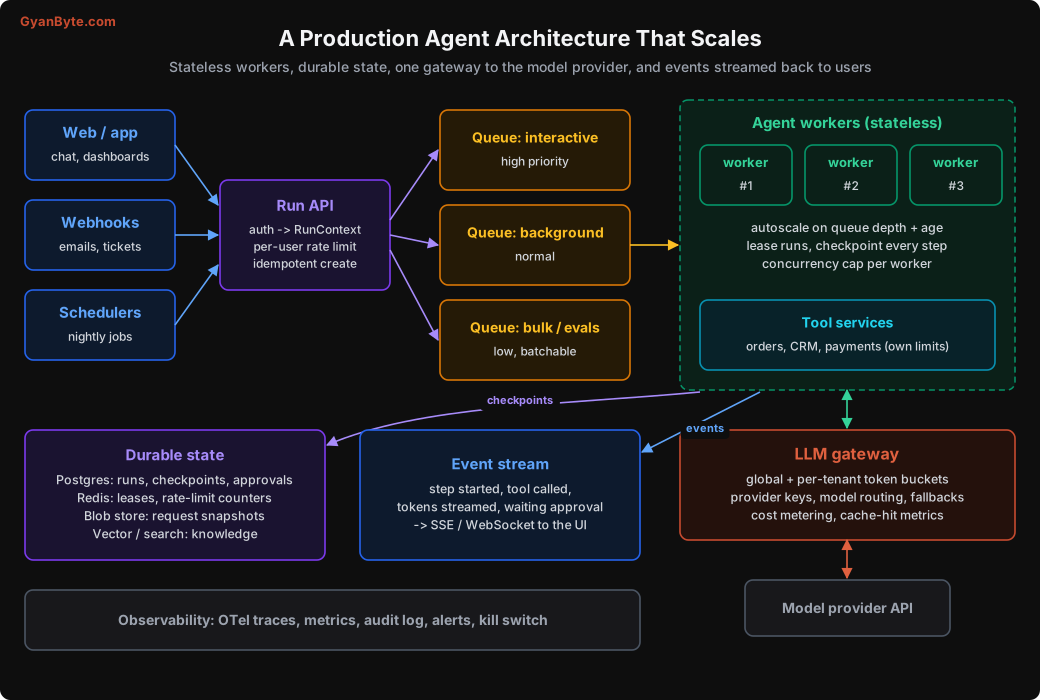
The pieces:
- Run API: authenticates the user, builds the
RunContext, applies per-user rate limits, creates the run idempotently (Lesson 10), puts it on a queue, and returns arun_idimmediately. - Priority queues: interactive chat, background tasks, and bulk work (evals, backfills) in separate lanes.
- Stateless workers: pull runs, take a lease, execute steps, checkpoint after each one. Any worker can continue any run.
- LLM gateway: every model call goes through it. It enforces rate limits, does fair sharing between tenants, routes models, meters cost.
- Event stream: workers publish progress events; the UI subscribes and shows them live.
- Durable state: runs, checkpoints, approvals in Postgres; leases and counters in Redis; big request snapshots in blob storage.
None of these are exotic. It’s the same architecture you’d use for any long-running job system. The agent-specific parts are the gateway and how you plan capacity.
Capacity Planning: Think in Tokens and Concurrency
Requests per second is the wrong unit. Let’s plan for a realistic scenario:
- 20,000 conversations a day, 15% of them in the peak hour
- During a sale, the peak is 4x normal
- Each conversation: 6 model calls, ~39k input tokens total, ~2.4k output tokens total (our Lesson 6 example)
- Average run duration: 30 seconds
Peak arrivals: 20,000 × 0.15 = 3,000 per hour = 50 per minute. Sale peak: 200 runs per minute.
Model API load at sale peak:
| Metric | Calculation | Result |
|---|---|---|
| Requests per minute | 200 runs × 6 calls | 1,200 RPM |
| Input tokens per minute | 200 × 39k | ~7.8M ITPM |
| Output tokens per minute | 200 × 2.4k | ~480k OTPM |
Compare these with your provider rate limits for your usage tier. On the Claude API, cached input tokens generally don’t count against input-token rate limits for current models, so good prompt caching (Lesson 6) also gives you rate-limit headroom, not just savings. Check your provider’s docs for the current rules. If your numbers are close to your limits, talk to your provider before the sale, not during it.
Concurrent runs (Little’s law: concurrency = arrival rate × duration): 200 per minute × 0.5 minutes = 100 runs in flight at peak. If runs slow down (because the API is busy and latency goes up), concurrency goes up with them. Plan for 2-3x.
Workers: since runs are I/O bound, one async worker process can comfortably juggle dozens of runs. 100-300 concurrent runs is a handful of small pods, not a big cluster. CPU is rarely your problem. Memory sometimes is, if you keep large conversations in memory, which is another reason to keep state in the DB.
Async Workers
Don’t use a thread or a process per run. Use asyncio (or your language’s equivalent) and a semaphore to cap concurrency per worker:
import asyncio
from anthropic import AsyncAnthropic

aclient = AsyncAnthropic(max_retries=4, timeout=120.0)
MAX_CONCURRENT_RUNS = 50

async def worker_main(worker_id: str):
    sem = asyncio.Semaphore(MAX_CONCURRENT_RUNS)
    while not shutting_down():
        await sem.acquire()
        msg = await queue.receive(lanes=["interactive", "background", "bulk"])  # priority order
        if msg is None:
            sem.release()
            await asyncio.sleep(0.2)
            continue
        asyncio.create_task(_run_and_release(msg, worker_id, sem))

async def _run_and_release(msg, worker_id, sem):
    try:
        await work_on_async(msg.run_id, worker_id)    # the leased, checkpointed loop from Lesson 10
        await msg.ack()
    except Exception:
        log.exception("run crashed", extra={"run_id": msg.run_id})
        await msg.nack(delay_s=10)                    # another worker will resume from checkpoint
    finally:
        sem.release()
A few practical notes:
- Graceful shutdown. On SIGTERM (deploys, scale-down), stop pulling new work, let in-flight steps finish their current step and checkpoint, then exit. Kubernetes gives you a grace period; set it longer than your longest step.
- Queue visibility timeouts vs run length. With SQS and similar queues, a message reappears if not acknowledged in time. Long runs will exceed it. Either extend visibility while working, or (my preference) ack the message once you hold a lease in the DB, and let lease expiry handle crashes.
- Autoscale on queue depth and age of the oldest message, not on CPU. CPU will sit at 5% while users wait. KEDA on Kubernetes or your cloud’s queue-based autoscaling works well.
The LLM Gateway
Every model call should go through one place. You can build it as a library inside the workers backed by Redis, or as a separate service. It does five jobs:
- Global rate limiting, to stay under your provider’s RPM, input TPM, and output TPM.
- Per-tenant fair share, so one customer’s bulk import doesn’t starve everyone else’s chat.
- Priority admission: interactive calls first, background next, bulk last.
- Routing and fallbacks: which model for which call, and what to do when the provider is overloaded.
- Metering: cost per tenant, per agent, per prompt version; cache hit ratios.
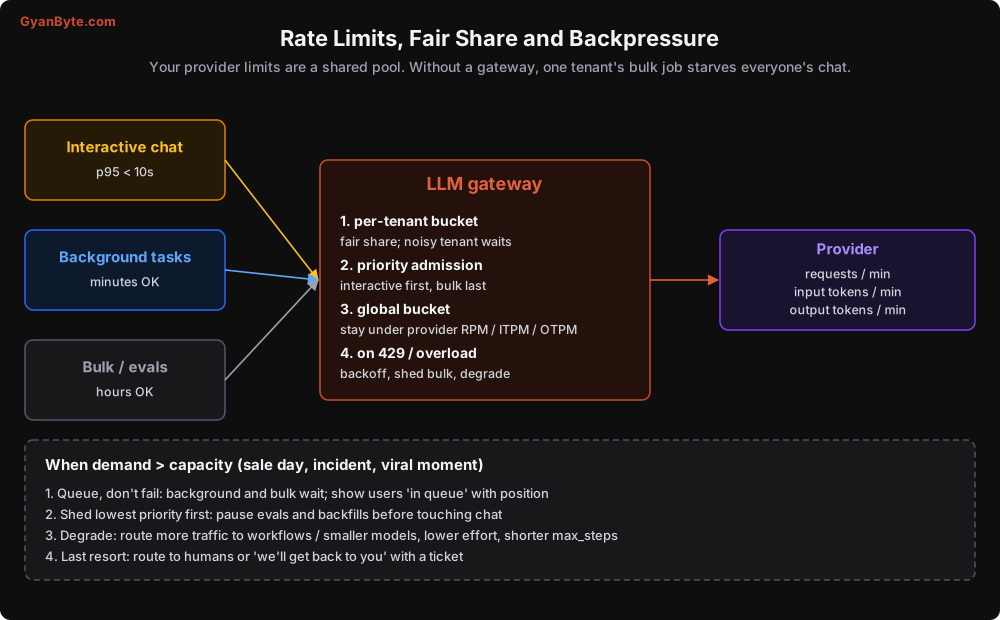
A token bucket in Redis is the standard tool. Here is a simplified version to show the idea (in production, do the check-and-decrement atomically with a Lua script or use a tested library):
import time

class TokenBucket:
    """Refills `rate` tokens per second up to `capacity`."""
    def __init__(self, redis, key: str, capacity: int, rate: float):
        self.r, self.key, self.capacity, self.rate = redis, key, capacity, rate

    async def try_take(self, amount: int) -> bool:
        now = time.time()
        data = await self.r.hgetall(self.key)
        tokens = float(data.get(b"tokens", self.capacity))
        last = float(data.get(b"ts", now))
        tokens = min(self.capacity, tokens + (now - last) * self.rate)
        if tokens < amount:
            await self.r.hset(self.key, mapping={"tokens": tokens, "ts": now})
            return False
        await self.r.hset(self.key, mapping={"tokens": tokens - amount, "ts": now})
        return True


async def admit(call_est_tokens: int, tenant_id: str, lane: str):
    """Wait until both the tenant bucket and the global bucket allow this call."""
    tenant = TokenBucket(redis, f"tb:tenant:{tenant_id}", **TENANT_LIMITS[tenant_id])
    global_ = TokenBucket(redis, f"tb:global:{lane}", **LANE_LIMITS[lane])
    delay = 0.05
    while True:
        if await tenant.try_take(call_est_tokens) and await global_.try_take(call_est_tokens):
            return
        await asyncio.sleep(delay)
        delay = min(delay * 2, 2.0 if lane == "interactive" else 30.0)
Giving each lane its own share of the global budget (say 60% interactive, 30% background, 10% bulk, with interactive allowed to borrow unused capacity) is the simplest way to protect chat latency.
Even with a gateway, you’ll occasionally get 429 or overloaded responses from the provider. The SDK retries them with backoff. If they persist, the gateway should shed bulk work first: pause eval runs and backfills before chat gets slower.
When demand exceeds capacity
Decide your degradation ladder in advance, and ideally automate it:
- Queue, don’t fail. Background runs wait. Show chat users “You’re in queue, about 1 minute” instead of an error.
- Shed the lowest priority (bulk, then background).
- Degrade quality slightly: send more traffic to workflows, use a smaller model or lower effort for routine steps, shorten
max_steps. - Hand off: route to human agents or offer a callback.
During the WhatsApp campaign I mentioned, step 1 alone would have saved us. Users are surprisingly patient with an honest “in queue” message. They’re not patient with a spinner that ends in an error.
Streaming Progress to Users
A 30-second agent run feels broken if the screen shows nothing. The same run feels fine if the user sees:
🔍 Looking up your orders… 📦 Checking courier status for CP-1123… ✍️ Writing your answer…
Workers publish events at each step, and the UI subscribes via Server-Sent Events or WebSockets:
async def emit(run_id: str, kind: str, **data):
    await redis.publish(f"run:{run_id}:events", json.dumps({"kind": kind, **data}))

# inside the loop
await emit(run.run_id, "tool_started", tool=block.name, label=FRIENDLY_LABELS[block.name])
...
# stream the final answer token by token
async with aclient.messages.stream(model=MODEL, max_tokens=4096, system=SYSTEM_BLOCKS,
                                   tools=TOOLS, messages=run.messages) as stream:
    async for text in stream.text_stream:
        await emit(run.run_id, "text_delta", text=text)
    response = await stream.get_final_message()
Use friendly labels for tools (“Checking courier status”) rather than function names. And never stream raw tool arguments or results to the user; they may contain internal data.
Since the run is decoupled from the HTTP request, the user can close the tab and come back. When they reconnect, send the current state from the DB first, then live events.
Multi-Tenancy
If you serve multiple business customers, each with their own data and configuration:
- Data isolation at the storage layer: tenant id on every row, enforced by row-level security or separate schemas, never just a filter in a prompt or tool argument (Lesson 9).
- Per-tenant configuration: some customers get custom instructions, tools, or models. Keep the common prefix (shared tools and base system prompt) first and the tenant-specific parts after it, so the shared prefix stays cacheable across tenants.
- Per-tenant budgets and rate limits, enforced in the gateway.
- Per-tenant cost attribution, so you can price your plans properly. Agents with usage-based costs and flat-rate pricing are how SaaS margins quietly disappear.
- Noisy neighbour alerts: one tenant suddenly using 10x their normal tokens is either a bug in their integration or abuse. Either way, you want to know.
Latency: Making Agents Feel Fast
Agent latency is mostly “number of sequential model calls × time per call” plus slow tools. Ways to cut it:
Prefetch context instead of making the agent fetch it. If 80% of support conversations need the customer’s recent orders, fetch them before the run starts and include a compact summary in the first user message. You’ve removed a whole model round trip from most runs. This is one of the highest-impact tricks I know, and it saves money too.
Parallel tool calls. Encourage the model to request independent lookups together, and run them with asyncio.gather. Two tools in parallel instead of two steps saves a full model call.
Prompt caching reduces time to first token for long prefixes, not just cost.
Smaller or lower-effort models for simple steps. Routing and summarisation with a small model are much faster.
Stream the final answer. Time to first token is what users perceive.
Watch your tools. In traces (Lesson 7), check which tools are slow. A 4-second CRM call on every run is often the single biggest latency contributor, and fixing it is ordinary backend work.
Versioning and Rollouts
An agent’s behaviour is defined by a bundle: system prompt, tool definitions, tool implementations, model, effort settings, limits. Change any one, and behaviour can change. So:
- Version the bundle as a unit.
support-agent@v23means a specific prompt, tool set, model, and settings. Store it in config, reviewed like code. - Pin runs to a version. A run that started on v22 finishes on v22, even if v23 is deployed mid-run. Mixing prompts within one run causes strange behaviour (and invalidates caches).
- Canary releases. Send 5% of new runs to v23. Compare success rate, escalation rate, steps, cost per task, and judge scores against v22 for a day before going to 100%.
- Gate with evals first (Lesson 8), canary second. Evals catch known regressions; canaries catch the unknown ones.
- Instant rollback via a config flag, not a deploy.
Load Testing Without Burning Money
You want to test queues, workers, gateway, and DB under 200 runs per minute. You don’t want to spend lakhs of rupees doing it.
Build a fake model server that mimics your provider’s API: realistic latency distribution, occasional 429s and 5xx errors, scripted tool-use responses from recorded traces. Point the SDK at it with base_url in your load-test environment. Now you can test the whole system at 5x peak load for the cost of a few pods. Then do a smaller run against the real API to validate rate-limit behaviour and real latency.
Pitfalls to Avoid
- Running the agent loop inside the HTTP request. Use a queue and return a run id; stream progress.
- Planning capacity in requests per second. Plan in tokens per minute and concurrent runs.
- One thread or process per run. Agent runs are I/O bound; use async with a concurrency cap.
- Autoscaling on CPU. Scale on queue depth and age.
- No gateway. Without central rate limiting and fair share, one tenant’s bulk job can starve all chat traffic.
- No degradation plan. Decide in advance what to queue, shed, and degrade when demand spikes.
- Tenant isolation only in prompts. Enforce it in storage and in tools.
- Letting the agent fetch context you could prefetch. Every saved step saves latency and money.
- Mixing versions within a run, or rolling out without canaries. Pin runs to a version and compare metrics before full rollout.
- Load testing against the real API. Use a fake model server for scale tests.
Quick Recap
- Agent runs are long, I/O bound, variable, token-limited, and stateful. Design for that.
- Run API → priority queues → async stateless workers with leases → LLM gateway → provider.
- Plan capacity with token maths and Little’s law. Check provider limits before big events.
- Gateway: global and per-tenant buckets, priority lanes, shedding and degradation.
- Stream progress, prefetch context, parallelise tools, and version agent bundles with canary rollouts.
That’s the last of the building blocks. In the final lesson, we put everything together: a production support agent from design doc to launch checklist.