

Security tools that nobody runs are security theater. I’ve seen teams buy expensive SAST licenses that sit unused because the tool takes 45 minutes to scan and nobody wants to wait. The secret to a security pipeline that actually works: make it fast, make it automatic, and make it block only what matters.
This article walks through building a complete security pipeline from pre-commit hooks to runtime monitoring.
Why a Security Pipeline?
The economics are simple: fixing a vulnerability in production costs 100x more than fixing it in development. A security pipeline shifts detection left — catching issues when they’re cheapest to fix.
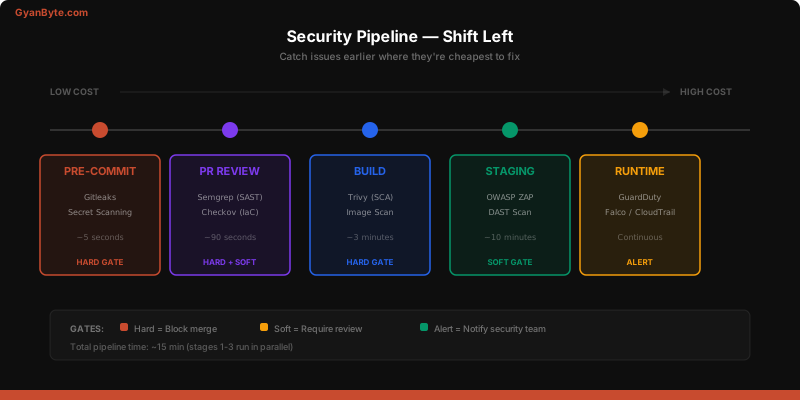
But here’s the nuance most teams miss: a security pipeline that blocks every PR on every finding is worse than no pipeline at all. Developers will route around it. The goal is high-signal, low-friction security gates.
The Security Scanning Stack
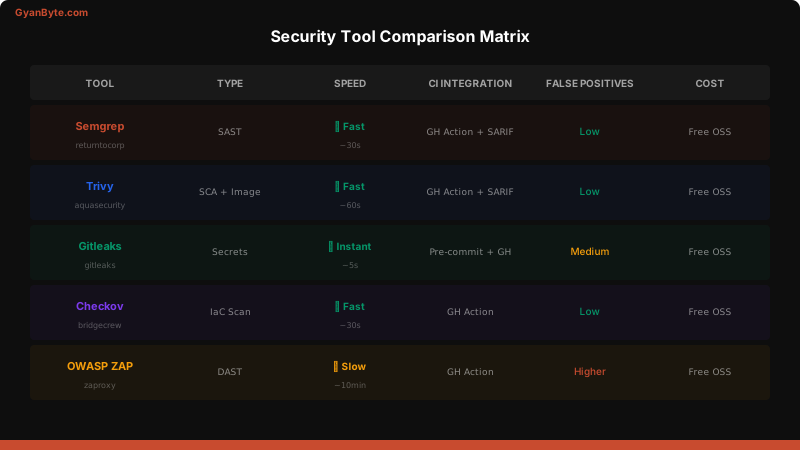
Every application needs five types of security scanning:
| Scan Type | What It Finds | When to Run | Tool |
|---|---|---|---|
| SAST | Code-level bugs (SQLi, XSS, hardcoded secrets) | Every PR | Semgrep |
| SCA | Vulnerable dependencies | Every build | Trivy, Snyk |
| Secret Scanning | Leaked API keys, passwords, tokens | Pre-commit + PR | Gitleaks |
| IaC Scanning | Misconfigured infrastructure | Every Terraform PR | Checkov |
| DAST | Runtime vulnerabilities | Staging deploys | OWASP ZAP |
Integrating into CI/CD — The Full Pipeline
Here’s a complete GitHub Actions workflow that implements all five scan types:
# .github/workflows/security-pipeline.yml
name: Security Pipeline

on:
  pull_request:
    branches: [main]
  push:
    branches: [main]

jobs:
  # Stage 1: Fast scans on every PR (< 2 min)
  secret-scan:
    runs-on: ubuntu-latest
    steps:
      - uses: actions/checkout@v4
        with:
          fetch-depth: 0

      - name: Gitleaks Secret Scan
        uses: gitleaks/gitleaks-action@v2
        env:
          GITHUB_TOKEN: ${{ secrets.GITHUB_TOKEN }}

  sast:
    runs-on: ubuntu-latest
    steps:
      - uses: actions/checkout@v4

      - name: Semgrep SAST Scan
        uses: returntocorp/semgrep-action@v1
        with:
          config: >-
            p/security-audit
            p/owasp-top-ten
            p/nodejs
          generateSarif: true

      - name: Upload SARIF
        if: always()
        uses: github/codeql-action/upload-sarif@v3
        with:
          sarif_file: semgrep.sarif

  iac-scan:
    runs-on: ubuntu-latest
    if: contains(github.event.pull_request.changed_files, 'terraform/')
    steps:
      - uses: actions/checkout@v4

      - name: Checkov IaC Scan
        uses: bridgecrewio/checkov-action@v12
        with:
          directory: terraform/
          framework: terraform
          soft_fail: false
          skip_check: CKV_AWS_18  # Skip specific checks if needed

  # Stage 2: Build-time scans (< 5 min)
  sca:
    runs-on: ubuntu-latest
    steps:
      - uses: actions/checkout@v4

      - name: Trivy Dependency Scan
        uses: aquasecurity/trivy-action@master
        with:
          scan-type: 'fs'
          scan-ref: '.'
          severity: 'CRITICAL,HIGH'
          exit-code: '1'
          format: 'sarif'
          output: 'trivy-results.sarif'

      - name: Upload Trivy SARIF
        if: always()
        uses: github/codeql-action/upload-sarif@v3
        with:
          sarif_file: trivy-results.sarif

  image-scan:
    runs-on: ubuntu-latest
    needs: [secret-scan, sast]
    steps:
      - uses: actions/checkout@v4

      - name: Build Docker Image
        run: docker build -t app:${{ github.sha }} .

      - name: Trivy Image Scan
        uses: aquasecurity/trivy-action@master
        with:
          image-ref: 'app:${{ github.sha }}'
          severity: 'CRITICAL,HIGH'
          exit-code: '1'

  # Stage 3: DAST on staging (post-deploy)
  dast:
    runs-on: ubuntu-latest
    needs: [image-scan]
    if: github.ref == 'refs/heads/main'
    steps:
      - name: Wait for staging deploy
        run: sleep 30  # Wait for deployment to complete

      - name: OWASP ZAP Baseline Scan
        uses: zaproxy/action-[email protected]
        with:
          target: 'https://staging.example.com'
          rules_file_name: '.zap/rules.tsv'
          cmd_options: '-a'

  # Quality Gate — aggregate results
  security-gate:
    runs-on: ubuntu-latest
    needs: [secret-scan, sast, sca, iac-scan]
    if: always()
    steps:
      - name: Check scan results
        run: |
          if [ "${{ needs.secret-scan.result }}" == "failure" ]; then
            echo "❌ Secret scan failed — blocking merge"
            exit 1
          fi
          if [ "${{ needs.sast.result }}" == "failure" ]; then
            echo "⚠️ SAST findings detected — review required"
            # Don't block, but require review
          fi
          if [ "${{ needs.sca.result }}" == "failure" ]; then
            echo "❌ Critical/High vulnerabilities found — blocking merge"
            exit 1
          fi
          echo "✅ Security gate passed"
Tool Deep Dives
Semgrep — SAST
Semgrep is my go-to for SAST because it’s fast (seconds, not minutes) and the rules are readable:
# .semgrep/custom-rules.yml
rules:
  - id: no-hardcoded-aws-keys
    patterns:
      - pattern-regex: "AKIA[0-9A-Z]{16}"
    message: "Hardcoded AWS access key detected"
    languages: [generic]
    severity: ERROR

  - id: no-eval-user-input
    patterns:
      - pattern: eval($X)
      - pattern-not: eval("...")
    message: "eval() with dynamic input — potential code injection"
    languages: [javascript, typescript]
    severity: ERROR

  - id: sql-injection-risk
    patterns:
      - pattern: |
          $QUERY = "..." + $INPUT + "..."
      - metavariable-regex:
          metavariable: $QUERY
          regex: ".*(SELECT|INSERT|UPDATE|DELETE).*"
    message: "SQL string concatenation — use parameterized queries"
    languages: [javascript, python]
    severity: ERROR
Gitleaks — Secret Scanning
# .gitleaks.toml
title = "Gitleaks Configuration"

[allowlist]
  paths = [
    '''\.test\.''',
    '''_test\.go''',
    '''testdata/''',
  ]

[[rules]]
  id = "aws-access-key"
  description = "AWS Access Key"
  regex = '''AKIA[0-9A-Z]{16}'''
  tags = ["aws", "credentials"]

[[rules]]
  id = "generic-api-key"
  description = "Generic API Key"
  regex = '''(?i)(api[_-]?key|apikey)\s*[:=]\s*['"][a-zA-Z0-9]{32,}['"]'''
  tags = ["api", "credentials"]

[[rules]]
  id = "private-key"
  description = "Private Key"
  regex = '''-----BEGIN (RSA |EC |DSA )?PRIVATE KEY-----'''
  tags = ["private-key"]
Checkov — Infrastructure Scanning
# Scan Terraform files
checkov -d terraform/ --framework terraform

# Scan with custom policy
checkov -d terraform/ \
  --external-checks-dir custom_policies/ \
  --check CKV_AWS_18,CKV_AWS_19,CKV_AWS_145

# Scan Kubernetes manifests
checkov -d k8s/ --framework kubernetes

# Scan Dockerfiles
checkov -f Dockerfile --framework dockerfile
Gating Strategy
This is where most teams go wrong. Here’s my approach:
Hard Gates (Block the PR)
- Secrets detected — always block, no exceptions
- Critical CVEs with known exploits — EPSS > 0.5
- SQL injection / command injection — high-confidence SAST findings
- Public S3 buckets in Terraform — infrastructure misconfigs
Soft Gates (Warn, Require Review)
- High-severity CVEs without exploits — might be a false positive
- Medium SAST findings — context-dependent
- Deprecated dependency versions — track but don’t block
Skip (Don’t Even Report)
- Info-level findings — noise that erodes trust
- Findings in test files — different risk profile
- Known false positives — maintain a suppression list
# .security/gate-config.yml
gates:
  hard_block:
    - secrets: all
    - sca:
        severity: [CRITICAL]
        epss_threshold: 0.5
    - sast:
        rules: [sql-injection, command-injection, ssrf]
        confidence: high
    - iac:
        checks: [CKV_AWS_18, CKV_AWS_19, CKV_AWS_20]

  soft_warn:
    - sca:
        severity: [HIGH]
    - sast:
        severity: [WARNING]

  suppress:
    - paths: ['**/test/**', '**/testdata/**']
    - ids: ['CVE-2023-XXXX']  # Known FP
Reducing False Positives
False positives are the #1 reason security pipelines fail. Developers stop trusting the tools and start ignoring findings.
Practical tips:
- Start in audit mode — report but don’t block for the first 2 weeks
- Tune aggressively — suppress false positives immediately with documented reasons
- Use SARIF — standardized format so all tools report to the same dashboard
- Track signal-to-noise ratio — if more than 20% of findings are false positives, tune more
Developer Experience
A security pipeline that annoys developers will be circumvented. Design for DX:
- Fast — secret scanning and SAST should complete in under 2 minutes
- Actionable — findings should include fix suggestions, not just vulnerability IDs
- Inline — show findings as PR comments, not in a separate dashboard
- Suppressible — let developers mark false positives with a comment and a reason
# Pre-commit hook for instant feedback
# .pre-commit-config.yaml
repos:
  - repo: https://github.com/gitleaks/gitleaks
    rev: v8.18.0
    hooks:
      - id: gitleaks

  - repo: https://github.com/returntocorp/semgrep
    rev: v1.50.0
    hooks:
      - id: semgrep
        args: ['--config', 'p/security-audit', '--error']
Key Takeaways
- Five scan types, one pipeline — SAST, SCA, secrets, IaC, and DAST cover your bases
- Gate wisely — hard block on secrets and critical exploitable CVEs; warn on everything else
- Speed matters — if your security scan takes 10+ minutes, developers will hate it
- False positives kill pipelines — tune aggressively, maintain suppression lists
- Start in audit mode — collect data before blocking
- Automate the boring stuff — secret scanning and SCA should be fully automated
A well-tuned security pipeline catches real issues without slowing down development. It’s the foundation that makes all the other security practices in this course sustainable.


