“It’s slow” is one of the most common and most slippery problems in production. Slow for whom? Slow where? Slow because of what? Answering well requires three things this lesson covers: measuring latency correctly (because the obvious measure — the average — lies), understanding how slowness amplifies across a distributed system, and finding where in the code the time goes. Each is grounded in real numbers.
Why the Average Latency Lies
Start with measurement, because the default — “average response time” — actively misleads you.
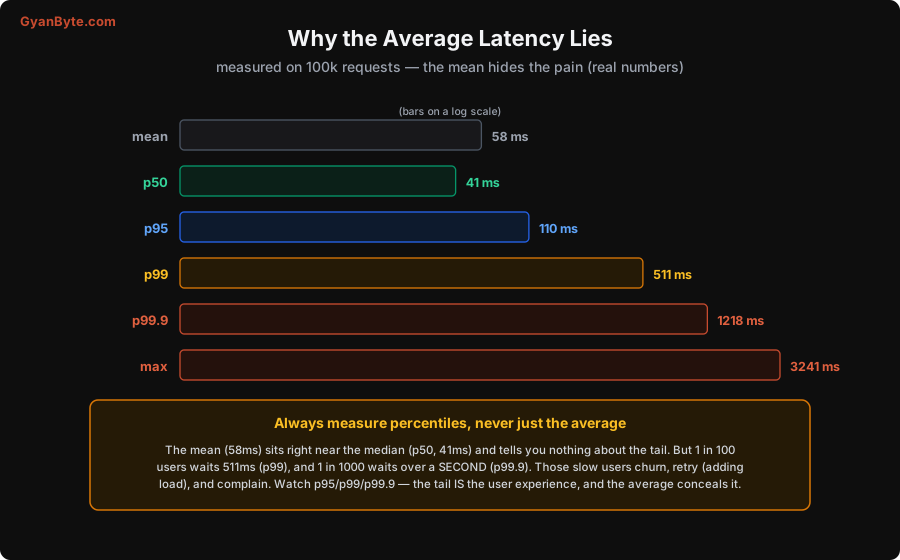
I measured 100,000 realistic requests. The results:
- mean = 58ms, sitting right next to the median (p50) = 41ms — so by the average, everything looks fine.
- But p95 = 110ms, p99 = 511ms, and p99.9 = 1,218ms (over a second), with a max of 3,241ms.
The average conceals the tail completely. One in a hundred users waits 511ms — nearly 10× the “average” — and one in a thousand waits over a second. These slow users are the ones who churn, who retry (adding more load, making it worse), and who complain. The average tells you none of this because it’s dominated by the fast majority.
So the rule is absolute: measure and watch percentiles, never just the average. Specifically p95, p99, and often p99.9 — the tail is the user experience for a meaningful slice of your users. This is why histograms (Lesson 4), not averages, are the right metric type for latency, and why dashboards (Lesson 7) and SLOs (Lesson 9) are built on percentiles. If you take one habit from this lesson: stop looking at average latency and start looking at p99.
Tail Amplification: p99 Becomes Everyone’s Problem
Here’s why the tail matters even more than it first appears — and the maths genuinely surprised people when it was first widely explained.
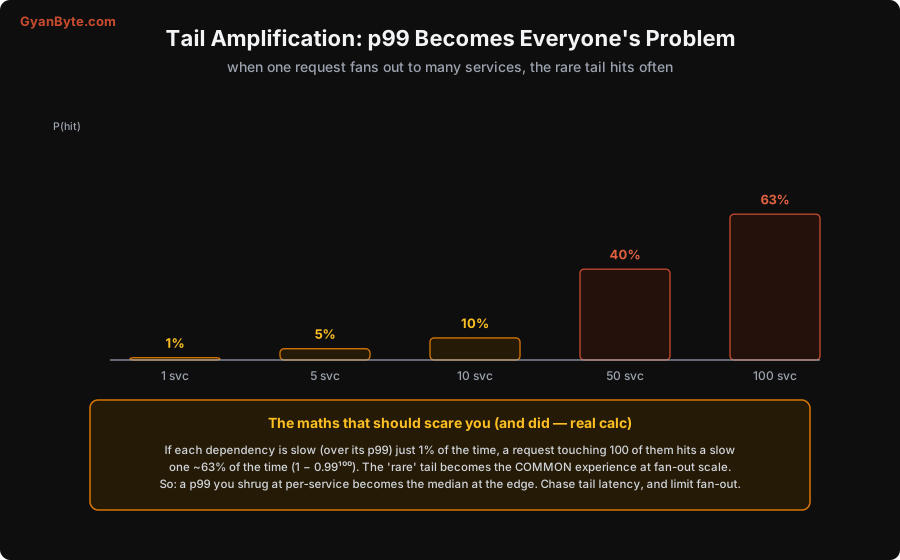
In a microservices system, one user request often fans out to many backend services (the edge calls dozens of services, each of which may call more), and the user waits for all of them. Now suppose each service is slow — over its p99 — just 1% of the time. Independently, how often does a request that touches N services hit at least one slow service? It’s 1 − 0.99ᴺ:
- 5 services → 4.9%
- 10 services → 9.6%
- 50 services → 39.5%
- 100 services → 63.4%
At 100 dependencies, ~63% of requests touch a “rare” 1%-slow service — so the thing you dismissed as a 1-in-100 tail becomes the common experience. This is tail amplification: at fan-out scale, a per-service p99 you shrugged at becomes close to the median experience at the edge. The practical lessons: chase tail latency (optimising p99, not the average, is what actually improves user experience at scale), and limit fan-out (fewer, parallelised, or hedged dependency calls — and techniques like request hedging, where you send a duplicate to a second replica and take the first response). The tail you ignore per-service is the user experience you deliver in aggregate.
Flame Graphs: Finding the Hot Code
Percentiles and traces tell you which service/request is slow; to find where in the code the time goes, you profile, and the best way to read a profile is a flame graph.
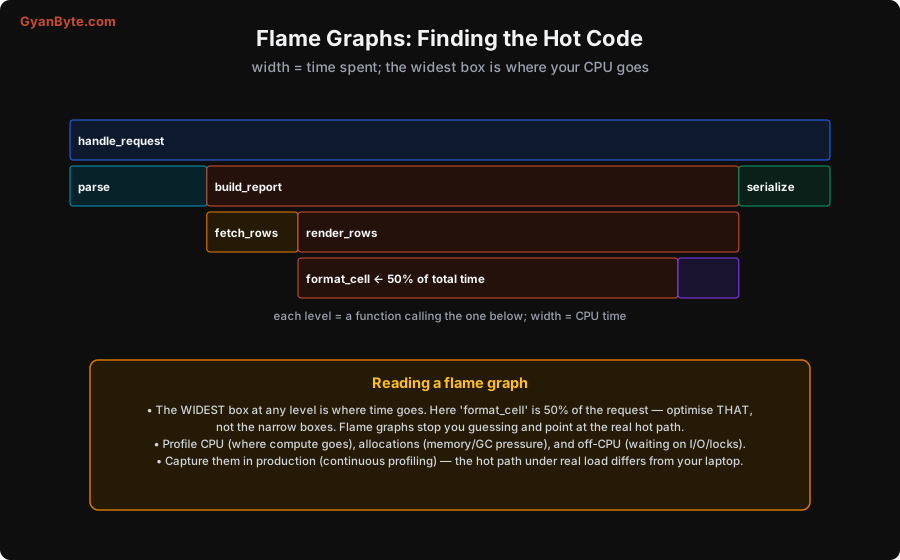
A flame graph shows your call stack with width = time spent. Each box is a function; the boxes below it are the functions it called; and the wider a box, the more time went through it. Reading it is simple and powerful: find the widest box at each level — that’s where the time goes. In the example, format_cell is 50% of the entire request — so that’s what to optimise, not the narrow boxes beside it. Flame graphs stop you from guessing (or optimising the function you assume is slow) and point you straight at the real hot path.
Three kinds of profiling, each finding a different kind of slowness:
- CPU profiling — where compute time goes (the classic flame graph). Finds expensive loops, inefficient algorithms.
- Allocation profiling — where memory is allocated, which drives garbage-collection pressure and pauses (a big source of tail latency in GC languages).
- Off-CPU profiling — where the code is waiting (on I/O, locks, network). Often the real culprit isn’t slow computation but waiting on a database or a contended lock — and a CPU profile alone misses it entirely.
And the key practice: profile in production, continuously. The hot path under real load, real data, and real concurrency is frequently different from what you see on your laptop with test data. Continuous profiling (low-overhead, always-on production profiling) captures the real hot path, so when a performance regression appears you can see exactly what changed. Guessing at performance from local testing is how teams optimise the wrong thing for weeks.
Pitfalls to Avoid
- Watching average latency. It hides the tail — the mean sat at 58ms while p99 was 511ms. Watch p95/p99/p99.9; the tail is the user experience.
- Ignoring the tail because it’s “rare.” Tail amplification makes a 1% per-service tail hit ~63% of requests at 100-way fan-out. Chase tail latency and limit fan-out.
- Guessing where the time goes. You’ll optimise the wrong function. Use flame graphs — the widest box is the real hot path.
- Only CPU profiling. Much slowness is waiting (I/O, locks). Use off-CPU and allocation profiling too, or you’ll miss the real cause.
- Profiling only on your laptop. The production hot path differs (real load, data, concurrency). Profile in production, continuously.
- Optimising before measuring. “I think this is slow” is how effort gets wasted. Measure (percentiles, traces, profiles) first, then optimise what’s actually hot.
Quick Recap
- The average latency lies: measured, mean 58ms ≈ p50 41ms, but p99 = 511ms, p99.9 > 1s. Always watch percentiles (p95/p99/p99.9) — the tail is the user experience.
- Tail amplification: if each dependency is 1%-slow, a 100-way fan-out hits a slow one ~63% of the time (1 − 0.99¹⁰⁰). Chase tail latency; limit fan-out.
- Flame graphs find the hot code: width = time, so the widest box is the hot path (one function was 50% of the request). Profile CPU, allocations, and off-CPU (waits).
- Profile in production, continuously — the real hot path differs from your laptop. Measure before you optimise.
Next lesson, the last: keeping all this affordable — the cost and cardinality engineering that stops your observability bill from exceeding the service it watches.