Metrics tell you something is slow; logs tell you what happened at one point. But in a system where a single request touches ten services, the critical question — where in that journey did the time go, or the failure happen? — is answered by neither. That’s what distributed tracing is for, and in a microservices world it’s often the pillar that turns an unsolvable mystery into an obvious fix. This lesson covers how traces work and, crucially, how to read one.
Spans and the Trace Waterfall
A trace represents one request’s complete journey. It’s made of spans — each span is one unit of work (a service handling the request, a database query, an external call), recording its start time, duration, parent span, and attributes (which DB, which user tier, the status). Spans form a tree: the root span is the overall request, its children are the services/operations it called, their children are what those called, and so on. When you lay that tree out against time, you get a waterfall — and reading it is the core tracing skill.
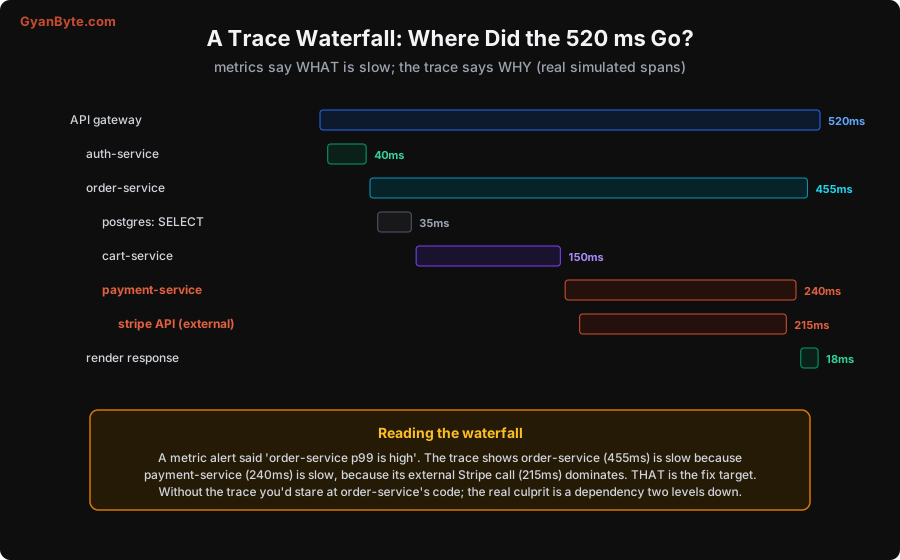
Read the waterfall top-down, following the widest bars. In this real (simulated) example, the whole request took 520ms. The API gateway span spans the whole thing. Under it, order-service took 455ms — most of the request. Why? Drill into its children: payment-service took 240ms, and within that, the external stripe API call took 215ms — that single external dependency, two levels deep, is where the time actually went. The postgres SELECT (35ms) and cart-service (150ms) weren’t the problem.
This is the whole value of tracing. A metric alert told you “order-service p99 is high.” Without a trace, you’d stare at order-service’s own code looking for the slowness — and find nothing, because the real culprit is an external Stripe call two services down. The trace points you straight at the fix target. In a distributed system, “where did the time go?” is almost never answerable without a trace, and it’s almost always the question that matters.
The Two Ideas That Make Tracing Work
Tracing feels magical, but it rests on two concrete mechanisms you have to get right.
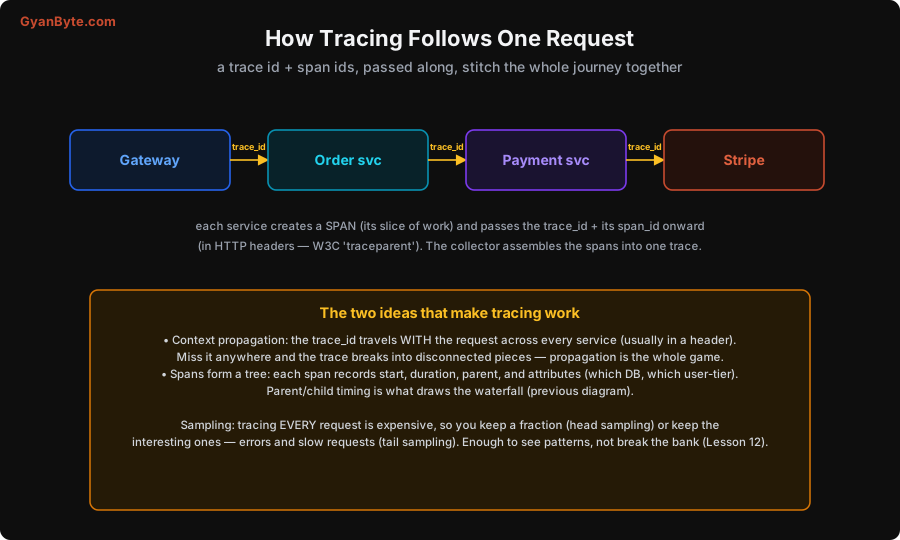
1. Context propagation. For spans from different services to be stitched into one trace, the trace ID must travel with the request across every hop — typically in an HTTP header (the W3C traceparent standard). Each service reads the incoming trace context, creates its own span as a child, and passes the trace ID (plus its span ID) onward to whatever it calls. A central collector then assembles all the spans sharing a trace ID into one trace. The critical implication: if propagation breaks anywhere — a service that doesn’t forward the header, a queue that drops it — the trace fragments into disconnected pieces, and you lose the end-to-end picture. Propagation is the whole game; it’s why you instrument consistently (and why OpenTelemetry, Lesson 6, matters — it standardises this).
2. Spans form a tree with timing. Each span records its parent, start, duration and attributes, so the collector can reconstruct the parent/child tree and draw the waterfall. The attributes (which database, which user tier, which endpoint) are also where high-cardinality detail lives safely (unlike metric labels, Lesson 4) — you can filter traces by user tier or endpoint without a cardinality explosion.
And the trace ID here is the same ID you put on every log line (Lesson 3) and that links from metrics (Lesson 2) — which is what lets you jump metric → trace → log for one request.
Sampling: You Can’t Trace Everything
Tracing every single request is expensive — the data volume is huge (Lesson 12) — so you sample: keep a representative or interesting subset.
- Head sampling decides at the start of a request whether to trace it (e.g. keep 5% of all requests). Simple and cheap, but it might miss the specific slow or failed request you care about, because the decision was made before you knew it’d be interesting.
- Tail sampling decides at the end, after seeing the whole trace, so you can always keep the interesting ones — the errors and the slow requests — and drop the boring fast successes. More useful for debugging, but needs buffering (the collector holds the trace until it’s complete).
The practical goal (Lesson 12): keep enough traces to see the patterns and catch the problems (always sample errors and slow requests) without tracing 100% and paying for it. You don’t need every trace; you need the ones that teach you something.
Using Traces in Practice
A few habits that make tracing pay off:
- Instrument the boundaries automatically, the business logic manually. Auto-instrumentation (Lesson 6) covers HTTP/DB/gRPC calls with little effort; add manual spans around your own significant operations (a complex computation, a batch step) so the waterfall shows your logic, not just framework calls.
- Put useful attributes on spans. User tier, endpoint, cache hit/miss, record counts — so you can filter and compare traces (“are slow requests all cache misses?”).
- Follow the waterfall, not your intuition. The whole point is that the slow part is often somewhere you didn’t expect (an external call, a dependency two levels down). Let the trace tell you where to look.
- Link traces to logs and metrics via the shared ID (Lessons 2–3) so you can pivot between pillars.
Pitfalls to Avoid
- Broken context propagation. A service or hop that doesn’t forward the trace ID fragments the trace and loses the end-to-end picture. Propagate consistently (use OpenTelemetry, Lesson 6).
- No tracing in a distributed system. Then “where did the time go across services?” is unanswerable — the one question that matters most. Instrument traces.
- Only auto-instrumentation. You see framework calls but not your own logic. Add manual spans around significant business operations.
- Tracing 100% of requests. Too expensive at scale. Sample — and use tail sampling to always keep errors and slow requests (Lesson 12).
- Head sampling only, then missing the bad request. If you decide at the start, you may drop the exact slow/failed trace you needed. Prefer keeping errors/slow via tail sampling.
- Staring at the wrong service. The metric names a slow service, but the trace often shows the real cause is a dependency deeper down. Follow the waterfall, not your assumption.
Quick Recap
- A trace follows one request across services as a tree of spans (each with start, duration, parent, attributes); their timing draws a waterfall.
- Read the waterfall top-down following the widest bars — the real example pinned a 520ms request on an external Stripe call two services deep, invisible without the trace.
- Two mechanisms: context propagation (the trace ID travels with the request via headers like
traceparent— break it and the trace fragments) and spans forming a timed tree. - Sample because you can’t trace everything: head (keep X% up front) or tail (keep errors and slow requests) — enough to see patterns without the full cost (Lesson 12).
- The trace ID is the same ID on your logs and from your metrics — the glue that lets you jump between pillars.
Next lesson: the standard that makes all three pillars portable and vendor-neutral — OpenTelemetry — one way to instrument logs, metrics and traces and send them anywhere.