Metrics are the workhorse of observability — the cheap, aggregatable numbers behind every dashboard (Lesson 7) and alert (Lesson 8). Because they’re so cheap, you can measure everything and keep the history, which makes them perfect for spotting trends and knowing what’s “normal.” But metrics have one sharp edge that will blow up your bill if you miss it — cardinality — so this lesson covers both the craft (what to measure, and how) and the trap (what never to do).
The Three Metric Types
Almost every metric is one of three types, and picking the right one matters.
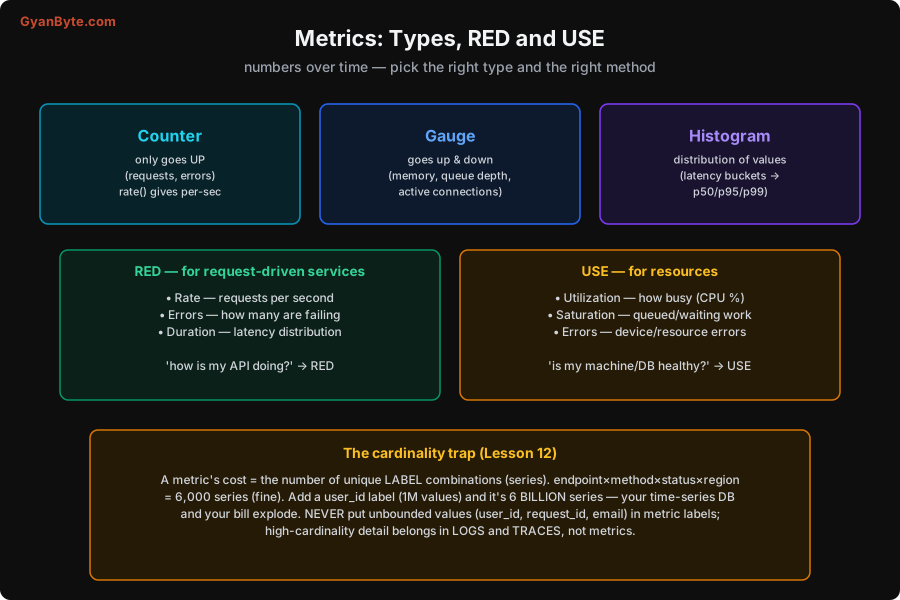
- Counter — a number that only ever goes up (total requests, total errors). You rarely read the raw total; instead you apply
rate()to get a per-second rate (“requests per second,” “errors per second”). Counters are for things that accumulate. - Gauge — a number that goes up and down (memory in use, queue depth, active connections, temperature). A gauge is a snapshot of a current value. Gauges are for levels that fluctuate.
- Histogram — captures the distribution of many values by bucketing them (e.g. latency into buckets), so you can compute percentiles (p50, p95, p99 — Lesson 11). This is how you measure latency properly, because the distribution is what matters, not the average (Lesson 11). Histograms are for measuring spread, especially latency.
Using the wrong type hurts: a counter where you needed a gauge gives nonsense; an average where you needed a histogram hides the tail. Match the type to what you’re measuring.
What to Measure: RED and USE
The hard question isn’t how to emit metrics — it’s which metrics matter. Two well-known methods answer this, each for a different thing.
RED — for request-driven services (your APIs, your web services):
- Rate — requests per second (how much traffic).
- Errors — how many requests are failing (the rate of 5xx, timeouts, wrong results).
- Duration — the latency distribution (p50/p95/p99).
RED answers “how is my service doing from the user’s point of view?” — and it’s the right default for almost any request-serving component. If you instrument nothing else on a service, instrument RED.
USE — for resources (CPU, memory, disks, connection pools, queues):
- Utilization — how busy the resource is (CPU %, memory %).
- Saturation — how much work is queued or waiting (run queue length, pool wait time) — often a better early warning than utilization.
- Errors — resource-level errors (disk errors, dropped packets).
USE answers “is this resource healthy?” and is how you find a saturated machine or an exhausted pool.
Closely related are the four golden signals (from Google’s SRE book), the four things to watch if you watch nothing else:
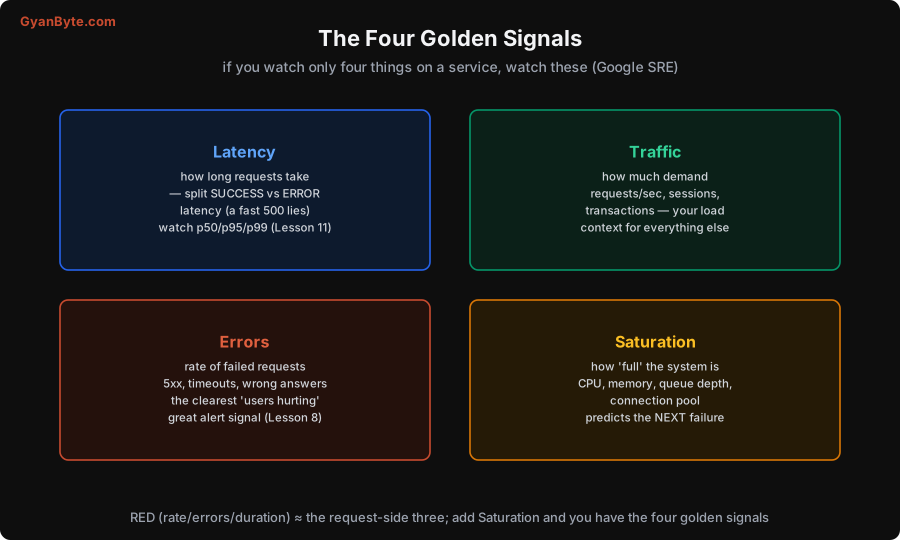
- Latency — how long requests take (and split successful vs failed latency — a fast error is still a failure, and lumping them hides problems).
- Traffic — how much demand (requests/sec), the context for everything else.
- Errors — the rate of failures, the clearest signal users are hurting (and your best alert signal, Lesson 8).
- Saturation — how “full” the system is, which predicts the next failure.
Notice RED ≈ the request-side three (rate/errors/duration), and adding Saturation gives you the four golden signals. These frameworks save you from the paralysis of “what should I even measure?” — start with RED on your services and USE on your resources, and you have the essentials.
The Cardinality Trap
Now the sharp edge, because it’s the mistake that explodes metrics bills and takes down time-series databases. A metric isn’t one number — it’s a number per unique combination of its labels, and each combination is a separate time series. The cost of a metric is the number of series, which is the product of its label value counts.
The measured example makes it vivid: a requests metric with labels endpoint (50 values) × method (4) × status (6) × region (5) = 6,000 series — perfectly fine. Now someone adds a user_id label with a million possible values: 6,000 × 1,000,000 = 6,000,000,000 series — six billion. Your time-series database (Prometheus, etc.) falls over, and your metrics bill goes to the moon.
The rule is absolute: never put unbounded or high-cardinality values in metric labels. That means no user_id, request_id, email, session_id, full url, or anything with a large, growing set of values. Labels must be low-cardinality — a bounded, small set (endpoint names, HTTP methods, status codes, regions). The high-cardinality per-request detail you do want belongs in logs and traces (Lessons 2, 3, 5), which are designed for it. Mixing the pillars up — stuffing per-request detail into metric labels — is the single most common and most expensive observability mistake. When you want to slice by user or request, that’s a logs/traces query, not a metric label.
A good habit: when adding a label, ask “how many distinct values can this have, ever?” If the answer is unbounded or large, it’s not a label — it’s a log field.
Pitfalls to Avoid
- Wrong metric type. A counter where you need a gauge, or an average where you need a histogram (hiding the tail, Lesson 11). Match the type to what you measure.
- No clear method. “What should I measure?” paralysis. Use RED for services, USE for resources, and watch the four golden signals.
- Averaging latency. The average lies (Lesson 11). Use histograms and watch p50/p95/p99.
- High-cardinality labels.
user_id/request_id/emailin labels explodes series count and cost (6,000 → 6 billion). Keep labels low-cardinality; put detail in logs/traces. - Lumping success and error latency. A fast error still failed; split them so a spike of fast 500s isn’t hidden by healthy-looking latency.
- Measuring everything and alerting on everything. Cheap to measure ≠ worth paging on. Measure broadly; alert narrowly on symptoms (Lesson 8).
Quick Recap
- Three metric types: counters (only up — use
rate()), gauges (up and down), histograms (distributions → percentiles). - Measure with method: RED (Rate, Errors, Duration) for request services; USE (Utilization, Saturation, Errors) for resources; the four golden signals (Latency, Traffic, Errors, Saturation) if you watch only four.
- Use histograms and percentiles for latency, not averages (Lesson 11).
- The cardinality trap: a metric’s cost = unique label combinations; a high-cardinality label (user_id) explodes 6,000 series into 6 billion. Never put unbounded values in metric labels — detail goes in logs/traces (Lesson 12).
Next lesson: the third pillar — distributed tracing — following one request across services, reading the trace waterfall, and the context propagation and sampling that make it work.