Everything in this course so far — the loop, the channels, the transports, STT/TTS, the LLM brain, Pipecat, latency, knowledge — assembles into real systems that do real work. This lesson makes it concrete: one use case worked end to end (a government-schemes helpline, which you asked about), and then a gallery of other proven use cases (including visitor management/gatepass) showing how the same engine serves very different jobs with small changes.
Worked Example: A Government-Schemes Helpline
India has hundreds of government schemes, differing by state, with eligibility rules that ordinary citizens find hard to navigate — and the people who most need them often can’t easily use a website or app. A voicebot helpline is a genuinely high-impact fit: call a number, ask in your language, find out what you’re entitled to and how to get it.
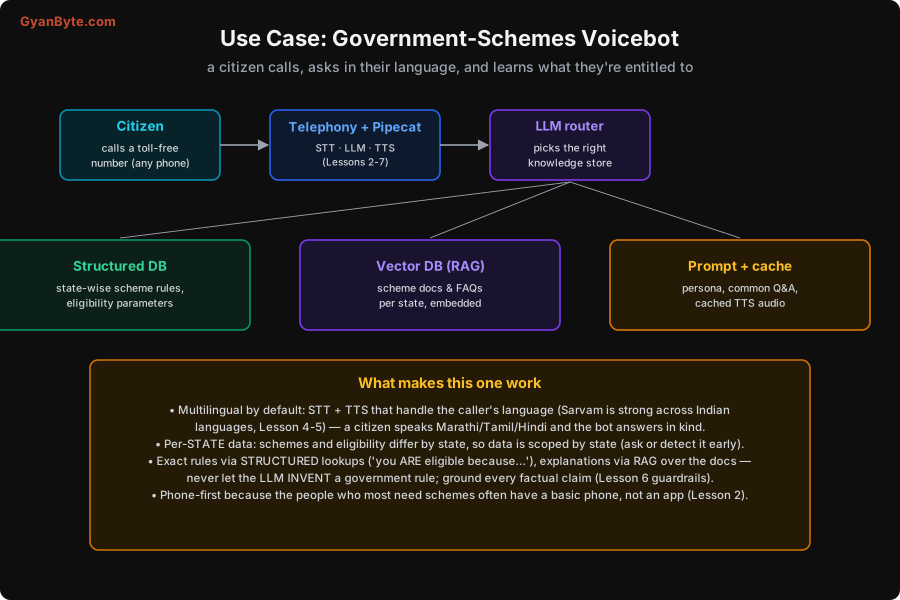
The architecture is everything you’ve learned, wired together: a citizen calls a toll-free number (telephony, Lesson 2) → Pipecat runs STT→LLM→TTS (Lessons 4–7) → an LLM router picks the right knowledge store (Lesson 9) among a structured DB (state-wise rules, eligibility), a vector DB (scheme docs for RAG), and prompt + cache (persona, common answers). What makes this use case work well:
- Multilingual by default. The STT and TTS must handle the caller’s language — this is exactly where Sarvam earns its place (Lessons 4–5). A citizen speaks Marathi, Tamil or Hindi and the bot answers in kind. Often you detect or ask the language early (Lesson 4) and set both STT and TTS to match.
- Per-state data. Schemes and eligibility differ by state, so the data is scoped by state — you ask or detect the caller’s state early and everything downstream (which rules, which documents) is filtered to it.
- Grounded, never invented. Exact eligibility comes from structured lookups (“you are eligible because your income is below ₹X and you’re in category Y”); explanations come from RAG over the scheme documents. The one unbreakable rule (Lesson 6 guardrails): never let the LLM invent a government rule or entitlement. A hallucinated scheme detail isn’t a glitch; it’s harmful misinformation to someone who may act on it.
- Phone-first. The audience is precisely the people who may have a basic phone and no app or data (Lesson 2). Telephony isn’t a nice-to-have here; it’s the whole point.
Here’s how a grounded, multilingual conversation actually flows:
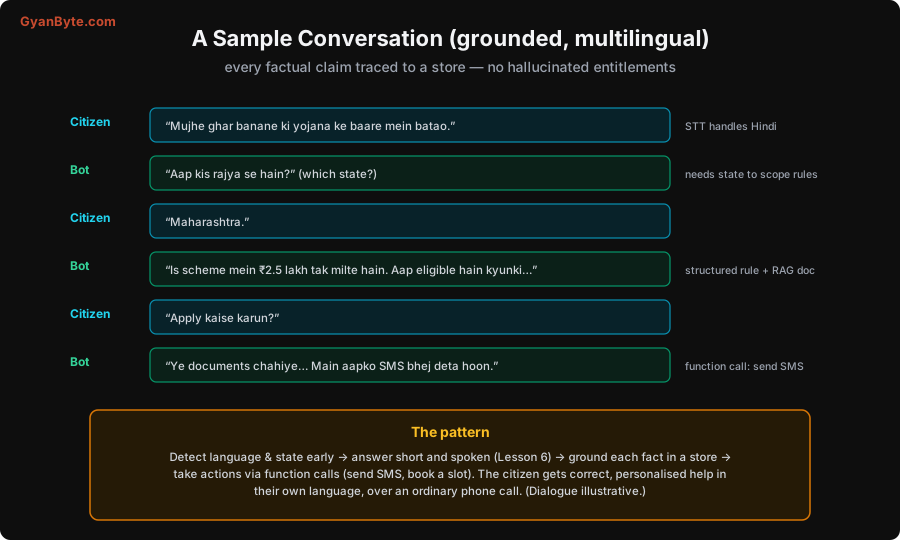
The pattern to copy: detect language and state early → answer short and spoken (Lesson 6) → ground each fact in a store → take actions via function calls (send an SMS with the document list, book a slot). The citizen gets correct, personalised help, in their own language, over an ordinary phone call. (Dialogue illustrative — but the structure is exactly how you’d build it.)
A Gallery of Use Cases
The real power is that this same engine — the shared brain plus swappable transport (Lesson 2) and knowledge stores (Lesson 9) — serves many different jobs. You change three things per use case: the data model (structured vs RAG), the channel (phone vs browser), and whether it’s inbound or outbound.
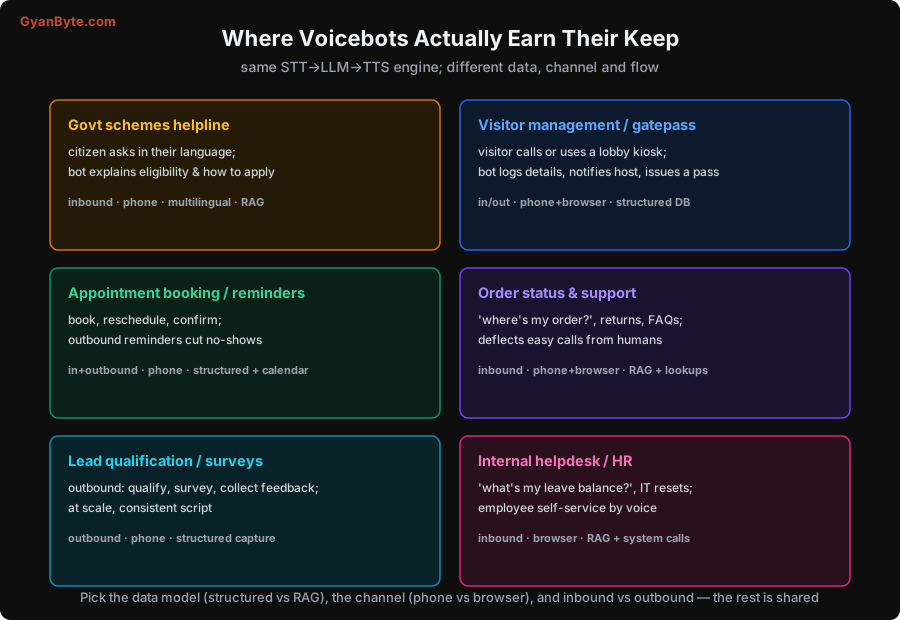
Walking the gallery:
- Visitor management / gatepass. A visitor calls ahead or talks to a lobby kiosk (browser/WebRTC); the bot collects their details, notifies the host, and issues a gatepass (an SMS/QR). This is mostly structured data — visitor records, host directory, pass generation via function calls (Lesson 6) — with little or no RAG. It’s a lovely fit because the interaction is short, repetitive and rule-based, and works on both a phone (call ahead) and a kiosk (on arrival).
- Appointment booking & reminders. Book, reschedule, confirm — inbound — and outbound reminders that cut no-shows. Structured data plus a calendar integration. The outbound-reminder pattern (the bot calls you) is a different flow worth noting: it’s proactive, scripted, and consent-sensitive (Lesson 13).
- Order status & support. “Where’s my order?”, returns, FAQs — deflecting the easy, high-volume calls from human agents. This mixes structured lookups (order status) with RAG (policy/FAQ explanations), over phone and browser.
- Lead qualification / surveys. Outbound at scale — qualify leads, run surveys, collect feedback — with a consistent script and structured capture of answers. Voice reaches people who won’t fill a form.
- Internal helpdesk / HR. Employee self-service by voice — “what’s my leave balance?”, IT password resets — usually in-browser, mixing RAG (policies) with system calls (HR/IT systems).
The lesson of the gallery: the engine is shared; the use case is a configuration. Once you’ve built the STT→LLM→TTS pipeline with swappable transports and knowledge stores, a new use case is mostly new data, new tools, and a new prompt — not a new system. That’s why the earlier lessons insisted on modularity (Lessons 2, 7, 9): it’s what makes you able to ship the second and third use case quickly after the first.
Designing a New Use Case: the Checklist
When you take on a new voicebot, answer these (each maps to a lesson):
- Channel: phone, browser, or both? (Lesson 2 — who are your users?)
- Inbound or outbound? (Outbound is scripted and consent-sensitive — Lesson 13.)
- Languages? (Lesson 4–5 — drives STT/TTS choice.)
- Knowledge: prompt facts, structured lookups, RAG, or a mix? (Lesson 9.)
- Actions: what tools does it need (lookup, book, issue, notify, send SMS)? (Lesson 6.)
- Grounding & guardrails: what must never be invented? (Lesson 6 — critical for govt/health/money.)
- Escalation: when does it hand off to a human? (Lesson 12.)
- Cost & scale: expected volume, and the per-minute budget? (Lesson 11.)
Answer those and you’ve essentially designed the bot; the rest is assembling the components you now know.
Pitfalls to Avoid
- Letting the bot invent facts in high-stakes domains. For government rules, eligibility, health or money, ground every claim (structured + RAG, Lesson 9) and never let the LLM guess. Misinformation here causes real harm.
- One-size-fits-all data. Scheme rules differ by state; visitor data is structured; FAQs are RAG. Scope and model the data to the use case (Lesson 9).
- Defaulting to browser for citizen services. The audience that needs schemes often has only a basic phone. Lead with telephony (Lesson 2).
- Ignoring language detection. Multilingual users won’t all speak your default. Detect or ask early and set STT/TTS to match (Lesson 4).
- No actions, just talk. A gatepass bot that can’t actually issue a pass, or a booking bot that can’t book, is useless. Give it tools (Lesson 6).
- Rebuilding the system per use case. The engine is shared; a new use case is new data, tools and prompt. If you’re rewriting the pipeline each time, your architecture is wrong (Lessons 2, 7).
Quick Recap
- The government-schemes helpline assembles the whole course: telephony + Pipecat + multilingual STT/TTS (Sarvam) + an LLM router over structured rules (eligibility), RAG (scheme docs), and prompt+cache — scoped per state, grounded (never inventing rules), phone-first.
- The same engine serves a gallery: visitor management/gatepass (structured, phone+kiosk), appointment booking/reminders, order status & support (RAG + lookups), outbound surveys, internal helpdesk.
- A new use case = choose the data model (structured vs RAG), channel (phone vs browser), and inbound vs outbound — the rest is shared.
- Use the design checklist (channel, in/outbound, languages, knowledge, actions, grounding, escalation, cost) to spec any new voicebot.
Next lesson: the question that decides whether your voicebot is viable — cost — with a worked ₹-per-minute breakdown and the levers that make it up to ~6× cheaper.