A voicebot that can only chat is a toy; a useful one knows things — your schemes, your orders, your rules, your policies. The reflexive answer these days is “add RAG” (retrieval over a vector database). But RAG is often the wrong tool, adding infrastructure, latency and cost you don’t need, and sometimes giving worse answers than a simpler approach. This lesson is about giving your voicebot knowledge the right way: knowing when to RAG, when not to, and how to store information so answers are correct and cheap.
Three Ways to Give a Bot Knowledge
There are three options, and the art is matching each kind of knowledge to the right one.
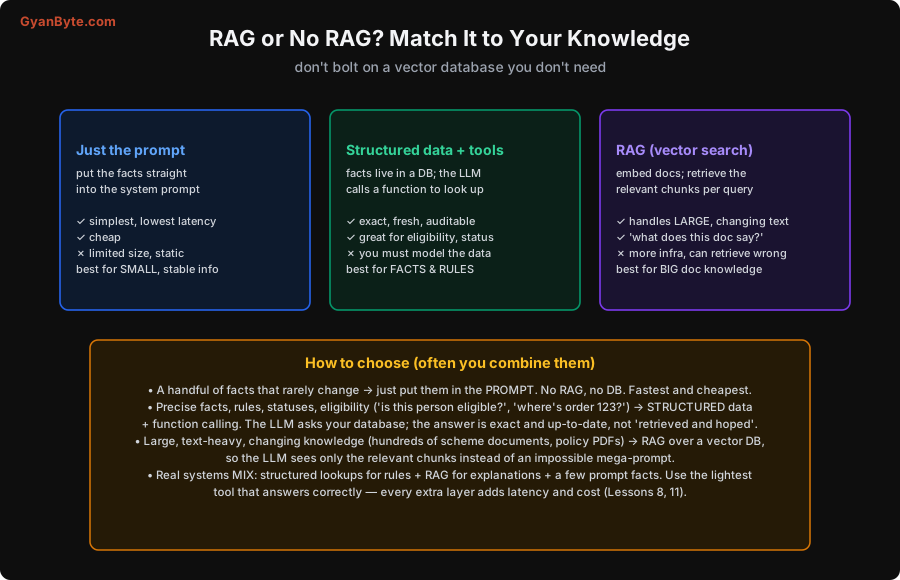
1. Just the prompt. Put the facts straight into the system prompt. “You are a helpdesk bot. Our hours are 9–6. Returns are allowed within 30 days.” Simplest possible, lowest latency (no lookup), cheapest — but limited in size and static (changing it means editing the prompt). Best for a small, stable set of facts: your persona, hours, a few policies.
2. Structured data + tools. The facts live in a database, and the LLM calls a function (Lesson 6) to look them up: get_order_status(123), check_eligibility(user, scheme). The answer is exact, fresh, and auditable — it comes straight from your system of record, not from the model’s memory or a fuzzy retrieval. You have to model the data, but you get precision. Best for facts, rules, statuses, eligibility — anything where the answer must be correct and current, not approximate.
3. RAG (retrieval over a vector DB). You embed your documents into vectors, and at query time retrieve the most relevant chunks to give the LLM as context (see the companion article on vector databases). Best for large, changing, text-heavy knowledge — hundreds of scheme documents, policy PDFs, FAQs — where you can’t fit everything in a prompt and the question is “what do these documents say about X?” The cost: more infrastructure, more latency, and it can retrieve the wrong chunks and mislead the model.
How to Choose (and Combine)
The decision rule: use the lightest tool that answers correctly.
- A handful of facts that rarely change → put them in the prompt. No RAG, no database. Fastest and cheapest. Don’t build retrieval infrastructure for ten facts.
- Precise facts, rules, statuses, eligibility (“is this person eligible?”, “where’s order 123?”, “is this visitor expected?”) → structured data + function calling. This is the one people most often get wrong by reaching for RAG. Eligibility is a rule, not a document to retrieve — compute it against structured data and the answer is exact and up-to-date. RAG would “retrieve and hope,” which for a rule is worse.
- Large, text-heavy, changing knowledge (explaining a scheme in detail, answering open-ended “what does the policy say about…”) → RAG over a vector DB, so the LLM sees only the relevant chunks instead of an impossible mega-prompt.
And the key realisation: real systems mix all three. A government-schemes bot (Lesson 10) uses structured lookups for eligibility rules, RAG for explaining the scheme documents, and prompt facts for the persona and common answers — routing each question to the right store. You don’t pick one; you use each where it fits. The thing to avoid is the lazy default of “RAG everything,” which adds latency (Lesson 8) and cost (Lesson 11) and can make factual answers less reliable than a structured lookup.
How to Store the Information
Concretely, that means three stores, each answering a different kind of question.
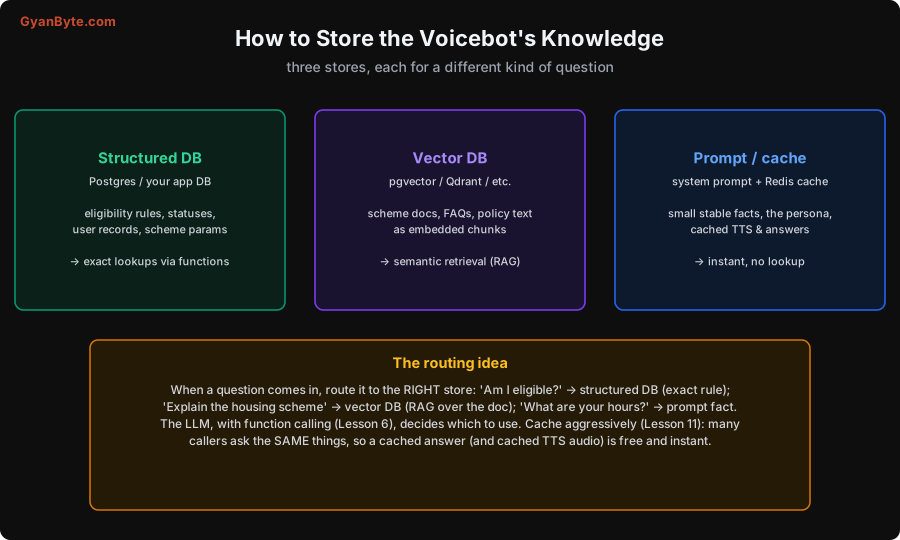
- Structured DB (Postgres or your app DB): eligibility rules, statuses, user records, scheme parameters. Answered by exact function lookups.
- Vector DB (pgvector on Postgres, or Qdrant/Weaviate/etc.): documents, FAQs, policy text, stored as embedded chunks. Answered by semantic retrieval (RAG). (Note: if you already run Postgres, pgvector often means you need no new database for RAG — a nice simplification.)
- Prompt + cache (system prompt plus a Redis cache): small stable facts, the persona, and cached answers and TTS audio. Answered instantly, with no lookup.
The routing idea ties it together: when a question comes in, send it to the right store — “Am I eligible?” → structured DB (exact rule); “Explain the housing scheme” → vector DB (RAG over the doc); “What are your hours?” → prompt fact. The LLM, with function calling (Lesson 6), decides which to use. And cache aggressively (Lesson 11): in a voicebot, many callers ask the same things, so a cached answer — and cached TTS audio (Lesson 5) for it — is free and instant, cutting both latency and cost.
Pitfalls to Avoid
- RAG-ing everything by default. It adds infrastructure, latency and cost, and can make factual answers less reliable. Use the lightest tool that answers correctly.
- Using RAG for exact facts and rules. Eligibility and statuses are computed against structured data, not “retrieved and hoped.” Use function calls on a real DB.
- Stuffing a huge knowledge base into the prompt. It’s slow, costly, and hits context limits. Large document knowledge belongs in RAG.
- Building a vector DB for a handful of facts. Put small, stable info in the prompt. Don’t over-engineer tiny knowledge.
- Letting RAG mislead the bot. Retrieval can fetch wrong chunks; ground critical facts in structured data and prompt the model to say “let me check” (Lesson 6).
- Not caching. Callers repeat the same questions; cache answers and TTS audio to cut latency and cost (Lesson 11).
Quick Recap
- Three ways to give a bot knowledge: prompt (small, stable facts — cheapest, fastest), structured data + tools (exact rules, statuses, eligibility), and RAG (large, changing document knowledge).
- Choose the lightest tool that answers correctly: a few facts → prompt; precise rules → structured lookups (not RAG); big documents → RAG.
- Real systems mix all three, routing each question to the right store; the LLM uses function calling to pick.
- Store accordingly — structured DB, vector DB (pgvector if you’re on Postgres), prompt+cache — and cache aggressively (answers and TTS audio) to cut latency and cost.
Next lesson: putting it all together in real use cases — a government-schemes helpline worked end to end, plus a gallery (visitor management/gatepass, support, outbound) showing how the same engine serves different jobs.