You’ve been writing tests for years. You know the value of a good test suite and the pain of a flaky one. Testing React is different from testing a REST API, but the core principles are the same: test behavior, not implementation.
The biggest mistake backend engineers make when testing React is treating component internals like they’d treat a class’s private methods. You wouldn’t test that your service called a specific DAO method — you’d test that the API endpoint returns the right response. Apply the same thinking to React: don’t test that setState was called. Test that the user sees the right thing on screen.
What to Test and What to Skip
Test these:
- User interactions — clicking a button shows a modal, submitting a form triggers a success message
- Conditional rendering — admin users see the delete button, regular users don’t
- Data display — fetched data renders in the correct format
- Error states — network failure shows an error message, not a blank screen
- Accessibility — elements have correct roles and labels
Skip these:
- Internal state values — don’t assert that
useStateholds a specific value - Implementation details — don’t test which helper function was called internally
- CSS/styling — unless visual correctness is critical to your feature
- Third-party libraries — React Router, React Query, etc. are already tested
Backend analogy: You test your /api/users endpoint by sending a request and checking the response. You don’t test that the controller called userService.findAll(). Same principle — test the output, not the wiring.
React Testing Library Basics
React Testing Library (RTL) is the standard. Its guiding principle: “The more your tests resemble the way your software is used, the more confidence they give you.”
The basic pattern has three steps:
import { render, screen } from '@testing-library/react';
import userEvent from '@testing-library/user-event';
import Greeting from './Greeting';

test('shows personalized greeting', () => {
  // 1. Render the component
  render(<Greeting name="Backend Engineer" />);

  // 2. Query the DOM (like a user would see it)
  const heading = screen.getByText('Hello, Backend Engineer!');

  // 3. Assert
  expect(heading).toBeInTheDocument();
});
That’s it. Render, query, assert. If you’ve used JUnit or pytest, this pattern feels familiar — setup, act, assert.
Screen Queries — Finding Elements
RTL provides a hierarchy of queries, ordered by preference:
// BEST: Query by role (how screen readers see it)
screen.getByRole('button', { name: 'Submit' });
screen.getByRole('heading', { level: 2 });
screen.getByRole('textbox', { name: 'Email' });

// GOOD: Query by label text (form elements)
screen.getByLabelText('Email address');

// GOOD: Query by placeholder or text
screen.getByPlaceholderText('Search...');
screen.getByText('No results found');

// LAST RESORT: Query by test ID
screen.getByTestId('user-avatar');
Why this order? Role-based queries test what the user (and assistive technology) actually sees. If getByRole('button') can’t find your button, your button might not be accessible — the test failure reveals a real problem.
Backend analogy: It’s like testing your API by calling the public endpoint rather than directly querying the database. The public interface is what matters.
Query variants:
getBy*— throws if not found (use for elements that should exist)queryBy*— returns null if not found (use for asserting absence)findBy*— returns a promise, waits for element to appear (use for async rendering)
// Assert element IS present
expect(screen.getByText('Welcome')).toBeInTheDocument();

// Assert element IS NOT present
expect(screen.queryByText('Error')).not.toBeInTheDocument();

// Wait for async element
const userName = await screen.findByText('John Doe');
Testing User Interactions
Use userEvent (not fireEvent) for realistic interaction simulation:
import userEvent from '@testing-library/user-event';

test('form submission shows success message', async () => {
  const user = userEvent.setup();
  render(<LoginForm />);

  // Type into inputs
  await user.type(screen.getByLabelText('Email'), '[email protected]');
  await user.type(screen.getByLabelText('Password'), 'secret123');

  // Click submit
  await user.click(screen.getByRole('button', { name: 'Log In' }));

  // Assert result
  expect(await screen.findByText('Welcome back!')).toBeInTheDocument();
});
userEvent simulates real browser events — focus, keydown, keyup, input, change — in the correct order. fireEvent just dispatches a single synthetic event. Always prefer userEvent.
Testing Custom Hooks
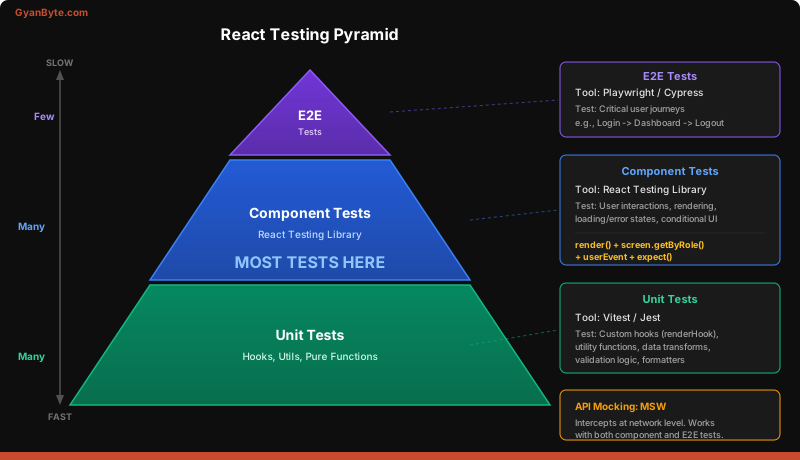
Custom hooks can’t be tested by calling them directly — they must run inside a component. RTL provides renderHook:
import { renderHook, act } from '@testing-library/react';
import useCounter from './useCounter';

test('increments counter', () => {
  const { result } = renderHook(() => useCounter(0));

  expect(result.current.count).toBe(0);

  act(() => {
    result.current.increment();
  });

  expect(result.current.count).toBe(1);
});
Backend analogy: renderHook is like creating a test harness for a service that requires dependency injection. The hook needs a React component context to run, and renderHook provides a minimal one.
When to test hooks directly: Only for reusable hooks with complex logic. If a hook is only used in one component, test it through that component instead.
Mocking API Calls with MSW
Mock Service Worker (MSW) intercepts HTTP requests at the network level. Your component’s fetch or axios calls work exactly as they do in production — MSW just returns controlled responses:
import { http, HttpResponse } from 'msw';
import { setupServer } from 'msw/node';

// Set up mock API handlers
const server = setupServer(
  http.get('/api/users', () => {
    return HttpResponse.json([
      { id: 1, name: 'Alice', role: 'admin' },
      { id: 2, name: 'Bob', role: 'viewer' },
    ]);
  })
);

beforeAll(() => server.listen());
afterEach(() => server.resetHandlers());
afterAll(() => server.close());
Backend analogy: MSW is like WireMock for Java or responses for Python. It’s a test double at the HTTP boundary. Your component code doesn’t know or care that responses are mocked — the network layer is intercepted transparently.
Why MSW over mocking fetch directly? Mocking fetch or axios couples your tests to implementation. If you switch from fetch to axios, every mock breaks. MSW doesn’t care which HTTP client you use.
Full Example: Testing a UserList Component
Here’s a complete test for a component that fetches data, shows a loading state, renders users, and handles errors:
import { render, screen } from '@testing-library/react';
import { http, HttpResponse } from 'msw';
import { setupServer } from 'msw/node';
import UserList from './UserList';

const server = setupServer(
  http.get('/api/users', () => {
    return HttpResponse.json([
      { id: 1, name: 'Alice' },
      { id: 2, name: 'Bob' },
    ]);
  })
);

beforeAll(() => server.listen());
afterEach(() => server.resetHandlers());
afterAll(() => server.close());

test('shows loading state then renders users', async () => {
  render(<UserList />);

  // Loading state appears immediately
  expect(screen.getByText('Loading...')).toBeInTheDocument();

  // Users appear after fetch completes
  expect(await screen.findByText('Alice')).toBeInTheDocument();
  expect(screen.getByText('Bob')).toBeInTheDocument();

  // Loading state is gone
  expect(screen.queryByText('Loading...')).not.toBeInTheDocument();
});

test('shows error message on API failure', async () => {
  // Override the default handler for this test
  server.use(
    http.get('/api/users', () => {
      return new HttpResponse(null, { status: 500 });
    })
  );

  render(<UserList />);

  expect(await screen.findByText('Failed to load users')).toBeInTheDocument();
});

test('shows empty state when no users exist', async () => {
  server.use(
    http.get('/api/users', () => {
      return HttpResponse.json([]);
    })
  );

  render(<UserList />);

  expect(await screen.findByText('No users found')).toBeInTheDocument();
});
Notice the pattern: each test focuses on one scenario. The happy path, the error path, and the empty state. This is exactly how you’d test a backend endpoint — you’d write separate tests for 200, 500, and empty results.
Test Organization
Structure your test files to mirror your component files:
src/
  components/
    UserList/
      UserList.jsx
      UserList.test.jsx     ← co-located test
  hooks/
    useAuth.js
    useAuth.test.js         ← co-located test
  __mocks__/
    handlers.js             ← shared MSW handlers
    server.js               ← MSW server setup
Co-locating tests with components makes them easy to find and keeps related files together. This is similar to how some backend projects keep UserServiceTest.java next to UserService.java.
What Makes a Good React Test
A good React test has these properties:
- Tests behavior, not implementation — Would the test break if you refactored the component without changing what the user sees? If yes, the test is too coupled.
- Reads like a user story — “When I click the submit button, I see a success message.” Not “When handleSubmit is called, setState is invoked with {submitted: true}.”
- Doesn’t test third-party code — Trust that React Router navigates correctly. Test that your component renders the right
<Link>, not that clicking it changes the URL. - Fails for the right reason — If the test fails, it should be because the feature is broken, not because an internal variable name changed.
Key Takeaways
- Test from the user’s perspective using React Testing Library. Query by role and text, not by class names or internal state.
- Use MSW for API mocking — it intercepts at the network level, keeping tests decoupled from your HTTP client choice.
- Most React tests should be component tests — they give the best confidence-to-effort ratio. Unit test complex hooks, and save E2E tests for critical user flows.
Next, we’ll put everything together and build a real project — a dashboard that uses every concept from this course.