Performance is the topic every backend engineer wants to talk about on day one. You’re used to flame graphs, P99 latencies, and database query plans. The good news: React has equivalent tools. The better news: you probably don’t need most of them yet.
The single most important performance lesson in React is this: don’t optimize until you’ve measured a problem. Premature optimization in React causes more bugs than it fixes. Let’s understand why, then learn the tools for when you genuinely need them.
How React Re-Rendering Works
When a component’s state changes, React re-renders that component and every child in its subtree. This is the mental model you need:
function Parent() {
  const [count, setCount] = useState(0);

  return (
    <div>
      <h1>Count: {count}</h1>
      <button onClick={() => setCount(c => c + 1)}>Increment</button>
      <ExpensiveChild />   {/* Re-renders even though it doesn't use count */}
      <AnotherChild />     {/* Also re-renders */}
    </div>
  );
}
Every time you click that button, ExpensiveChild and AnotherChild re-render — even though they receive no props related to count.
Backend analogy: Think of it like a cascading cache invalidation. You update one row in a table, and every materialized view that depends on that table gets recomputed — even if the specific columns they care about didn’t change.
Here’s the critical insight: most re-renders are fast and harmless. React’s virtual DOM diffing is extremely efficient. A component “re-rendering” doesn’t mean the browser repaints the entire screen. React diffs the virtual DOM, finds what actually changed, and only touches those real DOM nodes. For 95% of apps, the default behavior is perfectly fine.
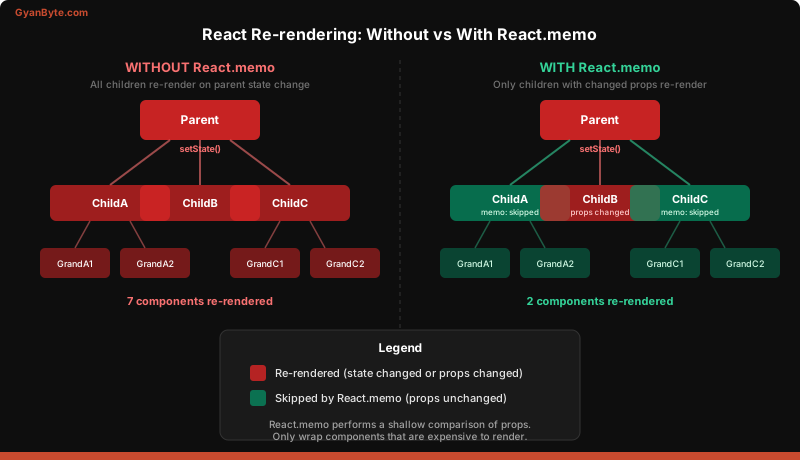
React.memo — Skip Re-renders When Props Haven’t Changed
When you have a genuinely expensive child component, wrap it with React.memo:
const ExpensiveChild = React.memo(function ExpensiveChild({ data }) {
  // Complex rendering logic
  return <div>{/* ... */}</div>;
});
Now ExpensiveChild only re-renders when its data prop actually changes (shallow comparison).
Backend analogy: This is like HTTP conditional requests. The browser sends an If-None-Match header with the ETag. If nothing changed, the server returns 304 Not Modified and skips the response body. React.memo is React’s 304 — if props haven’t changed, skip the render.
When to use it: Only when a component is noticeably slow to render, and its parent re-renders frequently with unchanged props. Don’t wrap every component in React.memo by default — the comparison itself has a cost.
useMemo — Cache Expensive Computations
useMemo memoizes a computed value. It only recalculates when its dependencies change:
function UserTable({ users, searchTerm }) {
  // Without useMemo: filters on EVERY render
  // With useMemo: only filters when users or searchTerm change
  const filteredUsers = useMemo(() => {
    return users.filter(user =>
      user.name.toLowerCase().includes(searchTerm.toLowerCase())
    );
  }, [users, searchTerm]);

  return (
    <table>
      {filteredUsers.map(user => (
        <tr key={user.id}><td>{user.name}</td></tr>
      ))}
    </table>
  );
}
Backend analogy: A computed column in a database view, or a Redis cache key that only gets recomputed when the underlying data changes. The dependency array is your cache key.
When to use it: When you have an expensive computation (filtering thousands of items, heavy data transformations) that runs on every render. Don’t use it for trivial operations — the overhead of memoization exceeds the cost of just recomputing.
useCallback — Cache Function References
Every time a component renders, any inline functions are recreated as new references:
function Parent() {
  const [count, setCount] = useState(0);

  // New function object created on every render
  const handleClick = () => console.log('clicked');

  // MemoizedChild re-renders because handleClick is a new reference each time!
  return <MemoizedChild onClick={handleClick} />;
}
useCallback fixes this by returning the same function reference across renders:
const handleClick = useCallback(() => {
  console.log('clicked');
}, []); // Empty deps = same function forever
Backend analogy: Imagine you have an object pool in Java. Instead of creating a new Runnable instance for every request, you reuse the same one. useCallback is React’s object pooling for functions.
When to use it: Only when passing callbacks to React.memo-wrapped children. If the child isn’t memoized, useCallback does nothing useful — you’re caching a reference that nobody checks.
Code Splitting with React.lazy and Suspense
Your backend app doesn’t load every module at startup — it lazy-loads what it needs. React can do the same with JavaScript bundles:
import { lazy, Suspense } from 'react';

// AdminPanel JS is NOT included in the main bundle
const AdminPanel = lazy(() => import('./AdminPanel'));

function App() {
  return (
    <Routes>
      <Route path="/dashboard" element={<Dashboard />} />
      <Route
        path="/admin"
        element={
          <Suspense fallback={<div>Loading admin...</div>}>
            <AdminPanel />
          </Suspense>
        }
      />
    </Routes>
  );
}
The AdminPanel bundle is only downloaded when a user navigates to /admin. This can dramatically reduce your initial page load time.
Backend analogy: Lazy-loading a Python module or dynamically importing a Java class. You don’t load the PDF generation library until someone actually requests a PDF.
When to use it: Route-level code splitting is almost always worth doing. Split any route that only a subset of users visit (admin, settings, reports).
Profiling with React DevTools
React DevTools includes a Profiler tab that records component renders and shows you exactly what’s slow:
- Open React DevTools in Chrome/Firefox
- Go to the Profiler tab
- Click Record, interact with your app, click Stop
- Examine the flame graph — each bar is a component render with its duration
The Profiler answers: “Why did this component render?” It will tell you whether it was a state change, a prop change, or a parent re-render.
Backend analogy: This is your APM tool. Think Datadog flame graphs or New Relic transaction traces. Instead of tracing HTTP requests through microservices, you’re tracing renders through the component tree.
Key metrics to look for:
- Components rendering more than 16ms (they’ll cause dropped frames at 60fps)
- Components rendering when their output doesn’t change
- Components rendering too frequently (e.g., on every keystroke)
Putting It Together: Optimizing an Expensive List
Here’s a real optimization combining useMemo, useCallback, and React.memo:
// Memoized row component — only re-renders when its specific props change
const UserRow = React.memo(function UserRow({ user, onSelect }) {
  return (
    <tr onClick={() => onSelect(user.id)}>
      <td>{user.name}</td>
      <td>{user.email}</td>
      <td>{user.role}</td>
    </tr>
  );
});

function UserTable({ users }) {
  const [search, setSearch] = useState('');
  const [selectedId, setSelectedId] = useState(null);

  // Memoize the filtered list — only recompute when users or search change
  const filtered = useMemo(() => {
    return users.filter(u =>
      u.name.toLowerCase().includes(search.toLowerCase())
    );
  }, [users, search]);

  // Stable function reference so UserRow's React.memo works
  const handleSelect = useCallback((id) => {
    setSelectedId(id);
  }, []);

  return (
    <div>
      <input
        value={search}
        onChange={e => setSearch(e.target.value)}
        placeholder="Search users..."
      />
      <table>
        <tbody>
          {filtered.map(user => (
            <UserRow
              key={user.id}
              user={user}
              onSelect={handleSelect}
            />
          ))}
        </tbody>
      </table>
    </div>
  );
}
Without optimization, typing in the search box would re-render every single UserRow on every keystroke — even rows that haven’t changed. With these three tools working together, only the rows that actually match the filter re-render.
The Optimization Decision Framework
Before reaching for any optimization tool, ask:
- Is there an actual performance problem? Use the Profiler to measure. If the app feels fast, stop here.
- Can I reduce the amount of state? Moving state closer to where it’s used (Lesson 5) often eliminates unnecessary re-renders entirely.
- Is the computation expensive? If yes,
useMemo. - Is a memoized child re-rendering because of a callback prop? If yes,
useCallback. - Is a child component expensive and receiving unchanged props? If yes,
React.memo. - Is the initial bundle too large? If yes,
React.lazy+Suspense.
The order matters. Most performance problems in React are solved at steps 1 and 2, long before you reach for memoization.
Key Takeaways
- Don’t optimize blindly. React re-rendering is fast by default. Measure with the Profiler before adding
useMemo,useCallback, orReact.memo. - useMemo caches values, useCallback caches functions, React.memo caches components. They all serve different purposes, and they work best together.
- Code splitting is the one optimization that’s almost always worth doing at the route level. Everything else requires measurement first.
Next up, we’ll learn how to test React components — and you’ll find that your backend testing instincts transfer surprisingly well.