You’ve spent your career on the other side of the wire — building the APIs that frontends call. Now you’re on the calling side. The mechanics of making HTTP requests from React are simple. The hard part is managing the lifecycle: what to show while loading, how to handle errors gracefully, and how to keep fetched data fresh without over-fetching.
This lesson starts with the basics and ends with React Query, which will feel like discovering Redis caching for the first time.
fetch vs axios
The browser gives you fetch() out of the box. It works, but has some sharp edges:
// fetch — built-in, no install required
const response = await fetch('/api/users');
if (!response.ok) throw new Error('Request failed');  // fetch doesn't throw on 4xx/5xx!
const data = await response.json();                     // Manual JSON parsing
Two gotchas that trip up backend engineers: fetch does not throw on HTTP error status codes (400, 500, etc.) — it only throws on network failures. And you must manually call .json() to parse the response body.
Axios handles both automatically:
// axios — npm install axios
import axios from 'axios';

const { data } = await axios.get('/api/users');  // Auto-parses JSON, throws on 4xx/5xx
Axios also gives you interceptors (like Express middleware for outgoing requests), automatic request cancellation, and configurable defaults:
// Create a configured instance — like your backend's httpClient wrapper
const api = axios.create({
  baseURL: 'https://api.myapp.com',
  timeout: 5000,
  headers: { 'Content-Type': 'application/json' },
});

// Add auth token to every request — like middleware
api.interceptors.request.use((config) => {
  const token = localStorage.getItem('token');
  if (token) config.headers.Authorization = `Bearer ${token}`;
  return config;
});

// Handle 401 globally — redirect to login
api.interceptors.response.use(
  (res) => res,
  (err) => {
    if (err.response?.status === 401) window.location.href = '/login';
    return Promise.reject(err);
  }
);
For most projects, either works fine. If you want interceptors and cleaner error handling, use axios. If you want zero dependencies, use fetch with a thin wrapper.
The Three States of Every API Call
Every data fetch has exactly three possible outcomes. Handling all three is non-negotiable:
function UserList() {
  const [users, setUsers] = useState([]);
  const [loading, setLoading] = useState(true);
  const [error, setError] = useState(null);

  useEffect(() => {
    let cancelled = false;  // Prevent state updates after unmount

    async function fetchUsers() {
      try {
        setLoading(true);
        const res = await fetch('/api/users');
        if (!res.ok) throw new Error(`HTTP ${res.status}`);
        const data = await res.json();
        if (!cancelled) setUsers(data);
      } catch (err) {
        if (!cancelled) setError(err.message);
      } finally {
        if (!cancelled) setLoading(false);
      }
    }

    fetchUsers();
    return () => { cancelled = true; };  // Cleanup on unmount
  }, []);

  if (loading) return <div>Loading users...</div>;
  if (error) return <div>Error: {error}</div>;

  return (
    <ul>
      {users.map(user => <li key={user.id}>{user.name}</li>)}
    </ul>
  );
}
That’s 30 lines of boilerplate for a single GET request. The cancelled flag prevents a common bug: if the component unmounts before the fetch completes (user navigates away), React would try to update state on an unmounted component. This is like handling connection cleanup in your backend — necessary but tedious.
Notice the pattern: three useState calls, a useEffect with cleanup, try/catch/finally. You’ll write this exact pattern for every API call. That’s a problem.
Custom Hooks: The Service Layer Pattern
Backend engineers extract repeated database access patterns into a service layer or repository. Do the same thing in React with custom hooks:
function useApi(url) {
  const [data, setData] = useState(null);
  const [loading, setLoading] = useState(true);
  const [error, setError] = useState(null);

  useEffect(() => {
    let cancelled = false;

    async function fetchData() {
      try {
        setLoading(true);
        setError(null);
        const res = await fetch(url);
        if (!res.ok) throw new Error(`HTTP ${res.status}`);
        const json = await res.json();
        if (!cancelled) setData(json);
      } catch (err) {
        if (!cancelled) setError(err.message);
      } finally {
        if (!cancelled) setLoading(false);
      }
    }

    fetchData();
    return () => { cancelled = true; };
  }, [url]);

  return { data, loading, error };
}
Now any component can fetch data in one line:
function UserList() {
  const { data: users, loading, error } = useApi('/api/users');

  if (loading) return <div>Loading...</div>;
  if (error) return <div>Error: {error}</div>;
  return <ul>{users.map(u => <li key={u.id}>{u.name}</li>)}</ul>;
}

function UserProfile({ userId }) {
  const { data: user, loading, error } = useApi(`/api/users/${userId}`);
  // ...
}
This is a good start — but it’s missing caching, background refresh, retry logic, and mutation handling. Building all of that yourself is like writing your own Redis client. Use a library instead.
React Query: Your Frontend Cache Layer
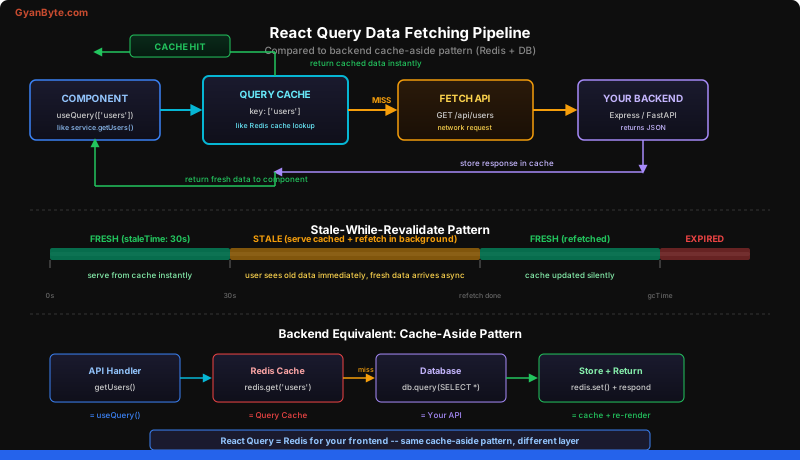
React Query (now TanStack Query) is to frontend data fetching what Redis is to backend data access. It provides a caching layer between your components and your API with automatic background refresh, retry, and cache invalidation.
npm install @tanstack/react-queryFirst, wrap your app in the QueryClientProvider (like setting up your database connection pool):
import { QueryClient, QueryClientProvider } from '@tanstack/react-query';

const queryClient = new QueryClient({
  defaultOptions: {
    queries: {
      staleTime: 30_000,    // Data is fresh for 30 seconds
      retry: 2,              // Retry failed requests twice
      refetchOnWindowFocus: true,  // Refresh when user returns to tab
    },
  },
});

function App() {
  return (
    <QueryClientProvider client={queryClient}>
      <Router />
    </QueryClientProvider>
  );
}
Now replace 30 lines of boilerplate with 3:
import { useQuery } from '@tanstack/react-query';

function UserList() {
  const { data: users, isLoading, error } = useQuery({
    queryKey: ['users'],                              // Cache key (like a Redis key)
    queryFn: () => fetch('/api/users').then(r => r.json()),  // Fetch function
  });

  if (isLoading) return <div>Loading...</div>;
  if (error) return <div>Error: {error.message}</div>;

  return <ul>{users.map(u => <li key={u.id}>{u.name}</li>)}</ul>;
}
The queryKey is like a Redis key — it uniquely identifies the cached data. When any component calls useQuery with ['users'], React Query checks its cache first. Cache hit? Return instantly. Cache miss? Fetch and store.
// Dynamic cache keys — like Redis keys with parameters
const { data: user } = useQuery({
  queryKey: ['users', userId],  // Different key per user
  queryFn: () => fetch(`/api/users/${userId}`).then(r => r.json()),
});
React Query implements the stale-while-revalidate pattern. When cached data exists but is older than staleTime, it returns the stale data immediately (so the UI is instant) and fetches fresh data in the background. When the fresh data arrives, the UI updates seamlessly. This is exactly the cache-aside pattern you’d use with Redis on the backend: serve from cache, refresh asynchronously.
Mutations: POST, PUT, DELETE
For write operations, React Query provides useMutation:
import { useMutation, useQueryClient } from '@tanstack/react-query';

function CreateUserForm() {
  const queryClient = useQueryClient();

  const createUser = useMutation({
    mutationFn: (newUser) =>
      fetch('/api/users', {
        method: 'POST',
        headers: { 'Content-Type': 'application/json' },
        body: JSON.stringify(newUser),
      }).then(r => r.json()),

    onSuccess: () => {
      // Invalidate the users cache — forces a refetch
      // Like deleting a Redis key after a write
      queryClient.invalidateQueries({ queryKey: ['users'] });
    },
  });

  function handleSubmit(data) {
    createUser.mutate(data);
  }

  return (
    <form onSubmit={handleSubmit}>
      {createUser.isPending && <span>Creating...</span>}
      {createUser.isError && <span>Error: {createUser.error.message}</span>}
      {createUser.isSuccess && <span>User created!</span>}
      {/* form fields */}
    </form>
  );
}
The invalidateQueries call is the equivalent of busting a Redis cache after a write. It marks the ['users'] cache as stale, which triggers an automatic background refetch. Any component displaying the user list will update automatically. No manual state management, no prop drilling, no pub/sub — React Query handles the entire lifecycle.
For optimistic updates (updating the UI before the server responds), you can modify the cache directly:
const createUser = useMutation({
  mutationFn: (newUser) => api.post('/api/users', newUser),
  onMutate: async (newUser) => {
    await queryClient.cancelQueries({ queryKey: ['users'] });
    const previous = queryClient.getQueryData(['users']);
    queryClient.setQueryData(['users'], (old) => [...old, { ...newUser, id: 'temp' }]);
    return { previous };
  },
  onError: (err, newUser, context) => {
    queryClient.setQueryData(['users'], context.previous);  // Rollback on error
  },
  onSettled: () => {
    queryClient.invalidateQueries({ queryKey: ['users'] });  // Refetch to sync
  },
});
This is like a database transaction with rollback — optimistically update the cache, and if the server call fails, revert to the previous state.
Key Takeaways
- React Query is your frontend Redis — it caches API responses, serves stale data instantly, and refreshes in the background. It replaces 30+ lines of useState/useEffect boilerplate with a 3-line
useQuerycall. - Every API call has three states: loading, error, success — skipping any of them creates a broken user experience. React Query manages all three automatically.
- Cache invalidation after mutations keeps your UI in sync —
invalidateQueriesis the equivalent of busting a Redis cache key after a database write, ensuring all components display fresh data.
Next up: Performance Optimization —>