Forms in React have a reputation for being painful. If you’ve spent years building backend APIs that accept POST bodies and validate them with Joi or Zod, you might wonder why a simple login form requires so much ceremony on the frontend. The short answer: React wants to own every piece of state, including every character the user types. That creates complexity — but also gives you total control.
This lesson walks through forms from first principles, then shows you how React Hook Form eliminates the boilerplate.
Controlled vs Uncontrolled Inputs
Here’s the fundamental question: who owns the input’s value — React or the DOM?
Controlled inputs mean React owns the value. Every keystroke fires an event, updates React state, and React re-renders the input with the new value. Think of it like an ORM managing your data — the ORM is the source of truth, not the database directly.
function LoginForm() {
  const [email, setEmail] = useState('');

  return (
    <input
      type="email"
      value={email}                          // React controls the value
      onChange={(e) => setEmail(e.target.value)}  // Every keystroke → state update
    />
  );
}
Uncontrolled inputs let the DOM own the value. You read it when you need it using a ref — like writing raw SQL instead of going through an ORM.
function LoginForm() {
  const emailRef = useRef();

  function handleSubmit() {
    const email = emailRef.current.value;  // Read directly from DOM
  }

  return <input type="email" ref={emailRef} />;
}
Controlled inputs are the standard approach because they give React full visibility into the form state at all times. You can validate on every keystroke, conditionally show fields, and disable the submit button until the form is valid.
Why Forms Are Hard in React
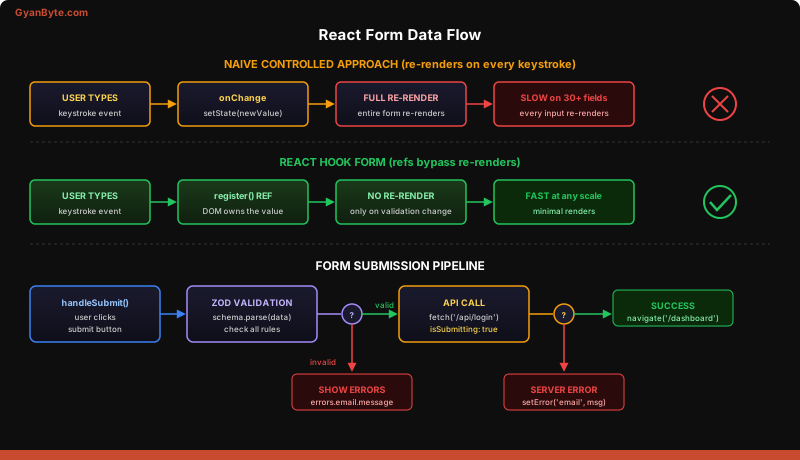
Here’s the problem: controlled inputs mean every keystroke triggers a re-render. For a login form with 2 fields, that’s fine. For a complex form with 30 fields, conditional sections, and validation rules, the naive approach becomes a performance nightmare.
Watch what happens with a simple controlled form:
function RegistrationForm() {
  const [name, setName] = useState('');
  const [email, setEmail] = useState('');
  const [password, setPassword] = useState('');
  const [company, setCompany] = useState('');
  const [role, setRole] = useState('');
  // ... 10 more fields

  // Typing ONE character in the name field re-renders the ENTIRE form
  // Every input, every label, every button — all re-rendered

  return (
    <form>
      <input value={name} onChange={e => setName(e.target.value)} />
      <input value={email} onChange={e => setEmail(e.target.value)} />
      {/* 10 more inputs, all re-rendering on every keystroke */}
    </form>
  );
}
This is like hitting your database on every keystroke instead of batching writes. It works for small forms but falls apart at scale. You end up juggling useState for every field, writing onChange handlers for each, and manually tracking validation errors. It’s tedious and error-prone.
React Hook Form: The Performance Solution
React Hook Form solves this by using refs internally instead of state. The DOM owns the values (uncontrolled), but React Hook Form tracks them behind the scenes. Components don’t re-render on every keystroke — only when validation state changes.
Think of it as a smart caching layer. Instead of querying state on every keystroke (controlled), it reads from the DOM directly (refs) and only notifies React when something meaningful changes (validation errors, form submission).
npm install react-hook-formimport { useForm } from 'react-hook-form';
function LoginForm() {
const {
register, // Connects an input to the form (like body-parser field mapping)
handleSubmit, // Wraps your submit handler with validation
formState: { errors, isSubmitting }
} = useForm();
async function onSubmit(data) {
// data = { email: "[email protected]", password: "secret" }
// Exactly like req.body in Express
const response = await fetch('/api/login', {
method: 'POST',
body: JSON.stringify(data),
});
}
return (
<form onSubmit={handleSubmit(onSubmit)}>
<input
type="email"
{...register('email', { required: 'Email is required' })}
/>
{errors.email && <span>{errors.email.message}</span>}
<input
type="password"
{...register('password', { required: 'Password is required', minLength: 8 })}
/>
{errors.password && <span>{errors.password.message}</span>}
<button type="submit" disabled={isSubmitting}>
{isSubmitting ? 'Logging in...' : 'Login'}
</button>
</form>
);
}The register() function returns { ref, name, onChange, onBlur } — it connects the input to the form system using refs instead of state. No re-renders on every keystroke. The handleSubmit() wrapper runs validation before calling your onSubmit function, exactly like validation middleware in Express that runs before your route handler.
Validation with Zod: Define Once, Validate Everywhere
If you use Zod on your backend (or Joi, or Yup), you already understand schema validation. The killer feature: define the schema once and use it on both client and server.
npm install zod @hookform/resolversimport { z } from 'zod';
import { useForm } from 'react-hook-form';
import { zodResolver } from '@hookform/resolvers/zod';
// Define schema — same as your backend validation
const loginSchema = z.object({
email: z.string().email('Invalid email address'),
password: z.string().min(8, 'Password must be at least 8 characters'),
});
// TypeScript gets the type for free
// type LoginForm = z.infer<typeof loginSchema>;
function LoginForm() {
const {
register,
handleSubmit,
formState: { errors, isSubmitting },
} = useForm({
resolver: zodResolver(loginSchema), // Plug in Zod validation
});
async function onSubmit(data) {
// data is already validated — types match the schema
try {
const res = await fetch('/api/login', {
method: 'POST',
headers: { 'Content-Type': 'application/json' },
body: JSON.stringify(data),
});
if (!res.ok) throw new Error('Login failed');
// Handle success — redirect, update auth state, etc.
} catch (err) {
// Handle error — show toast, set form error
}
}
return (
<form onSubmit={handleSubmit(onSubmit)}>
<div>
<label htmlFor="email">Email</label>
<input id="email" type="email" {...register('email')} />
{errors.email && <p className="error">{errors.email.message}</p>}
</div>
<div>
<label htmlFor="password">Password</label>
<input id="password" type="password" {...register('password')} />
{errors.password && <p className="error">{errors.password.message}</p>}
</div>
<button type="submit" disabled={isSubmitting}>
{isSubmitting ? 'Signing in...' : 'Sign In'}
</button>
</form>
);
}This pattern mirrors how you’d structure validation on an Express backend:
// Backend equivalent — same Zod schema validates the request body
app.post('/api/login', (req, res) => {
  const result = loginSchema.safeParse(req.body);
  if (!result.success) return res.status(400).json(result.error);
  // proceed with validated data...
});
Share the Zod schema between frontend and backend (in a shared package or monorepo), and you get type-safe, consistent validation on both sides.
Async Submission: Loading, Error, and Success
Every form submission involves three states, and skipping any of them creates a poor experience:
async function onSubmit(data) {
  // isSubmitting is automatically true (managed by React Hook Form)
  try {
    const res = await fetch('/api/register', {
      method: 'POST',
      headers: { 'Content-Type': 'application/json' },
      body: JSON.stringify(data),
    });

    if (!res.ok) {
      const error = await res.json();
      // Set server-side errors on specific fields
      if (error.field === 'email') {
        setError('email', { message: 'Email already registered' });
      }
      return;
    }

    // Success — navigate to dashboard
    navigate('/dashboard');
  } catch (err) {
    // Network error — show generic message
    setError('root', { message: 'Something went wrong. Try again.' });
  }
}
React Hook Form tracks isSubmitting automatically — it’s true from the moment onSubmit is called until the promise resolves. Use it to disable the button and show a loading indicator. The setError() function lets you programmatically set errors on any field, which is perfect for server-side validation errors (like “email already taken”).
Key Takeaways
- Controlled inputs give React full ownership of form state but re-render on every keystroke — React Hook Form uses refs internally to avoid this performance cost while keeping the API clean.
- Zod schemas can be shared between frontend and backend — define your validation once in a shared package and get type-safe, consistent checks on both sides of the wire.
- Every form submission needs three states: loading, error, success — React Hook Form’s
isSubmittingandsetError()handle all three without manualuseStateboilerplate.
Next up: Talking to Your Backend —>