If you’ve built APIs with Express, you already understand routing. You define a path, attach a handler, and when a request matches that path, the handler runs. React Router works the same way — except instead of returning JSON or HTML from a server, it swaps a component into the page. No server round-trip, no full page reload.
This lesson maps everything you know about server-side routing onto client-side routing with React Router v6.
Client-Side Routing: No Reload Required
In a traditional server-rendered app, every navigation triggers an HTTP request. The browser sends GET /dashboard to your server, Express matches the route, your controller fetches data, renders a template, and sends back HTML. The browser tears down the current page and builds a new one.
Client-side routing skips all of that. When a user clicks a link to /dashboard, JavaScript intercepts the click, updates the browser’s URL bar using the History API, and React renders the matching component. The server is never contacted for the page itself (data fetching is separate).
Think of it this way: your Express server has one route that serves the React app’s index.html. After that, React Router takes over all navigation internally.
// Express: one route serves the entire React app
app.get('*', (req, res) => {
  res.sendFile('build/index.html');
});

// React Router handles everything from here
This is why single-page apps (SPAs) feel fast — navigation is instant because there’s no network round-trip for the page shell.
React Router v6 Basics
Install it with npm install react-router-dom. Here are the core pieces:
| React Router | Express Equivalent |
|---|---|
BrowserRouter |
express() (the app) |
Routes |
Router middleware |
Route |
app.get('/path', handler) |
Link |
<a href> without reload |
Outlet |
next() for nested routes |
Here’s a basic setup:
import { BrowserRouter, Routes, Route, Link } from 'react-router-dom';
import Home from './pages/Home';
import Dashboard from './pages/Dashboard';
import UserProfile from './pages/UserProfile';
import Login from './pages/Login';
import NotFound from './pages/NotFound';

function App() {
  return (
    <BrowserRouter>
      <nav>
        <Link to="/">Home</Link>
        <Link to="/dashboard">Dashboard</Link>
        <Link to="/login">Login</Link>
      </nav>

      <Routes>
        <Route path="/" element={<Home />} />
        <Route path="/login" element={<Login />} />
        <Route path="/dashboard" element={<Dashboard />} />
        <Route path="/users/:id" element={<UserProfile />} />
        <Route path="*" element={<NotFound />} />
      </Routes>
    </BrowserRouter>
  );
}
Compare this to Express:
// Express equivalent — same mental model
app.get('/', homeController);
app.get('/login', loginController);
app.get('/dashboard', dashboardController);
app.get('/users/:id', userProfileController);
app.use('*', notFoundController);  // catch-all
The <Link> component replaces <a> tags. Regular <a href="/dashboard"> would cause a full page reload. <Link to="/dashboard"> uses the History API to change the URL without reloading.
Dynamic Routes and Params
In Express, you grab URL parameters with req.params:
app.get('/users/:id', (req, res) => {
  const userId = req.params.id;  // "42"
  // fetch user from database...
});
React Router’s useParams() hook does the exact same thing:
import { useParams } from 'react-router-dom';

function UserProfile() {
  const { id } = useParams();  // Same as req.params.id

  return <h1>User Profile: {id}</h1>;
}
You can also use useSearchParams() for query strings — it’s the equivalent of req.query:
import { useSearchParams } from 'react-router-dom';

function UserList() {
  const [searchParams] = useSearchParams();
  const page = searchParams.get('page');  // Same as req.query.page

  return <h1>Users - Page {page}</h1>;
}
Nested Routes with Outlet
Nested routes are where React Router gets powerful. Think of Outlet as calling next() in Express middleware — it renders the child route inside the parent layout.
function App() {
  return (
    <BrowserRouter>
      <Routes>
        <Route path="/dashboard" element={<DashboardLayout />}>
          <Route index element={<DashboardHome />} />
          <Route path="settings" element={<Settings />} />
          <Route path="analytics" element={<Analytics />} />
        </Route>
      </Routes>
    </BrowserRouter>
  );
}

function DashboardLayout() {
  return (
    <div>
      <Sidebar />
      <main>
        {/* Child route renders here — like next() in middleware */}
        <Outlet />
      </main>
    </div>
  );
}
When the URL is /dashboard/settings, React renders DashboardLayout with Settings plugged into the <Outlet />. The layout persists across child route changes — the sidebar doesn’t re-mount. This is like having Express middleware that wraps multiple routes with shared logic.
Protecting Routes with Auth
In Express, you protect routes with middleware:
function requireAuth(req, res, next) {
  if (!req.user) return res.redirect('/login');
  next();
}

app.get('/dashboard', requireAuth, dashboardController);
In React, you create a wrapper component that checks auth state and either renders the child route or redirects:
import { Navigate, Outlet } from 'react-router-dom';
import { useAuth } from './AuthContext';

function ProtectedRoute() {
  const { user, loading } = useAuth();

  if (loading) return <div>Loading...</div>;
  if (!user) return <Navigate to="/login" replace />;

  return <Outlet />;  // Render the protected child route
}
Now wrap your protected routes:
function App() {
  return (
    <BrowserRouter>
      <Routes>
        {/* Public routes */}
        <Route path="/" element={<Home />} />
        <Route path="/login" element={<Login />} />

        {/* Protected routes — ProtectedRoute acts as middleware */}
        <Route element={<ProtectedRoute />}>
          <Route path="/dashboard" element={<Dashboard />} />
          <Route path="/dashboard/settings" element={<Settings />} />
          <Route path="/users/:id" element={<UserProfile />} />
        </Route>

        <Route path="*" element={<NotFound />} />
      </Routes>
    </BrowserRouter>
  );
}
The ProtectedRoute component wraps multiple routes, just like applying requireAuth middleware to a group of Express routes. If the user isn’t authenticated, <Navigate to="/login" replace /> performs a client-side redirect (the replace prop prevents the protected URL from appearing in browser history, so the back button doesn’t create a redirect loop).
Programmatic Navigation
Sometimes you need to navigate after an action — like redirecting to /dashboard after a successful login. In Express, you’d call res.redirect(). In React Router, use the useNavigate() hook:
import { useNavigate } from 'react-router-dom';

function LoginForm() {
  const navigate = useNavigate();

  async function handleLogin(credentials) {
    await authService.login(credentials);
    navigate('/dashboard');  // Like res.redirect('/dashboard')
  }

  return <form onSubmit={handleLogin}>...</form>;
}
You can also pass state through navigation and go back in history:
navigate('/error', { state: { message: 'Payment failed' } });
navigate(-1);  // Go back — like hitting the browser back button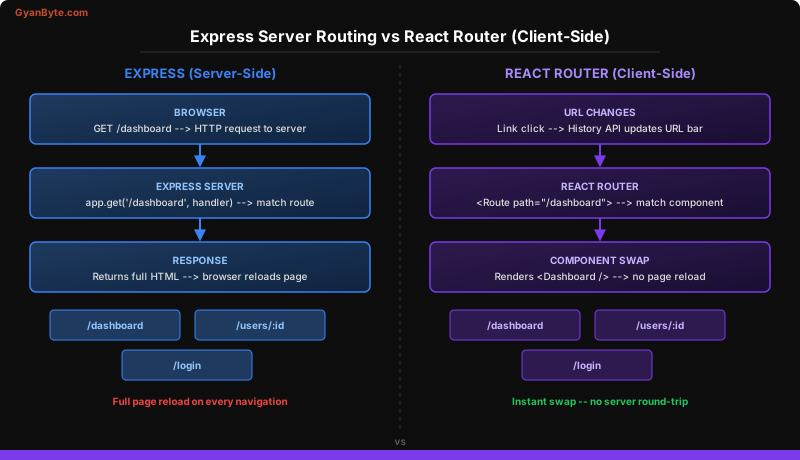
Key Takeaways
- React Router is Express routing for the browser — same mental model of path matching to handlers, but components render instead of HTTP responses being sent.
useParams()isreq.params,useSearchParams()isreq.query— the APIs map directly to what you already know from server-side routing.- Protected routes are auth middleware — wrap routes in a component that checks context and redirects, exactly like
requireAuthmiddleware in Express.
Next up: Forms — The Painful Part Made Simple —>