So far, every piece of state we have worked with lives inside a single component. That works fine when a value is only needed in one place. But real applications have state that multiple components need to access — the current user, the theme, a shopping cart, feature flags. Passing that data through every intermediate component is painful, and React’s Context API is the first tool that solves it.
The Prop Drilling Problem
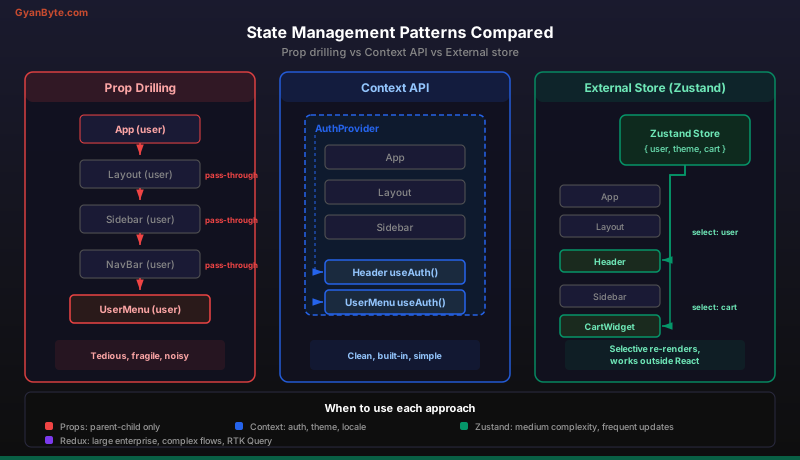
Imagine you have a backend service where every function call requires you to pass the database connection, the logger instance, the current user, and the feature flags as arguments — through five layers of function calls, even when the intermediate functions do not use them. That is prop drilling in React.
// Every component in the chain must accept and forward the "user" prop
function App() {
  const [user, setUser] = useState(null);
  return <Layout user={user} />;
}

function Layout({ user }) {
  return <Sidebar user={user} />;
}

function Sidebar({ user }) {
  return <UserMenu user={user} />;
}

function UserMenu({ user }) {
  return <p>Hello, {user?.name}</p>;
}
Layout and Sidebar do not care about user. They just pass it along because UserMenu needs it. In a backend codebase, you would solve this with dependency injection or environment variables. React’s answer is Context.
Context API — Dependency Injection for React
The Context API has three pieces: createContext, Provider, and useContext. If you come from Spring, think of it as defining a bean, registering it in the application context, and injecting it wherever needed.
Step 1: Create the Context
// contexts/AuthContext.js
import { createContext, useState, useContext } from 'react';

const AuthContext = createContext(null);
This creates a “slot” that can hold a value. The argument to createContext is the default value used when no Provider is found above the consumer in the tree. In practice, you almost always wrap your app with a Provider, so the default rarely matters.
Step 2: Build the Provider
export function AuthProvider({ children }) {
  const [user, setUser] = useState(null);
  const [token, setToken] = useState(null);

  async function login(email, password) {
    const response = await fetch('/api/auth/login', {
      method: 'POST',
      headers: { 'Content-Type': 'application/json' },
      body: JSON.stringify({ email, password }),
    });
    const data = await response.json();
    setUser(data.user);
    setToken(data.token);
  }

  function logout() {
    setUser(null);
    setToken(null);
  }

  const value = { user, token, login, logout };

  return (
    <AuthContext.Provider value={value}>
      {children}
    </AuthContext.Provider>
  );
}
The Provider wraps a section of the component tree and makes the value available to any descendant. This is like registering a singleton service in your DI container — any component below can access it without it being passed through intermediate layers.
Step 3: Consume with useContext
export function useAuth() {
  const context = useContext(AuthContext);
  if (context === null) {
    throw new Error('useAuth must be used within an AuthProvider');
  }
  return context;
}
This custom hook wraps useContext and adds a safety check. Now any component can access auth state:
function Header() {
  const { user, logout } = useAuth();

  return (
    <header>
      {user ? (
        <div>
          <span>Welcome, {user.name}</span>
          <button onClick={logout}>Logout</button>
        </div>
      ) : (
        <a href="/login">Sign In</a>
      )}
    </header>
  );
}

function ProtectedRoute({ children }) {
  const { user } = useAuth();

  if (!user) {
    return <Navigate to="/login" />;
  }

  return children;
}
Neither Header nor ProtectedRoute needs user passed as a prop. They pull it directly from context. The intermediate components (Layout, Sidebar, PageWrapper) are completely unaware auth state even exists.
Wiring It Up
function App() {
  return (
    <AuthProvider>
      <Header />
      <main>
        <ProtectedRoute>
          <Dashboard />
        </ProtectedRoute>
      </main>
    </AuthProvider>
  );
}
Everything inside <AuthProvider> can call useAuth(). Everything outside cannot. This scoping is deliberate and useful — you control exactly which parts of your app have access to which state.
The Re-render Gotcha
Here is where Context diverges from backend dependency injection. In Spring, injecting a service does not cause side effects when the service’s internal state changes. In React, every component that calls useContext(SomeContext) re-renders whenever the context value changes. Every single one, regardless of whether it uses the specific property that changed.
// If AuthProvider's value changes (even just the token),
// BOTH Header and ProtectedRoute re-render
const value = { user, token, login, logout };
If token changes but Header only uses user, Header still re-renders. For auth state that changes rarely (login/logout), this is fine. For state that changes frequently — a search query, a form value, an animation frame — this becomes a performance problem.
Mitigations
Split contexts by update frequency. Do not put everything in one mega-context. Separate auth (changes rarely) from theme (changes on toggle) from real-time data (changes constantly).
// Good: separate contexts
<AuthProvider>
  <ThemeProvider>
    <NotificationProvider>
      <App />
    </NotificationProvider>
  </ThemeProvider>
</AuthProvider>
Memoize the value object. Without memoization, a new object is created every render, triggering consumer re-renders even when nothing actually changed:
function AuthProvider({ children }) {
  const [user, setUser] = useState(null);
  const [token, setToken] = useState(null);

  // Memoize to prevent unnecessary re-renders of consumers
  const value = useMemo(
    () => ({ user, token, login, logout }),
    [user, token]
  );

  return (
    <AuthContext.Provider value={value}>
      {children}
    </AuthContext.Provider>
  );
}
Context vs Redux vs Zustand — A Decision Framework
This is the question every team argues about. Here is a practical framework.
Context API
Use when: You have low-frequency global state — theme, auth, locale, feature flags. The data changes rarely and the number of consumers is small.
Strengths: Built into React, no extra dependencies, simple API, co-located with your component tree.
Weaknesses: No built-in devtools, no middleware, re-renders all consumers on any change, no selector pattern.
Zustand
Use when: You need a shared store with medium complexity — multiple slices of state, some of which update frequently. You want selectors so components only re-render when their specific slice changes.
Strengths: Tiny bundle size (1KB), simple API, works outside React components, built-in selector support, excellent devtools via middleware.
import { create } from 'zustand';

const useStore = create((set) => ({
  count: 0,
  increment: () => set((state) => ({ count: state.count + 1 })),
}));

// Component only re-renders when count changes
function Counter() {
  const count = useStore((state) => state.count);
  const increment = useStore((state) => state.increment);
  return <button onClick={increment}>{count}</button>;
}
Weaknesses: External dependency, less “React-native” than Context.
Redux (with Redux Toolkit)
Use when: You have a large enterprise application with complex state transitions, need time-travel debugging, middleware for side effects (Redux Saga or RTK Query), or your team already knows Redux.
Strengths: Mature ecosystem, excellent devtools, predictable state updates via reducers, RTK Query handles data fetching and caching, large community.
Weaknesses: More boilerplate (even with Redux Toolkit), steeper learning curve, overkill for small apps.
The Decision Flowchart
Ask yourself these questions in order:
- Is the state only used by one component or its direct children? Use
useStateand props. - Is it global but changes rarely (auth, theme)? Use Context.
- Do you need selectors, middleware, or the state is moderately complex? Use Zustand.
- Is it a large app with complex data flows, team of 10+, or you need RTK Query? Use Redux Toolkit.
Most applications need a combination. Context for auth and theme, Zustand or Redux for application state, and local useState for component-specific UI state.
When NOT to Use Context
Context is a poor fit for frequently-changing data. If a value updates on every keystroke, every mouse move, or every animation frame, Context will force re-renders on every consumer on every update. For these cases:
- Forms: Use a form library like React Hook Form that manages state outside of React’s render cycle.
- Animations: Use CSS animations or a library like Framer Motion that bypasses React state.
- Real-time data with many consumers: Use Zustand with selectors or a dedicated subscription model.
The rule is simple: Context is for state that changes infrequently and is consumed widely. If either condition is not met, choose a different tool.
Key Takeaways
- Context API eliminates prop drilling by letting any descendant component access shared state directly, like dependency injection in Spring or environment variables in a backend service. Use it for auth, theme, and other low-frequency global state.
- Context re-renders all consumers on every change — split contexts by update frequency and memoize the value object to avoid performance problems. Never use Context for rapidly-changing data.
- Match the tool to the complexity:
useStatefor local state, Context for simple global state, Zustand for medium complexity with selectors, Redux for large enterprise applications with complex data flows.
Next up: React Router — Navigation Without Page Reloads —>