Every backend system has side effects — database writes, HTTP calls, message queue publishes, log flushes. In React, side effects are anything that reaches outside the component’s pure render logic: API calls, subscriptions, timers, and direct DOM manipulation. The useEffect hook is how you manage all of them, and the dependency array is how you control when they fire.
What Counts as a Side Effect
A React component’s primary job is to return JSX — that is the “pure” part. Anything else is a side effect. If you are a backend engineer, think of the component function as a request handler. The handler’s job is to return a response. Everything else — logging, cache writes, event publishing — is a side effect that happens alongside the main job.
Common side effects in React:
- Fetching data from an API (like calling an external service from your handler)
- Subscribing to a WebSocket or event emitter (like consuming from a message queue)
- Setting timers with
setIntervalorsetTimeout(like scheduling a cron job) - Manipulating the DOM directly (like writing to a file outside your normal output)
- Updating document title or other browser APIs
All of these belong inside useEffect, never in the component body directly.
The Dependency Array
The second argument to useEffect is the dependency array, and it is the single most common source of bugs in React applications. There are three forms, and each maps to a backend concept.
Empty Array: Run Once on Mount
useEffect(() => {
  fetchUserProfile();
}, []);
An empty dependency array means “run this effect once, after the first render.” This is like @PostConstruct in Spring or the onModuleInit lifecycle hook in NestJS. Use it for initial data fetching, one-time setup, or subscriptions you create once.
With Dependencies: Run When Specific Values Change
useEffect(() => {
  fetchUserOrders(userId);
}, [userId]);
When you list dependencies, the effect re-runs whenever any of those values change. Think of it like a database trigger that fires when a specific column is updated. In this example, every time userId changes, we fetch that user’s orders.
React compares dependencies using Object.is (similar to ===). Primitives like strings and numbers compare by value. Objects and arrays compare by reference — a new object with the same contents is still “different.” This matters and we will come back to it.
No Array: Run Every Render
useEffect(() => {
  console.log('Rendered!');
});
Omitting the array entirely means the effect runs after every render. This is almost never what you want. It is like running a database migration on every single API request. You will see it in tutorials but rarely in production code.
Summary Table
| Dependency Array | When It Runs | Backend Analogy |
|---|---|---|
[] |
Once on mount | @PostConstruct |
[a, b] |
When a or b change |
Database trigger on columns |
| (omitted) | Every render | Middleware on every request |
Cleanup Functions
Many side effects create resources that need to be released. A WebSocket connection needs to be closed. A timer needs to be cleared. A subscription needs to be unsubscribed. In backend terms, this is the finally block that closes your database connection, or the shutdown hook that drains your message consumer.
The cleanup function is what you return from the effect:
useEffect(() => {
  const ws = new WebSocket('wss://api.example.com/feed');

  ws.onmessage = (event) => {
    setMessages(prev => [...prev, JSON.parse(event.data)]);
  };

  // Cleanup: close the connection
  return () => {
    ws.close();
  };
}, []);
The cleanup runs in two situations:
- Before the effect re-runs (when dependencies change). React cleans up the old effect before running the new one.
- When the component unmounts. This is the final cleanup.
This pattern ensures you never leak resources. Compare it to try-with-resources in Java or a context manager in Python — the cleanup is co-located with the setup.
Timer Example with Cleanup
function PollingComponent({ endpoint, intervalMs }) {
  const [data, setData] = useState(null);

  useEffect(() => {
    // Setup: start polling
    const timer = setInterval(async () => {
      const response = await fetch(endpoint);
      const json = await response.json();
      setData(json);
    }, intervalMs);

    // Cleanup: stop polling
    return () => clearInterval(timer);
  }, [endpoint, intervalMs]);

  return <pre>{JSON.stringify(data, null, 2)}</pre>;
}
If endpoint or intervalMs changes, React clears the old interval and starts a new one with the updated values. No stale timers, no leaked intervals.
Fetching Data on Mount
The most common useEffect pattern — loading data when a component appears:
function UserProfile({ userId }) {
  const [user, setUser] = useState(null);
  const [loading, setLoading] = useState(true);
  const [error, setError] = useState(null);

  useEffect(() => {
    let cancelled = false;

    async function loadUser() {
      try {
        setLoading(true);
        const response = await fetch(`/api/users/${userId}`);
        const data = await response.json();

        if (!cancelled) {
          setUser(data);
          setError(null);
        }
      } catch (err) {
        if (!cancelled) {
          setError(err.message);
        }
      } finally {
        if (!cancelled) {
          setLoading(false);
        }
      }
    }

    loadUser();

    return () => {
      cancelled = true;
    };
  }, [userId]);

  if (loading) return <p>Loading...</p>;
  if (error) return <p>Error: {error}</p>;
  return <h1>{user.name}</h1>;
}
Notice the cancelled flag. If the user navigates away (or userId changes) before the fetch completes, the cleanup sets cancelled = true and the response is ignored. Without this, you get the classic “Can’t perform a React state update on an unmounted component” warning. It is the same reason you check if a connection is still open before writing a response on the backend.
Common Mistakes
Missing Dependencies
// BUG: count is used inside the effect but not listed as a dependency
useEffect(() => {
  const timer = setInterval(() => {
    console.log(count); // Always logs the initial value!
  }, 1000);
  return () => clearInterval(timer);
}, []); // count is missing here
The effect closes over the initial count value and never sees updates. This is a stale closure — the function captured a snapshot of count at creation time. Fix it by adding count to the dependency array, or use a ref to hold the latest value.
Infinite Loops
// BUG: creates a new object every render, which is a "new" dependency every time
useEffect(() => {
  fetchData(filters);
}, [filters]); // if filters = { page: 1 } is created inline, this loops forever
If filters is an object created during render (const filters = { page: 1 }), it is a new reference every render. The effect sees a “new” dependency, runs, triggers a state update, which triggers a render, which creates a new filters object, and the loop continues. Fix it by memoizing the object with useMemo or by using primitive dependencies.
Running Async Functions Directly
// WRONG: useEffect cannot return a Promise
useEffect(async () => {
  const data = await fetch('/api/data');
  // ...
}, []);
useEffect expects the return value to be either nothing or a cleanup function. An async function returns a Promise. The fix is to define the async function inside the effect and call it immediately, as shown in the fetch example above.
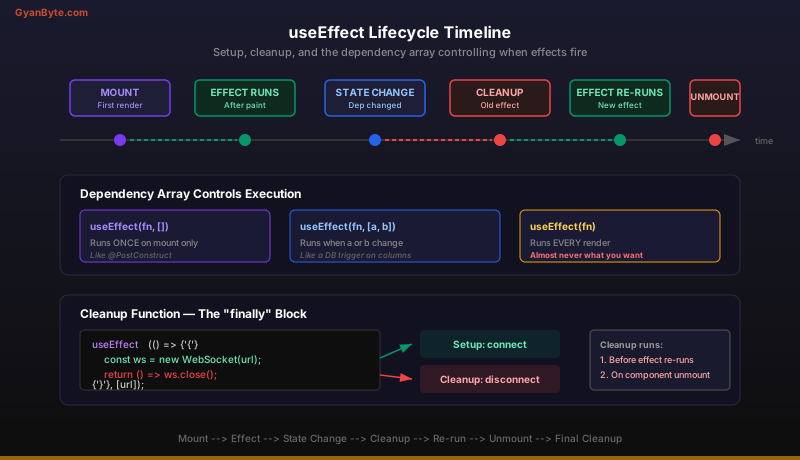
The Mental Model
Here is the simplest way to think about useEffect as a backend engineer:
Your component function is a stateless request handler that runs on every render. useEffect is the middleware layer that runs after the handler returns its response (JSX). The dependency array is the route matcher — it decides which renders trigger the middleware. The cleanup function is the finally block that releases resources.
Once this model clicks, effects stop feeling magical and start feeling like ordinary lifecycle management — something every backend engineer already understands.
Key Takeaways
- The dependency array controls when your effect fires — empty for mount-only, with values for reactive re-runs, omitted for every render. Get it wrong and you get stale data or infinite loops.
- Always return a cleanup function when your effect creates subscriptions, timers, or connections. It runs before re-execution and on unmount, preventing resource leaks.
- Stale closures are the most subtle bug — if your effect reads state but does not list it as a dependency, it captures a frozen snapshot. Use the ESLint
exhaustive-depsrule to catch these automatically.
Next up: Context API and State Management —>