If you have spent any time with older React tutorials, you have seen class components — big blocks of code with constructor, this.state, this.setState, and lifecycle methods like componentDidMount. Hooks replaced all of that in React 16.8, and once you understand why, you will never want to go back.
Why Hooks Replaced Class Components
Think about a typical backend service class. You have your constructor wiring up dependencies, instance variables holding state, and methods that read and mutate those variables. Now imagine every method needs to reference those variables through this, and this changes meaning depending on how the method is called. That is exactly the problem class components had.
Hooks solve three problems that plagued class components:
Less boilerplate. A class component needs a constructor, super call, state initialization, and method bindings before you write a single line of business logic. A functional component with hooks jumps straight to the point.
Composable logic. In class components, related logic was scattered across componentDidMount, componentDidUpdate, and componentWillUnmount. With hooks, a single useEffect keeps related code together. Even better, you can extract stateful logic into custom hooks and reuse it across components — something class components could never do cleanly.
No “this” confusion. JavaScript’s this keyword behaves differently than self in Python or this in Java. In class components, forgetting to bind a method in the constructor meant this.state was suddenly undefined inside an event handler. Hooks eliminate this entirely.
useState in Depth
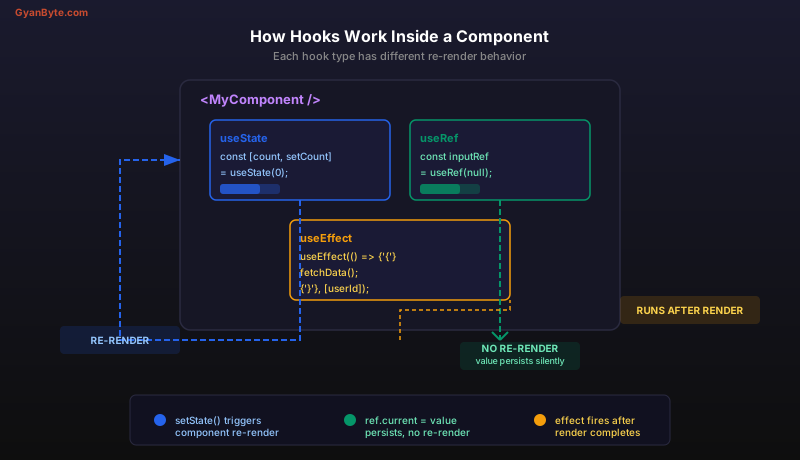
If you come from a backend world, think of useState as declaring a database column you can read and write — except the “database” is the component’s memory, and every write triggers a re-render (like a view refresh).
import { useState } from 'react';

function Counter() {
  const [count, setCount] = useState(0);

  return (
    <div>
      <p>Count: {count}</p>
      <button onClick={() => setCount(count + 1)}>Increment</button>
    </div>
  );
}
The useState(0) call returns a pair: the current value and a setter function. The 0 is the initial value — it only matters on the first render, just like a column default in a migration.
Functional Updates
Here is where backend engineers often get tripped up. State updates in React are asynchronous and batched. If you call setCount(count + 1) three times in a row, you do not get count + 3. You get count + 1, because all three calls read the same stale count value.
The fix is a functional update — pass a function instead of a value:
function handleTripleIncrement() {
  setCount(prev => prev + 1);
  setCount(prev => prev + 1);
  setCount(prev => prev + 1);
  // Now count increases by 3
}
Think of it like an atomic compare-and-swap. The prev parameter always holds the latest value, even if multiple updates are queued. Use the functional form any time your new value depends on the previous one.
Multiple State Variables
Unlike class component state which was a single object, hooks encourage separate variables for separate concerns:
function UserForm() {
  const [name, setName] = useState('');
  const [email, setEmail] = useState('');
  const [isSubmitting, setIsSubmitting] = useState(false);

  // Each has its own setter — clean separation of concerns
}
This is like having individual columns instead of a JSON blob. Each piece of state is independent, updated independently, and easy to reason about.
useRef — The Mutable Box That Doesn’t Trigger Re-renders
If useState is a reactive database column, useRef is an in-memory cache that never invalidates the view. It holds a mutable value that persists across renders, but changing it does not cause a re-render.
import { useRef } from 'react';

function Stopwatch() {
  const [elapsed, setElapsed] = useState(0);
  const intervalRef = useRef(null);

  function start() {
    intervalRef.current = setInterval(() => {
      setElapsed(prev => prev + 1);
    }, 1000);
  }

  function stop() {
    clearInterval(intervalRef.current);
  }

  return (
    <div>
      <p>{elapsed} seconds</p>
      <button onClick={start}>Start</button>
      <button onClick={stop}>Stop</button>
    </div>
  );
}
The intervalRef stores the timer ID. We need it to persist between renders so stop can clear it, but changing the timer ID should not cause the UI to update. That is the perfect use case for useRef.
useRef for DOM Access
The other common use is grabbing a reference to an actual DOM element — similar to document.getElementById but React-managed:
function AutoFocusInput() {
  const inputRef = useRef(null);

  function handleClick() {
    inputRef.current.focus();
  }

  return (
    <div>
      <input ref={inputRef} type="text" />
      <button onClick={handleClick}>Focus the input</button>
    </div>
  );
}
The ref attribute connects the React ref to the DOM node. After the component mounts, inputRef.current points to the actual <input> element.
The rule of thumb: if you need a value to persist across renders and changing it should trigger a UI update, use useState. If you need persistence but no UI update, use useRef.
Writing Custom Hooks
Custom hooks are where the composability promise pays off. A custom hook is just a function whose name starts with use and that calls other hooks inside it. Think of it like extracting a utility module on the backend — you take reusable logic, put it in its own function, and import it wherever needed.
Example: useLocalStorage
Suppose multiple components need to read and write to localStorage and stay in sync. Instead of duplicating that logic, extract a custom hook:
import { useState, useEffect } from 'react';

function useLocalStorage(key, initialValue) {
  // Read from localStorage on first render, fall back to initialValue
  const [value, setValue] = useState(() => {
    const stored = localStorage.getItem(key);
    return stored !== null ? JSON.parse(stored) : initialValue;
  });

  // Write to localStorage whenever the value changes
  useEffect(() => {
    localStorage.setItem(key, JSON.stringify(value));
  }, [key, value]);

  return [value, setValue];
}
Now any component can use it exactly like useState, but the value automatically persists:
function Settings() {
  const [theme, setTheme] = useLocalStorage('theme', 'dark');
  const [language, setLanguage] = useLocalStorage('lang', 'en');

  return (
    <div>
      <button onClick={() => setTheme(theme === 'dark' ? 'light' : 'dark')}>
        Toggle theme: {theme}
      </button>
      <select value={language} onChange={e => setLanguage(e.target.value)}>
        <option value="en">English</option>
        <option value="es">Spanish</option>
      </select>
    </div>
  );
}
The hook encapsulates the localStorage read, the state management, and the sync logic. The consuming component knows nothing about localStorage — it just gets a value and a setter. This is the same separation of concerns you practice when you hide database access behind a repository layer.
Rules of Hooks
Two rules you must never break:
- Only call hooks at the top level. Never inside loops, conditions, or nested functions. React relies on call order to track which hook is which.
- Only call hooks from React functions. Either inside a component or inside another custom hook. Never from a plain utility function.
These rules exist because React stores hook state in an internal array indexed by call order. If you put a hook inside an if block, the array shifts on some renders and React assigns the wrong state to the wrong hook.
Key Takeaways
- useState is your reactive state primitive — use functional updates (
prev => prev + 1) when the new value depends on the old one, because state updates are batched and asynchronous. - useRef is a mutable box that survives re-renders without causing them — use it for timer IDs, DOM references, or any value that should not trigger a UI update when it changes.
- Custom hooks let you extract and reuse stateful logic across components, the same way you extract utility modules or service classes on the backend. Name them
useXxxand follow the rules of hooks.
Next up: useEffect — Side Effects Done Right —>