Every backend system has a data model and rules for how data moves through the system. React is no different. It has exactly two mechanisms for handling data: props and state. Understanding the difference — and when to use each — is the foundation of every React application you will ever build.
Props Are Function Arguments
Props (short for “properties”) are data passed from a parent component to a child component. They are read-only. The child receives them and uses them but never modifies them.
function Greeting({ name, role }) {
  return <p>Hello, {name}. You are a {role}.</p>;
}

// Usage:
<Greeting name="Alice" role="admin" />
If you write backend code, you already understand this pattern perfectly. Props are function arguments. When you write a function like processOrder(orderId, userId), the function does not modify orderId — it reads the value and does its work. Props work exactly the same way.
Props can be any JavaScript value: strings, numbers, booleans, objects, arrays, and even functions. That last one is important — passing functions as props is how child components communicate back to parents.
function SearchInput({ onSearch }) {
  return (
    <input
      type="text"
      onChange={(e) => onSearch(e.target.value)}
      placeholder="Search..."
    />
  );
}
Here, onSearch is a callback function passed from the parent. When the user types, the child calls that function. The child does not know what the parent will do with the search term — it just invokes the callback. This is the same inversion-of-control pattern you see with dependency injection or event listeners in backend systems.
State Is Local Memory
State is data that a component owns and can modify. It is declared inside the component using the useState hook, and when it changes, React re-renders that component.
function Counter() {
  const [count, setCount] = React.useState(0);

  return (
    <div>
      <p>Count: {count}</p>
      <button onClick={() => setCount(count + 1)}>Increment</button>
    </div>
  );
}
useState(0) initializes the state to 0 and returns two things: the current value (count) and a setter function (setCount). Calling setCount updates the value and triggers a re-render.
Think of state as an instance variable in an object-oriented backend service. If you have a ShoppingCart service class with a this.items list, that list is internal state — it belongs to that service instance, it can be modified by the service’s methods, and external callers interact with it only through the service’s public API.
React state works the same way. The component owns it, modifies it through setter functions, and exposes derived values to children through props.
Crucial difference: state updates trigger re-renders
In a backend service, changing an instance variable just changes the variable. Nothing else happens automatically. In React, calling a state setter triggers a re-render of the component and all its children. This is the reactive part of React — the UI automatically stays in sync with the data.
This is similar to how an event-driven system works. Updating state is like publishing an event. React subscribes to that event and updates the UI. You do not manually refresh anything.
One-Way Data Flow
React enforces one-way (unidirectional) data flow. Data moves down the tree through props. Events move up the tree through callback functions. Never sideways, never skipping levels (without explicit patterns for doing so).
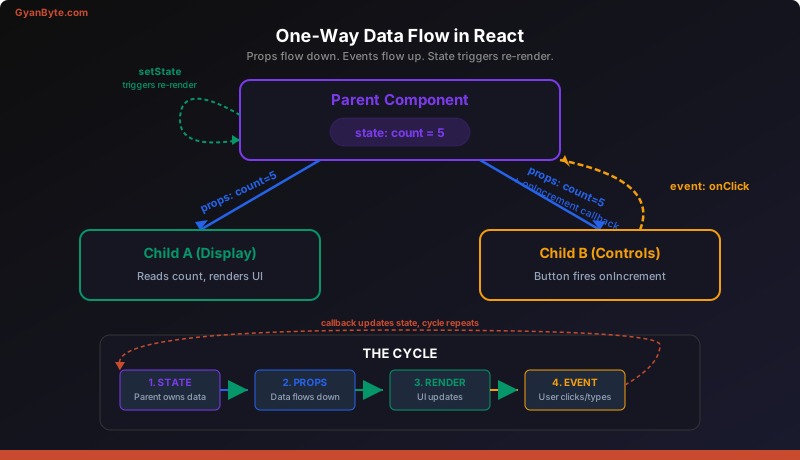
Compare this to a REST API. When a client sends a request to your API, it does not reach into your database and mutate rows directly. It sends a request. Your API validates it, processes it, and updates the database. The client never has direct write access to your data layer.
React’s one-way data flow follows the same principle. A child component never reaches into the parent and mutates the parent’s state directly. Instead, the child calls a callback function (like sending a request). The parent receives that callback, decides what to do, and updates its own state (like processing the request). The updated state flows back down as new props.
This constraint makes React applications predictable. When something goes wrong, you trace the data flow: where does the state live? What callback changes it? What props propagate the change? The unidirectional flow gives you a clear debugging path, just like request logs in a backend system.
Props vs State: Decision Framework
When you encounter data in a React component, ask these questions:
| Question | If Yes… |
|---|---|
| Is it passed from a parent? | It is a prop |
| Does it change over time due to user interaction? | It needs to be state |
| Can it be computed from existing props or state? | It is a derived value — do not store it as state |
| Is it constant and never changes? | It is a constant — define it outside the component |
A common mistake (especially from backend engineers used to caching) is storing derived data in state. If you have firstName and lastName as props, do not create a fullName state variable. Just compute it: const fullName = firstName + ' ' + lastName. If the props change, the component re-renders, and the derived value updates automatically.
In backend terms: do not cache what you can compute cheaply. React re-renders are fast. Unnecessary state creates synchronization bugs — the same kind you get when a cache goes stale.
Lifting State Up
Here is a scenario you will encounter immediately. Two sibling components need access to the same piece of data:
Parent
├── SearchInput    (needs to update the filter)
└── ResultsList    (needs to read the filter)
SearchInput cannot pass data directly to ResultsList — they are siblings, not parent-child. The solution is to lift the state up to their shared parent.
function SearchPage() {
  const [query, setQuery] = React.useState('');

  return (
    <div>
      <SearchInput onSearch={setQuery} />
      <ResultsList filter={query} />
    </div>
  );
}

function SearchInput({ onSearch }) {
  return (
    <input
      type="text"
      onChange={(e) => onSearch(e.target.value)}
      placeholder="Search..."
    />
  );
}

function ResultsList({ filter }) {
  const results = useFilteredResults(filter);
  return (
    <ul>
      {results.map(item => (
        <li key={item.id}>{item.name}</li>
      ))}
    </ul>
  );
}
The state (query) lives in SearchPage. SearchInput gets a callback to update it. ResultsList gets the current value as a prop. When the user types, the event flows up via the callback, the parent state updates, and the new value flows down to both children.
This pattern is the React equivalent of extracting shared configuration to a higher-level service. When two microservices need the same config, you do not duplicate it — you move it to a shared config service. When two components need the same state, you move it to their nearest common ancestor.
How far up should state go?
Move state to the lowest common ancestor of the components that need it. No higher. If only SearchInput and ResultsList need the query, it belongs in SearchPage — not in App. Putting state too high forces unnecessary re-renders of unrelated components, like making every microservice subscribe to events they do not care about.
Putting It All Together: Shared Counter
Here is a complete example that combines props, state, callbacks, and lifting state:
function App() {
  const [count, setCount] = React.useState(0);

  return (
    <div>
      <Display count={count} />
      <Controls
        onIncrement={() => setCount(count + 1)}
        onDecrement={() => setCount(count - 1)}
        onReset={() => setCount(0)}
      />
    </div>
  );
}

function Display({ count }) {
  return (
    <div className="display">
      <h1>{count}</h1>
      <p>{count === 0 ? 'Start counting!' : `You've clicked ${count} times`}</p>
    </div>
  );
}

function Controls({ onIncrement, onDecrement, onReset }) {
  return (
    <div className="controls">
      <button onClick={onDecrement}>-</button>
      <button onClick={onReset}>Reset</button>
      <button onClick={onIncrement}>+</button>
    </div>
  );
}
App owns the state. Display reads it via props. Controls modifies it via callbacks. Data flows down, events flow up. Neither Display nor Controls knows about the other — they only know about the props they receive. This is loose coupling, and you already know why that matters.
Key Takeaways
- Props are read-only function arguments passed from parent to child. State is mutable local memory owned by a component. Changing state triggers a re-render.
- One-way data flow is non-negotiable. Data flows down through props. Events flow up through callbacks. This constraint makes applications predictable and debuggable, the same way stateless request handling simplifies backend reasoning.
- Lift state to the lowest common ancestor when siblings need shared data. Do not lift it higher than necessary — over-lifting causes unnecessary re-renders and couples unrelated parts of your component tree.
Next up: Hooks Deep Dive —>