The first time you see React code, your brain will say “that’s HTML inside JavaScript.” It is not. That syntax is called JSX, and understanding what it actually is — and what components actually are — will save you hours of confusion.
This lesson breaks down JSX and components using analogies you already understand from backend engineering.
JSX Is Not HTML
Look at this React code:
function Greeting() {
  return <h1 className="title">Hello, World</h1>;
}
That looks like HTML, but it is not. It is JSX — a syntax extension for JavaScript that gets compiled into function calls. The code above is syntactic sugar for this:
function Greeting() {
  return React.createElement('h1', { className: 'title' }, 'Hello, World');
}
React.createElement returns a plain JavaScript object — a description of what should appear on screen. React reads these objects and uses them to construct and update the DOM.
If you have used template engines like EJS, Handlebars, or Jinja2, JSX serves a similar purpose — it lets you mix logic with markup. But there is a critical difference: template engines work at the string level (they concatenate strings that happen to be HTML), while JSX works at the object level (it produces a tree of JavaScript objects that React can diff and optimize).
Think of it this way: template engines are like printf for HTML. JSX is like building an AST. The AST approach gives React the ability to do intelligent diffing, which is why the Virtual DOM works.
Key JSX gotchas for backend engineers
className instead of class. Because class is a reserved word in JavaScript. This trips up everyone on day one.
Expressions in curly braces. Anything inside {} is evaluated as JavaScript. You can put variables, function calls, ternary operators — any expression that returns a value.
function UserGreeting({ name, role }) {
  return (
    <div>
      <h1>Welcome, {name}</h1>
      <p>{role === 'admin' ? 'Full access' : 'Limited access'}</p>
      <p>Logged in at {new Date().toLocaleTimeString()}</p>
    </div>
  );
}
Self-closing tags are mandatory. In HTML you can write <img> or <br>. In JSX, you must write <img /> and <br />. Every tag must be closed.
One root element. A component must return a single root element. If you need to return multiple siblings, wrap them in a <div> or use a React Fragment (<>...</>).
Components Are Just Functions
A React component is a JavaScript function that returns JSX. That is it. No magic, no special inheritance, no framework annotations.
function WelcomeBanner() {
  return <h1>Welcome to the app</h1>;
}
If you come from a backend like Java Spring or C# ASP.NET, you might expect classes, decorators, or registration. React functional components have none of that. They are plain functions.
Think of a component as an endpoint handler that returns HTML instead of JSON. In Express, you write:
app.get('/user/:id', (req, res) => {
  const user = db.getUser(req.params.id);
  res.json({ name: user.name, email: user.email });
});
A React component is structurally similar:
function UserProfile({ userId }) {
  const user = getUser(userId);
  return (
    <div>
      <h2>{user.name}</h2>
      <p>{user.email}</p>
    </div>
  );
}
The input comes from props (instead of req), and the output is JSX (instead of res.json). The function takes data in and returns a description of UI out. Pure and predictable.
Component Composition — Like Middleware Chains
The real power of React is composition. You build small components and snap them together to form larger ones. This works exactly like composing middleware in Express or pipes in Unix.
Here is a practical example. Suppose you need to display a user card:
First, build the small pieces:
function Avatar({ imageUrl, alt }) {
  return <img src={imageUrl} alt={alt} className="avatar" />;
}

function Name({ first, last }) {
  return <h2>{first} {last}</h2>;
}

function Bio({ text }) {
  return <p className="bio">{text}</p>;
}
Then compose them into a UserCard:
function UserCard({ user }) {
  return (
    <div className="user-card">
      <Avatar imageUrl={user.avatar} alt={user.name} />
      <Name first={user.firstName} last={user.lastName} />
      <Bio text={user.bio} />
    </div>
  );
}
And use UserCard inside a page:
function TeamPage({ members }) {
  return (
    <div className="team">
      <h1>Our Team</h1>
      {members.map(member => (
        <UserCard key={member.id} user={member} />
      ))}
    </div>
  );
}
Each component does one thing. Avatar only cares about rendering an image. Name only cares about formatting a name. UserCard composes them. TeamPage composes multiple UserCard instances. This is the same layered architecture you use in backend services — controllers call services, services call repositories, each layer has a single responsibility.
When to Split Into Smaller Components
Backend engineers already have good instincts here. The same rules apply:
Split when a component does more than one thing. If your component fetches data, formats dates, handles click events, and renders a complex layout — that is a god function. Break it apart.
Split when you see duplication. If the same markup pattern appears in two places, extract it into a shared component. Same as extracting a utility function.
Split when a section has its own state or logic. If a search bar inside a page has its own input state, debouncing logic, and API calls, it deserves to be its own component. This is like extracting a class when a function accumulates too much local state.
Do not split prematurely. A 30-line component that does one thing clearly is fine. Not everything needs to be decomposed into 5-line micro-components. Over-abstraction is as harmful in React as it is in backend code.
A good rule of thumb: if you cannot describe what a component does in one sentence, it probably needs to be split.
The Component Tree
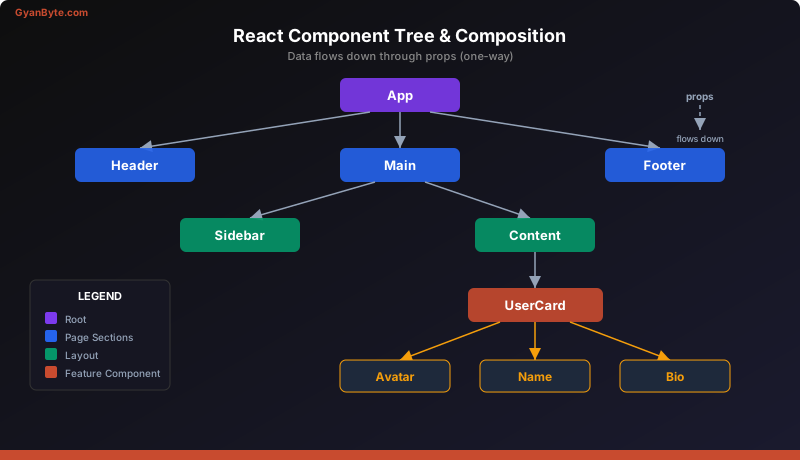
Every React application forms a tree of components. At the root is typically an App component. It renders children, which render their own children, and so on. This tree structure is important because it determines how data flows (top-down) and how React decides what to re-render.
App
├── Header
│   ├── Logo
│   └── NavMenu
├── Main
│   ├── Sidebar
│   └── Content
│       ├── UserCard
│       │   ├── Avatar
│       │   ├── Name
│       │   └── Bio
│       └── UserCard
│           ├── Avatar
│           ├── Name
│           └── Bio
└── Footer
This is your dependency tree. Like a microservice dependency graph, it tells you what depends on what. But unlike microservices, the dependency is always one-way: parents know about children, children do not know about parents. This strict hierarchy is what makes React applications predictable.
JSX Compilation in Practice
When you run a React build pipeline (using tools like Vite, Webpack, or Next.js), a compiler called Babel (or SWC) transforms your JSX into React.createElement calls before the browser ever sees it. The browser receives plain JavaScript — no JSX.
This is similar to how TypeScript compiles to JavaScript, or how Kotlin compiles to JVM bytecode. JSX is a developer convenience that disappears at build time. Understanding this helps demystify errors — when you see a “JSX element type does not have any construct or call signatures” error, you now know it means the compiled createElement call could not find a valid component function.
Key Takeaways
- JSX is compiled to
React.createElementcalls, not HTML strings. It produces an object tree that React can diff. Think of it as building an AST rather than concatenating strings. - Components are plain functions that take props as input and return JSX as output. They compose together the same way you compose middleware, services, or Unix pipes.
- Split components using the same single-responsibility rules you already apply to backend functions — one clear purpose per component, extract when you see duplication, and resist premature abstraction.
Next up: Props and State — Data Flow in React —>