If you have spent years building APIs, writing database queries, and designing microservices, the frontend can feel like the wild west. The DOM is mutable global state. Events fire from everywhere. And somehow, millions of developers ship complex UIs every day without losing their minds. React is the reason.
This lesson explains what problem React actually solves, why it matters to you as a backend engineer, and how to rewire your mental model for frontend thinking.
The Problem: Imperative DOM Manipulation
Before React, building dynamic UIs meant writing imperative code that manually touched the DOM. Think of it like writing raw SQL with string concatenation instead of using an ORM — it works, but it does not scale.
Here is what “vanilla” JavaScript looks like when you want to update a simple counter:
// Imperative DOM manipulation
const button = document.getElementById('increment');
const display = document.getElementById('count');
let count = 0;

button.addEventListener('click', () => {
  count += 1;
  display.textContent = `Count: ${count}`;
  // What if count > 10? Add a CSS class manually.
  if (count > 10) {
    display.classList.add('warning');
  }
  // What if we also need to update a sidebar? Another manual update.
  document.getElementById('sidebar-count').textContent = count;
});
You are telling the browser how to update the screen, step by step. Every new requirement means another line of manual DOM manipulation. This is the frontend equivalent of hand-rolling HTTP parsing instead of using Express or Spring Boot.
Now look at the same thing in React:
// Declarative React approach
function Counter() {
  const [count, setCount] = React.useState(0);

  return (
    <div>
      <p className={count > 10 ? 'warning' : ''}>
        Count: {count}
      </p>
      <button onClick={() => setCount(count + 1)}>
        Increment
      </button>
      <Sidebar count={count} />
    </div>
  );
}
You describe what the UI should look like for any given state. React figures out how to update the DOM. This is the same leap you made when you moved from imperative file I/O to declarative SQL queries — you describe the result, not the procedure.
The Virtual DOM — Think Database Migrations
React maintains a lightweight JavaScript copy of the DOM called the Virtual DOM. When state changes, React builds a new virtual tree, diffs it against the previous one, and applies only the minimal set of changes to the real DOM.
If you have worked with database migration tools like Flyway or Alembic, the concept is identical. You do not drop the entire database and rebuild it from scratch on every schema change. Instead, the tool computes a diff between the current schema and the desired schema, then generates the minimal ALTER statements. React does the same thing, but for HTML elements.
This diffing algorithm is what makes React fast enough for production. You write code as if you are rebuilding the entire UI on every state change, but React ensures only the parts that actually changed get touched in the real DOM.
React vs Vue vs Plain JavaScript
The frontend ecosystem has multiple options. Here is a quick comparison through a backend lens:
Plain JavaScript / jQuery — Like writing raw HTTP servers without a framework. Full control, zero abstractions, but you will reinvent every wheel. Suitable for tiny scripts on static pages. Not suitable for anything with more than a few interactive elements.
Vue.js — Like Flask or Sinatra. Gentle learning curve, great documentation, convention-driven. It uses a template syntax that feels more like traditional HTML. Smaller ecosystem than React but growing steadily.
React — Like Express or Spring Boot. Massive ecosystem, enormous job market, and the most battle-tested option for large-scale applications. It is more “JavaScript-first” than Vue, which means you will use JavaScript patterns you already know rather than learning framework-specific template syntax.
Why pick React? Three reasons that matter to a backend engineer entering the frontend:
- Ecosystem depth. Need authentication? There is a library. Need data fetching with caching? React Query. Need server-side rendering? Next.js. The ecosystem solves problems you have not even hit yet.
- Transferable skills. React Native for mobile, Electron for desktop, and frameworks like Remix and Next.js for full-stack. Learning React once covers a lot of surface area.
- Job market reality. React dominates frontend job postings. If you are adding frontend skills to your resume, React gives you the most leverage.
The Mental Model Shift
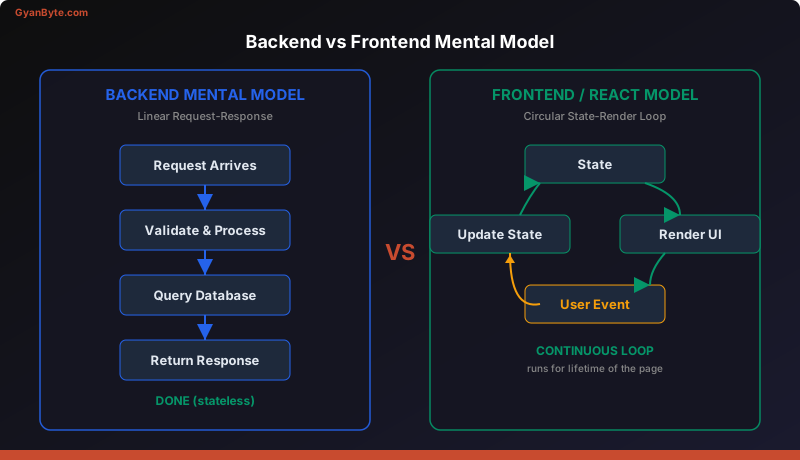
This is the most important section of this lesson. Backend and frontend programming have fundamentally different mental models, and failing to internalize this will cause frustration.
Backend mental model: Request-Response.
A request arrives. You validate it, process it, query a database, and return a response. The flow is linear. Once the response is sent, you are done. State lives in the database, not in your application process. Each request is largely independent.
Frontend/React mental model: State-Render-Event loop.
The application starts with an initial state. React renders the UI based on that state. The user interacts with the UI (clicks, types, scrolls). Those interactions fire events. Event handlers update the state. React re-renders the UI to reflect the new state. This loop runs continuously for as long as the page is open.
Think of it as a long-lived WebSocket connection rather than stateless HTTP. Your component is not a request handler that runs once — it is a persistent process that reacts to events over time. The “state” in React is like an in-memory cache that drives what the user sees. When the cache updates, the view updates automatically.
Here is the key insight: in backend code, you imperatively tell the system what to do. In React, you declaratively describe what the UI should look like for a given state, and React handles the transitions.
This is similar to how you might use a declarative infrastructure tool like Terraform. You do not write “create this server, then attach this disk, then configure this network.” You declare the desired state, and the tool figures out the steps to get there. React is Terraform for your UI.
A Word on “Thinking in Components”
Backend engineers naturally decompose systems into services, modules, and functions. React asks you to do the same thing with UI. Every piece of your interface is a component — a self-contained unit with its own logic, markup, and (optionally) styling.
A page is a component. A navigation bar is a component. A single button can be a component. You compose them together like you compose functions or chain middleware. This should feel natural — it is the same single-responsibility principle you already follow in backend code.
We will dive deep into components in the next lesson. For now, understand that React’s component model is the reason large teams can work on complex UIs without stepping on each other — the same way microservices let backend teams work independently.
Key Takeaways
- React is declarative. You describe what the UI should look like for a given state. React handles the DOM updates. This is the same shift from imperative SQL string building to declarative ORMs.
- The Virtual DOM is a diffing engine. Like database migration tools, it computes the minimal set of changes needed, keeping updates fast even for complex UIs.
- Frontend is a state-event loop, not request-response. Your components are long-lived processes that continuously react to user input and state changes. Internalizing this mental model is the single biggest unlock.
Next up: JSX and Components — The Building Blocks —>