This is it. Twelve lessons of React, and now we wire everything together into a real application. No toy examples. No counter apps. We’re building an analytics dashboard — the kind of internal tool backend engineers build all the time, except now the frontend is yours too.
This lesson is a guided walkthrough. You’ll see how every concept from the course fits into a production-like project. Think of it as a capstone that references everything you’ve learned.
Project Overview
We’re building an analytics dashboard with these features:
- Authentication — login page, protected routes, JWT token management
- Data fetching — dashboard stats from a REST API with loading and error states
- Filtering — date range and status filters with form state management
- Data table — sortable, filterable user list with pagination
- Responsive layout — sidebar navigation, mobile-friendly
- Performance — memoized expensive renders, code-split admin routes
This covers concepts from every lesson: components (2-3), state (4-5), context (6), routing (7), forms (8), async/API (9), performance (10), and testing (11).
Project Structure
Before writing code, establish a clear folder structure. Backend engineers appreciate this — it’s the equivalent of your controller/service/repository layers:
src/
  api/              ← API client functions (like your service layer)
    auth.js
    dashboard.js
    users.js
  components/       ← Reusable UI components (like shared utilities)
    StatsCard.jsx
    DataTable.jsx
    FilterBar.jsx
    ProtectedRoute.jsx
    Layout.jsx
  context/          ← Global state providers (like dependency injection)
    AuthContext.jsx
  hooks/            ← Custom hooks (like your middleware/interceptors)
    useAuth.js
    useDashboardData.js
  pages/            ← Route-level components (like your controllers)
    LoginPage.jsx
    DashboardPage.jsx
    UserDetailPage.jsx
  App.jsx           ← Root component with routing
  main.jsx          ← Entry point
Backend analogy: pages/ are your controllers — they handle a specific route and orchestrate which components to render. api/ is your service/client layer — it knows how to talk to the backend. hooks/ are your middleware — they handle cross-cutting concerns like auth state and data fetching. context/ is your dependency injection container — it provides shared state to any component that needs it.
Step 1: Set Up Routing (Lesson 7)
Start with the skeleton. Every page needs a URL:
// src/App.jsx
import { BrowserRouter, Routes, Route } from 'react-router-dom';
import { AuthProvider } from './context/AuthContext';
import ProtectedRoute from './components/ProtectedRoute';
import Layout from './components/Layout';
import LoginPage from './pages/LoginPage';
import DashboardPage from './pages/DashboardPage';
import UserDetailPage from './pages/UserDetailPage';

export default function App() {
  return (
    <AuthProvider>
      <BrowserRouter>
        <Routes>
          <Route path="/login" element={<LoginPage />} />
          <Route element={<ProtectedRoute />}>
            <Route element={<Layout />}>
              <Route path="/" element={<DashboardPage />} />
              <Route path="/users/:id" element={<UserDetailPage />} />
            </Route>
          </Route>
        </Routes>
      </BrowserRouter>
    </AuthProvider>
  );
}
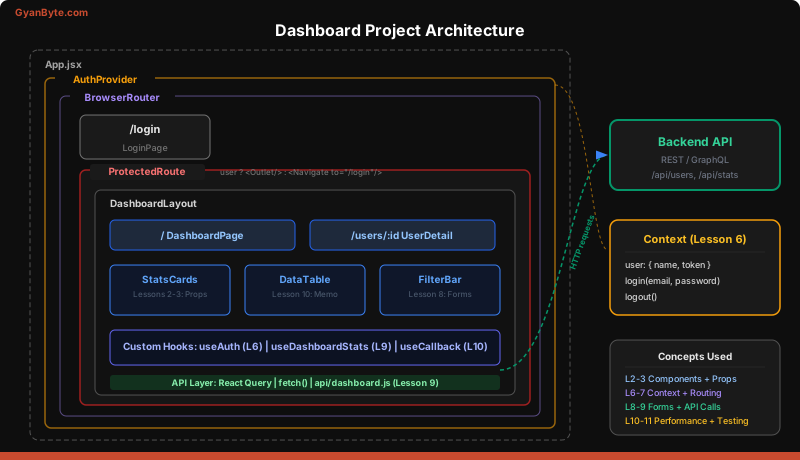
Notice the nesting: AuthProvider wraps everything (it’s context, so it goes outside the router). ProtectedRoute wraps the authenticated section. Layout provides the sidebar and header for all dashboard pages.
Step 2: Auth Context (Lesson 6)
Authentication is global state — every component needs to know if the user is logged in. This is a textbook use case for Context:
// src/context/AuthContext.jsx
import { createContext, useContext, useState, useCallback } from 'react';
import { loginAPI, logoutAPI } from '../api/auth';

const AuthContext = createContext(null);

export function AuthProvider({ children }) {
  const [user, setUser] = useState(() => {
    const saved = localStorage.getItem('user');
    return saved ? JSON.parse(saved) : null;
  });

  const login = useCallback(async (email, password) => {
    const userData = await loginAPI(email, password);
    setUser(userData);
    localStorage.setItem('user', JSON.stringify(userData));
  }, []);

  const logout = useCallback(() => {
    setUser(null);
    localStorage.removeItem('user');
    logoutAPI();
  }, []);

  return (
    <AuthContext.Provider value={{ user, login, logout }}>
      {children}
    </AuthContext.Provider>
  );
}

export const useAuth = () => useContext(AuthContext);
Backend analogy: This is your session middleware. It initializes from persistent storage (localStorage, like a session cookie), provides the current user to any downstream handler, and exposes login/logout operations.
Step 3: Protected Routes (Lesson 7)
Redirect unauthenticated users to login. This is the frontend equivalent of an auth middleware that returns 401:
// src/components/ProtectedRoute.jsx
import { Navigate, Outlet } from 'react-router-dom';
import { useAuth } from '../context/AuthContext';

export default function ProtectedRoute() {
  const { user } = useAuth();

  if (!user) {
    return <Navigate to="/login" replace />;
  }

  return <Outlet />;
}
Three lines of logic. If no user, redirect. Otherwise, render child routes via <Outlet />.
Step 4: API Layer with React Query (Lesson 9)
Centralize your API calls. Each function mirrors a backend endpoint:
// src/api/dashboard.js
const BASE_URL = import.meta.env.VITE_API_URL;

export async function fetchDashboardStats(dateRange) {
  const res = await fetch(
    `${BASE_URL}/api/dashboard/stats?from=${dateRange.from}&to=${dateRange.to}`
  );
  if (!res.ok) throw new Error('Failed to fetch dashboard stats');
  return res.json();
}

export async function fetchUsers(page, filters) {
  const params = new URLSearchParams({ page, ...filters });
  const res = await fetch(`${BASE_URL}/api/users?${params}`);
  if (!res.ok) throw new Error('Failed to fetch users');
  return res.json();
}
Then wrap these in a custom hook using React Query:
// src/hooks/useDashboardData.js
import { useQuery } from '@tanstack/react-query';
import { fetchDashboardStats } from '../api/dashboard';

export function useDashboardStats(dateRange) {
  return useQuery({
    queryKey: ['dashboard-stats', dateRange],
    queryFn: () => fetchDashboardStats(dateRange),
    staleTime: 30_000, // Consider data fresh for 30 seconds
  });
}
Backend analogy: The api/ folder is your HTTP client layer. The hooks are like repository classes that add caching and error handling on top. staleTime is your cache TTL.
Step 5: Dashboard Components (Lessons 2-3)
Build the reusable pieces. Each component has a single responsibility:
// src/components/StatsCard.jsx
export default function StatsCard({ title, value, change, icon }) {
  const isPositive = change >= 0;

  return (
    <div className="rounded-lg bg-white p-6 shadow-sm">
      <div className="flex items-center justify-between">
        <span className="text-sm text-gray-500">{title}</span>
        <span className="text-2xl">{icon}</span>
      </div>
      <p className="mt-2 text-3xl font-bold">{value.toLocaleString()}</p>
      <p className={`mt-1 text-sm ${isPositive ? 'text-green-600' : 'text-red-600'}`}>
        {isPositive ? '+' : ''}{change}% from last period
      </p>
    </div>
  );
}
The dashboard page composes these cards:
// src/pages/DashboardPage.jsx (partial)
function DashboardPage() {
  const [dateRange, setDateRange] = useState(defaultDateRange);
  const { data: stats, isLoading, error } = useDashboardStats(dateRange);

  if (isLoading) return <LoadingSkeleton />;
  if (error) return <ErrorMessage message={error.message} />;

  return (
    <div>
      <FilterBar dateRange={dateRange} onChange={setDateRange} />
      <div className="grid grid-cols-1 gap-4 md:grid-cols-2 lg:grid-cols-4">
        <StatsCard title="Total Users" value={stats.totalUsers} change={stats.userGrowth} />
        <StatsCard title="Active Sessions" value={stats.activeSessions} change={stats.sessionChange} />
        <StatsCard title="Revenue" value={stats.revenue} change={stats.revenueChange} />
        <StatsCard title="Error Rate" value={stats.errorRate} change={stats.errorChange} />
      </div>
      <DataTable users={stats.recentUsers} />
    </div>
  );
}
Step 6: Filter Form (Lesson 8)
The FilterBar manages form state for date range and status filters:
// src/components/FilterBar.jsx
import { useState } from 'react';

export default function FilterBar({ dateRange, onChange }) {
  const [from, setFrom] = useState(dateRange.from);
  const [to, setTo] = useState(dateRange.to);

  const handleApply = (e) => {
    e.preventDefault();
    if (new Date(from) > new Date(to)) {
      alert('Start date must be before end date');
      return;
    }
    onChange({ from, to });
  };

  return (
    <form onSubmit={handleApply} className="mb-6 flex items-end gap-4">
      <label className="flex flex-col text-sm">
        From
        <input type="date" value={from} onChange={e => setFrom(e.target.value)} />
      </label>
      <label className="flex flex-col text-sm">
        To
        <input type="date" value={to} onChange={e => setTo(e.target.value)} />
      </label>
      <button type="submit" className="rounded bg-blue-600 px-4 py-2 text-white">
        Apply
      </button>
    </form>
  );
}
Validation is inline and simple. For a production app, you might reach for a form library (Lesson 8), but for two date inputs this is clean enough.
Step 7: Performance Optimization (Lesson 10)
The DataTable renders potentially hundreds of rows. Memoize it:
import { useMemo, useCallback } from 'react';

const UserRow = React.memo(function UserRow({ user, onSelect }) {
  return (
    <tr onClick={() => onSelect(user.id)} className="cursor-pointer hover:bg-gray-50">
      <td className="p-3">{user.name}</td>
      <td className="p-3">{user.email}</td>
      <td className="p-3">{user.lastActive}</td>
    </tr>
  );
});

export default function DataTable({ users }) {
  const [sortKey, setSortKey] = useState('name');

  const sorted = useMemo(() => {
    return [...users].sort((a, b) => a[sortKey].localeCompare(b[sortKey]));
  }, [users, sortKey]);

  const handleSelect = useCallback((id) => {
    window.location.href = `/users/${id}`;
  }, []);

  return (
    <table className="w-full">
      <thead>
        <tr>
          <th onClick={() => setSortKey('name')} className="cursor-pointer p-3">Name</th>
          <th onClick={() => setSortKey('email')} className="cursor-pointer p-3">Email</th>
          <th onClick={() => setSortKey('lastActive')} className="cursor-pointer p-3">Last Active</th>
        </tr>
      </thead>
      <tbody>
        {sorted.map(user => (
          <UserRow key={user.id} user={user} onSelect={handleSelect} />
        ))}
      </tbody>
    </table>
  );
}
useMemo for the sort, useCallback for the click handler, and React.memo on the row component. Sorting only re-runs when users or sortKey changes. Individual rows only re-render when their user prop changes.
Step 8: One Test (Lesson 11)
Test the StatsCard component — it’s pure, props-in, UI-out:
import { render, screen } from '@testing-library/react';
import StatsCard from './StatsCard';

test('renders stats with positive change', () => {
  render(<StatsCard title="Users" value={1500} change={12.5} icon="👤" />);

  expect(screen.getByText('Users')).toBeInTheDocument();
  expect(screen.getByText('1,500')).toBeInTheDocument();
  expect(screen.getByText('+12.5% from last period')).toBeInTheDocument();
});

test('renders negative change in red', () => {
  render(<StatsCard title="Errors" value={42} change={-8.3} icon="⚠️" />);

  const change = screen.getByText('-8.3% from last period');
  expect(change).toHaveClass('text-red-600');
});
Simple, focused, and tests what the user actually sees.
Deployment Checklist
Before shipping, run through this:
- Environment variables — move all API URLs and keys to
.envfiles. Never hardcode them. Vite usesVITE_prefix for client-exposed variables. - Build command —
npm run buildproduces adist/folder with static assets. Test the build locally withnpx serve dist. - Static hosting — deploy to Vercel (
vercel deploy) or Netlify (netlify deploy). Both auto-detect Vite/React and configure everything. - SPA routing — add a
_redirectsfile (Netlify) orvercel.jsonrewrite so all routes serveindex.html. Without this, direct navigation to/users/123returns 404. - Error monitoring — add Sentry or similar.
ErrorBoundarycatches render errors, but you also need to catch async errors in your API layer.
# Netlify _redirects file
/*    /index.html   200
// vercel.json
{
"rewrites": [{ "source": "/(.*)", "destination": "/index.html" }]
}The Complete App Structure
Here’s what the finished project looks like at a glance — every file maps to a lesson:
src/
  api/
    auth.js             ← Lesson 9: API calls
    dashboard.js        ← Lesson 9: API calls
  components/
    DataTable.jsx       ← Lessons 2-3, 10: Components + memoization
    FilterBar.jsx       ← Lesson 8: Forms
    Layout.jsx          ← Lesson 2: Component composition
    ProtectedRoute.jsx  ← Lesson 7: Routing
    StatsCard.jsx       ← Lesson 2: Props
    StatsCard.test.jsx  ← Lesson 11: Testing
  context/
    AuthContext.jsx      ← Lesson 6: Context
  hooks/
    useAuth.js           ← Lesson 5: Custom hooks
    useDashboardData.js  ← Lesson 9: React Query
  pages/
    DashboardPage.jsx    ← Lessons 4-5: State + effects
    LoginPage.jsx        ← Lesson 8: Forms
    UserDetailPage.jsx   ← Lesson 7: Route params
  App.jsx                ← Lesson 7: Route definitions
  main.jsx               ← Entry point
Every concept has a home. Every lesson has a real use case.
Key Takeaways
- A real React project is just small concepts composed together. Routing, context, hooks, components, and API calls each handle one concern. The app is the composition.
- Project structure matters. Separating pages, components, hooks, api, and context mirrors the layered architecture you already use on the backend. When someone asks “where does auth live?” the answer is obvious.
- Start with the skeleton (routing), then add layers. Auth context first, then data fetching, then components, then optimization. Each layer builds on the last — exactly like building a backend service.
Congratulations! You’ve completed the React.js Crash Course for Backend Engineers.
You started with JSX and components, progressed through state management and hooks, learned routing and forms, handled async data, optimized performance, wrote tests, and built a full project. Every lesson was framed in concepts you already know from the backend — because React isn’t a foreign language. It’s a different dialect of the same engineering principles.
What’s Next
Your React journey doesn’t end here. Three recommended paths forward:
-
Next.js — The full-stack React framework. It adds server-side rendering, API routes, file-based routing, and server components. If you liked React but miss the server, Next.js bridges both worlds. It’s the closest thing to a backend framework in the React ecosystem.
-
TypeScript strict mode — You’ve been writing JavaScript. Add
"strict": trueto yourtsconfig.jsonand convert your project to TypeScript. As a backend engineer, you’ll appreciate the type safety. It catches entire categories of bugs at compile time that would otherwise reach production. -
Build a real project — Pick something you’d actually use. A monitoring dashboard for your services. A log viewer. A deployment tracker. The best way to solidify these skills is to build something where you’re both the developer and the user. You’ll make real architectural decisions, not textbook ones.
The skills transfer both ways. Understanding how frontends consume your APIs makes you a better API designer. Knowing about re-renders and bundle size makes you a better architect. You’re now a more complete engineer.