On the 3rd of every month, the finance team at a D2C company I worked with would send the same email: “Gateway settlements for last month are ₹3.1 lakh less than the sales report. Please explain.”
The engineering team would spend two days in spreadsheets. They’d find some refunds that were done directly from the gateway dashboard (not through our system). Some payments where the webhook never arrived, so our system showed them as failed while the gateway had captured them. Some chargebacks. A fee change nobody told us about. They’d explain most of it, write off the rest as “timing differences”, and do it all again next month.
The real problem was that we were reconciling once a month, by hand, after the fact. This lesson is about doing it every day, automatically, so that problems are found the day after they happen, when they’re small and easy to fix.
How Settlement Works
Quick recap from Lesson 1: when a customer pays, the money goes to the gateway’s escrow account. The gateway then settles it to your bank account, usually on T+1 (one working day after the transaction), in batches.
A few practical details:
- Working days only. Bank holidays and Sundays shift settlements. Friday’s payments might arrive on Monday or Tuesday. Your recon must know the bank holiday calendar, or every long weekend will look like a missing settlement.
- One batch, one bank credit. Each settlement batch shows up in your bank statement as one credit, with a UTR (Unique Transaction Reference) number. That UTR is the link between the gateway’s settlement report and your bank statement.
- Net, not gross. The gateway deducts fees, GST, refunds, held chargebacks and other adjustments before paying you.
- Different schedules per method. Some payment methods or merchants may have different settlement cycles. Instant or on-demand settlement is often available for a fee.
Reading a settlement report
Here is what one settlement batch typically breaks down to:
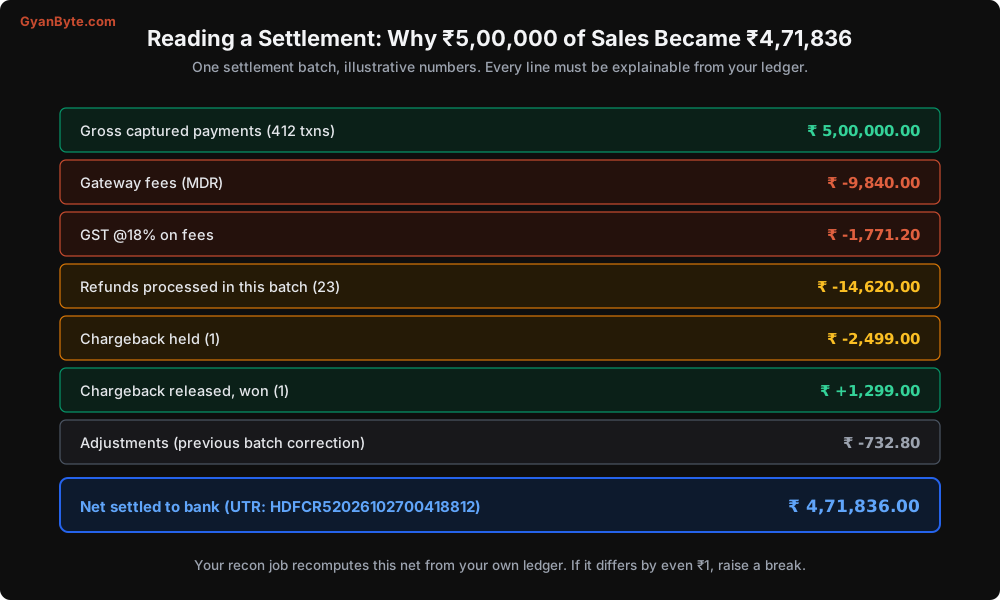
Every line in that report should be explainable from your own records:
- Gross payments: your captured payments for that period.
- Fees and GST: the fee and tax you stored per payment (Lesson 3).
- Refunds: your refunds that the gateway processed in that window.
- Chargebacks held and released: your dispute records (Lesson 8).
- Adjustments: these are the tricky ones. Previous-batch corrections, fee reversals, manual adjustments by the gateway. Each must be investigated the first time it appears.
If your ledger is set up as in Lesson 7, the gateway_receivable account’s movements for the batch should exactly equal the net settlement. That’s the whole idea.
Three-Way Reconciliation
You have three independent records of the same money:
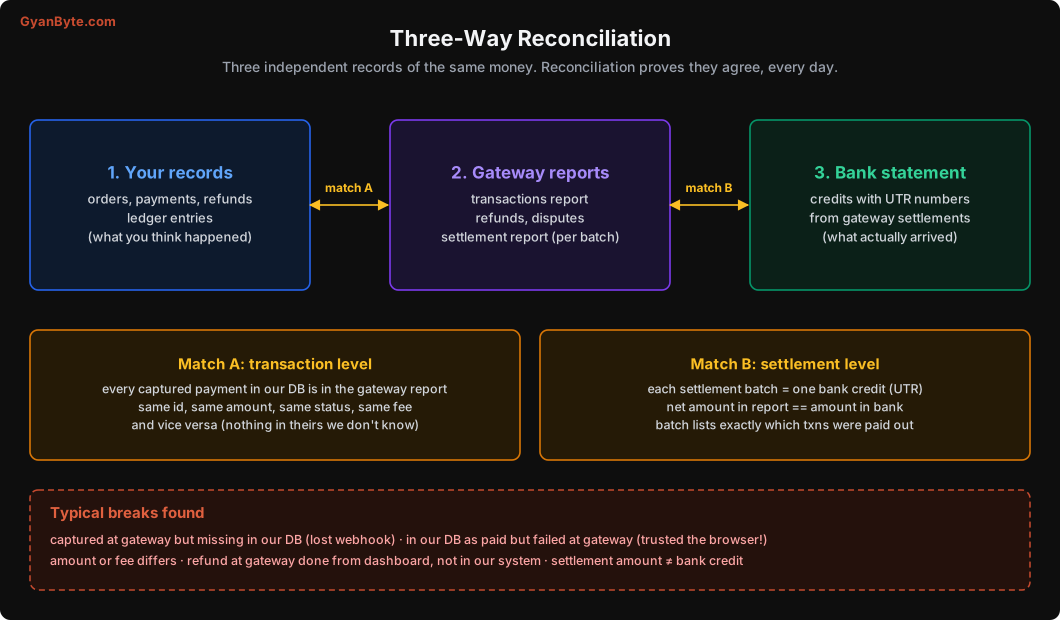
- Your records: what you think happened.
- Gateway reports: what the gateway says happened.
- Bank statement: what actually arrived.
Reconciliation proves they agree. It happens at two levels:
- Match A, transaction level: every payment and refund in your DB matches the gateway’s transaction report, with the same id, amount, status and fee. And nothing exists at the gateway that you don’t know about.
- Match B, settlement level: each gateway settlement batch matches exactly one bank credit, by UTR and amount. And the transactions listed in the batch match what you expected to be settled.
Building the Pipeline
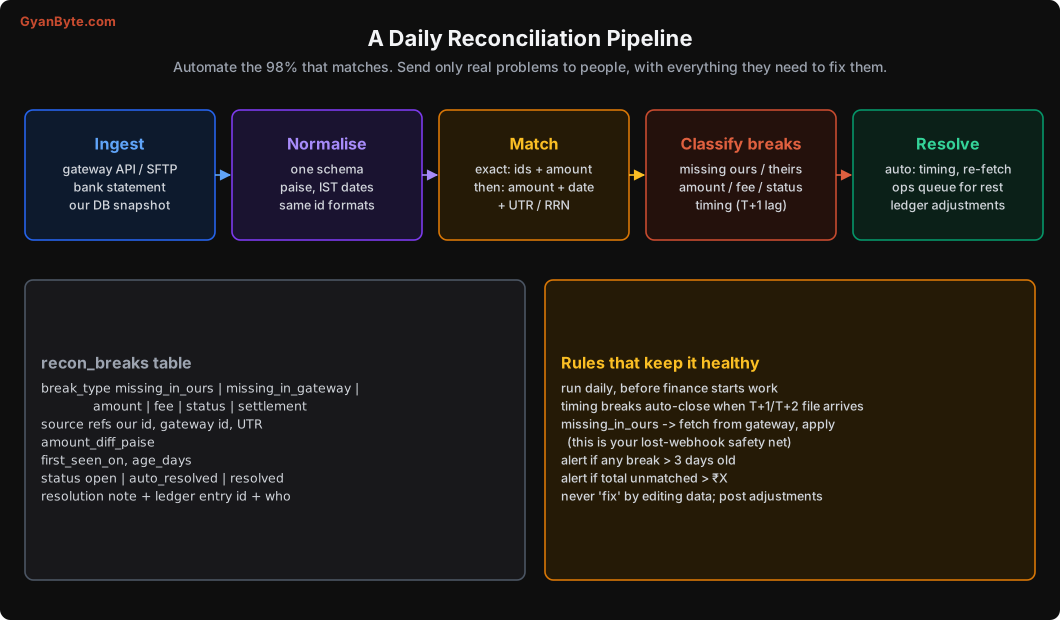
Step 1: Ingest
Pull data from all three sources every day:
- Gateway: most gateways provide settlement and transaction reports through an API, and many also through scheduled files (SFTP or email). Prefer the API. Pull a few days back each time, since late changes happen.
- Bank: many banks now offer APIs for current account statements. Otherwise, a daily statement file (CSV, Excel, or the MT940 format). Finance can usually help set this up with the bank.
- Your DB: payments, refunds, disputes and ledger entries for the period.
Step 2: Normalise
Put everything into the same shape before matching:
CREATE TABLE recon_gateway_txns (
    gateway          TEXT NOT NULL,
    gateway_id       TEXT NOT NULL,          -- pay_xxx or rfnd_xxx
    kind             TEXT NOT NULL,          -- 'payment', 'refund', 'adjustment', 'dispute'
    amount_paise     BIGINT NOT NULL,
    fee_paise        BIGINT NOT NULL DEFAULT 0,
    tax_paise        BIGINT NOT NULL DEFAULT 0,
    status           TEXT NOT NULL,
    txn_date_ist     DATE NOT NULL,
    settlement_id    TEXT,
    report_date      DATE NOT NULL,
    PRIMARY KEY (gateway, gateway_id, kind)
);

CREATE TABLE recon_bank_credits (
    bank_account     TEXT NOT NULL,
    value_date       DATE NOT NULL,
    amount_paise     BIGINT NOT NULL,
    utr              TEXT,
    narration        TEXT NOT NULL,
    PRIMARY KEY (bank_account, value_date, amount_paise, narration)
);
Normalisation rules that save pain:
- Amounts in paise, as integers. Gateway reports often have rupees with decimals; convert carefully (
round(Decimal(x) * 100), neverfloat). - Dates in IST. Gateways may give timestamps in UTC. A payment at 1 AM IST on the 15th is 7:30 PM UTC on the 14th. If you mix time zones, every payment near midnight lands on the wrong day and shows up as a break.
- Extract the UTR from the bank narration. Banks put it inside free text like
NEFT CR-HDFC0000001-RAZORPAY SOFTWARE-UTR HDFCR52026102700418812. Write a parser with tests for each bank’s format.
Step 3: Match
Start with exact matching on ids. For transaction level, a full outer join finds everything that doesn’t line up:
-- Match A: our captured payments vs gateway payments for a day
WITH ours AS (
    SELECT gateway_payment_id AS id, amount_paise, fee_paise, tax_paise, status
      FROM payments
     WHERE gateway = 'razorpay'
       AND status IN ('captured', 'partially_refunded', 'refunded', 'disputed')
       AND (captured_at AT TIME ZONE 'Asia/Kolkata')::date = $1
),
theirs AS (
    SELECT gateway_id AS id, amount_paise, fee_paise, tax_paise, status
      FROM recon_gateway_txns
     WHERE gateway = 'razorpay' AND kind = 'payment' AND txn_date_ist = $1
)
SELECT COALESCE(o.id, t.id) AS id,
       CASE
         WHEN o.id IS NULL THEN 'missing_in_ours'
         WHEN t.id IS NULL THEN 'missing_in_gateway'
         WHEN o.amount_paise <> t.amount_paise THEN 'amount'
         WHEN o.fee_paise IS DISTINCT FROM t.fee_paise
           OR o.tax_paise IS DISTINCT FROM t.tax_paise THEN 'fee'
         ELSE 'status'
       END AS break_type,
       o.amount_paise AS our_amount, t.amount_paise AS their_amount
  FROM ours o
  FULL OUTER JOIN theirs t ON o.id = t.id
 WHERE o.id IS NULL OR t.id IS NULL
    OR o.amount_paise <> t.amount_paise
    OR o.fee_paise IS DISTINCT FROM t.fee_paise
    OR o.tax_paise IS DISTINCT FROM t.tax_paise
OR NOT status_compatible(o.status, t.status);(status_compatible is a small function you write that knows, for example, that our partially_refunded is fine against their captured with a refund.)
For settlement level, match each settlement batch with a bank credit by UTR, and fall back to amount + date when the UTR is missing:
-- Match B: settlements vs bank credits
SELECT s.settlement_id, s.net_paise, s.utr, b.amount_paise AS bank_amount, b.value_date
  FROM gateway_settlements s
  LEFT JOIN recon_bank_credits b
         ON b.utr = s.utr
 WHERE s.settled_on BETWEEN $1 AND $2
   AND (b.utr IS NULL OR b.amount_paise <> s.net_paise);
Then check the settlement’s internals: the sum of its transactions (payments minus refunds minus fees minus tax, plus or minus disputes and adjustments) must equal its net amount, and must equal the movement of gateway_receivable in your ledger for those transactions.
Step 4: Record breaks
Everything that didn’t match becomes a row in a recon_breaks table, with the type, the references from each side, the amount difference, and when it was first seen. Breaks are tracked until resolved, not recomputed from scratch every day, so you can see their age.
Step 5: Resolve
Most breaks fall into a few types, and many can be resolved automatically:
| Break type | Usual cause | Resolution |
|---|---|---|
| Timing | Payment at 11:58 PM, settlement next batch; holidays | Auto-close when it appears in the next report |
| Missing in ours | Lost or failed webhook | Fetch from gateway and apply via the normal path (see below) |
| Missing in gateway | We marked paid without proper verification | Investigate urgently. Possible bug or fraud |
| Status | Late success or late failure | Re-fetch and apply through the state machine |
| Fee / tax | Pricing change, special card types | Accept gateway value, post adjustment, update fee expectations |
| Dashboard refund | Someone refunded from the gateway dashboard | Import into refunds table, post ledger entry, and stop people doing this |
| Settlement vs bank | Bank credit missing or different | Check with gateway and bank; often a holiday or a split credit |
The missing in ours row is especially important. It’s your safety net for lost webhooks. Even if every webhook and every status poll failed, the daily recon will find the captured payment the next morning and apply it:
def resolve_missing_in_ours(brk):
    p = pg.fetch_payment(brk.gateway_id)                 # always re-fetch, don't trust the report row
    order_id = p.get("notes", {}).get("order_id")
    if not order_id:
        return send_to_ops_queue(brk, reason="no order reference on gateway payment")
    apply_gateway_payment(order_id, p)                   # same function as webhook (Lesson 4)
    close_break(brk, resolution="applied missed payment via recon", by="system")
This is why Lesson 4 insisted on passing your order id in the gateway’s notes / receipt. Without it, a payment missing on your side is very hard to connect to an order.
Missing in gateway is the dangerous one. It means your system thinks a payment happened, and the gateway says it didn’t. Usually that’s a bug where something marked an order paid without verifying with the gateway (trusting the browser, a test-mode key in production, a manual DB update). Treat every one of these as an incident.
Rules that keep it healthy
- Never fix a break by editing data. If the ledger is wrong, post an adjustment entry with a reason and a reference to the break. The history must show what was corrected and why.
- Run before finance starts their day. A recon summary in the finance team’s Slack channel at 9 AM (“Yesterday: 4,812 txns matched, 3 breaks, ₹1,247 unexplained”) builds a lot of trust.
- Alert on age and size. Any break older than 3 working days, or total unexplained above a threshold, goes to a human.
- Watch the trend. A slow rise in fee breaks often means a pricing change. A sudden rise in missing-in-ours means your webhooks are failing.
Month-End and Year-End
Daily recon makes month-end close almost boring, which is exactly what finance wants. A few extra things at month end:
- Gateway tax invoices. Gateways send a monthly GST invoice for their fees. The total fee and GST should match the sum of fees and tax in your records for the month. Finance needs this for input tax credit.
- Cut-off. Payments captured on the last day but settled next month must be reported correctly. The
occurred_atvsrecorded_atdistinction from Lesson 7 makes this straightforward. - 31st March. The financial year ends. Make sure nothing is in a “we’ll look at it later” state. Old unresolved breaks become audit questions.
A Note on Multiple Gateways
Many companies end up with two or more gateways (for redundancy, better pricing on certain methods, or because of an acquisition). Build recon per gateway from the start, with the gateway as a column everywhere, and one shared breaks table and dashboard. Each gateway’s report format is different, so the ingest and normalise steps are per gateway, but matching and resolution can be shared.
Pitfalls to Avoid
- Monthly manual recon. Do it daily and automatically. Small problems found early stay small.
- Ignoring bank holidays. Every long weekend will look like missing money.
- Mixing UTC and IST dates. Payments near midnight land on the wrong day.
- Floats when parsing reports. Use decimals and convert to integer paise.
- Matching only one way. Check both “ours not in theirs” and “theirs not in ours”.
- No order reference in gateway notes. Missing-in-ours payments become impossible to resolve.
- Treating missing-in-gateway as a small break. It’s an incident: something marked paid without verifying.
- Fixing breaks by editing records. Post adjustments with a reason and reference.
- Allowing refunds from the gateway dashboard. They bypass your system. Restrict dashboard permissions.
- Recomputing breaks daily from scratch. Track them as rows so you can see their age.
Quick Recap
- Settlement is batched, net of fees, GST, refunds and disputes, usually T+1 on working days, with a UTR per bank credit.
- Reconcile three records daily: your DB, gateway reports, bank statement.
- Match A at transaction level, Match B at settlement level, with exact matching first.
- Breaks are tracked rows with type and age. Timing breaks auto-close; missing-in-ours triggers fetch-and-apply; missing-in-gateway is an incident.
- Never edit data to fix a break; post adjustments.
Next lesson: recurring payments. Subscriptions, UPI AutoPay and e-mandates under RBI’s rules, and how to bill customers every month without surprising them.