A fitness app I know had a painful quarter. Their subscription renewal flow was built quickly: store the card, charge it every month. Then two things happened. RBI’s rules on recurring card payments came into force, and their old stored-card renewals started failing in large numbers. And when they rushed to move to mandates, a bug in their cancellation flow meant that customers who cancelled in the app still had active mandates with the bank, and some were charged again the next month.
The first problem cost them revenue. The second cost them trust, chargebacks, and a lot of angry Play Store reviews.
Recurring payments in India have specific rules, and they’re there to protect customers from exactly that second problem. If you understand the rules and model the system properly, subscriptions work very well.
How Recurring Payments Work in India
You can’t just “store a card and charge it every month” any more. Recurring debits work through a mandate: a standing instruction that the customer approves once, with full authentication, and that their bank records.
The main options:
| Method | Customer sets up with | Good for | Notes |
|---|---|---|---|
| UPI AutoPay | UPI PIN in their UPI app | Most consumer subscriptions | Customer can see and cancel mandates in their UPI app |
| Card mandate (standing instruction) | Card + OTP (on a tokenised card) | Customers who prefer cards, international | Issuer must support it |
| e-NACH | Net banking or debit card, sometimes Aadhaar-based | Loan EMIs, insurance, SIPs, larger amounts | Bank-account based; setup can take longer |
Your gateway likely offers a “subscriptions” or “recurring payments” product that wraps all three. Use it. Building mandate flows directly with banks is not something most companies should do.
The Rules, in Plain Words
RBI’s framework for recurring transactions (often called the e-mandate or AFA rules) comes down to a few principles. The exact limits change from time to time, so treat the numbers as examples and check the current circular:
- Setup needs full authentication. The first registration of a mandate requires the customer’s additional factor of authentication: UPI PIN, card OTP, net banking login.
- Later debits up to a limit can run without fresh authentication. At the time of writing, the general limit for automatic debits without AFA is ₹15,000 per transaction, and higher (₹1 lakh) for some categories like mutual fund subscriptions, insurance premiums and credit card bill payments. Above the limit, the customer must authenticate each debit.
- Pre-debit notification. The customer must be notified before each debit (at least 24 hours before, at the time of writing), with the amount and date, and a way to opt out of that debit.
- The customer can cancel any time. Through their bank or UPI app, without your permission.
- Mandates have a maximum amount and a validity. You can’t debit more than the approved maximum, or after the end date.
Who sends the pre-debit notification? Often the bank or the gateway sends it on your behalf, and sometimes you’re expected to send it too. Find out exactly how your gateway handles it, because if a notification isn’t sent, the debit may fail or be disputed.
The Mandate Lifecycle
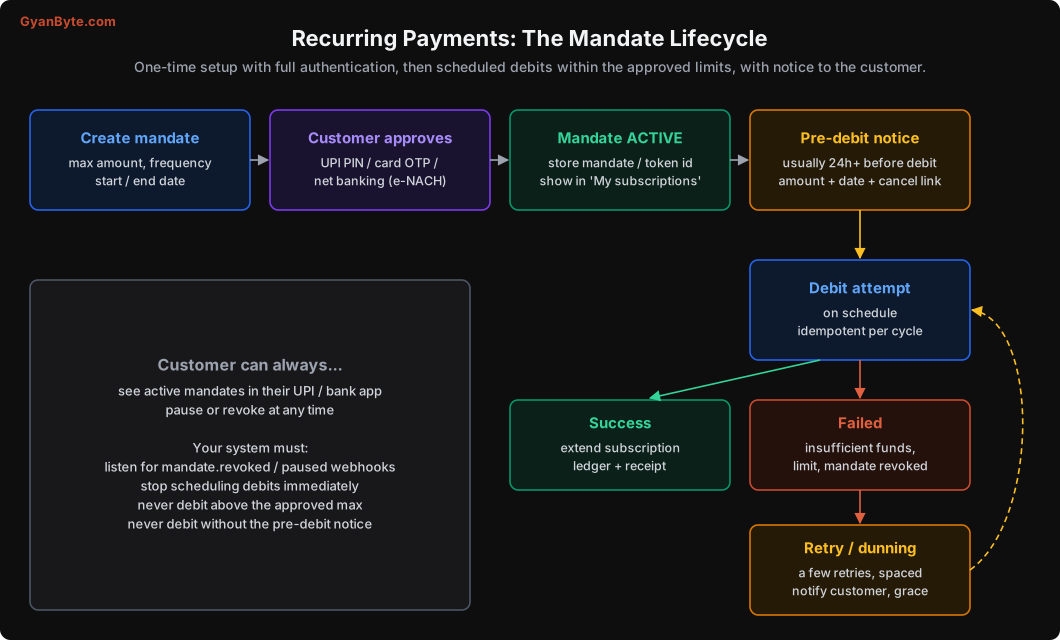
When you create a mandate, decide these carefully:
- Maximum amount. Set it a bit above the plan price to allow for taxes and small price changes, but not much more. A ₹299/month plan with a ₹15,000 maximum looks suspicious to customers when they see it in their UPI app, and many will refuse to approve it. Something like ₹500 for a ₹299 plan is a reasonable buffer. If you later need to charge more than the maximum, you need a new mandate.
- Frequency. Monthly, yearly, or “as presented” (for usage-based billing).
- Validity. Start and end dates. Long validity is convenient, but some customers prefer shorter.
A simple mandates table:
CREATE TABLE mandates (
    id                  BIGSERIAL PRIMARY KEY,
    customer_id         BIGINT NOT NULL,
    gateway             TEXT NOT NULL,
    gateway_mandate_id  TEXT NOT NULL UNIQUE,   -- token / subscription / mandate id at gateway
    method              TEXT NOT NULL,          -- 'upi_autopay' | 'card' | 'enach'
    max_amount_paise    BIGINT NOT NULL,
    frequency           TEXT NOT NULL,          -- 'monthly' | 'yearly' | 'as_presented'
    status              TEXT NOT NULL,          -- 'pending_auth','active','paused','revoked','expired','failed'
    valid_from          DATE NOT NULL,
    valid_until         DATE,
    created_at          TIMESTAMPTZ NOT NULL DEFAULT now(),
    updated_at          TIMESTAMPTZ NOT NULL DEFAULT now()
);
Very important: listen for mandate status webhooks. When a customer revokes or pauses a mandate in their UPI or bank app, the gateway tells you. Your system must stop scheduling debits on that mandate immediately, and update the subscription. Trying to debit a revoked mandate fails anyway, but it also looks bad and can lead to complaints.
Subscriptions Are a Separate State Machine
Don’t mix up the mandate (permission to debit), the subscription (what the customer gets) and the invoice / payment (each charge). They change at different times for different reasons.
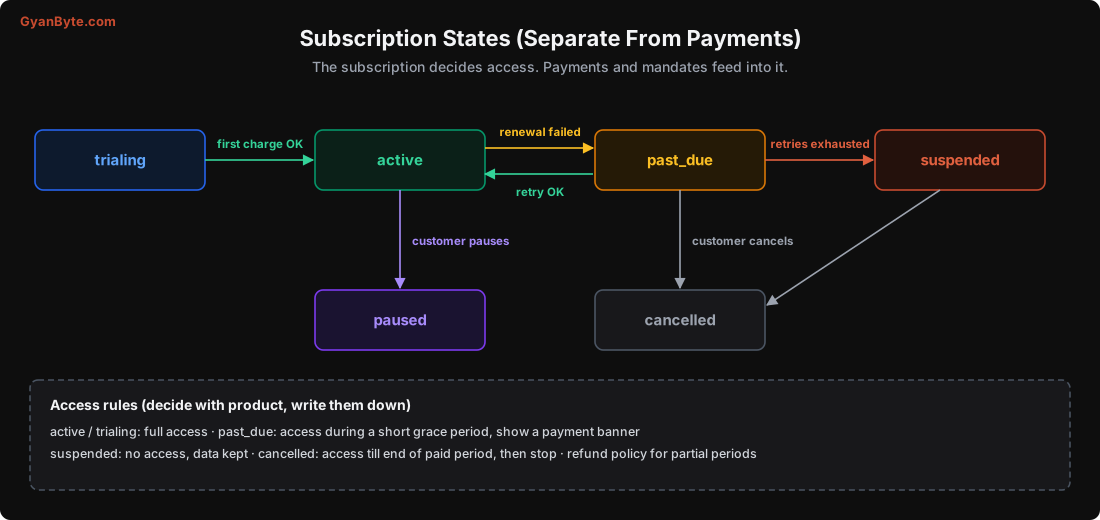
The subscription decides access. Write down the access rules with your product team: what does a past_due customer see? How long is the grace period? What happens to their data when suspended? These are business decisions, but they need to be explicit in code.
CREATE TABLE subscriptions (
    id                   BIGSERIAL PRIMARY KEY,
    customer_id          BIGINT NOT NULL,
    plan_id              TEXT NOT NULL,
    mandate_id           BIGINT REFERENCES mandates(id),
    status               TEXT NOT NULL,      -- 'trialing','active','past_due','suspended','paused','cancelled'
    current_period_start DATE NOT NULL,
    current_period_end   DATE NOT NULL,
    cancel_at_period_end BOOLEAN NOT NULL DEFAULT false,
    created_at           TIMESTAMPTZ NOT NULL DEFAULT now()
);

CREATE TABLE invoices (
    id               BIGSERIAL PRIMARY KEY,
    subscription_id  BIGINT NOT NULL REFERENCES subscriptions(id),
    cycle_number     INT NOT NULL,
    amount_paise     BIGINT NOT NULL,
    status           TEXT NOT NULL,          -- 'scheduled','notified','charging','paid','failed','void'
    notify_at        TIMESTAMPTZ NOT NULL,
    charge_at        TIMESTAMPTZ NOT NULL,
    attempts         INT NOT NULL DEFAULT 0,
    payment_id       BIGINT REFERENCES payments(id),
    UNIQUE (subscription_id, cycle_number)  -- one invoice per cycle, ever
);
That UNIQUE (subscription_id, cycle_number) is the idempotency guarantee for billing. No matter how many times the scheduler runs, there is exactly one invoice for “subscription 812, cycle 7”.
The Billing Scheduler
A scheduler job runs every few minutes and does three things:
from datetime import timedelta

NOTICE = timedelta(hours=26)        # a bit more than 24h, to be safe with delays

def create_upcoming_invoices(conn, now):
    """For subscriptions renewing soon, create the next invoice (idempotently)."""
    subs = conn.fetch("""
        SELECT s.* FROM subscriptions s
          JOIN mandates m ON m.id = s.mandate_id
         WHERE s.status IN ('active', 'past_due')
           AND NOT s.cancel_at_period_end
           AND m.status = 'active'
           AND s.current_period_end <= ($1 + interval '3 days')::date
    """, now)
    for s in subs:
        cycle = next_cycle_number(conn, s["id"])
        amount = price_for(s["plan_id"])
        mandate = conn.fetchrow("SELECT * FROM mandates WHERE id=$1", s["mandate_id"])
        if amount > mandate["max_amount_paise"]:
            flag_needs_new_mandate(s)            # can't exceed approved max
            continue
        charge_at = start_of_day_ist(s["current_period_end"])
        conn.execute("""
            INSERT INTO invoices (subscription_id, cycle_number, amount_paise, status,
                                  notify_at, charge_at)
            VALUES ($1, $2, $3, 'scheduled', $4, $5)
            ON CONFLICT (subscription_id, cycle_number) DO NOTHING
        """, s["id"], cycle, amount, charge_at - NOTICE, charge_at)

def send_due_notifications(conn, now):
    for inv in conn.fetch("SELECT * FROM invoices WHERE status='scheduled' AND notify_at <= $1", now):
        pg.notify_pre_debit(inv)                  # or your own SMS/email, per your gateway's model
        conn.execute("UPDATE invoices SET status='notified' WHERE id=$1 AND status='scheduled'",
                     inv["id"])

def charge_due_invoices(conn, now):
    for inv in conn.fetch("""
        SELECT * FROM invoices WHERE status='notified' AND charge_at <= $1
    """, now):
        updated = conn.execute("""
            UPDATE invoices SET status='charging', attempts = attempts + 1
             WHERE id=$1 AND status='notified'
        """, inv["id"])
        if updated == "UPDATE 0":
            continue                              # another worker took it
        pg.charge_recurring(
            mandate_id=mandate_for(inv)["gateway_mandate_id"],
            amount=inv["amount_paise"],
            reference=f"inv:{inv['subscription_id']}:{inv['cycle_number']}:{inv['attempts'] + 1}",
        )
        # result arrives via webhook -> payment captured / failed -> update invoice + subscription
Things to notice:
- Notify, then charge. An invoice can’t be charged until it has been in
notifiedstate, andcharge_atis at least the notice period afternotify_at. - Conditional updates (
WHERE status='notified') make sure two scheduler workers can’t charge the same invoice. - A unique reference per attempt goes to the gateway, so a retried API call doesn’t create two charges.
- The result comes by webhook, through the same payment state machine as one-time payments (Lesson 6), linked to the invoice.
Time zones, again
Bill in IST. A subscription that renews “on the 5th” should be charged on the 5th in India, not at 5:30 AM IST on the 5th because your server thinks in UTC midnight, and certainly not on the 4th. Also avoid charging at midnight exactly; early morning in India (say 7-9 AM) usually gives better success rates than midnight, when some banks run batch jobs.
Failed Renewals and Retries
Recurring debits fail for ordinary reasons: insufficient balance (very common around month end, before salary day), the bank’s server is down, the mandate was revoked, the amount exceeded a limit.
A reasonable approach:
- On failure, move the subscription to
past_dueand start the grace period. Keep access for a few days. - Tell the customer clearly: “We couldn’t renew your subscription. We’ll try again on 8th Nov. You can also pay now.”
- Retry a few times, spaced out. For example, after 1 day, 3 days and 5 days. Each retry needs a fresh pre-debit notification under the rules (check how your gateway handles retries). Don’t retry many times a day; banks and customers both dislike it.
- Offer a manual “pay now” link with any payment method. Many customers whose mandate failed are happy to pay by UPI right away.
- After the last retry, move to
suspended. Keep their data. Make it easy to come back.
Don’t retry when the failure reason means retrying won’t help: mandate revoked, mandate expired, amount above the maximum. For those, ask the customer to set up a new mandate.
Smart retry timing helps a lot in India. Salary credit days (usually the 1st, or the last working day of the month) are when balances are highest. If a renewal fails on the 27th for insufficient funds, a retry on the 1st has a much better chance than one on the 28th.
Cancellation: Make It Easy and Make It Real
This is where the fitness app went wrong. When a customer cancels in your app:
- Set
cancel_at_period_end = true(or cancel immediately, per your policy). - Cancel or revoke the mandate at the gateway (most gateways have an API for this). Don’t just stop scheduling invoices; also remove the permission. The customer should see the mandate disappear from their UPI app.
- Void any
scheduledornotifiedinvoices for future cycles. - Send a confirmation.
And when the customer cancels the mandate from their bank or UPI app instead, your webhook handler does steps 1, 3 and 4 from the other direction.
Make cancellation easy to find in your app. Hiding it doesn’t keep customers. It just turns cancellations into chargebacks and complaints, which cost you more.
Plan Changes and Prices
- Upgrades mid-cycle: charge the prorated difference now (as a one-time payment, or on the mandate if within limits and with notice), then the new price from the next cycle.
- Downgrades: usually take effect from the next cycle. Simpler and fewer refund edge cases.
- Price increases: notify customers in advance. If the new price is above the mandate’s maximum, they need to approve a new mandate. Plan for some customers not doing it.
- Annual plans: often above the no-AFA limit for some methods, so the customer may need to authenticate the annual renewal. Send a reminder with a payment link a few days before.
Free Trials
Common pattern: set up the mandate at the start of the trial (sometimes with a small verification charge that’s refunded, depending on your gateway), and charge the first real amount when the trial ends.
Be very clear in the UI about when the first charge will happen and how much it will be. Send a reminder before the trial ends. Surprise charges after a trial are the single biggest source of subscription chargebacks.
Pitfalls to Avoid
- Storing cards and charging them directly. Not allowed for recurring payments any more. Use mandates.
- Huge mandate maximums. Customers refuse to approve them. Set a reasonable buffer above the plan price.
- Charging without a pre-debit notification, or charging before the notice period ends.
- Ignoring mandate revoke / pause webhooks. Stop debits the moment the customer withdraws permission.
- Mixing mandate, subscription and invoice states. Keep three separate models.
- Non-idempotent billing. One invoice per subscription cycle, enforced by a unique constraint.
- Billing in UTC. Bill on IST dates, at a sensible hour.
- Retrying too often or retrying hopeless failures. Space retries; use salary-day timing; stop on revoked mandates.
- Cancelling in your app without revoking the mandate. Customers get charged again and file chargebacks.
- Unclear trial-to-paid conversion. Remind customers before the first charge.
Quick Recap
- Recurring payments in India run on mandates: UPI AutoPay, card mandates, e-NACH.
- RBI rules: full authentication at setup, limits for automatic debits, pre-debit notifications, cancel any time.
- Separate state machines for mandates, subscriptions and invoices.
- Idempotent scheduler: create invoice per cycle, notify, then charge, with unique references.
- Handle failures with grace periods and spaced retries; make cancellation real by revoking the mandate.
Next lesson: fraud, security and compliance. The attacks that target payment flows in India, how to keep your systems and data safe, and the RBI and PCI rules you need to know about.