A support lead at an online electronics store once told me, “Refunds are where our money leaks.” She was right, and it wasn’t fraud by customers. It was their own system.
Two support agents could open the same ticket and both click “Refund ₹14,999”. It happened about twice a month. A refund job retried after a timeout and created a second refund at the gateway. A partial refund of ₹2,000 on a ₹14,999 order was later followed by a “full refund” of ₹14,999, because the full refund button didn’t subtract what was already refunded. Each of these was a real loss, and the gateway happily processed every one of them, because to the gateway they all looked like valid requests.
This lesson covers money going back to customers: refunds you start, and chargebacks and disputes that customers start through their banks.
Refunds Are Payments in Reverse
A refund has the same problems as a payment: it can be slow, it can fail, it can be sent twice, and the customer doesn’t see it immediately.
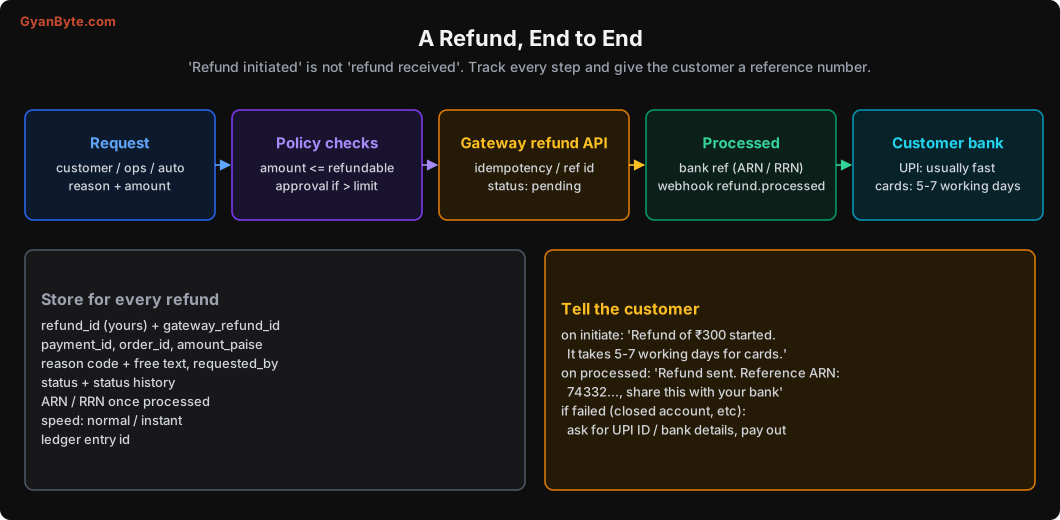
The stages:
- Request: from the customer (cancel order), an ops agent, or an automatic job (extra payment, late success, stock-out).
- Policy checks: is this amount refundable? Does it need approval?
- Gateway refund API: you create the refund. Status is usually
pendingorcreatedat first. - Processed: the gateway and banks process it. You get a webhook, and a bank reference number:
- For cards, an ARN (Acquirer Reference Number).
- For UPI, an RRN (Retrieval Reference Number) or UTR.
- Customer’s bank: the money reaches the customer’s account. UPI refunds are usually quick; card refunds can take 5-7 working days, sometimes more, depending on the issuing bank.
The refund table
CREATE TABLE refunds (
    id                 BIGSERIAL PRIMARY KEY,
    refund_ref         TEXT NOT NULL UNIQUE,      -- your idempotent reference
    payment_id         BIGINT NOT NULL REFERENCES payments(id),
    order_id           TEXT NOT NULL,
    amount_paise       BIGINT NOT NULL CHECK (amount_paise > 0),
    reason_code        TEXT NOT NULL,             -- 'customer_cancel', 'extra_payment', 'damaged', ...
    reason_note        TEXT,
    requested_by       TEXT NOT NULL,             -- 'customer', 'ops:priya', 'system:extra_capture'
    speed              TEXT NOT NULL DEFAULT 'normal',   -- 'normal' | 'instant'
    status             TEXT NOT NULL,             -- 'requested','pending','processed','failed'
    gateway_refund_id  TEXT UNIQUE,
    bank_reference     TEXT,                      -- ARN / RRN once known
    created_at         TIMESTAMPTZ NOT NULL DEFAULT now(),
    updated_at         TIMESTAMPTZ NOT NULL DEFAULT now()
);
Never Over-Refund
The refundable amount for a payment is:
refundable = captured - already_refunded - refunds_in_progressThat last term is the one people forget. If a ₹2,000 refund is pending at the gateway, it’s not yet “refunded”, but it will be. If you don’t count it, a second refund can take the total above what was captured.
And the check must happen under a lock, so two agents clicking at the same time can’t both pass it:
class RefundTooLarge(Exception): ...

def request_refund(conn, *, payment_id: int, amount: int, reason_code: str,
                   requested_by: str, refund_ref: str, note: str = "") -> int:
    with conn.transaction():
        p = conn.fetchrow("""
            SELECT id, order_id, status, captured_paise, refunded_paise
              FROM payments WHERE id = $1 FOR UPDATE
        """, payment_id)
        if p["status"] not in ("captured", "partially_refunded", "dispute_won"):
            raise ValueError(f"payment in status {p['status']} can't be refunded")

        in_progress = conn.fetchval("""
            SELECT COALESCE(SUM(amount_paise), 0) FROM refunds
             WHERE payment_id = $1 AND status IN ('requested', 'pending')
        """, payment_id)
        refundable = p["captured_paise"] - p["refunded_paise"] - in_progress
        if amount > refundable:
            raise RefundTooLarge(f"asked {amount}, refundable {refundable}")

        row = conn.fetchrow("""
            INSERT INTO refunds (refund_ref, payment_id, order_id, amount_paise,
                                 reason_code, reason_note, requested_by, status)
            VALUES ($1, $2, $3, $4, $5, $6, $7, 'requested')
            ON CONFLICT (refund_ref) DO NOTHING
            RETURNING id
        """, refund_ref, payment_id, p["order_id"], amount, reason_code, note, requested_by)

    if row is None:
        return conn.fetchval("SELECT id FROM refunds WHERE refund_ref=$1", refund_ref)
    queue.enqueue("submit_refund_to_gateway", refund_id=row["id"])
    return row["id"]
Two things make this safe:
FOR UPDATEon the payment row means two refund requests for the same payment run one after the other, and the second one sees the first one’srequestedrow.refund_refis unique. For an ops click, the frontend sends a UUID created when the refund dialog opened. For automatic refunds, derive it from the business reason, likeextra_capture:{payment_id}. A retry with the same reference never creates a second refund.
Submitting to the gateway
def submit_refund_to_gateway(refund_id: int):
    r = db.refunds.get(refund_id)
    if r.status != "requested":
        return                                          # already submitted

    payment = db.payments.get(r.payment_id)
    try:
        g = pg.create_refund(
            payment_id=payment.gateway_payment_id,
            amount=r.amount_paise,
            speed=r.speed,
            notes={"refund_ref": r.refund_ref, "order_id": r.order_id},
            idempotency_key=r.refund_ref,               # if your gateway supports it
        )
    except TimeoutError:
        # Don't blindly retry. Did the gateway create it?
        g = find_gateway_refund_by_ref(payment.gateway_payment_id, r.refund_ref)
        if g is None:
            raise                                       # safe to retry later (job retry)

    db.refunds.update(refund_id, status="pending", gateway_refund_id=g["id"])
    ledger.on_refund_created(r, g)                      # see ledger section below
Look at the timeout handling. If the request timed out, we look for a refund with our reference in its notes before trying again. This is the “check before retrying a write” rule from Lesson 5, applied to a real case.
Refund Timelines and Customer Messages
The biggest source of refund complaints isn’t failed refunds. It’s customers not knowing where their money is.
- Tell them the realistic time. “5-7 working days for cards” sets the right expectation. “Refund processed!” on day one, followed by nothing in their account, causes calls.
- Share the bank reference (ARN for cards, RRN/UTR for UPI) as soon as you have it. When a customer calls their bank and says “I didn’t get my refund”, the bank can trace it with this number. Without it, the bank says “we don’t see anything”, and the customer blames you.
- RBI’s turnaround time rules apply to failed transactions and certain refunds, with compensation if banks are late. Your support team should know the current rules for each payment method.
Refund Options
Refund to the original payment method by default. Other options exist for specific cases.
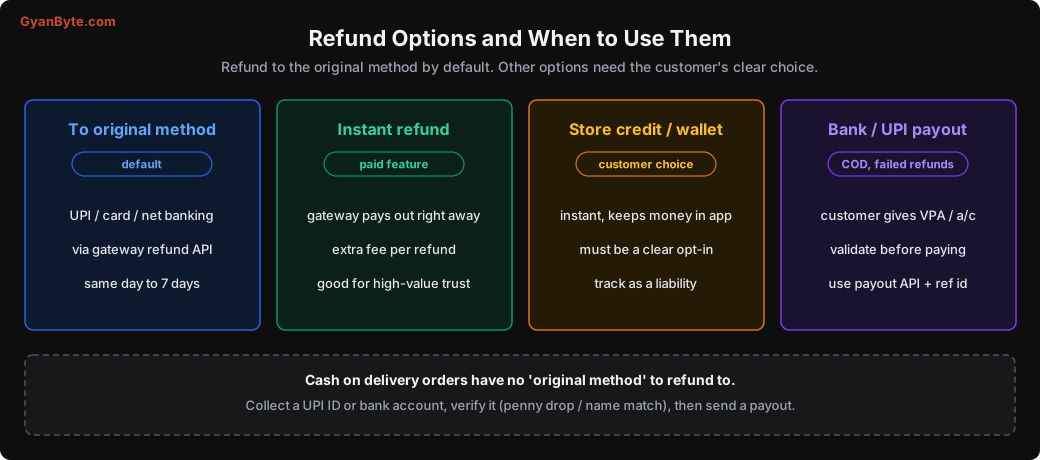
Instant refunds. Many gateways offer instant refunds for an extra fee: they pay the customer immediately via IMPS/UPI and recover the money through the normal refund later. Useful for high-value customers or when trust matters a lot.
Store credit. Instant and keeps money in your business, which is why many apps push it. It must be a genuine, clear choice by the customer, not the default hidden behind small print. In the ledger, store credit is a liability (Lesson 7).
COD refunds. Cash-on-delivery orders (still very common in India) have no original method to refund to. You collect the customer’s UPI ID or bank account and send a payout. Always validate the account first: most payout providers offer a penny-drop or name-match check. Money sent to a wrong account is very hard to get back.
Failed refunds. Sometimes a refund fails: the card was closed, the bank account was closed, the UPI handle no longer exists. Your system must notice the refund.failed webhook and move the case to the payout path, asking the customer for current details. A failed refund nobody follows up is a customer who never got their money.
Refund Fraud and Controls
Refunds are money going out, so they need controls:
- Refund only to the source. Never let anyone (customer or agent) refund a card payment to “this other UPI ID, please”. The only exception is the verified COD and failed-refund payout path above, with strong checks.
- Limits per agent. An agent can refund up to ₹5,000 alone; above that needs a second person (maker-checker). Thresholds depend on your business.
- Reason codes are required. And track refunds by reason, by agent, by customer. One customer with 14 “item not received” refunds in two months is a pattern worth looking at.
- Audit everything. Who requested, who approved, when, why. This is also what auditors will ask for.
Chargebacks: When the Customer Goes to Their Bank
A chargeback happens when a cardholder disputes a charge with their bank instead of asking you. Common reasons:
- “I didn’t make this payment” (fraud, or a family member used the card)
- “I didn’t receive the item”
- “The item was not as described”
- “I was charged twice”
- “I cancelled the subscription but was still charged”
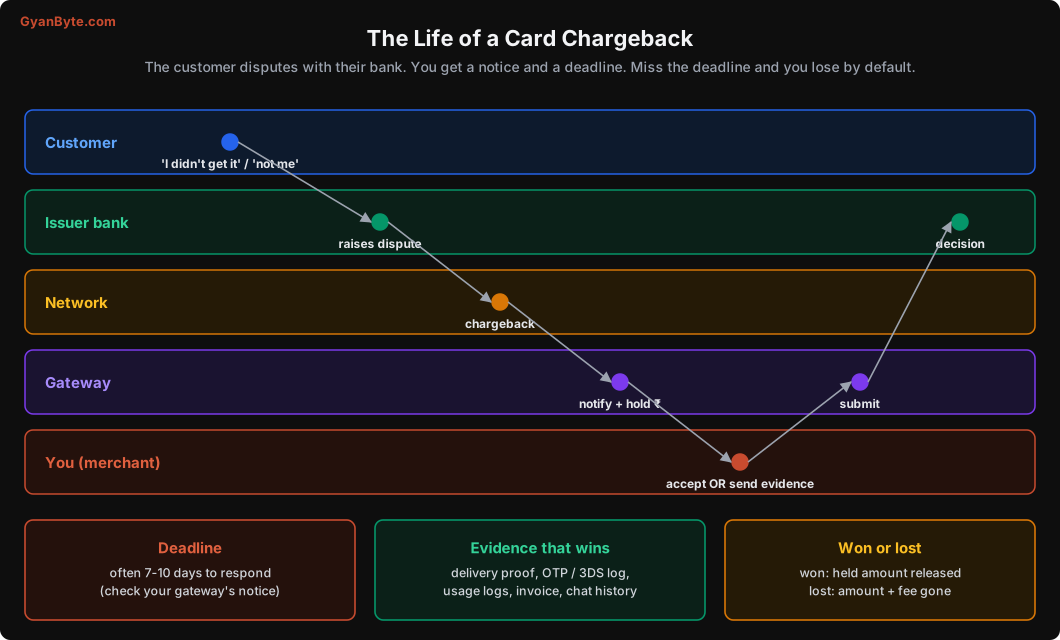
What happens:
- The customer complains to their bank.
- The bank raises a dispute through the card network.
- Your gateway notifies you (dashboard, email, webhook) and usually holds or debits the disputed amount from your settlement.
- You have a deadline (often around a week; check your gateway’s notice) to either accept the chargeback or contest it with evidence.
- The issuing bank decides. Some cases go through more rounds.
- If you win, the held amount comes back. If you lose, you lose the amount, and often a chargeback fee too.
If you miss the deadline, you lose by default. Many companies lose chargebacks they could have won simply because the notice email went to a shared inbox nobody watched.
Build chargebacks as cases
Treat each chargeback as a case with an owner and a due date:
CREATE TABLE disputes (
    id                 BIGSERIAL PRIMARY KEY,
    gateway_dispute_id TEXT NOT NULL UNIQUE,
    payment_id         BIGINT NOT NULL REFERENCES payments(id),
    amount_paise       BIGINT NOT NULL,
    reason_code        TEXT NOT NULL,
    phase              TEXT NOT NULL,     -- 'open','under_review','won','lost','accepted'
    respond_by         TIMESTAMPTZ NOT NULL,
    owner              TEXT,
    evidence           JSONB,
    created_at         TIMESTAMPTZ NOT NULL DEFAULT now()
);- When the dispute webhook arrives, create the case, move the payment to
disputed(Lesson 6), and alert the owner team with the deadline. - Collect evidence automatically. Your system already has most of it: the order, invoice, delivery proof (courier tracking with delivery timestamp, OTP-based delivery confirmation, photo), 3DS authentication result, IP and device details, customer’s usage logs for digital products, chat history. Build a function that assembles this into a PDF or the gateway’s format. Manual evidence collection is why teams don’t bother contesting.
- Escalate as the deadline approaches. Alerts at 3 days, 1 day.
Some cases you should just accept: genuine duplicate charges, undelivered items, real fraud. Contesting them wastes time and annoys customers and banks.
Watch your dispute rate
Card networks monitor merchants’ chargeback ratios. Merchants with high ratios can be put into monitoring programs with extra fees, and in bad cases lose the ability to accept cards. Track chargebacks as a percentage of card transactions, by month, and investigate any rise. A sudden jump often means a fraud attack (stolen cards being used on your site), which Lesson 11 covers.
UPI Disputes
UPI has its own dispute system. Customers can raise complaints directly in their UPI app (“money debited, merchant didn’t receive”, “I paid but didn’t get the product”). These go through NPCI’s online dispute resolution system, called UDIR (Unified Dispute and Issue Resolution), to the banks and then to your gateway.
For you, this mainly means:
- Your gateway will forward UPI complaints with a deadline, similar to chargebacks.
- Many UPI complaints are really “pending” or “debited but failed” cases from Lesson 2. If your system handles those well (auto-refunds for failed orders, clear status for pending), you’ll get far fewer.
- Respond quickly with the transaction status and, if you refunded, the refund reference.
The Ledger Side
Every refund and dispute movement goes into the ledger (Lesson 7):
Refund created at gateway (gateway will deduct it from settlement):
Dr sales_returns                 +30000
Cr gateway_receivable:razorpay   -30000
Refund failed (reverse it, and owe the customer until you pay out):
Dr gateway_receivable:razorpay   +30000
Cr customer_refunds_payable      -30000
Chargeback opened, amount held:
Dr disputes_held                 +149900
Cr gateway_receivable:razorpay   -149900
Chargeback won (released):
Dr gateway_receivable:razorpay   +149900
Cr disputes_held                 -149900
Chargeback lost (plus a fee):
Dr chargeback_losses (expense)   +149900
Cr disputes_held                 -149900

Dr chargeback_fees (expense)     +XXX
Cr gateway_receivable:razorpay   -XXX
With these entries, at any moment you can answer: how much is currently held in disputes, how much did we lose to chargebacks this quarter, and how much refund money are we still holding for customers.
Pitfalls to Avoid
- Forgetting in-progress refunds when calculating the refundable amount.
- No lock on the payment during the refund check. Two clicks, two refunds.
- Refund retries without a reference. Use an idempotent
refund_refand check the gateway before retrying a timed-out call. - “Refund processed” on day one. Tell customers the real timeline and give them the ARN or RRN.
- Ignoring failed refunds. Watch the webhook and move to a verified payout.
- Refunds to a different account than the source. Only through the verified COD / failed-refund payout path.
- No approval limits or reason codes. Use maker-checker above a threshold and audit everything.
- Chargeback notices to an unwatched inbox. Webhooks, cases, owners, deadlines and alerts.
- Manual evidence collection. Automate it from data you already have.
- Not tracking your dispute rate. High ratios bring penalties; a sudden rise often means fraud.
Quick Recap
- Refunds have states, failures and delays like payments. Store them with references and history.
- Refundable = captured − refunded − in progress, checked under a lock, with idempotent references.
- Give customers realistic timelines and the bank reference number.
- Original method by default; verified payouts for COD and failed refunds.
- Chargebacks and UPI disputes are cases with deadlines and evidence. Track your dispute rate.
- Every refund and dispute movement has ledger entries.
Next lesson: settlement and reconciliation. Your records, the gateway’s records, and the bank’s records will never match on their own. Here’s how to make them match every single day.