One evening during an IPL final, our support queue suddenly had 300 tickets with the same message: “Money cut but order not placed.” The tech team checked everything. No errors in our logs. Gateway dashboard showed most of those payments as “pending”. Our code had a simple rule: if the payment doesn’t succeed in 5 minutes, mark the order as failed.
So the customers paid, the banks were slow under heavy load, and our system gave up after 5 minutes. Twenty minutes later, most of those payments turned successful. By then the orders were already cancelled, the stock was released, and the customers were angry.
UPI is fantastic. It’s fast, it’s cheap, and almost every Indian with a smartphone uses it. But the happy path is only half the story. This lesson is about the other half.
The Basics, in Engineer Terms
A few terms first:
- VPA (Virtual Payment Address): the UPI ID, like
ravi@okhdfcbankor9876543210@ybl. It maps to a bank account. - PSP (Payment Service Provider): the bank that powers a UPI app. PhonePe, Google Pay, Paytm and others work with PSP banks.
- Remitter bank: the customer’s bank (money goes out from here).
- Beneficiary bank: the bank receiving the money (for a merchant, usually linked to the gateway’s setup).
- UPI PIN: the customer’s secret PIN, entered only inside the UPI app. Your app never sees it.
- NPCI: runs the UPI switch that connects all these banks.
As a merchant using a gateway, you don’t deal with most of this directly. The gateway gives you an API to create a payment, and tells you the result. But knowing the path helps you understand why payments get stuck.
What Happens When a Customer Taps “Pay”
Here is a typical UPI intent payment on a mobile app:
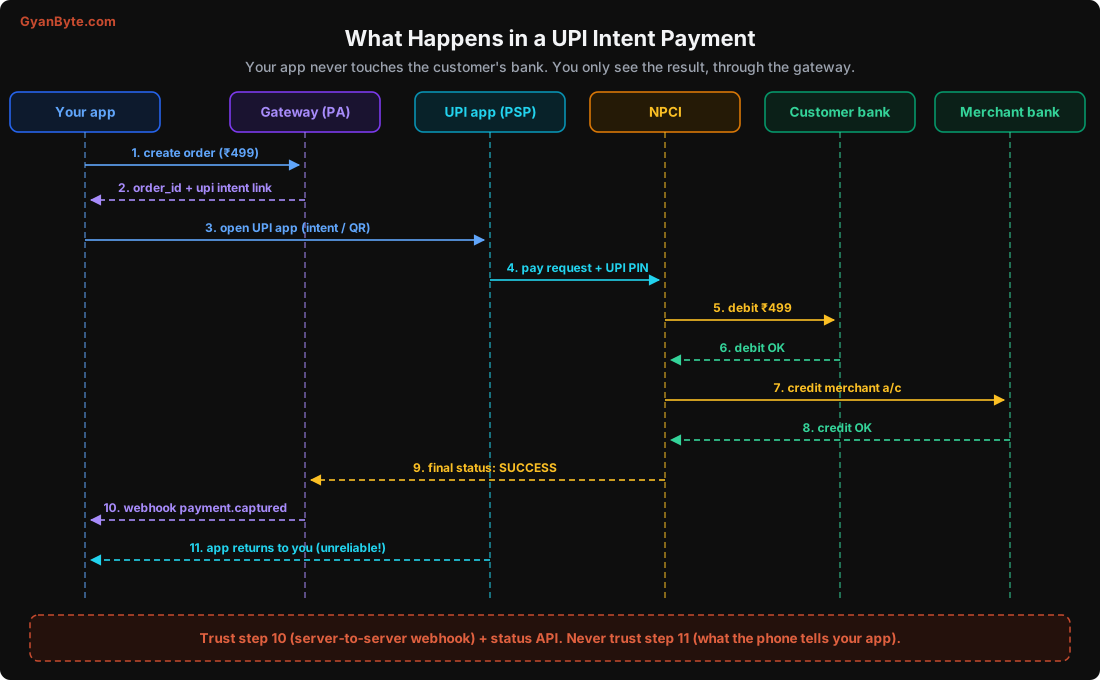
- Your backend creates an order with the gateway for ₹499 (49900 paise).
- The gateway returns an order id and the details needed to start a UPI payment.
- Your app opens the customer’s UPI app (PhonePe, GPay, etc.) with an intent link, or shows a QR code.
- The customer picks a bank account and enters the UPI PIN. The UPI app sends the request through its PSP bank to NPCI.
- NPCI asks the customer’s bank to debit ₹499.
- The customer’s bank confirms the debit.
- NPCI asks the beneficiary bank to credit the amount.
- The beneficiary bank confirms.
- NPCI sends the final status back. The gateway learns the payment succeeded.
- The gateway sends your backend a webhook (a server-to-server HTTP call) saying payment captured.
- Separately, the UPI app returns the customer to your app, and your app may get a “success” callback.
Notice there are many hops, and each one can be slow or time out. When any hop doesn’t reply in time, the payment becomes pending: the system doesn’t yet know whether the money moved.
The golden rule: never trust step 11
Step 11 (what your app gets back from the UPI app or the gateway’s checkout on the phone) is not reliable:
- The customer may kill the app before returning.
- The phone may lose network right after paying.
- On some phones, the return from the UPI app to your app simply doesn’t happen.
- A smart user can fake a client-side “success” callback.
So the only sources of truth are:
- The webhook from the gateway to your server, after you verify its signature (Lesson 4).
- The gateway’s payment status API, which you call from your server.
Your app’s client-side callback should only be used to show a nice “please wait, confirming your payment” screen, and to trigger your server to check the status. Never mark an order as paid because the phone said so.
UPI Modes: Intent, QR, Collect, AutoPay, Lite
There are several ways to start a UPI payment. Which one you use affects your success rate a lot.
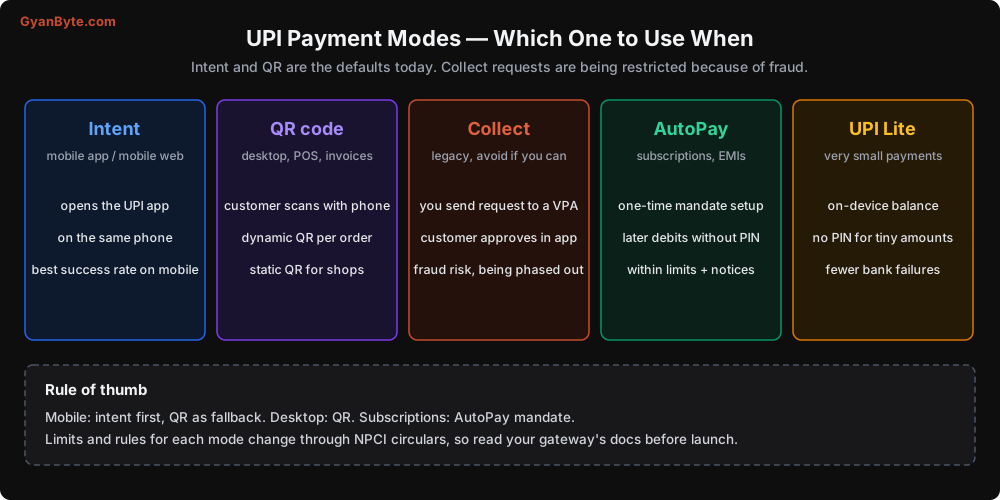
Intent. On mobile, your app (or mobile website) opens the customer’s UPI app directly, with the amount and merchant details filled in. The customer just enters the PIN. This has the best success rate on mobile because there’s no typing and no app switching confusion. Use this as your default on mobile.
QR code. The customer scans a QR with their phone. On desktop websites this is the natural choice. Use a dynamic QR (generated per order, with the amount fixed) for online orders, so each QR maps to exactly one order. Static QR codes (same QR for every payment) are for shops; avoid them for online orders, because you then have to guess which payment belongs to which order.
Collect. The older way: the customer types their UPI ID, you send a “collect request”, and they approve it in their UPI app. This had poor success rates (customers don’t notice the request, or the request expires) and became a common fraud method (“I am sending you money, just approve this request”). NPCI has been restricting collect requests, especially for person-to-person payments. If you still use collect, plan to move to intent and QR.
UPI AutoPay. For recurring payments. The customer sets up a mandate once with their PIN, and later debits happen without the PIN, within limits and with advance notification. We cover this in Lesson 10.
UPI Lite. A small on-device balance for very small payments, which can be paid without a PIN and without hitting the bank’s core system every time. Useful for low-value, high-frequency payments. Your gateway handles it; for you, it mainly means fewer bank-related failures on small amounts.
The Four Outcomes of a UPI Payment
This is the core of this lesson. Every UPI payment ends in one of four states, and your code needs a plan for each.
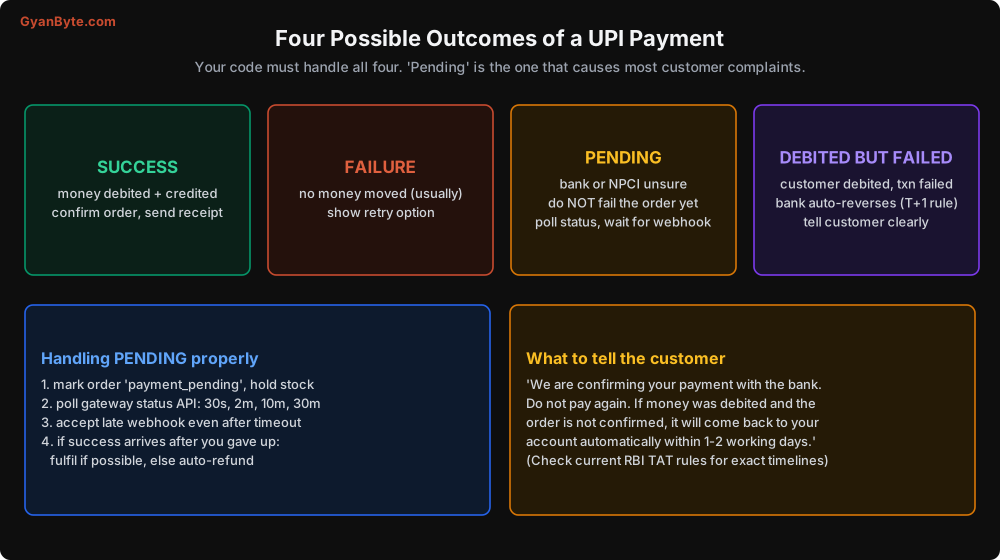
1. Success
Easy one. Verify the webhook, mark the order paid, send the receipt. (Make sure this is idempotent, because you may get the same webhook twice. Lesson 5.)
2. Failure
The bank declined: wrong PIN, not enough balance, daily limit crossed, bank server down. Usually no money moved. Show the customer a clear message and a retry option. If the gateway gives you an error reason, show a friendly version: “Your bank declined this payment. Please try another UPI app or bank account” is better than “U30: Transaction failed”.
3. Pending
The request went out, but some hop didn’t reply in time, so nobody knows yet whether the money moved. This happens more often during peak times (salary days, festive sales, big cricket matches) and when a particular bank is having issues.
The mistake is to treat pending as failure. Pending means “we don’t know yet”. Most pending payments resolve within minutes, some take longer.
How to handle it:
- Mark the order as
payment_pending. Hold the stock (don’t release it to someone else yet). - Show the customer a clear “confirming your payment” message. Tell them not to pay again.
- Poll the gateway’s status API with increasing gaps: after 30 seconds, 2 minutes, 10 minutes, 30 minutes, and so on.
- Keep accepting the webhook, even after your own timeout.
- If success arrives late: fulfil the order if you still can. If you can’t (stock gone, slot expired), refund automatically and tell the customer.
- If it finally fails: tell the customer, and if their account was debited, tell them the money will come back automatically.
4. Debited but failed
Sometimes the customer’s account is debited, but the transaction fails overall (for example, the credit leg to the merchant fails). In this case, the money must go back to the customer.
RBI has rules for this. Under RBI’s turnaround time (TAT) framework for failed transactions, banks must reverse such failed UPI debits automatically within a fixed time (T+1 at the time of writing), and pay compensation to the customer if they are late. You don’t do this reversal yourself; the banks do. But your support team should know about it, and your app should explain it to the customer instead of leaving them confused.
Handling Pending in Code
Here is a simple version of the logic, in Python. I’m using a made-up pg client with two calls, create_order and fetch_order_payments. Every real gateway has equivalents; check your gateway’s docs for exact names.
First, when you create the order, also schedule status checks:
from datetime import datetime, timedelta, timezone

CHECK_SCHEDULE = [30, 120, 600, 1800, 3600, 4 * 3600]   # seconds after creation

def start_payment(order) -> dict:
    pg_order = pg.create_order(
        amount=order.amount_paise,          # always integer paise, e.g. 49900
        currency="INR",
        receipt=order.id,                   # your own order id, for matching later
        notes={"customer_id": order.customer_id},
    )
    order.pg_order_id = pg_order["id"]
    order.status = "payment_initiated"
    db.save(order)

    now = datetime.now(timezone.utc)
    for delay in CHECK_SCHEDULE:
        jobs.schedule("check_payment_status", run_at=now + timedelta(seconds=delay),
                      args={"order_id": order.id})
    return pg_order
Then the status check job. Notice it does exactly the same thing as the webhook handler: both call one function, apply_payment_result, so you have only one place where the order status changes.
def check_payment_status(order_id: str):
    order = db.get_order(order_id)
    if order.status in ("paid", "failed_final", "refunded"):
        return                                   # already settled, nothing to do

    payments = pg.fetch_order_payments(order.pg_order_id)
    for p in payments:
        apply_payment_result(order, p)           # same function the webhook uses

    if order.status == "payment_initiated" and is_last_check(order):
        mark_failed_final(order)                 # gave up waiting; late success handled below
And the single place where results are applied:
def apply_payment_result(order, payment: dict):
    status = payment["status"]          # e.g. "captured", "failed", "pending" (names vary by gateway)

    if status == "captured":
        if order.status in ("payment_initiated", "payment_pending"):
            mark_paid(order, payment)
        elif order.status == "failed_final":
            # Late success after we gave up. Don't ignore it!
            handle_late_success(order, payment)
        elif order.status == "paid" and order.paid_payment_id != payment["id"]:
            # A SECOND successful payment for the same order
            refund_extra_payment(order, payment)
    elif status == "pending":
        if order.status == "payment_initiated":
            order.status = "payment_pending"
            db.save(order)
    elif status == "failed":
        record_failed_attempt(order, payment)    # order can still get a successful retry
Look at the last branch of captured. This is a case many teams miss.
One order, two successful payments
It happens more than you think. The customer pays, sees “pending”, gets nervous, and pays again from a different UPI app. Twenty minutes later, both payments succeed. Or the customer scans the same QR twice.
Your system must handle this:
- One order is linked to many payment attempts, not just one. (Store them in a separate
paymentstable. Lesson 6.) - The first successful payment marks the order as paid.
- Any further successful payment for the same order is automatically refunded, with a clear message to the customer.
If you don’t do this, these extra payments sit in your account, the customer complains, and someone in finance has to find and refund them manually.
Late success after you gave up
What should handle_late_success do? It depends on your business:
- E-commerce with stock: if the item is still available, fulfil the order and inform the customer. If not, refund.
- Ticket booking or time slots: if the seat is gone, refund immediately.
- Digital goods or subscriptions: usually just fulfil.
Whatever you choose, never silently ignore a late success. That is money you have taken without giving anything back.
Other UPI Edge Cases
A few more things that come up in production:
Limits. UPI has per-transaction and daily limits, set by NPCI and by each bank. Some categories (like tax payments, hospitals, education, IPO applications) have higher limits than normal payments. Banks can also set lower limits, and new users often have lower limits for the first few days. If your average order value is high, expect some UPI failures due to limits, and offer cards or net banking as alternatives.
Bank downtime. Individual banks have outages. Gateways usually publish real-time health per bank and per UPI app. Some gateways can show a “this bank is facing issues” warning in checkout. Use it if available; it saves a lot of failed attempts.
Peak hours. Salary days (1st of the month), sale events, and big matches push the whole system harder. Pending rates go up. If you have a big sale planned, increase your pending wait time for that period and add more status checks.
App switching on iOS and some Android phones. Returning from the UPI app to your app doesn’t always work. Make sure your app also checks the payment status when it comes back to the foreground, not only when it receives a callback.
Amount changes. Never let the amount be decided on the client. Create the order on your server with the amount from your database, and when the payment comes back, check that the paid amount matches the order amount.
What to Tell the Customer
Good messages reduce support tickets a lot. Some examples that worked well for us:
- Pending: “We’re confirming your payment with your bank. This can take a few minutes. Please don’t pay again. We’ll notify you as soon as it’s confirmed.”
- Failed with debit: “Your payment could not be completed. If money was debited from your account, it will be returned automatically by your bank, usually within 1-2 working days.”
- Extra payment refunded: “We received two payments for order #48213. We have refunded ₹499 for the extra payment. It will reach your account in 5-7 working days.”
Translate them into the languages your customers use. A Hindi or Tamil message during a stressful moment builds a lot of trust.
Pitfalls to Avoid
- Trusting the phone’s redirect or callback. Only the verified webhook and the server-side status API decide if an order is paid.
- Treating pending as failure. Pending means unknown. Hold the order and keep checking.
- Giving up too early. A 5-minute timeout is too short for peak hours. Keep checking for hours, and accept late webhooks.
- Ignoring late successes. That’s customer money you took without delivering. Fulfil or refund.
- One payment per order in your schema. Orders can have many attempts, and sometimes more than one success. Detect and refund extras.
- Static QR codes for online orders. You can’t reliably match payments to orders. Use dynamic QR per order.
- Relying on collect requests. Low success rates, high fraud, and being restricted. Use intent and QR.
- Different code paths for webhook and polling. Use one function to apply payment results, or the two paths will drift apart and create bugs.
- Taking the amount from the client. Always use the server-side order amount, and verify the paid amount.
- Confusing customer messages. Clear words in the customer’s language prevent duplicate payments and support calls.
Quick Recap
- A UPI payment passes through your gateway, the UPI app, its PSP bank, NPCI, and two banks. Any hop can be slow.
- Use intent on mobile, dynamic QR on desktop, AutoPay for subscriptions. Avoid collect.
- Trust only the verified webhook and status API, never the phone.
- Four outcomes: success, failure, pending, debited-but-failed. Plan for all four.
- Handle pending with holds, status polling, late webhooks, and auto-refund of late or extra successes.
Next lesson: card payments. Authorisation and capture, OTP and 3D Secure, tokenisation, and why you are not allowed to store your customers’ card numbers.