In my first job at a Bengaluru startup, I was asked to “add Razorpay” to our checkout. I thought it would take two days. The integration did take two days. Then I spent the next two months fixing everything around it.
The first surprise came on day one after launch. Our sales dashboard said ₹4,82,000 was collected. Our bank account had received ₹3,91,000. Finance wanted to know where the remaining ₹91,000 was. I had no idea. I thought when the screen said “Payment successful”, the money was in our account.
It wasn’t. Some of it was still waiting in an escrow account. Some of it was taken as fees and GST. Some of it had been refunded. And a small part was from payments that were “successful” on the customer’s phone but had actually failed.
That day I realised I didn’t understand how money moves. This lesson is everything I wish someone had explained to me before that launch.
Who Is Involved When a Customer Pays ₹499
From your code, a payment looks simple: you call the gateway’s API, the customer pays, you get a “success” message. But behind that one API, many companies and systems are involved.
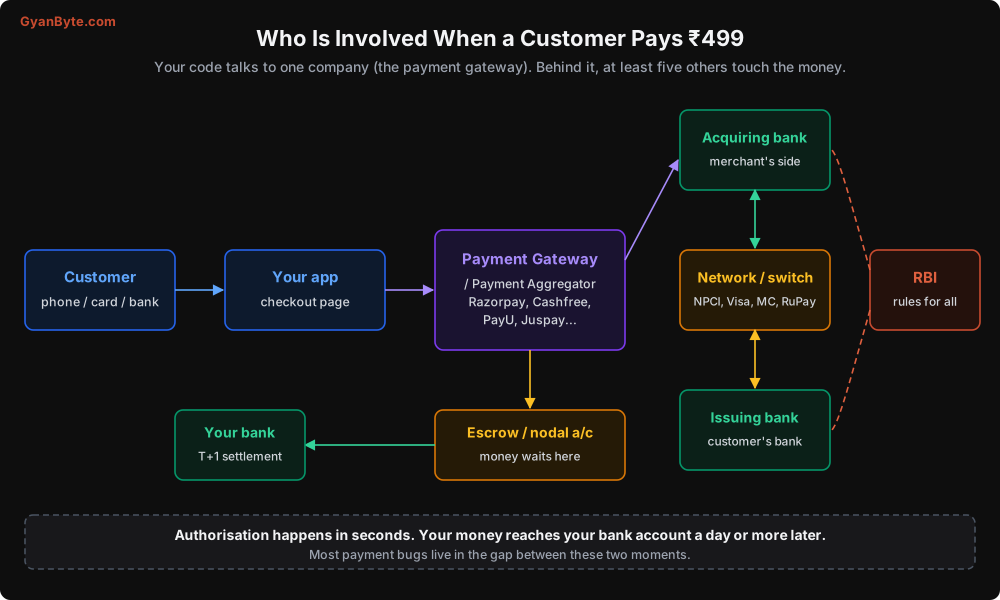
Let me explain each one in simple words.
Customer. The person paying. They pay using a UPI app, a card, net banking or a wallet.
Your app (the merchant). That’s you. In payment language, any business that accepts payments is called a merchant.
Payment Gateway / Payment Aggregator (PG / PA). Companies like Razorpay, Cashfree, PayU, Juspay, CCAvenue, PhonePe PG and others. Technically these are two different things:
- A payment gateway is the technology: the checkout page, the APIs, the connection to banks and networks.
- A payment aggregator is the business arrangement: they collect money on your behalf, hold it, and pass it on to you. RBI regulates payment aggregators, and they need RBI authorisation to operate.
Most companies you use today are both. In this course I will just say “gateway” to keep it simple.
Network or switch. The system that connects banks to each other.
- For UPI, IMPS and RuPay, this is NPCI (National Payments Corporation of India).
- For cards, it is the card network: Visa, Mastercard, RuPay, Amex, Diners.
Issuing bank. The customer’s bank. For cards, the bank that issued the card. For UPI, the bank account linked to the customer’s UPI ID. The issuing bank decides whether to approve the payment: is there enough balance, is the PIN correct, does it look like fraud.
Acquiring bank. The bank on the merchant’s side, which “acquires” the payment for the merchant. Your gateway works with one or more acquiring banks.
Escrow or nodal account. When a customer pays you through a gateway, the money doesn’t come directly to your bank account. It first goes into an escrow account that the gateway maintains with a bank. RBI requires this so that merchants’ money is protected and kept separate from the gateway’s own money. From here, the gateway settles money to your bank account.
RBI. The regulator. RBI makes rules for payment aggregators, cards, mandates, data storage, refunds timelines and much more. NPCI makes the detailed rules for UPI and other systems it runs.
Your bank. Where the money finally lands, after the gateway settles it.
As an engineer, you only talk to the gateway. But when something goes wrong, the problem could be at any of these points. A customer saying “money is debited but order not placed” might be a bank delay, an NPCI timeout, a gateway webhook delay, or a bug in your code. Knowing who is involved helps you ask the right questions.
Three Different Moments: Authorisation, Clearing, Settlement
This is the most important idea in this lesson. A payment doesn’t happen in one step. It happens in three.
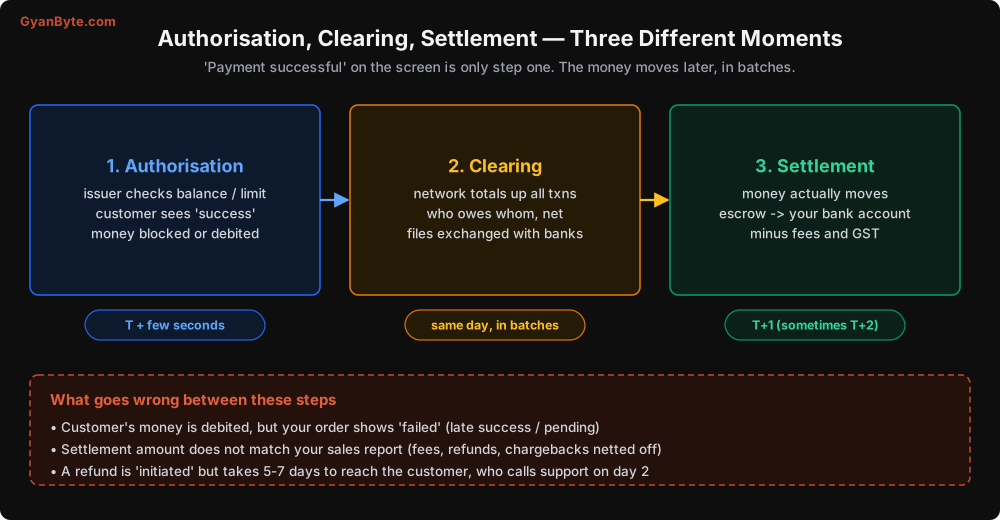
1. Authorisation (a few seconds)
The customer enters their UPI PIN or card OTP. The request goes through the network to the customer’s bank. The bank checks: is the PIN right, is there enough balance, is this card blocked, does this look like fraud. If all is fine, it approves.
For UPI, the money is debited from the customer’s account right away. For cards, the amount is usually blocked (held) on the card first and charged later.
This is when the customer sees “Payment successful” and you get a success response or webhook.
2. Clearing (same day, in batches)
At the end of the day (or at fixed times during the day), the network adds up all the transactions. It calculates how much each bank owes to each other bank, and sends files to all the banks. This is called clearing. You won’t usually see this step directly, but it explains why settlements happen in batches and not one by one.
3. Settlement (usually T+1)
The money actually moves between banks and reaches the gateway’s escrow account. Then the gateway transfers it to your bank account, after cutting its fees and GST on those fees.
“T+1” means one working day after the transaction day (T). Some gateways offer T+2 or longer for certain payment methods, and many offer “instant settlement” for an extra fee.
Why this matters for you
Here are three real problems that come from mixing up these moments:
- Your sales report doesn’t match your bank. Your dashboard counts payments at authorisation. Your bank receives money at settlement, after fees, GST, refunds and chargebacks are deducted. Different numbers, different dates. We will fix this properly in Lesson 9 (reconciliation).
- “Money debited, order failed.” The customer’s bank debited the money (authorisation), but your system never got the success message, or got it late. Lesson 2 and Lesson 6 cover how to handle this.
- Refund confusion. You click “refund” and the gateway says “refund initiated”. But the money reaches the customer days later, after it goes back through the network and the bank. Customers call support on day two saying “you promised a refund”. Lesson 8 covers this.
The Payment Rails in India
A payment rail is the system that actually carries the money: UPI, card networks, NEFT and so on. Each rail has different speed, cost, limits and failure behaviour.
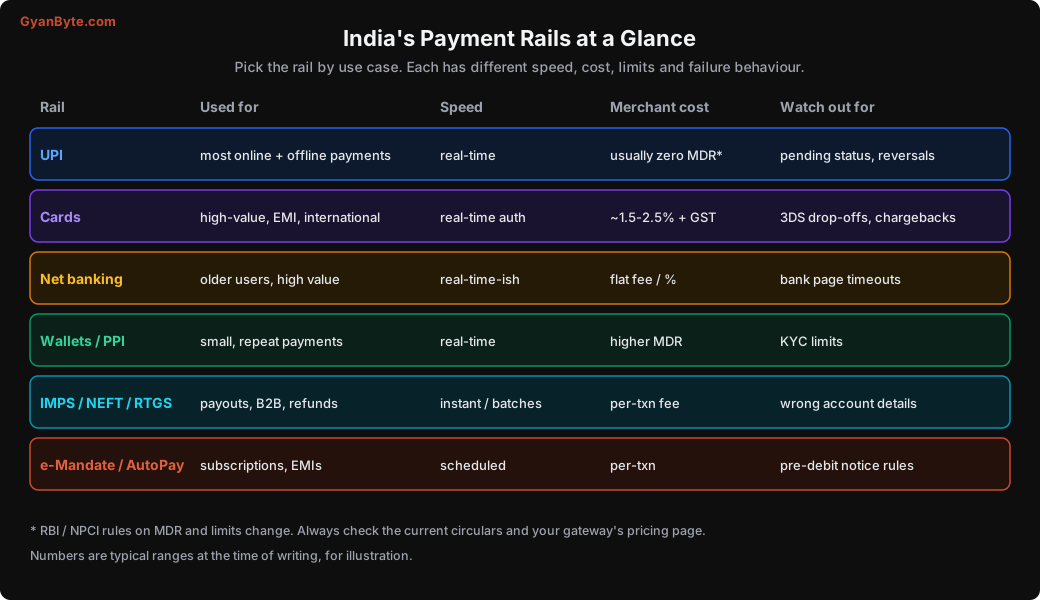
Let me go through them with an engineer’s eye.
UPI
The rail most of your customers will use. Real-time, works 24x7, works on every smartphone. For person-to-merchant UPI payments, the merchant fee (called MDR, Merchant Discount Rate) has been zero for most cases under government policy, which is why UPI is so popular with merchants too. Gateways may still charge their own fees in some cases, so check your pricing.
The engineering challenge with UPI is not the happy path. It’s the pending and failed-after-debit cases, which happen more often than you’d expect, especially during peak hours and bank downtime. The whole of Lesson 2 is about this.
Cards (credit, debit, prepaid)
Used for higher amounts, EMI purchases, international customers, and by people who want reward points. MDR for cards is typically a percentage of the amount, plus 18% GST on that fee.
Engineering challenges: the extra authentication step (3D Secure / OTP) where many customers drop off, chargebacks (customer disputes the charge with their bank), and strict rules about card data storage. Lesson 3.
Net banking
The customer is redirected to their bank’s website to log in and approve. Still used by older customers and for high-value payments. Engineering challenge: bank pages are slow, sometimes down, and customers often close the tab midway, leaving payments in an unknown state.
Wallets and prepaid instruments (PPI)
Paytm wallet, Amazon Pay balance, etc. Good for small, repeat payments. Fees are usually higher. KYC rules limit how much a customer can hold or spend.
IMPS, NEFT, RTGS
These are bank-to-bank transfers. As a merchant, you mostly use them for payouts: paying sellers, delivery partners, vendors, refunds to bank accounts, salaries.
- IMPS: instant, 24x7, for smaller amounts.
- NEFT: runs in half-hourly batches, any amount.
- RTGS: for large amounts (₹2 lakh and above), real-time.
Engineering challenge: wrong account numbers or IFSC codes. Money sent to a wrong account is very hard to get back. Always verify the account before the first payout (gateways offer “penny drop” or account validation APIs for this).
e-Mandates and UPI AutoPay
For recurring payments: subscriptions, EMIs, SIPs, insurance premiums. The customer approves a mandate once, and you can debit later within the approved limits. RBI has specific rules here (pre-debit notifications, limits for auto-debit without extra authentication). Lesson 10.
How to Choose
For a typical consumer app in India today:
- Offer UPI first on mobile, with intent flow (we’ll see what that means in Lesson 2). This will be most of your volume.
- Offer cards for high-value orders and EMI.
- Keep net banking and wallets as fallbacks. Some customers will only use these.
- Use IMPS/NEFT payouts for refunds to bank accounts and payments to partners.
- Use mandates only if you have a subscription or EMI model.
Your gateway will handle most of this in its checkout. Your job is to understand what each method means for your backend: how long until the payment is final, how refunds work, how disputes work, and when the money actually reaches you.
Some Words You Will Hear a Lot
A quick glossary, because payments people love short forms:
| Term | Meaning |
|---|---|
| Merchant | The business accepting payment (you) |
| PA / PG | Payment Aggregator / Payment Gateway |
| MDR | Merchant Discount Rate: the fee the merchant pays per transaction |
| VPA | Virtual Payment Address, the UPI ID like name@okhdfcbank |
| PSP | Payment Service Provider: the bank behind a UPI app |
| Issuer | The customer’s bank (or the card-issuing bank) |
| Acquirer | The merchant’s bank for accepting payments |
| T+1 | One working day after the transaction day |
| Settlement | Actual transfer of money to the merchant’s bank |
| Reconciliation | Matching your records with the gateway’s and bank’s records |
| Chargeback | Customer disputes a card payment through their bank |
| Payout | Money you send out: to sellers, partners, or customers |
| Paise | 1/100 of a rupee. We will store all amounts in paise |
That last row is important. From the next lesson onwards, every amount in our code will be an integer number of paise. ₹499 will be 49900. Never use floating-point numbers for money. 0.1 + 0.2 in most languages is 0.30000000000000004, and in payments, that small error eventually becomes a real mismatch that someone has to explain.
Pitfalls to Avoid
- Thinking “payment successful” means “money received”. It means authorised. Settlement comes later, minus fees, refunds and chargebacks.
- Building finance reports from payment success events alone. They will never match the bank. You need settlement data too (Lesson 9).
- Using floats for money. Store integers in paise. Always.
- Treating the gateway as the only party. When debugging, remember the bank, the network and the customer’s app are all in the path.
- Offering every payment method on day one. Each method has its own edge cases. Start with UPI and cards, add more when you have handled their failure cases well.
- Payouts without account verification. Money sent to the wrong account is very hard to recover.
- Copying limits and fees from an old blog post. RBI and NPCI rules change often. Check current circulars and your gateway’s docs.
Quick Recap
- Your app talks to the gateway, but the network, both banks, an escrow account and RBI rules are all involved.
- A payment has three moments: authorisation (seconds), clearing (batches), settlement (usually T+1).
- Most bugs and finance mismatches live in the gap between authorisation and settlement.
- UPI for most payments, cards for high value and EMI, IMPS/NEFT for payouts, mandates for subscriptions.
- Store money as integer paise.
Next lesson, we go deep into UPI: what actually happens when a customer taps “Pay”, and how to handle the payments that are neither success nor failure.