A friend runs a small online furniture store in Jaipur. Average order around ₹28,000. Most of his customers pay by credit card, many on EMI. One month he noticed something odd: lots of customers reached the payment page, but card payments were failing much more than UPI. He asked me to look.
The problem wasn’t his code. It was the OTP step. Many customers were on slow mobile networks, the bank’s OTP page took long to load, the OTP SMS came late, and people gave up. Some tried again and got blocked by their bank for “too many attempts”. He had no idea this step even existed in his flow, because the gateway’s checkout handled it.
Cards are more complex than UPI. There are more steps, more parties, more fees, and stricter rules about data. This lesson explains each part in plain words, so that when something goes wrong, you know where to look.
Three Steps: Authentication, Authorisation, Capture
People often use these words loosely. They are three different things.
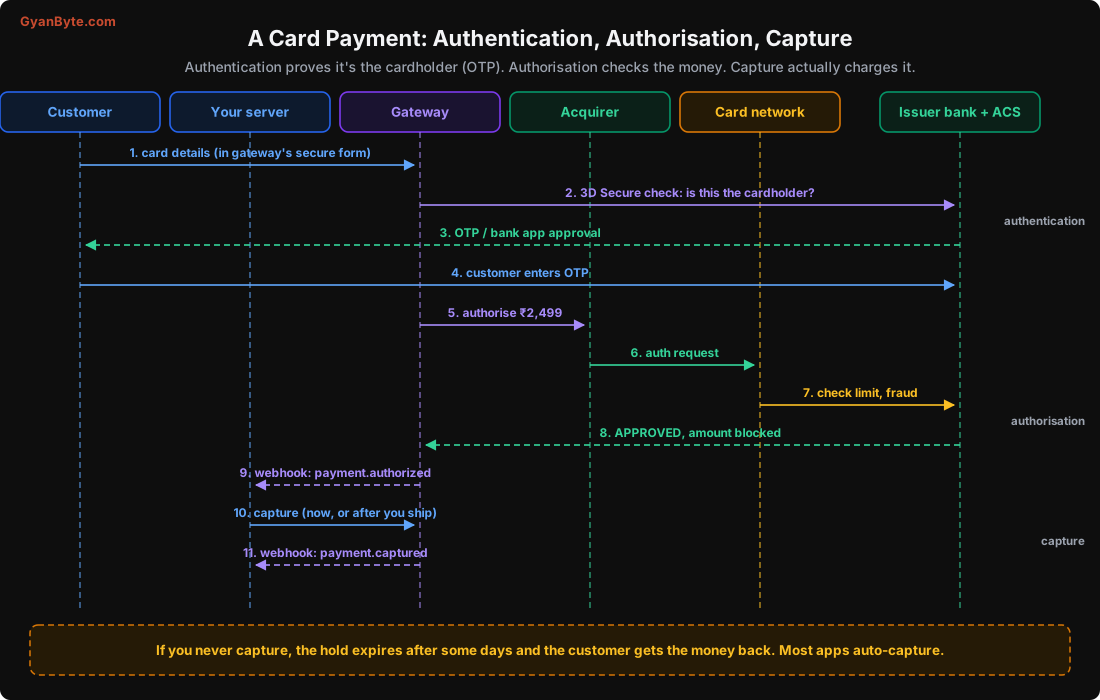
Authentication: is this really the cardholder?
For most online card payments in India, RBI requires an additional factor of authentication (AFA). Usually this is an OTP sent by the bank, or approval in the bank’s app. The system behind this is called 3D Secure (3DS). Visa calls it “Visa Secure”, Mastercard calls it “Identity Check”, but it’s the same idea.
The bank runs a server called the ACS (Access Control Server) that shows the OTP page. Your gateway sends the customer there, the customer enters the OTP, and the bank confirms “yes, it’s the cardholder”.
This step is where many customers drop off: slow OTP SMS, a bank page that doesn’t load well on mobile, a customer who doesn’t have the registered phone with them. You can’t remove this step for domestic cards (RBI has some exemptions, for example for small contactless payments and certain recurring payments, but online checkout usually needs it). What you can do is:
- Choose a gateway with good success rates and native OTP pages (where the OTP is entered without redirecting to the bank’s page).
- Show clear instructions (“You will get an OTP from your bank”).
- Track drop-off at this step separately in your analytics, so you know it’s happening.
Authorisation: does the money exist?
After authentication, the gateway sends an authorisation request through the acquirer and the card network to the issuing bank. The issuer checks:
- Is the card active, not blocked, not expired?
- Is there enough limit (credit card) or balance (debit card)?
- Does this look like fraud? (Unusual merchant, location, amount.)
If all is fine, the issuer approves and blocks the amount on the card. The customer may see this as a “pending” transaction in their bank app. The money hasn’t fully moved yet.
Capture: actually take the money
Capture tells the issuer “yes, charge this amount now”. Only after capture is the payment included in clearing and settlement.
Most gateways let you choose:
- Auto-capture: capture immediately after authorisation. This is what most apps use, and what you should use unless you have a reason not to.
- Manual (delayed) capture: authorise now, capture later. Useful when you need to confirm something before charging, like stock availability for a high-value item, or a hotel booking confirmation.
If you authorise and never capture, the block expires after some days and the customer gets their limit back. Gateways often auto-refund or auto-void uncaptured payments after a fixed period. Check your gateway’s rules, because an “authorised but not captured” payment that you forgot about is a lost sale and a confused customer.
You can usually capture less than the authorised amount (for example, if one item went out of stock), but not more.
Card Declines
A decline is when the issuer says no. Declines have reason codes, and your gateway will pass them to you in some form. They fall into two groups:
Soft declines, where a retry might work:
- Issuer temporarily unavailable
- Authentication timed out
- Possible fraud, customer can confirm with bank
Hard declines, where retrying won’t help:
- Insufficient funds or limit
- Card blocked, lost or stolen
- Card expired
- Incorrect CVV (after a few attempts the bank may block the card)
- Transaction not allowed (for example, card not enabled for online or international use)
Engineering rules:
- Never retry a card payment automatically in the background for a one-time purchase. Show the customer a message and let them retry or choose another method. Automatic retries on cards can trigger the bank’s fraud systems and get the customer’s card blocked.
- Show useful messages. “Your card is not enabled for online payments. You can enable it in your bank’s app” is far better than “Payment failed”.
- Track decline reasons by bank and card type. A sudden rise in one bank’s declines usually means a bank-side problem, not your problem.
A very common one in India: card not enabled for online or international transactions. Since RBI’s 2020 rules, new cards are usually issued with only domestic in-person use enabled, and customers have to switch on online or international use themselves. Many don’t know this. A clear message saves a support call.
Where Your Money Goes: MDR and GST
Every card payment has a fee called MDR (Merchant Discount Rate). It’s a percentage of the amount (sometimes with a fixed part), and it’s split between several parties.
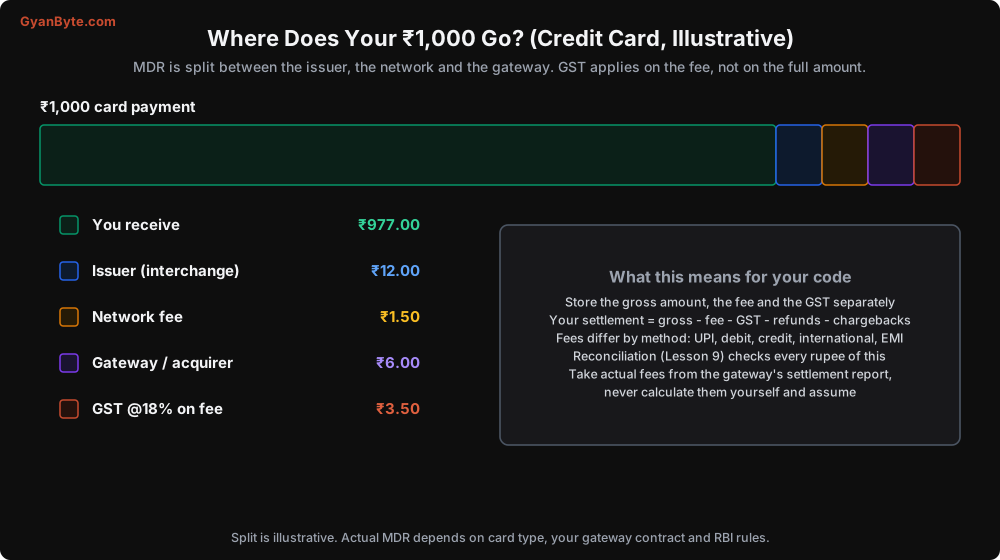
- Interchange goes to the issuing bank. This is the biggest part.
- Network fee goes to Visa, Mastercard, RuPay, etc.
- Gateway / acquirer margin goes to your gateway and acquiring bank.
- GST at 18% is charged on the fee (not on the whole payment amount).
The numbers vary a lot: debit cards are usually cheaper than credit cards; premium, corporate and international cards cost more; EMI has its own pricing. RuPay debit cards have had special zero-MDR rules for certain merchants under government policy.
What this means for your code:
- Store three amounts for every payment: gross amount, fee, and tax on fee. Not just the gross.
- Don’t calculate fees yourself and assume they’re right. Take the actual fee from the gateway’s payment details or settlement report. Your calculation will drift from reality the moment your pricing changes or a customer uses an unusual card.
- Fees on refunds depend on the gateway: some refund the fee, many don’t. Know your contract.
We’ll use all of this in the reconciliation lesson.
Card Data: What You Can and Can’t Store
This is where the rules are strictest, and where a mistake can be very expensive.
PCI DSS
PCI DSS (Payment Card Industry Data Security Standard) is a global set of security rules from the card networks for anyone who stores, processes or transmits card data. If full card numbers touch your servers, you need to follow a large set of controls and get audited. That is expensive and slow.
The easy way out: don’t let card data touch your servers at all. Use your gateway’s hosted checkout, or its secure embedded fields (iframes or SDK components where the card number goes directly from the customer’s browser or app to the gateway). Then your PCI scope becomes very small. For almost all companies, this is the right choice.
RBI card-on-file tokenisation
Earlier, many Indian merchants saved customers’ card numbers to make repeat payments faster. Since October 2022, RBI rules say merchants (and gateways acting for them) must not store actual card data. Instead, saved cards work through tokenisation.
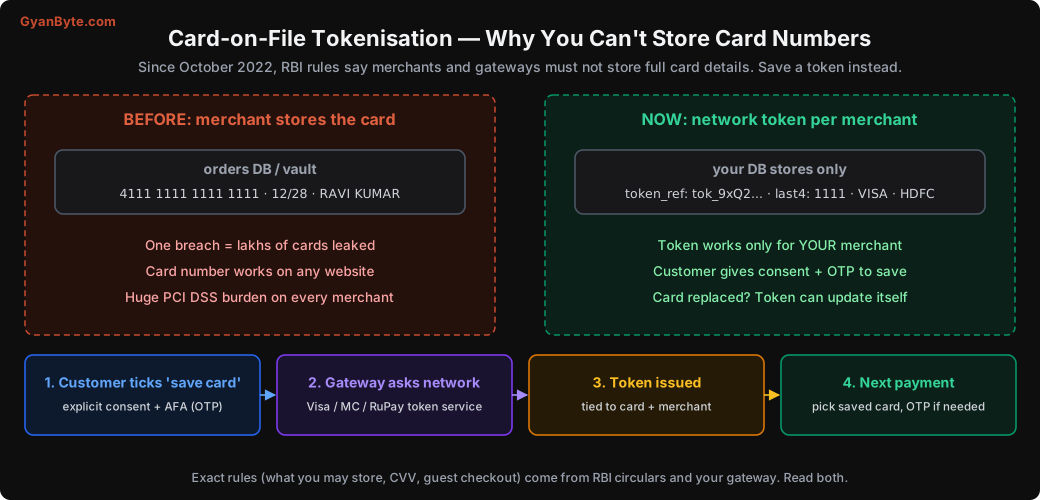
How it works:
- The customer ticks “save this card” and gives explicit consent, with an OTP.
- The gateway asks the card network’s token service to create a token for this card, for your merchant.
- The token is stored (by the gateway / token system). You keep a reference to it, plus display details like the last 4 digits and the card network or issuer name.
- Next time, the customer picks the saved card. The token is used instead of the real card number.
Why this is better: a token works only for your merchant. If your database leaks, the tokens are useless elsewhere. And when the customer’s card is replaced, the token can often be updated automatically.
What you can store, in practice:
CREATE TABLE saved_payment_methods (
    id              BIGSERIAL PRIMARY KEY,
    customer_id     BIGINT NOT NULL REFERENCES customers(id),
    gateway         TEXT NOT NULL,            -- 'razorpay', 'cashfree', ...
    gateway_token   TEXT NOT NULL,            -- the gateway's token reference
    card_last4      CHAR(4),
    card_network    TEXT,                     -- 'VISA', 'MASTERCARD', 'RUPAY'
    card_issuer     TEXT,                     -- 'HDFC', 'ICICI', ...
    card_type       TEXT,                     -- 'credit', 'debit'
    expiry_month    SMALLINT,                 -- only if your gateway gives it for display
    expiry_year     SMALLINT,
    created_at      TIMESTAMPTZ NOT NULL DEFAULT now(),
    revoked_at      TIMESTAMPTZ,
    UNIQUE (gateway, gateway_token)
);
-- Never: full card number, CVV, PIN, track data.
The exact list of what’s allowed comes from RBI’s circulars and your gateway’s guidance. When in doubt, store less. CVV must never be stored by anyone, ever, that’s a PCI rule too.
Also give customers a way to see and delete their saved cards. That’s expected under the rules, and under India’s data protection law too.
Keep card numbers out of your logs
Even with hosted checkout, card numbers sneak into systems through side doors: a customer pastes their card number into a support chat, a debug log prints a full gateway response, an error tracker captures a request body.
Add a log filter that masks anything that looks like a card number. A simple version with the Luhn check (the checksum all card numbers follow) avoids masking random long numbers like order ids:
import logging
import re

CARD_LIKE = re.compile(r"\b(?:\d[ -]?){13,19}\b")

def luhn_ok(digits: str) -> bool:
    total, alt = 0, False
    for ch in reversed(digits):
        d = int(ch)
        if alt:
            d *= 2
            if d > 9:
                d -= 9
        total += d
        alt = not alt
    return total % 10 == 0

def mask_cards(text: str) -> str:
    def repl(m):
        digits = re.sub(r"\D", "", m.group())
        if 13 <= len(digits) <= 19 and luhn_ok(digits):
            return f"[CARD ****{digits[-4:]}]"
        return m.group()
    return CARD_LIKE.sub(repl, text)

class CardMaskingFilter(logging.Filter):
    def filter(self, record: logging.LogRecord) -> bool:
        record.msg = mask_cards(str(record.msg))
        if record.args:
            record.args = tuple(mask_cards(str(a)) for a in record.args)
        return True

logging.getLogger().addFilter(CardMaskingFilter())
Apply the same masking in your support tool, your error tracker (most have a “before send” hook), and your analytics events.
A Few Card Features You’ll Meet
EMI. Card EMI (the bank converts the purchase into instalments) and cardless EMI or Buy Now Pay Later (a lender pays you and collects from the customer). For you, these usually show up as a different payment method with different fees and different refund rules. Partial refunds on EMI purchases can be tricky; check how your gateway handles them.
International cards. Need to be enabled separately on your gateway account. Expect higher fees, more fraud, more chargebacks, and different 3DS behaviour. If you sell abroad, read up on settlement currency and export rules with your finance team.
Card-present vs card-not-present. Everything in this course is card-not-present (online). Card-present payments at a POS machine have different fraud rules and lower chargeback risk.
Pitfalls to Avoid
- Not tracking the OTP step. It’s a big drop-off point. Measure it separately and pick a gateway that handles it well.
- Auto-retrying declined cards. Can trigger fraud blocks on the customer’s card. Let the customer decide.
- Generic decline messages. Tell customers what to do: enable online use, try another card, contact the bank.
- Forgetting uncaptured payments. If you use manual capture, have a job that captures or voids before the hold expires.
- Storing only the gross amount. You need fee and GST per payment for reconciliation.
- Calculating fees yourself. Use the gateway’s actual numbers.
- Card data on your servers. Use hosted checkout or secure fields. Keep your PCI scope small.
- Storing card numbers or CVV. Not allowed. Use tokens, store only last 4 and display info.
- Card numbers in logs and support tools. Mask them everywhere, with a Luhn check to avoid false positives.
- No way to delete saved cards. Customers must be able to remove them.
Quick Recap
- Authentication (OTP / 3DS) proves the cardholder; authorisation checks and blocks the money; capture charges it.
- Use auto-capture unless you have a business reason not to; if you delay, don’t forget to capture.
- Hard declines shouldn’t be retried; give customers clear next steps.
- MDR is split between issuer, network and gateway, with 18% GST on the fee. Store gross, fee and GST separately.
- No card numbers on your servers or in your logs. Saved cards use network tokens under RBI rules.
Next lesson: we put this together and integrate a payment gateway properly, from creating the order to verifying the result, in a way that never loses a payment.