Observability rests on three kinds of telemetry, usually called the three pillars: logs, metrics, and traces. You’ll hear them discussed as if you must choose between them, but that’s the wrong frame — they answer different questions and you need all three, working together. This lesson defines each, is honest about its trade-offs, and then covers the part that actually makes observability work: how the three combine, tied by a shared ID, into one coherent story.
The Three Pillars
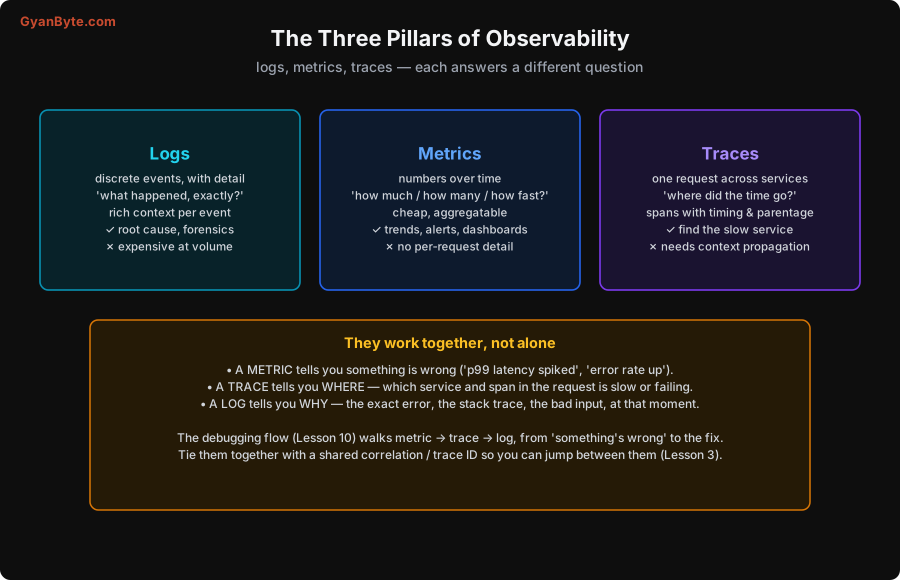
Logs are discrete, timestamped events, each with rich detail: “user asha’s payment failed with error TIMEOUT calling stripe, request id ab12.” They answer “what happened, exactly?” — the specific error, the stack trace, the bad input, the full context at a moment. Logs are your forensic record, invaluable for root cause. Their weakness is cost at volume: at scale you emit billions of them, and storing and searching that is expensive (Lesson 12) — so you can’t log everything forever.
Metrics are numbers measured over time: requests per second, error count, p99 latency, memory used, queue depth. They answer “how much, how many, how fast?” Metrics are cheap and aggregatable — a single number per interval, not a record per event — which makes them perfect for trends, dashboards and alerts (Lessons 4, 7, 8). Their weakness is the flip side: a metric is an aggregate, so it has no per-request detail. “p99 latency is 500ms” tells you there’s a problem but not which requests or why.
Traces follow a single request across all the services it touches, breaking it into spans (each service’s slice of work, with timing and parent/child relationships). They answer “where did the time go?” — which service, which call, is slow or failing within one request’s journey (the trace waterfall, Lesson 5). Their weakness is that they require context propagation: the trace ID must travel with the request across every service, which takes instrumentation (Lessons 5–6), and tracing every request is expensive, so you sample.
They Work Together, Not Alone
Here’s the insight that turns three separate tools into observability: you use them in sequence, each handing off to the next.
- A metric tells you something is wrong: “p99 latency spiked at 2:04,” “error rate is up.” Metrics are your early-warning and your alerts (Lesson 8) — cheap enough to watch everything, aggregate enough to show the trend.
- A trace tells you where: you open a slow request’s trace and the waterfall (Lesson 5) shows which service and span is the bottleneck — maybe an external call two services deep (the real example in Lesson 5).
- A log tells you why: at that service and moment, the log line shows the exact error — “connection pool exhausted,” “null in field X,” the stack trace.
This metric → trace → log progression (what’s wrong → where → why) is the backbone of the debugging workflow in Lesson 10. Each pillar alone is insufficient: metrics without traces leave you knowing something’s slow but not where; traces without logs show you the slow span but not the underlying error; logs without metrics drown you in detail with no way to know what’s normal or where to look. Together, they take you from a spike on a graph to a fix.
The Glue: a Shared Correlation ID
The thing that makes the three pillars one story rather than three disconnected datasets is a shared correlation ID — usually the trace ID — stamped on everything related to a request.
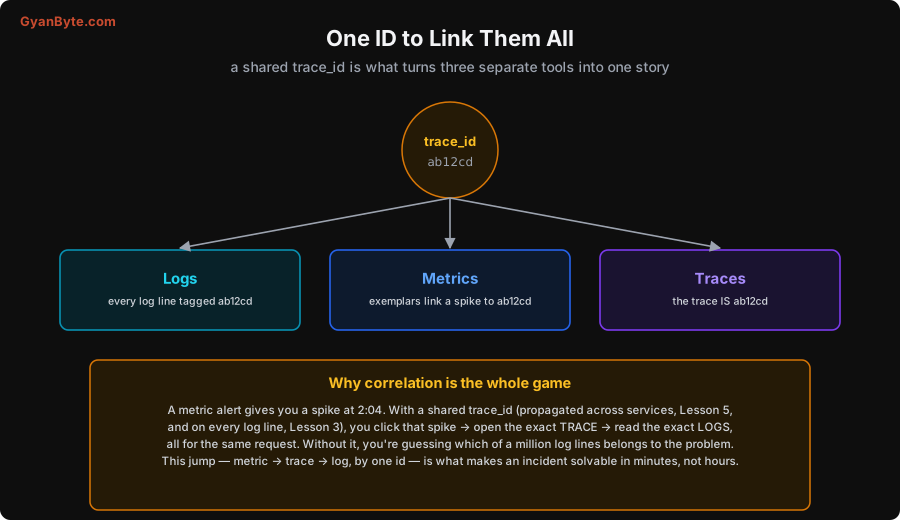
When every log line carries the trace ID (Lesson 3), the trace is that ID, and metrics can link to example traces (exemplars), you can jump between the pillars for a single request: a metric spike → click → the exact trace → the exact logs, all for the same request ab12cd. Without this correlation, the pillars are islands: you see a latency spike on a graph and then have to guess which of a million log lines across a dozen services belongs to the problem. With it, the jump from “what’s wrong” to “why” is a click, not an archaeology dig. This is why Lesson 3 insists on putting a trace/request ID on every log, and Lesson 5 insists on propagating it across services — correlation is what makes the three pillars add up to observability rather than three separate dashboards.
Picking What Goes Where
A practical corollary, which saves you money and grief (Lesson 12): put each kind of information in the right pillar.
- Aggregates and trends (rates, counts, percentiles) → metrics. Cheap, perfect for dashboards and alerts.
- High-cardinality per-request detail (which user, which order, the exact error) → logs and traces, not metric labels. Putting a user ID in a metric label is the cardinality bomb (Lessons 4, 12).
- The journey of a request across services → traces.
Matching the signal to the pillar keeps metrics cheap, logs useful, and traces affordable — and it’s a decision you make constantly as you instrument (Lessons 3–6).
Pitfalls to Avoid
- Treating the pillars as alternatives. They answer different questions; you need all three. Metrics alone can’t tell you why; logs alone can’t tell you what’s normal.
- No shared correlation ID. Without a trace/request ID on everything, the pillars are disconnected islands and you debug by guessing. Correlate everything.
- Putting per-request detail in metrics. High-cardinality values (user, order, request IDs) belong in logs/traces, not metric labels — or you get a cardinality explosion (Lessons 4, 12).
- Logging everything to compensate for weak metrics/traces. Logs are the most expensive pillar; don’t use them for aggregates metrics do cheaply (Lesson 12).
- Skipping traces in a distributed system. Without traces you can’t see where in a multi-service request the time goes — you’re blind to the one thing that matters most (Lesson 5).
- Forgetting the debugging direction. Metric → trace → log (what → where → why). Jumping straight to logs in a big system means grepping blind.
Quick Recap
- Logs = discrete events, rich detail (“what happened?“) — forensic, but expensive at volume.
- Metrics = numbers over time (“how much/fast?“) — cheap, aggregatable, great for trends/alerts, but no per-request detail.
- Traces = one request across services (“where did the time go?“) — find the slow span, but need context propagation.
- They work together: metric (what’s wrong) → trace (where) → log (why) — the debugging workflow (Lesson 10).
- A shared correlation / trace ID on everything is the glue that lets you jump between pillars for one request. Put each kind of info in the right pillar to keep costs sane.
Next lesson: the first pillar in detail — structured logging done right, including the correlation ID habit that makes everything else work.