File uploads are deceptively complex. They introduce security risks (malicious files), resource pressure (memory, disk, bandwidth), and operational concerns (storage, cleanup, CDN delivery). This lesson covers the full pipeline from receiving a file to serving it globally.
Multipart Form Uploads with Multer
Browsers send file uploads as multipart/form-data. Multer is Express middleware that parses these requests and gives you access to the uploaded files.
Basic Setup
const express = require('express');
const multer = require('multer');

const app = express();

// Memory storage (files held in buffer, not written to disk)
const upload = multer({
  storage: multer.memoryStorage(),
  limits: {
    fileSize: 10 * 1024 * 1024, // 10 MB max
    files: 5,                    // max 5 files per request
  },
});

app.post('/upload', upload.single('avatar'), (req, res) => {
  // req.file = { fieldname, originalname, mimetype, buffer, size }
  console.log(`Received ${req.file.originalname} (${req.file.size} bytes)`);
  res.json({ message: 'Upload successful' });
});

app.post('/upload/multiple', upload.array('photos', 5), (req, res) => {
  // req.files = array of file objects
  res.json({ count: req.files.length });
});
Use memoryStorage when you plan to stream the file to S3 immediately. Use diskStorage when you need to process files locally before uploading:
const diskUpload = multer({
  storage: multer.diskStorage({
    destination: '/tmp/uploads',
    filename: (req, file, cb) => {
      const uniqueName = `${Date.now()}-${crypto.randomUUID()}`;
      const ext = path.extname(file.originalname);
      cb(null, `${uniqueName}${ext}`);
    },
  }),
});
File Validation
Never trust the client. The Content-Type header and file extension can be spoofed. Validate file content by reading the magic bytes (file signature).
const fileType = require('file-type');

const ALLOWED_TYPES = new Set([
  'image/jpeg',
  'image/png',
  'image/webp',
  'image/gif',
  'application/pdf',
]);

async function validateFile(buffer, originalName) {
  // Check magic bytes
  const type = await fileType.fromBuffer(buffer);

  if (!type) {
    throw new Error('Unable to determine file type');
  }

  if (!ALLOWED_TYPES.has(type.mime)) {
    throw new Error(`File type ${type.mime} not allowed`);
  }

  // Check for embedded scripts in images (basic XSS prevention)
  const content = buffer.toString('utf8', 0, 1024);
  if (content.includes('<script') || content.includes('javascript:')) {
    throw new Error('Potentially malicious file content');
  }

  return {
    mime: type.mime,
    ext: type.ext,
  };
}
Apply validation as middleware:
function validateUpload(allowedTypes) {
  return async (req, res, next) => {
    if (!req.file) {
      return res.status(400).json({ error: 'No file provided' });
    }

    try {
      const { mime, ext } = await validateFile(req.file.buffer, req.file.originalname);
      req.file.validatedMime = mime;
      req.file.validatedExt = ext;
      next();
    } catch (err) {
      res.status(400).json({ error: err.message });
    }
  };
}

app.post('/upload',
  upload.single('file'),
  validateUpload(ALLOWED_TYPES),
  handleUpload
);
Streaming Uploads to S3
Don’t write files to disk and then upload them. Stream directly from the request to S3.
const {
  S3Client,
  PutObjectCommand,
} = require('@aws-sdk/client-s3');

const s3 = new S3Client({ region: process.env.AWS_REGION });

async function uploadToS3(file, folder = 'uploads') {
  const key = `${folder}/${Date.now()}-${crypto.randomUUID()}.${file.validatedExt}`;

  const command = new PutObjectCommand({
    Bucket: process.env.S3_BUCKET,
    Key: key,
    Body: file.buffer,
    ContentType: file.validatedMime,
    CacheControl: 'public, max-age=31536000, immutable',
    Metadata: {
      originalName: file.originalname,
      uploadedBy: file.userId || 'anonymous',
    },
  });

  await s3.send(command);

  return {
    key,
    url: `https://${process.env.CDN_DOMAIN}/${key}`,
  };
}
Complete Upload Handler
async function handleUpload(req, res) {
  try {
    const { key, url } = await uploadToS3(req.file, 'avatars');

    // Save reference in database
    await db.users.updateOne(
      { _id: req.user.id },
      { $set: { avatarUrl: url, avatarKey: key } }
    );

    res.json({ url });
  } catch (err) {
    console.error('Upload failed:', err);
    res.status(500).json({ error: 'Upload failed' });
  }
}
Presigned URLs for Direct Client Uploads
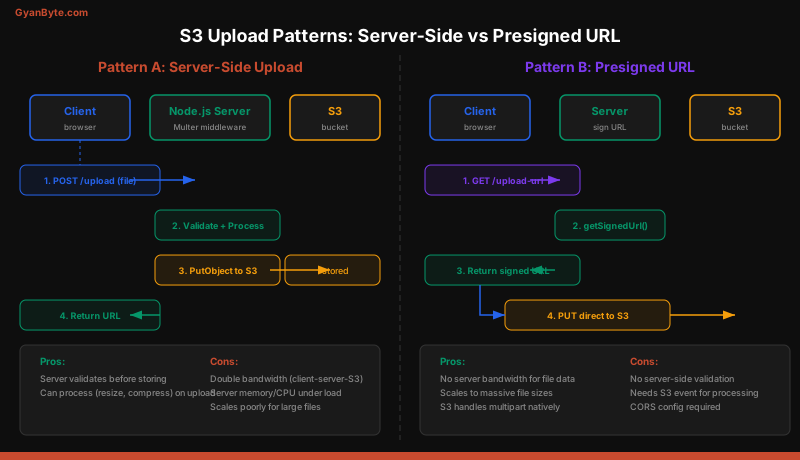
For large files, the server-side upload pattern has a problem: every byte passes through your server twice (client to server, server to S3). Presigned URLs let the client upload directly to S3.
Generating a Presigned URL
const { getSignedUrl } = require('@aws-sdk/s3-request-presigner');

async function getUploadUrl(req, res) {
  const { filename, contentType } = req.body;
  const key = `uploads/${req.user.id}/${Date.now()}-${filename}`;

  const command = new PutObjectCommand({
    Bucket: process.env.S3_BUCKET,
    Key: key,
    ContentType: contentType,
  });

  const uploadUrl = await getSignedUrl(s3, command, {
    expiresIn: 300, // URL valid for 5 minutes
  });

  res.json({ uploadUrl, key });
}
Client-Side Upload
// Browser code
async function uploadFile(file) {
  // Step 1: Get presigned URL from your server
  const { uploadUrl, key } = await fetch('/api/upload-url', {
    method: 'POST',
    headers: { 'Content-Type': 'application/json' },
    body: JSON.stringify({
      filename: file.name,
      contentType: file.type,
    }),
  }).then(r => r.json());

  // Step 2: Upload directly to S3
  await fetch(uploadUrl, {
    method: 'PUT',
    headers: { 'Content-Type': file.type },
    body: file,
  });

  // Step 3: Confirm upload to your server
  await fetch('/api/upload-confirm', {
    method: 'POST',
    headers: { 'Content-Type': 'application/json' },
    body: JSON.stringify({ key }),
  });

  return key;
}
The presigned URL includes your AWS credentials (signed, not exposed) and expires after the specified duration. The client never needs AWS credentials.
Multipart Uploads for Large Files
S3 multipart upload splits large files into parts (minimum 5 MB each) and uploads them in parallel. Use this for files over 100 MB.
const {
  CreateMultipartUploadCommand,
  UploadPartCommand,
  CompleteMultipartUploadCommand,
  AbortMultipartUploadCommand,
} = require('@aws-sdk/client-s3');

async function multipartUpload(fileBuffer, key) {
  const PART_SIZE = 10 * 1024 * 1024; // 10 MB parts
  const parts = [];

  // Initiate multipart upload
  const { UploadId } = await s3.send(new CreateMultipartUploadCommand({
    Bucket: process.env.S3_BUCKET,
    Key: key,
  }));

  try {
    // Upload parts in parallel (limit concurrency)
    const totalParts = Math.ceil(fileBuffer.length / PART_SIZE);

    for (let i = 0; i < totalParts; i++) {
      const start = i * PART_SIZE;
      const end = Math.min(start + PART_SIZE, fileBuffer.length);

      const { ETag } = await s3.send(new UploadPartCommand({
        Bucket: process.env.S3_BUCKET,
        Key: key,
        UploadId,
        PartNumber: i + 1,
        Body: fileBuffer.subarray(start, end),
      }));

      parts.push({ PartNumber: i + 1, ETag });
    }

    // Complete multipart upload
    await s3.send(new CompleteMultipartUploadCommand({
      Bucket: process.env.S3_BUCKET,
      Key: key,
      UploadId,
      MultipartUpload: { Parts: parts },
    }));
  } catch (err) {
    // Abort on failure (clean up incomplete parts)
    await s3.send(new AbortMultipartUploadCommand({
      Bucket: process.env.S3_BUCKET,
      Key: key,
      UploadId,
    }));
    throw err;
  }
}
Always wrap multipart uploads in try/catch and abort on failure. Incomplete multipart uploads consume storage until manually cleaned up or removed by a lifecycle rule.
Image Processing with Sharp
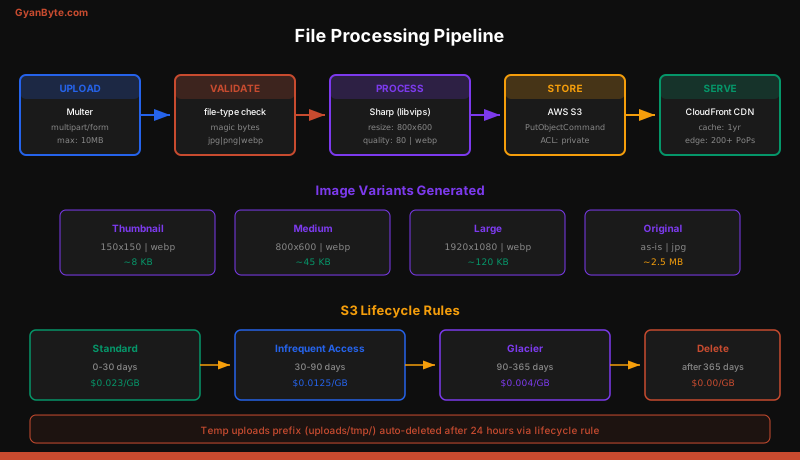
Sharp uses libvips for high-performance image processing. It’s significantly faster than ImageMagick and uses less memory.
const sharp = require('sharp');

async function processImage(inputBuffer) {
  const variants = {};

  // Thumbnail
  variants.thumbnail = await sharp(inputBuffer)
    .resize(150, 150, { fit: 'cover' })
    .webp({ quality: 80 })
    .toBuffer();

  // Medium
  variants.medium = await sharp(inputBuffer)
    .resize(800, 600, { fit: 'inside', withoutEnlargement: true })
    .webp({ quality: 80 })
    .toBuffer();

  // Large
  variants.large = await sharp(inputBuffer)
    .resize(1920, 1080, { fit: 'inside', withoutEnlargement: true })
    .webp({ quality: 85 })
    .toBuffer();

  return variants;
}
Complete Pipeline
async function handleImageUpload(req, res) {
  try {
    // 1. Validate
    const { mime, ext } = await validateFile(req.file.buffer);

    // 2. Process variants
    const variants = await processImage(req.file.buffer);

    // 3. Upload all variants to S3 in parallel
    const baseKey = `images/${req.user.id}/${Date.now()}`;

    const uploads = await Promise.all([
      uploadToS3({ buffer: variants.thumbnail, validatedExt: 'webp', validatedMime: 'image/webp' }, baseKey + '/thumb'),
      uploadToS3({ buffer: variants.medium, validatedExt: 'webp', validatedMime: 'image/webp' }, baseKey + '/medium'),
      uploadToS3({ buffer: variants.large, validatedExt: 'webp', validatedMime: 'image/webp' }, baseKey + '/large'),
      uploadToS3(req.file, baseKey + '/original'),
    ]);

    // 4. Save references in database
    const image = {
      userId: req.user.id,
      thumbnail: uploads[0].url,
      medium: uploads[1].url,
      large: uploads[2].url,
      original: uploads[3].url,
      createdAt: new Date(),
    };

    await db.images.insertOne(image);

    res.json(image);
  } catch (err) {
    console.error('Image processing failed:', err);
    res.status(500).json({ error: 'Processing failed' });
  }
}
S3 Bucket Policies and CORS Configuration
For presigned URL uploads, the S3 bucket needs a CORS configuration:
{
  "CORSRules": [
    {
      "AllowedOrigins": ["https://yourdomain.com"],
      "AllowedMethods": ["PUT", "GET"],
      "AllowedHeaders": ["Content-Type", "Content-Length"],
      "MaxAgeSeconds": 3600
    }
  ]
}
Set it with the AWS CLI:
aws s3api put-bucket-cors \
  --bucket my-uploads-bucket \
  --cors-configuration file://cors.json
For the bucket policy, restrict access to your CloudFront distribution:
{
  "Version": "2012-10-17",
  "Statement": [
    {
      "Sid": "AllowCloudFrontAccess",
      "Effect": "Allow",
      "Principal": {
        "Service": "cloudfront.amazonaws.com"
      },
      "Action": "s3:GetObject",
      "Resource": "arn:aws:s3:::my-uploads-bucket/*",
      "Condition": {
        "StringEquals": {
          "AWS:SourceArn": "arn:aws:cloudfront::ACCOUNT:distribution/DIST_ID"
        }
      }
    }
  ]
}
This ensures objects are only accessible through CloudFront, not directly from S3.
S3 Lifecycle Rules
Lifecycle rules automate storage management. Common rules for upload buckets:
const { PutBucketLifecycleConfigurationCommand } = require('@aws-sdk/client-s3');

await s3.send(new PutBucketLifecycleConfigurationCommand({
  Bucket: process.env.S3_BUCKET,
  LifecycleConfiguration: {
    Rules: [
      {
        ID: 'CleanupTempUploads',
        Filter: { Prefix: 'uploads/tmp/' },
        Status: 'Enabled',
        Expiration: { Days: 1 },
      },
      {
        ID: 'TransitionToIA',
        Filter: { Prefix: 'images/' },
        Status: 'Enabled',
        Transitions: [
          {
            Days: 30,
            StorageClass: 'STANDARD_IA',
          },
          {
            Days: 90,
            StorageClass: 'GLACIER',
          },
        ],
      },
      {
        ID: 'AbortIncompleteMultipart',
        Filter: { Prefix: '' },
        Status: 'Enabled',
        AbortIncompleteMultipartUpload: {
          DaysAfterInitiation: 1,
        },
      },
    ],
  },
}));
The AbortIncompleteMultipartUpload rule is particularly important. Without it, failed multipart uploads silently accumulate storage charges.
Error Handling and Edge Cases
Handle common upload failures gracefully:
const multer = require('multer');

app.use((err, req, res, next) => {
  if (err instanceof multer.MulterError) {
    switch (err.code) {
      case 'LIMIT_FILE_SIZE':
        return res.status(413).json({ error: 'File too large (max 10 MB)' });
      case 'LIMIT_FILE_COUNT':
        return res.status(400).json({ error: 'Too many files (max 5)' });
      case 'LIMIT_UNEXPECTED_FILE':
        return res.status(400).json({ error: `Unexpected field: ${err.field}` });
      default:
        return res.status(400).json({ error: err.message });
    }
  }
  next(err);
});
Also set request body limits at the server level to prevent memory exhaustion:
app.use(express.json({ limit: '1mb' }));
app.use(express.urlencoded({ limit: '1mb', extended: true }));
Key Takeaways
- Multer parses multipart uploads and gives you file buffers or disk paths. Use
memoryStoragewhen streaming to S3 immediately,diskStoragewhen processing locally first. - Validate file content, not just extensions. Read magic bytes with the
file-typelibrary to verify the actual file type. - Presigned URLs bypass your server for file data. The client uploads directly to S3 — your server only generates the signed URL and confirms completion.
- Use multipart uploads for files over 100 MB. Always abort on failure and set a lifecycle rule to clean up incomplete uploads.
- Sharp handles image processing efficiently. Generate multiple variants (thumbnail, medium, large) and upload them in parallel.
- S3 lifecycle rules automate cleanup. Transition old files to cheaper storage classes and delete temporary uploads automatically.
- Always restrict S3 access through bucket policies. Serve files through CloudFront, not directly from S3 public URLs.