HTTP is request-response. The client asks, the server answers. For real-time features — chat, live notifications, collaborative editing, stock tickers — you need the server to push data to the client without being asked. WebSockets solve this with a persistent, full-duplex connection.
WebSocket Protocol Basics
WebSockets start as a regular HTTP request. The client sends an upgrade request, the server agrees, and the connection switches from HTTP to the WebSocket protocol over the same TCP socket.
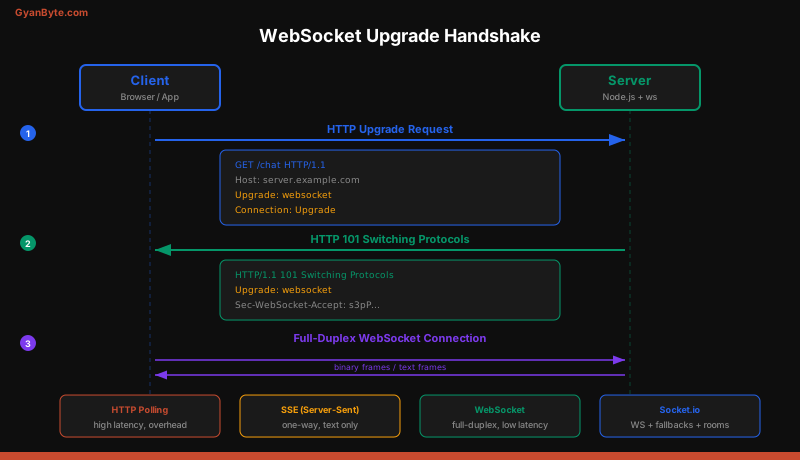
The handshake looks like this:
Client → Server:
GET /chat HTTP/1.1
Host: server.example.com
Upgrade: websocket
Connection: Upgrade
Sec-WebSocket-Key: dGhlIHNhbXBsZSBub25jZQ==
Sec-WebSocket-Version: 13

Server → Client:
HTTP/1.1 101 Switching Protocols
Upgrade: websocket
Connection: Upgrade
Sec-WebSocket-Accept: s3pPLMBiTxaQ9kYGzzhZRbK+xOo=
After the 101 response, both sides communicate using WebSocket frames — lightweight binary or text messages with minimal overhead (2-14 bytes per frame vs hundreds of bytes for HTTP headers).
Native ws Library
The ws library is the most popular WebSocket implementation for Node.js. It’s fast, spec-compliant, and has no dependencies.
Server
const { WebSocketServer } = require('ws');

const wss = new WebSocketServer({ port: 8080 });

wss.on('connection', (ws, req) => {
  const ip = req.socket.remoteAddress;
  console.log(`Client connected from ${ip}`);

  ws.on('message', (data) => {
    const message = JSON.parse(data);
    console.log('Received:', message);

    // Echo back
    ws.send(JSON.stringify({ type: 'echo', payload: message }));
  });

  ws.on('close', (code, reason) => {
    console.log(`Client disconnected: ${code} ${reason}`);
  });

  ws.on('error', (err) => {
    console.error('WebSocket error:', err.message);
  });

  // Send welcome message
  ws.send(JSON.stringify({ type: 'welcome', message: 'Connected' }));
});
Client
const WebSocket = require('ws');

const ws = new WebSocket('ws://localhost:8080');

ws.on('open', () => {
  ws.send(JSON.stringify({ type: 'chat', text: 'Hello server' }));
});

ws.on('message', (data) => {
  console.log('Server says:', JSON.parse(data));
});
The ws library is great for server-to-server communication or when you need raw WebSocket control. For browser-facing applications, Socket.io provides a much better developer experience.
Socket.io — Events, Rooms, Namespaces
Socket.io is not a WebSocket library. It’s a real-time framework that uses WebSocket as its primary transport but falls back to HTTP long-polling when WebSocket isn’t available. It adds features that raw WebSockets don’t have: automatic reconnection, rooms, namespaces, acknowledgements, and binary support.
Setting Up Socket.io
const express = require('express');
const { createServer } = require('http');
const { Server } = require('socket.io');

const app = express();
const httpServer = createServer(app);
const io = new Server(httpServer, {
  cors: {
    origin: 'http://localhost:3000',
    methods: ['GET', 'POST'],
  },
  pingInterval: 25000,   // heartbeat every 25s
  pingTimeout: 20000,    // disconnect after 20s without pong
});

httpServer.listen(3001, () => {
  console.log('Socket.io server on port 3001');
});
Events
Socket.io uses an event-driven model. Both client and server can emit and listen for custom events.
// Server
io.on('connection', (socket) => {
  console.log(`User connected: ${socket.id}`);

  socket.on('chat:message', (data, callback) => {
    // data = { room: 'general', text: 'Hello' }
    const message = {
      id: generateId(),
      user: socket.data.username,
      text: data.text,
      timestamp: Date.now(),
    };

    // Broadcast to the room
    socket.to(data.room).emit('chat:message', message);

    // Acknowledge receipt to sender
    callback({ status: 'ok', id: message.id });
  });
});
// Client (browser)
import { io } from 'socket.io-client';
const socket = io('http://localhost:3001');
socket.emit('chat:message', { room: 'general', text: 'Hello' }, (response) => {
console.log('Server acknowledged:', response.id);
});
socket.on('chat:message', (message) => {
appendToChat(message);
});The callback parameter in emit is an acknowledgement. The server calls it and the client receives the response. This gives you request-response semantics over an event-driven connection.
Rooms
Rooms are server-side groupings of sockets. A socket can join multiple rooms, and you can broadcast to all sockets in a room.
io.on('connection', (socket) => {
  socket.on('room:join', (roomName) => {
    socket.join(roomName);
    socket.to(roomName).emit('room:userJoined', {
      user: socket.data.username,
    });
  });

  socket.on('room:leave', (roomName) => {
    socket.leave(roomName);
    socket.to(roomName).emit('room:userLeft', {
      user: socket.data.username,
    });
  });
});
Namespaces
Namespaces are separate communication channels that share the same underlying connection. Use them to separate concerns — a /chat namespace for messaging, a /notifications namespace for alerts.
const chatNsp = io.of('/chat');
const notificationsNsp = io.of('/notifications');

chatNsp.on('connection', (socket) => {
  // Only handles chat events
  socket.on('message', (data) => { /* ... */ });
});

notificationsNsp.on('connection', (socket) => {
  // Only handles notification events
  socket.on('subscribe', (topics) => { /* ... */ });
});
On the client side:
const chatSocket = io('http://localhost:3001/chat');
const notifSocket = io('http://localhost:3001/notifications');
Broadcasting Patterns
Socket.io gives you fine-grained control over who receives a message:
// To everyone except the sender
socket.broadcast.emit('event', data);

// To everyone in a room except the sender
socket.to('room-1').emit('event', data);

// To everyone in a room INCLUDING the sender
io.to('room-1').emit('event', data);

// To everyone in multiple rooms
io.to('room-1').to('room-2').emit('event', data);

// To a specific socket by ID
io.to(socketId).emit('event', data);

// To everyone (all connected sockets)
io.emit('event', data);
Building a Real-Time Chat System
Here’s a complete chat server with rooms, typing indicators, and message history:
const { Server } = require('socket.io');

function setupChat(httpServer) {
  const io = new Server(httpServer);
  const messages = new Map(); // room -> messages[]

  io.use(authMiddleware); // see authentication section below

  io.on('connection', (socket) => {
    const { username } = socket.data;

    socket.on('chat:join', (room) => {
      socket.join(room);

      // Send message history
      const history = messages.get(room) || [];
      socket.emit('chat:history', history.slice(-50));

      // Notify room
      socket.to(room).emit('chat:userJoined', { username });

      // Track which room the user is in
      socket.data.currentRoom = room;
    });

    socket.on('chat:message', (data, ack) => {
      const message = {
        id: crypto.randomUUID(),
        username,
        text: data.text,
        room: data.room,
        timestamp: Date.now(),
      };

      // Store message
      if (!messages.has(data.room)) messages.set(data.room, []);
      messages.get(data.room).push(message);

      // Broadcast to room
      io.to(data.room).emit('chat:message', message);
      ack({ id: message.id });
    });

    socket.on('chat:typing', (room) => {
      socket.to(room).emit('chat:typing', { username });
    });

    socket.on('disconnect', () => {
      const { currentRoom } = socket.data;
      if (currentRoom) {
        socket.to(currentRoom).emit('chat:userLeft', { username });
      }
    });
  });

  return io;
}
Scaling with @socket.io/redis-adapter
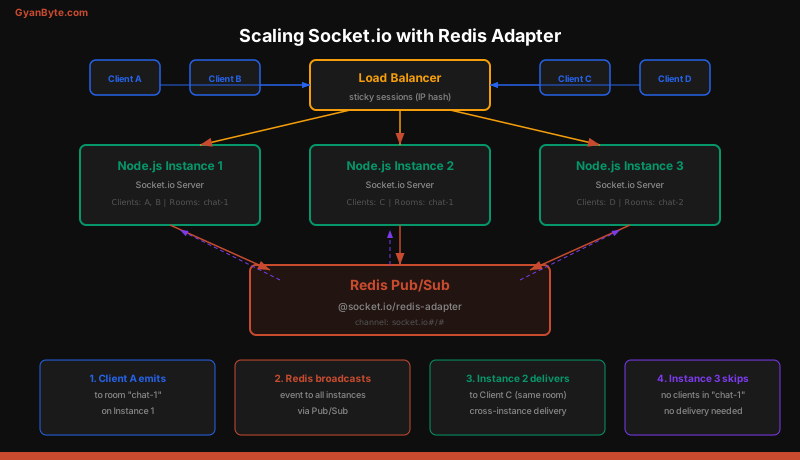
A single Node.js process handles one set of connected sockets. When you run multiple instances behind a load balancer, a message sent from a socket on instance 1 won’t reach sockets on instance 2. The Redis adapter solves this by using Redis Pub/Sub to relay events between instances.
Setup
const { createAdapter } = require('@socket.io/redis-adapter');
const { createClient } = require('redis');

async function setupScaledSocketIO(httpServer) {
  const io = new Server(httpServer);

  const pubClient = createClient({ url: 'redis://localhost:6379' });
  const subClient = pubClient.duplicate();

  await Promise.all([pubClient.connect(), subClient.connect()]);

  io.adapter(createAdapter(pubClient, subClient));

  return io;
}
When instance 1 emits to a room, the adapter publishes the event to Redis. All other instances receive it through their subscriptions and deliver it to their local sockets in that room.
Sticky Sessions
Socket.io’s HTTP long-polling fallback requires sticky sessions. The initial handshake creates a session that must reach the same server for subsequent requests. Configure your load balancer to use IP hash or cookie-based affinity:
upstream socketio {
    ip_hash;
    server 127.0.0.1:3001;
    server 127.0.0.1:3002;
    server 127.0.0.1:3003;
}

server {
    location /socket.io/ {
        proxy_pass http://socketio;
        proxy_http_version 1.1;
        proxy_set_header Upgrade $http_upgrade;
        proxy_set_header Connection "upgrade";
    }
}
If you know all clients support WebSocket (modern browsers, mobile apps), you can disable the HTTP transport and skip sticky sessions entirely:
const io = new Server(httpServer, {
  transports: ['websocket'], // disable polling
});
Authentication with Socket.io Middleware
Socket.io middleware runs before the connection event. Use it to verify JWT tokens:
const jwt = require('jsonwebtoken');

function authMiddleware(socket, next) {
  const token = socket.handshake.auth.token;

  if (!token) {
    return next(new Error('Authentication required'));
  }

  try {
    const decoded = jwt.verify(token, process.env.JWT_SECRET);
    socket.data.userId = decoded.sub;
    socket.data.username = decoded.username;
    next();
  } catch (err) {
    next(new Error('Invalid token'));
  }
}

io.use(authMiddleware);
On the client side:
const socket = io('http://localhost:3001', {
  auth: {
    token: localStorage.getItem('accessToken'),
  },
});

socket.on('connect_error', (err) => {
  if (err.message === 'Invalid token') {
    refreshToken().then((newToken) => {
      socket.auth.token = newToken;
      socket.connect();
    });
  }
});
Handling Disconnections and Reconnection
Connections drop. WiFi switches, phones go to sleep, servers restart. Socket.io handles reconnection automatically on the client side, but you need to handle the server-side implications.
io.on('connection', (socket) => {
  // Rejoin rooms after reconnection
  socket.on('session:restore', async (sessionId) => {
    const session = await redis.get(`session:${sessionId}`);
    if (session) {
      const { rooms, username } = JSON.parse(session);
      socket.data.username = username;
      rooms.forEach((room) => socket.join(room));
      socket.emit('session:restored', { rooms });
    }
  });

  socket.on('disconnect', async (reason) => {
    // Save session state for reconnection
    const rooms = [...socket.rooms].filter((r) => r !== socket.id);
    await redis.set(
      `session:${socket.data.sessionId}`,
      JSON.stringify({ rooms, username: socket.data.username }),
      'EX', 300 // 5 minute TTL
    );

    console.log(`Disconnected: ${reason}`);
    // Possible reasons: 'transport close', 'ping timeout',
    // 'client namespace disconnect', 'server namespace disconnect'
  });
});
Performance Considerations
Message size — Keep payloads small. Send IDs instead of full objects when possible. Use binary frames for large data.
Room size — Broadcasting to a room with 100,000 sockets means serializing the message 100,000 times. For very large rooms, consider batching or using a fan-out pattern with multiple intermediary rooms.
Heartbeats — Socket.io sends ping/pong frames at the pingInterval. If a pong isn’t received within pingTimeout, the connection is closed. Tune these values based on your use case — lower values detect dead connections faster but generate more traffic.
Connection limits — Each WebSocket connection holds an open file descriptor. A single Node.js process can typically handle 10,000-50,000 concurrent connections depending on message frequency and payload size. Monitor memory usage closely.
Compression — Enable per-message deflate for text-heavy payloads:
const io = new Server(httpServer, {
  perMessageDeflate: {
    threshold: 1024, // only compress messages > 1KB
  },
});
Key Takeaways
- WebSockets upgrade from HTTP to a persistent, full-duplex connection. Both sides can send data at any time without request/response overhead.
- Socket.io adds rooms, namespaces, and auto-reconnection on top of WebSockets. It also falls back to HTTP long-polling when WebSocket is unavailable.
- Use the Redis adapter to scale across multiple Node.js instances. Without it, sockets on different instances can’t communicate.
- Authenticate in middleware, not in event handlers. Reject unauthorized connections before they reach your application logic.
- Save session state for reconnection. Users expect to rejoin rooms and recover context after temporary disconnections.
- Monitor connection count and memory. Each WebSocket is a long-lived connection that holds server resources for its entire lifetime.