Production systems rarely do everything synchronously. When a user places an order, you don’t want the API to block while you send confirmation emails, update inventory, notify the warehouse, and charge the payment processor. Message queues let you hand off work to background consumers, keeping your API fast and your architecture resilient.
Why Message Queues
Three problems that queues solve:
Decoupling — Your order service doesn’t need to know about the email service, the inventory service, or the analytics pipeline. It publishes a message and moves on. Each consumer subscribes independently.
Async processing — Heavy operations (PDF generation, image processing, third-party API calls) move out of the request-response cycle. The user gets an immediate response while work happens in the background.
Load leveling — During traffic spikes, messages queue up instead of overwhelming downstream services. Consumers process at their own pace. A burst of 10,000 orders per second doesn’t crash your payment processor that handles 500 per second.
RabbitMQ with amqplib
RabbitMQ implements the AMQP 0-9-1 protocol. The core concepts are: connections (TCP sockets to the broker), channels (multiplexed virtual connections within a TCP connection), exchanges (message routers), queues (message buffers), and bindings (rules connecting exchanges to queues).
Setting Up a Connection
const amqp = require('amqplib');

async function connect() {
  const connection = await amqp.connect('amqp://localhost:5672');
  const channel = await connection.createChannel();

  // Prefetch limits how many unacked messages a consumer holds
  await channel.prefetch(10);

  // Handle connection errors
  connection.on('error', (err) => {
    console.error('Connection error:', err.message);
  });

  connection.on('close', () => {
    console.error('Connection closed, reconnecting...');
    setTimeout(connect, 5000);
  });

  return { connection, channel };
}
Always set prefetch. Without it, RabbitMQ pushes all messages to one consumer, starving the others. A prefetch of 10 means each consumer holds at most 10 unacknowledged messages at a time.
Publishing Messages
async function publishOrder(channel, order) {
  const exchange = 'orders';
  const routingKey = 'order.created';

  await channel.assertExchange(exchange, 'topic', { durable: true });

  channel.publish(
    exchange,
    routingKey,
    Buffer.from(JSON.stringify(order)),
    {
      persistent: true,       // survive broker restart
      contentType: 'application/json',
      messageId: order.id,    // for idempotency
      timestamp: Date.now(),
    }
  );
}
Setting persistent: true writes messages to disk. Combined with a durable: true queue, messages survive RabbitMQ restarts. Without both, you lose messages when the broker goes down.
Consuming Messages
async function consumeOrders(channel) {
  const queue = 'order-processing';
  const exchange = 'orders';

  await channel.assertQueue(queue, {
    durable: true,
    deadLetterExchange: 'orders.dlx',
    deadLetterRoutingKey: 'order.failed',
  });

  await channel.bindQueue(queue, exchange, 'order.created');

  channel.consume(queue, async (msg) => {
    if (!msg) return;

    try {
      const order = JSON.parse(msg.content.toString());
      await processOrder(order);
      channel.ack(msg);
    } catch (err) {
      console.error('Processing failed:', err.message);
      // requeue: false sends to dead-letter exchange
      channel.nack(msg, false, false);
    }
  });
}
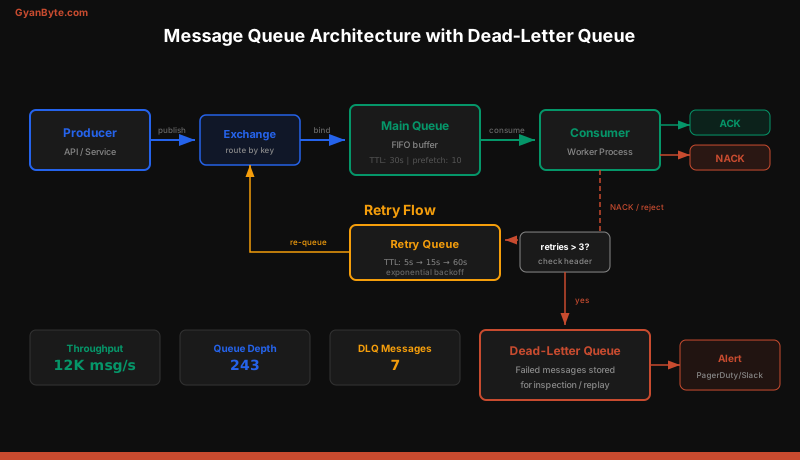
The ack / nack pattern is critical. If your consumer crashes before acknowledging, RabbitMQ redelivers the message to another consumer. Never auto-acknowledge — always acknowledge after successful processing.
Exchange Types
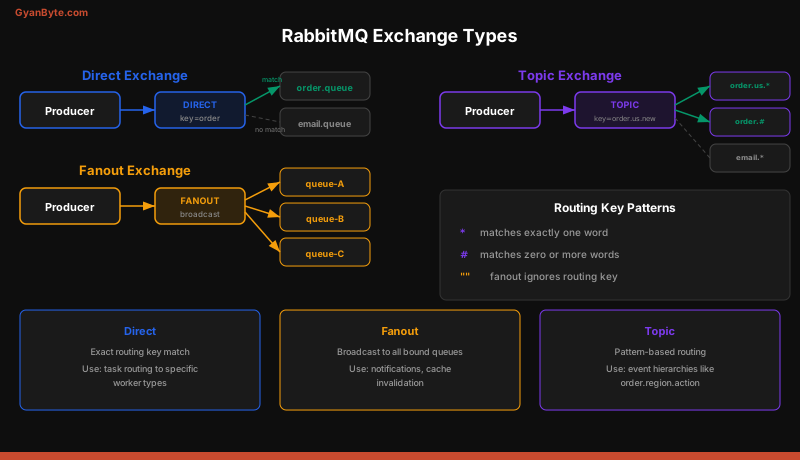
RabbitMQ routes messages through exchanges, not directly to queues. The exchange type determines the routing logic.
Direct Exchange
Routes messages to queues whose binding key exactly matches the routing key. If you publish with routing key order.created, only queues bound with that exact key receive the message.
await channel.assertExchange('tasks', 'direct', { durable: true });
await channel.bindQueue('email-queue', 'tasks', 'send-email');
await channel.bindQueue('sms-queue', 'tasks', 'send-sms');

// Only email-queue receives this
channel.publish('tasks', 'send-email', Buffer.from(payload));
Use direct exchanges when you need one-to-one routing with known routing keys.
Fanout Exchange
Broadcasts every message to all bound queues, ignoring routing keys entirely.
await channel.assertExchange('notifications', 'fanout', { durable: true });
await channel.bindQueue('email-notifications', 'notifications', '');
await channel.bindQueue('push-notifications', 'notifications', '');
await channel.bindQueue('analytics-events', 'notifications', '');

// All three queues receive this
channel.publish('notifications', '', Buffer.from(payload));
Use fanout for broadcasting — cache invalidation, event logging, multi-channel notifications.
Topic Exchange
Routes based on wildcard pattern matching on the routing key. * matches one word, # matches zero or more words.
await channel.assertExchange('events', 'topic', { durable: true });

// Receives order.us.created, order.us.cancelled
await channel.bindQueue('us-orders', 'events', 'order.us.*');

// Receives all order events: order.us.created, order.eu.shipped, etc.
await channel.bindQueue('all-orders', 'events', 'order.#');

channel.publish('events', 'order.us.created', Buffer.from(payload));
Topic exchanges are the most flexible. Use them when consumers need to subscribe to subsets of events based on hierarchical routing keys.
Dead-Letter Queues and Retry Strategies
When a consumer fails to process a message, you have three options: requeue it (risk infinite loops), drop it (lose data), or send it to a dead-letter queue (DLQ) for inspection and retry.
Setting Up DLQ with Exponential Backoff
// Main queue with DLQ configuration
await channel.assertExchange('orders.dlx', 'direct', { durable: true });

await channel.assertQueue('order-processing', {
  durable: true,
  deadLetterExchange: 'orders.dlx',
  deadLetterRoutingKey: 'order.failed',
});

// DLQ for inspection
await channel.assertQueue('order-processing.dlq', { durable: true });
await channel.bindQueue('order-processing.dlq', 'orders.dlx', 'order.failed');

// Retry queue with TTL (messages re-enter main exchange after delay)
await channel.assertQueue('order-processing.retry', {
  durable: true,
  deadLetterExchange: 'orders',
  deadLetterRoutingKey: 'order.created',
  messageTtl: 5000, // 5 second delay before retry
});
For exponential backoff, use multiple retry queues with increasing TTLs (5s, 15s, 60s). Track retry count in message headers:
function getRetryCount(msg) {
  const deaths = msg.properties.headers?.['x-death'];
  if (!deaths) return 0;
  return deaths.reduce((sum, d) => sum + d.count, 0);
}

channel.consume(queue, async (msg) => {
  try {
    await processOrder(JSON.parse(msg.content.toString()));
    channel.ack(msg);
  } catch (err) {
    const retries = getRetryCount(msg);
    if (retries >= 3) {
      // Max retries exceeded, send to DLQ
      channel.nack(msg, false, false);
    } else {
      // Send to retry queue for delayed reprocessing
      channel.publish('', 'order-processing.retry',
        msg.content, { headers: msg.properties.headers }
      );
      channel.ack(msg);
    }
  }
});
AWS SQS with @aws-sdk/client-sqs
SQS is a fully managed queue service. No broker to maintain, no cluster to configure. You create a queue and start sending messages.
Sending Messages
const { SQSClient, SendMessageCommand } = require('@aws-sdk/client-sqs');

const sqs = new SQSClient({ region: 'us-east-1' });

async function sendMessage(order) {
  const command = new SendMessageCommand({
    QueueUrl: process.env.ORDER_QUEUE_URL,
    MessageBody: JSON.stringify(order),
    MessageAttributes: {
      orderType: {
        DataType: 'String',
        StringValue: order.type,
      },
    },
    // For FIFO queues only
    // MessageGroupId: order.customerId,
    // MessageDeduplicationId: order.id,
  });

  return sqs.send(command);
}
Receiving and Deleting Messages
const {
  ReceiveMessageCommand,
  DeleteMessageCommand,
} = require('@aws-sdk/client-sqs');

async function pollMessages() {
  const command = new ReceiveMessageCommand({
    QueueUrl: process.env.ORDER_QUEUE_URL,
    MaxNumberOfMessages: 10,
    WaitTimeSeconds: 20,           // long polling
    VisibilityTimeout: 30,         // 30s to process
    MessageAttributeNames: ['All'],
  });

  const { Messages = [] } = await sqs.send(command);

  for (const msg of Messages) {
    try {
      const order = JSON.parse(msg.Body);
      await processOrder(order);

      await sqs.send(new DeleteMessageCommand({
        QueueUrl: process.env.ORDER_QUEUE_URL,
        ReceiptHandle: msg.ReceiptHandle,
      }));
    } catch (err) {
      console.error('Failed to process:', err.message);
      // Message becomes visible again after VisibilityTimeout
    }
  }
}

// Continuous polling loop
async function startConsumer() {
  while (true) {
    await pollMessages();
  }
}
SQS Standard vs FIFO Queues
| Feature | Standard | FIFO |
|---|---|---|
| Throughput | Unlimited | 300 msg/s (3,000 with batching) |
| Ordering | Best-effort | Strict per message group |
| Delivery | At-least-once (possible duplicates) | Exactly-once |
| Deduplication | None | 5-minute window |
| Queue name | Any | Must end in .fifo |
| Price | Lower | ~20% higher |
Use Standard for most workloads. Use FIFO when ordering matters (financial transactions, sequential event processing) or when you need exactly-once delivery.
Message Visibility Timeout
When a consumer receives a message, SQS hides it from other consumers for the VisibilityTimeout period. If the consumer doesn’t delete the message before the timeout expires, SQS makes it visible again for another consumer to pick up.
Set the timeout longer than your maximum processing time. If processing takes 25 seconds, set the timeout to at least 30 seconds. You can extend it mid-processing with ChangeMessageVisibility.
Long Polling
Setting WaitTimeSeconds to a value between 1 and 20 enables long polling. Instead of returning immediately when the queue is empty, SQS waits up to that many seconds for a message to arrive. This reduces the number of empty responses and lowers your SQS bill.
RabbitMQ vs SQS Comparison
| Aspect | RabbitMQ | AWS SQS |
|---|---|---|
| Hosting | Self-managed (or CloudAMQP) | Fully managed |
| Protocol | AMQP 0-9-1 | HTTP/HTTPS API |
| Routing | Exchanges + bindings (flexible) | Queue-based (simple) |
| Delivery model | Push (broker pushes to consumer) | Pull (consumer polls) |
| Dead-letter | Exchange-based DLQ | Built-in DLQ policy |
| Message size | No hard limit (128MB default) | 256 KB (up to 2 GB with S3) |
| Latency | Sub-millisecond | 1-10ms |
| Ordering | Per-queue FIFO | Standard: best-effort, FIFO: strict |
| Scaling | Manual (add nodes) | Automatic |
| Best for | Complex routing, low latency | AWS-native, managed simplicity |
Choose RabbitMQ when you need complex routing patterns, very low latency, or when running outside AWS. Choose SQS when you want zero operational overhead, automatic scaling, and your stack is already on AWS.
Idempotent Consumer Pattern
Both RabbitMQ and SQS deliver messages at least once. Your consumer might process the same message twice due to network issues, consumer crashes, or visibility timeout expiry. Every consumer must be idempotent — processing the same message twice should produce the same result.
const processedMessages = new Set(); // Use Redis in production

async function processOrder(order, messageId) {
  // Check if already processed
  if (processedMessages.has(messageId)) {
    console.log(`Duplicate message ${messageId}, skipping`);
    return;
  }

  // Process the order
  await db.orders.updateOne(
    { _id: order.id },
    { $set: { status: 'confirmed' } },
    { upsert: true } // idempotent DB operation
  );

  await sendConfirmationEmail(order);

  // Mark as processed
  processedMessages.add(messageId);
}
In production, use Redis with an expiration to track processed message IDs:
const Redis = require('ioredis');
const redis = new Redis();

async function isProcessed(messageId) {
  const result = await redis.set(
    `processed:${messageId}`,
    '1',
    'EX', 86400,  // expire after 24 hours
    'NX'          // only set if not exists
  );
  return result === null; // null means key already existed
}
The NX flag on Redis SET is atomic — even with multiple consumers racing, only one will successfully set the key. This makes your deduplication logic safe under concurrency.
Key Takeaways
- Queues decouple producers from consumers. Your API stays fast while background workers handle heavy processing.
- RabbitMQ exchanges give you routing power. Use direct for point-to-point, fanout for broadcasting, and topic for pattern-based routing.
- SQS is managed simplicity. No broker to maintain, automatic scaling, and native AWS integration. Use FIFO queues when ordering matters.
- Dead-letter queues catch failures. Set a max retry count and send exhausted messages to a DLQ for manual inspection.
- Always acknowledge explicitly. Never use auto-ack in production — a crashed consumer loses the message.
- Every consumer must be idempotent. At-least-once delivery means your handler will see duplicates. Use message IDs and atomic operations to handle them safely.