Redis is an in-memory data structure store that serves as a cache, message broker, session store, and general-purpose key-value database. It processes over 100,000 operations per second on a single node with sub-millisecond latency — making it the go-to tool for any Node.js application that needs to be fast. In this lesson, you will learn to use Redis for caching, sessions, pub/sub, rate limiting, and leaderboards with practical code patterns.
Redis Setup with Docker
# docker-compose.yml
version: "3.9"
services:
  redis:
    image: redis:7-alpine
    ports:
      - "6379:6379"
    command: redis-server --maxmemory 256mb --maxmemory-policy allkeys-lru
    volumes:
      - redisdata:/data

volumes:
  redisdata:
The allkeys-lru eviction policy ensures Redis automatically removes the least recently used keys when memory is full — the right default for caching workloads.
Connecting with ioredis
Use ioredis over the older redis package. It supports Cluster, Sentinel, pipelining, and Lua scripting out of the box.
npm install ioredisimport Redis from "ioredis";
const redis = new Redis({
host: "localhost",
port: 6379,
maxRetriesPerRequest: 3,
retryStrategy(times) {
const delay = Math.min(times * 50, 2000);
return delay; // reconnect after delay ms
},
lazyConnect: true, // don't connect until first command
});
await redis.connect();For production with Redis Cluster:
const cluster = new Redis.Cluster([
  { host: "redis-1", port: 6379 },
  { host: "redis-2", port: 6379 },
  { host: "redis-3", port: 6379 },
]);
Redis Data Structures
Redis is more than a key-value store. Each data structure has specific use cases.
| Structure | Commands | Use Case |
|---|---|---|
| Strings | SET, GET, INCR, DECR |
Cache values, counters, flags |
| Hashes | HSET, HGET, HGETALL |
Object storage, user sessions |
| Lists | LPUSH, RPUSH, LPOP, LRANGE |
Queues, recent activity feeds |
| Sets | SADD, SMEMBERS, SISMEMBER |
Tags, unique visitors, relationships |
| Sorted Sets | ZADD, ZRANGE, ZRANGEBYSCORE |
Leaderboards, priority queues, time-series |
// Strings
await redis.set("user:1:name", "Alice");
await redis.set("page:home:views", 0);
await redis.incr("page:home:views"); // atomic increment

// Hashes — store objects without serialization
await redis.hset("user:1", { name: "Alice", email: "[email protected]", role: "admin" });
const user = await redis.hgetall("user:1");

// Lists — recent activity feed
await redis.lpush("feed:global", JSON.stringify({ type: "post", id: 42, ts: Date.now() }));
await redis.ltrim("feed:global", 0, 99); // keep only last 100 items
const recent = await redis.lrange("feed:global", 0, 9); // last 10 items

// Sets — track unique visitors
await redis.sadd("visitors:2026-04-03", "user:1", "user:2", "user:3");
const uniqueCount = await redis.scard("visitors:2026-04-03");

// Sorted Sets — leaderboard
await redis.zadd("leaderboard:weekly", 1500, "user:1", 2300, "user:2", 1800, "user:3");
const topPlayers = await redis.zrevrange("leaderboard:weekly", 0, 9, "WITHSCORES");
Caching Patterns
Caching is the primary reason most Node.js applications add Redis. A well-implemented cache reduces database load by 10-100x for read-heavy workloads.
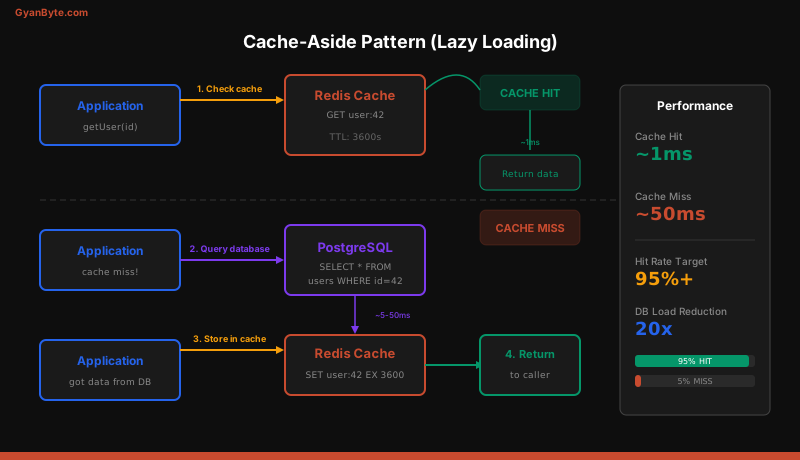
Cache-Aside (Lazy Loading)
The application checks the cache first. On a miss, it queries the database, stores the result in Redis, and returns it. This is the most common pattern.
async function getUser(userId) {
  const cacheKey = `user:${userId}`;

  // 1. Check cache
  const cached = await redis.get(cacheKey);
  if (cached) {
    return JSON.parse(cached);
  }

  // 2. Cache miss — query database
  const user = await db.query("SELECT * FROM users WHERE id = $1", [userId]);
  if (!user) return null;

  // 3. Store in cache with TTL
  await redis.set(cacheKey, JSON.stringify(user), "EX", 3600); // 1 hour

  return user;
}
Pros: Only caches data that is actually requested. Cache misses are self-healing. Cons: First request is always slow (cache miss). Data can become stale until TTL expires.
Write-Through
Every write goes through the cache. The cache is always up-to-date but every write is slower.
async function updateUser(userId, data) {
  const cacheKey = `user:${userId}`;

  // 1. Update database
  const user = await db.query(
    "UPDATE users SET name = $1, email = $2 WHERE id = $3 RETURNING *",
    [data.name, data.email, userId]
  );

  // 2. Update cache
  await redis.set(cacheKey, JSON.stringify(user), "EX", 3600);

  return user;
}
Cache Invalidation
When data changes, invalidate the cache instead of waiting for the TTL.
async function deleteUser(userId) {
  await db.query("DELETE FROM users WHERE id = $1", [userId]);
  await redis.del(`user:${userId}`);

  // Also invalidate any list caches that include this user
  await redis.del("users:all", "users:admin");
}
For pattern-based invalidation, use key prefixes and SCAN:
async function invalidateUserCaches(userId) {
  let cursor = "0";
  do {
    const [nextCursor, keys] = await redis.scan(cursor, "MATCH", `user:${userId}:*`, "COUNT", 100);
    cursor = nextCursor;
    if (keys.length > 0) {
      await redis.del(...keys);
    }
  } while (cursor !== "0");
}
Never use KEYS in production. It blocks Redis while scanning all keys. Use SCAN with a cursor.
Session Storage with connect-redis
Storing sessions in Redis lets you share sessions across multiple Node.js instances and survive restarts.
npm install express-session connect-redis ioredisimport session from "express-session";
import RedisStore from "connect-redis";
const redisStore = new RedisStore({
client: redis,
prefix: "sess:",
ttl: 86400, // 24 hours
});
app.use(
session({
store: redisStore,
secret: process.env.SESSION_SECRET,
resave: false,
saveUninitialized: false,
cookie: {
secure: process.env.NODE_ENV === "production",
httpOnly: true,
maxAge: 86400000, // 24 hours in ms
sameSite: "lax",
},
})
);Each session is stored as a Redis hash under the key sess:<sessionId>. When a user makes a request, express-session reads the session from Redis, attaches it to req.session, and writes it back if modified.
Pub/Sub for Real-Time Events
Redis Pub/Sub enables real-time event broadcasting between services or between your Node.js instances. Publishers send messages to channels, and all subscribers on that channel receive the message.
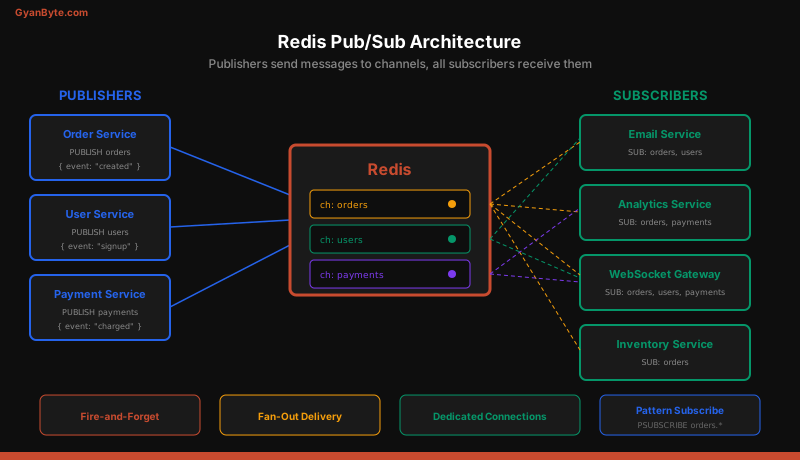
Important: Pub/Sub requires dedicated Redis connections. A connection in subscriber mode cannot execute regular commands.
import Redis from "ioredis";

// Dedicated connections for pub/sub
const publisher = new Redis();
const subscriber = new Redis();

// Subscribe to channels
await subscriber.subscribe("orders", "notifications");

subscriber.on("message", (channel, message) => {
  const data = JSON.parse(message);
  console.log(`[${channel}]`, data);

  switch (channel) {
    case "orders":
      handleOrderEvent(data);
      break;
    case "notifications":
      broadcastToWebSocket(data);
      break;
  }
});

// Publish events from anywhere in your application
async function publishOrderCreated(order) {
  await publisher.publish(
    "orders",
    JSON.stringify({
      event: "order.created",
      data: { orderId: order.id, userId: order.userId, total: order.total },
      timestamp: Date.now(),
    })
  );
}
Pattern Subscriptions
Subscribe to channels matching a glob pattern:
await subscriber.psubscribe("orders.*");

subscriber.on("pmessage", (pattern, channel, message) => {
  // pattern: "orders.*"
  // channel: "orders.created" or "orders.shipped"
  console.log(`[${channel}]`, JSON.parse(message));
});
Pub/Sub limitations: Messages are fire-and-forget. If a subscriber is disconnected when a message is published, it misses that message. For guaranteed delivery, use Redis Streams or a dedicated message queue like RabbitMQ.
Rate Limiting with Redis
Redis’s atomic INCR and EXPIRE commands make it ideal for rate limiting.
Fixed Window Rate Limiter
async function rateLimit(key, maxRequests, windowSeconds) {
  const current = await redis.incr(key);

  if (current === 1) {
    // First request in this window — set expiry
    await redis.expire(key, windowSeconds);
  }

  if (current > maxRequests) {
    const ttl = await redis.ttl(key);
    return { allowed: false, retryAfter: ttl };
  }

  return { allowed: true, remaining: maxRequests - current };
}

// Express middleware
async function rateLimitMiddleware(req, res, next) {
  const key = `ratelimit:${req.ip}:${Math.floor(Date.now() / 60000)}`;
  const result = await rateLimit(key, 100, 60); // 100 requests per minute

  res.set("X-RateLimit-Remaining", result.remaining ?? 0);

  if (!result.allowed) {
    res.set("Retry-After", result.retryAfter);
    return res.status(429).json({ error: "Too many requests" });
  }

  next();
}
Sliding Window with Sorted Sets
For smoother rate limiting, use a sorted set where each request is a member with the current timestamp as its score.
async function slidingWindowRateLimit(userId, maxRequests, windowMs) {
  const key = `ratelimit:${userId}`;
  const now = Date.now();
  const windowStart = now - windowMs;

  const pipeline = redis.pipeline();
  pipeline.zremrangebyscore(key, 0, windowStart); // remove old entries
  pipeline.zadd(key, now, `${now}:${Math.random()}`); // add current request
  pipeline.zcard(key); // count requests in window
  pipeline.expire(key, Math.ceil(windowMs / 1000)); // cleanup

  const results = await pipeline.exec();
  const requestCount = results[2][1];

  return requestCount <= maxRequests;
}
Sorted Sets for Leaderboards
Sorted sets are purpose-built for leaderboards. Each member has a score, and Redis maintains the ordering automatically.
// Add or update scores
await redis.zadd("leaderboard:weekly", 1500, "user:alice");
await redis.zincrby("leaderboard:weekly", 100, "user:alice"); // atomic increment

// Top 10 players (highest scores first)
const top10 = await redis.zrevrange("leaderboard:weekly", 0, 9, "WITHSCORES");
// ["user:bob", "2300", "user:alice", "1600", ...]

// Get a specific player's rank (0-based, highest first)
const rank = await redis.zrevrank("leaderboard:weekly", "user:alice");

// Get players around a specific rank (for "your position" UI)
const around = await redis.zrevrange(
  "leaderboard:weekly",
  Math.max(0, rank - 2),
  rank + 2,
  "WITHSCORES"
);
TTL Strategies and Cache Invalidation
Every cached key should have a TTL. Without TTLs, your Redis instance fills up with stale data.
// Static TTLs by data type
const TTL = {
  USER_PROFILE: 3600,      // 1 hour — changes infrequently
  PRODUCT_LIST: 300,       // 5 minutes — moderate churn
  SEARCH_RESULTS: 60,      // 1 minute — highly dynamic
  SESSION: 86400,          // 24 hours
  RATE_LIMIT: 60,          // 1 minute window
};

// Jitter prevents thundering herd (all keys expiring at once)
function ttlWithJitter(baseTtl) {
  const jitter = Math.floor(Math.random() * baseTtl * 0.1); // +-10%
  return baseTtl + jitter;
}

await redis.set("product:42", data, "EX", ttlWithJitter(TTL.PRODUCT_LIST));
Thundering herd problem: If 1,000 concurrent users request the same cached value and it expires simultaneously, all 1,000 requests hit the database at once. Jitter spreads expiration times, and “lock-based” cache refresh ensures only one request rebuilds the cache.
async function getWithLock(key, ttl, fetchFn) {
  const cached = await redis.get(key);
  if (cached) return JSON.parse(cached);

  // Try to acquire a lock
  const lockKey = `lock:${key}`;
  const acquired = await redis.set(lockKey, "1", "EX", 10, "NX");

  if (acquired) {
    try {
      const data = await fetchFn();
      await redis.set(key, JSON.stringify(data), "EX", ttl);
      return data;
    } finally {
      await redis.del(lockKey);
    }
  }

  // Another process is rebuilding — wait and retry
  await new Promise((r) => setTimeout(r, 100));
  return getWithLock(key, ttl, fetchFn);
}
Redis Cluster Basics
A single Redis node handles most workloads, but for high availability and data sizes beyond a single node’s memory, use Redis Cluster.
Redis Cluster automatically shards data across multiple nodes using hash slots (16,384 slots distributed across nodes). ioredis handles cluster topology and redirects transparently.
const cluster = new Redis.Cluster(
  [
    { host: "redis-1", port: 6379 },
    { host: "redis-2", port: 6379 },
    { host: "redis-3", port: 6379 },
  ],
  {
    redisOptions: { password: process.env.REDIS_PASSWORD },
    scaleReads: "slave",  // read from replicas to reduce primary load
    clusterRetryStrategy(times) {
      return Math.min(times * 100, 3000);
    },
  }
);
Cluster gotcha: Multi-key operations (MGET, MSET, transactions) only work if all keys hash to the same slot. Use hash tags to force keys onto the same node: {user:1}:profile and {user:1}:settings both hash on user:1.
Pipelining for Batch Operations
Pipelining sends multiple commands to Redis without waiting for each response, reducing round-trip overhead.
const pipeline = redis.pipeline();

for (const userId of userIds) {
  pipeline.get(`user:${userId}`);
}

const results = await pipeline.exec();
const users = results.map(([err, data]) => (data ? JSON.parse(data) : null));
For 100 sequential GET commands, pipelining reduces total time from ~100ms (1ms round-trip each) to ~2ms (single round-trip with batch processing).
Summary
Redis is the Swiss Army knife of Node.js backend engineering. Use it as a cache (cache-aside with TTL and jitter), session store (connect-redis with shared sessions across instances), pub/sub broker (real-time events between services), rate limiter (atomic counters with sliding windows), and leaderboard engine (sorted sets with O(log N) operations). Always set TTLs, use pipelining for batch operations, and prefer ioredis for its cluster support and performance. For guaranteed message delivery, pair Redis Pub/Sub with Redis Streams or a dedicated message queue.