MongoDB is the most widely used NoSQL database in the Node.js ecosystem. Its document model maps naturally to JavaScript objects, and Mongoose — the dominant ODM (Object Document Mapper) — adds schema enforcement, validation, and middleware on top of MongoDB’s flexible document store. In this lesson, you will learn how to design schemas effectively, avoid common pitfalls, and use advanced features like aggregation pipelines and middleware hooks.
MongoDB Setup with Docker
# docker-compose.yml
version: "3.9"
services:
  mongo:
    image: mongo:7
    environment:
      MONGO_INITDB_ROOT_USERNAME: root
      MONGO_INITDB_ROOT_PASSWORD: secret
    ports:
      - "27017:27017"
    volumes:
      - mongodata:/data/db

volumes:
  mongodata:
docker compose up -dConnection string: mongodb://root:secret@localhost:27017/myapp?authSource=admin
Mongoose Schemas, Models, and Validation
Mongoose enforces structure on MongoDB’s schemaless documents. Define a schema, compile it into a model, and use the model for all database operations.
Defining a Schema
import mongoose from "mongoose";

const userSchema = new mongoose.Schema(
  {
    email: {
      type: String,
      required: [true, "Email is required"],
      unique: true,
      lowercase: true,
      trim: true,
      match: [/^\S+@\S+\.\S+$/, "Invalid email format"],
    },
    name: {
      type: String,
      required: true,
      minlength: 2,
      maxlength: 100,
    },
    role: {
      type: String,
      enum: ["user", "admin", "moderator"],
      default: "user",
    },
    profile: {
      bio: { type: String, maxlength: 500 },
      avatar: String,
      socialLinks: [{ platform: String, url: String }],
    },
    loginCount: { type: Number, default: 0 },
  },
  {
    timestamps: true, // adds createdAt, updatedAt
    toJSON: { virtuals: true },
    toObject: { virtuals: true },
  }
);

const User = mongoose.model("User", userSchema);
export default User;
Mongoose validates every document before saving. If validation fails, the operation throws a ValidationError with details about each invalid field.
Connecting to MongoDB
import mongoose from "mongoose";

await mongoose.connect("mongodb://root:secret@localhost:27017/myapp", {
  authSource: "admin",
  maxPoolSize: 10,
  serverSelectionTimeoutMS: 5000,
  socketTimeoutMS: 45000,
});

console.log("Connected to MongoDB");
Always set serverSelectionTimeoutMS so your app fails fast if the database is unreachable during startup.
CRUD Operations with Mongoose
// CREATE
const user = await User.create({
  email: "[email protected]",
  name: "Alice",
  profile: { bio: "Backend engineer" },
});

// READ — find with filters
const admins = await User.find({ role: "admin" })
  .select("email name")
  .sort({ createdAt: -1 })
  .limit(20)
  .lean(); // returns plain objects, not Mongoose documents

// READ — single document
const user = await User.findOne({ email: "[email protected]" });

// UPDATE
await User.findByIdAndUpdate(
  userId,
  {
    $set: { "profile.bio": "Senior engineer" },
    $inc: { loginCount: 1 },
  },
  { new: true, runValidators: true }
);

// DELETE
await User.findByIdAndDelete(userId);
Always pass runValidators: true on updates. By default, Mongoose skips validation on findByIdAndUpdate and updateMany.
Use .lean() for read-heavy endpoints. It skips Mongoose document instantiation and returns plain JavaScript objects, which is 3-5x faster for large result sets.
Schema Design Patterns
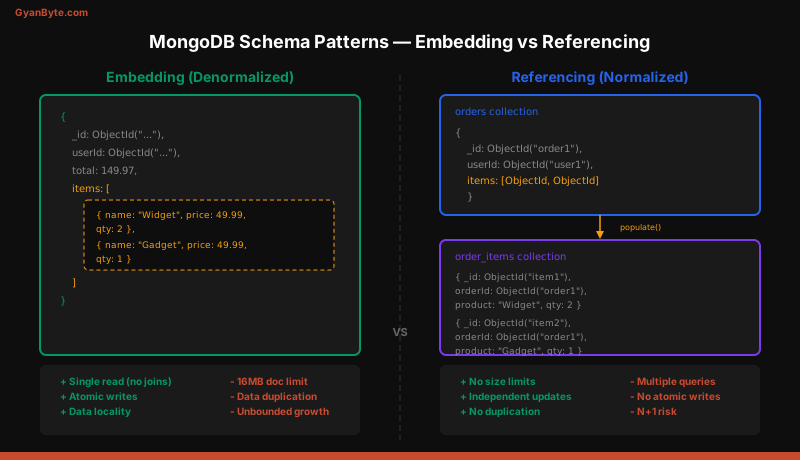
MongoDB schema design is fundamentally different from relational design. You design around query patterns, not entity relationships.
Embedding (Denormalization)
Embed related data directly inside the parent document when the data is always accessed together and the embedded array is bounded.
const orderSchema = new mongoose.Schema({
  user: { type: mongoose.Schema.Types.ObjectId, ref: "User" },
  items: [
    {
      productId: mongoose.Schema.Types.ObjectId,
      name: String,         // denormalized from Product
      price: Number,        // snapshot at time of order
      qty: { type: Number, min: 1 },
    },
  ],
  total: Number,
  status: {
    type: String,
    enum: ["pending", "paid", "shipped", "delivered"],
    default: "pending",
  },
});
When to embed: Comments on a blog post (bounded), order line items (frozen snapshot), address on a user profile (1:1 relationship).
Referencing (Normalization)
Store a reference (ObjectId) and resolve it at query time with .populate().
const reviewSchema = new mongoose.Schema({
  author: { type: mongoose.Schema.Types.ObjectId, ref: "User", required: true },
  product: { type: mongoose.Schema.Types.ObjectId, ref: "Product", required: true },
  rating: { type: Number, min: 1, max: 5 },
  body: String,
});

// Query with population
const reviews = await Review.find({ product: productId })
  .populate("author", "name avatar")
  .sort({ createdAt: -1 })
  .limit(20);
When to reference: Many-to-many relationships, unbounded lists, data that changes frequently and must stay consistent, or documents that are accessed independently.
The Hybrid Approach
In practice, most schemas use both patterns. Embed data you read together and reference data you update independently.
const postSchema = new mongoose.Schema({
  author: { type: mongoose.Schema.Types.ObjectId, ref: "User" },
  authorName: String,  // denormalized for display (avoids populate on listing pages)
  title: String,
  body: String,
  tags: [String],      // embedded — bounded, queried with the post
  comments: [{ type: mongoose.Schema.Types.ObjectId, ref: "Comment" }], // referenced — unbounded
});
Indexing Strategies
Indexes are the single most important performance lever in MongoDB. Without them, every query scans the entire collection.
// Single field index
userSchema.index({ email: 1 });

// Compound index — order matters for query optimization
orderSchema.index({ user: 1, createdAt: -1 });

// Text index for search
postSchema.index({ title: "text", body: "text" });

// TTL index — auto-delete documents after expiration
sessionSchema.index({ expiresAt: 1 }, { expireAfterSeconds: 0 });

// Partial index — only index documents matching a filter
orderSchema.index(
  { status: 1 },
  { partialFilterExpression: { status: { $in: ["pending", "paid"] } } }
);
Compound index rule: Follow the ESR pattern — Equality fields first, then Sort fields, then Range fields. A compound index on { user: 1, createdAt: -1 } supports queries that filter by user and sort by createdAt in a single index scan.
Use explain() to verify that your queries use indexes:
const plan = await Order.find({ user: userId })
  .sort({ createdAt: -1 })
  .explain("executionStats");

console.log(plan.executionStats.totalDocsExamined); // should be close to nReturned
Aggregation Pipeline
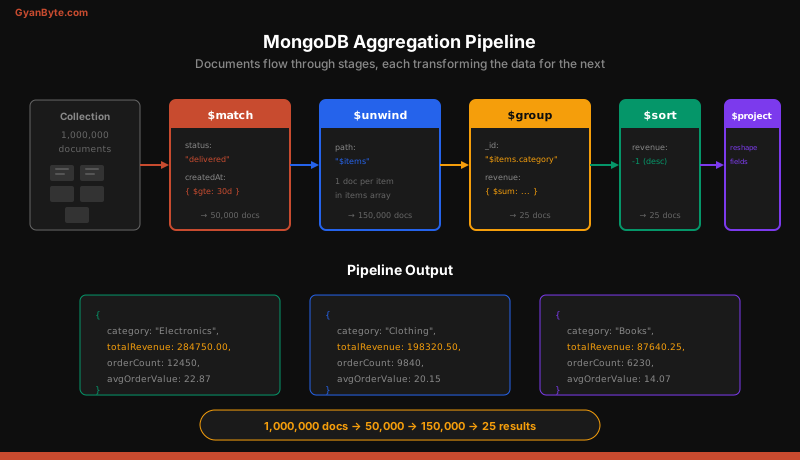
The aggregation pipeline processes documents through a sequence of stages, each transforming the data for the next stage. It is MongoDB’s answer to SQL GROUP BY, JOIN, and window functions.
// Revenue by product category for the last 30 days
const results = await Order.aggregate([
  // Stage 1: Filter to recent, completed orders
  {
    $match: {
      status: "delivered",
      createdAt: { $gte: new Date(Date.now() - 30 * 86400000) },
    },
  },
  // Stage 2: Unwind the items array (one doc per item)
  { $unwind: "$items" },
  // Stage 3: Group by category, sum revenue
  {
    $group: {
      _id: "$items.category",
      totalRevenue: { $sum: { $multiply: ["$items.price", "$items.qty"] } },
      orderCount: { $sum: 1 },
      avgOrderValue: { $avg: { $multiply: ["$items.price", "$items.qty"] } },
    },
  },
  // Stage 4: Sort by revenue descending
  { $sort: { totalRevenue: -1 } },
  // Stage 5: Reshape output
  {
    $project: {
      category: "$_id",
      totalRevenue: { $round: ["$totalRevenue", 2] },
      orderCount: 1,
      avgOrderValue: { $round: ["$avgOrderValue", 2] },
      _id: 0,
    },
  },
]);
Performance tip: Place $match and $limit as early in the pipeline as possible. MongoDB can use indexes on the first $match stage, dramatically reducing the documents processed by later stages.
Population and Virtuals
Population
Population replaces ObjectId references with actual documents. It executes additional queries under the hood.
const order = await Order.findById(orderId)
  .populate("user", "name email")
  .populate({
    path: "items.productId",
    select: "name price images",
    model: "Product",
  });
Warning: Population on arrays with thousands of entries causes N+1 queries. For large datasets, use the aggregation pipeline with $lookup instead.
// $lookup is MongoDB's equivalent of a SQL JOIN
const orders = await Order.aggregate([
  { $match: { user: new mongoose.Types.ObjectId(userId) } },
  {
    $lookup: {
      from: "users",
      localField: "user",
      foreignField: "_id",
      as: "userDetails",
    },
  },
  { $unwind: "$userDetails" },
]);
Virtuals
Virtuals are computed properties that exist on the document but are not persisted to MongoDB.
userSchema.virtual("posts", {
  ref: "Post",
  localField: "_id",
  foreignField: "author",
});

userSchema.virtual("displayName").get(function () {
  return `${this.name} (${this.role})`;
});
Common Pitfalls
1. Unbounded Arrays
Embedding an unbounded array (e.g., all comments on a viral post) causes documents to exceed the 16MB BSON limit and degrades write performance as the document grows.
Fix: Reference unbounded collections. Store comments in a separate collection with a postId field.
2. Missing Indexes
Every query that does a full collection scan (COLLSCAN) is a ticking time bomb. As data grows, queries slow down linearly.
Fix: Run db.collection.getIndexes() and compare against your query patterns. Every query in a find() or $match should hit an index.
3. N+1 Query Problem
Populating references inside a loop causes one query per document.
// BAD — N+1 queries
const posts = await Post.find().limit(20);
for (const post of posts) {
  post.author = await User.findById(post.author); // 20 extra queries
}

// GOOD — single populate
const posts = await Post.find().limit(20).populate("author", "name avatar");
4. Not Using lean()
Mongoose wraps every result in a full document instance with change tracking, getters, setters, and methods. For read-only endpoints, this overhead is wasted.
// 3-5x slower — full Mongoose documents
const users = await User.find({ role: "admin" });

// 3-5x faster — plain JavaScript objects
const users = await User.find({ role: "admin" }).lean();
5. Ignoring Write Concerns
By default, MongoDB acknowledges writes after they reach the primary. For critical data, use w: "majority" to ensure the write is replicated before acknowledgment.
Mongoose Middleware (Pre/Post Hooks)
Middleware lets you run logic before or after specific operations — useful for hashing passwords, updating timestamps, or cascading deletes.
// Pre-save: hash password before storing
userSchema.pre("save", async function (next) {
  if (!this.isModified("password")) return next();
  this.password = await bcrypt.hash(this.password, 12);
  next();
});

// Post-save: send welcome email
userSchema.post("save", function (doc) {
  if (doc.wasNew) {
    emailService.sendWelcome(doc.email, doc.name);
  }
});

// Pre-find: exclude soft-deleted documents
userSchema.pre(/^find/, function (next) {
  this.where({ deletedAt: null });
  next();
});

// Pre-remove: cascade delete user's posts
userSchema.pre("deleteOne", { document: true }, async function (next) {
  await Post.deleteMany({ author: this._id });
  next();
});
Gotcha: Middleware does not run on updateMany, deleteMany, or bulkWrite. If you need middleware on those operations, iterate with save() / deleteOne() on each document, or use database-level triggers.
Summary
MongoDB with Mongoose gives you flexible document modeling with the safety net of schema validation and middleware. Design your schemas around how you query data, not how entities relate to each other. Use embedding for bounded, co-accessed data and referencing for unbounded or independently accessed data. Index every query pattern, use lean() for read-heavy paths, and prefer the aggregation pipeline over multiple populates for complex data assembly. Avoid unbounded arrays, missing indexes, and N+1 queries — these three pitfalls account for the majority of MongoDB performance issues in production.