PostgreSQL is the most popular relational database in the Node.js ecosystem, and for good reason. It offers ACID compliance, powerful JSON support, full-text search, and a mature extension ecosystem. In this lesson, you will learn three approaches to integrating PostgreSQL with Node.js — raw SQL with the pg driver, a query builder with Knex.js, and a full ORM with Prisma — and understand when to reach for each one.
Setting Up PostgreSQL with Docker
Before writing any code, spin up a local PostgreSQL instance. Docker makes this reproducible across machines.
# docker-compose.yml
version: "3.9"
services:
  postgres:
    image: postgres:16-alpine
    environment:
      POSTGRES_USER: app
      POSTGRES_PASSWORD: secret
      POSTGRES_DB: myapp
    ports:
      - "5432:5432"
    volumes:
      - pgdata:/var/lib/postgresql/data

volumes:
  pgdata:
Start it with docker compose up -d. Your connection string is:
postgresql://app:secret@localhost:5432/myappRaw Queries with node-postgres (pg)
The pg package is the foundational PostgreSQL driver for Node.js. Every higher-level tool — Knex, Prisma, TypeORM — builds on top of it or speaks the same wire protocol.
Installation
npm install pgBasic Connection and Query
import pg from "pg";
const { Pool } = pg;

const pool = new Pool({
  connectionString: "postgresql://app:secret@localhost:5432/myapp",
  max: 20,               // max connections in pool
  idleTimeoutMillis: 30000,
  connectionTimeoutMillis: 2000,
});

// Parameterized query — ALWAYS use $1, $2 placeholders
const result = await pool.query(
  "SELECT id, email, created_at FROM users WHERE email = $1",
  ["[email protected]"]
);

console.log(result.rows); // [{ id: 1, email: '[email protected]', ... }]
Never interpolate user input into SQL strings. Parameterized queries prevent SQL injection at the protocol level — the database receives the query template and parameters separately.
Connection Pooling
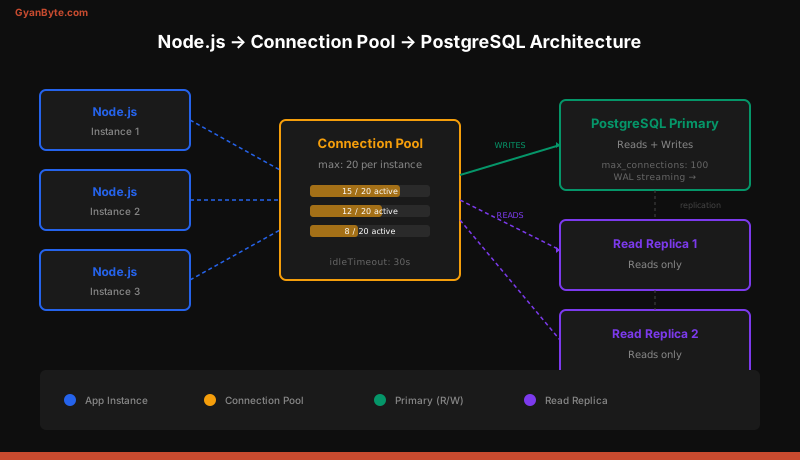
A connection pool maintains a set of open connections and lends them to queries on demand. Without pooling, every query opens a new TCP connection, performs a TLS handshake, and authenticates — adding 20-50ms of overhead per query.
const pool = new Pool({
  max: 20,                    // tune based on: max_connections / app_instances
  idleTimeoutMillis: 30000,   // close idle connections after 30s
  connectionTimeoutMillis: 2000, // fail fast if pool is exhausted
});

// The pool automatically checks out and returns connections
const { rows } = await pool.query("SELECT NOW()");
Production rule of thumb: Set max to (max_connections - 10) / number_of_app_instances. PostgreSQL defaults to 100 max connections. If you run 4 app instances, set max: 20 per instance.
Transactions with pg
Transactions ensure that a group of queries either all succeed or all fail. Use a dedicated client from the pool.
const client = await pool.connect();
try {
  await client.query("BEGIN");

  const { rows } = await client.query(
    "INSERT INTO orders (user_id, total) VALUES ($1, $2) RETURNING id",
    [userId, total]
  );
  const orderId = rows[0].id;

  await client.query(
    "INSERT INTO order_items (order_id, product_id, qty) VALUES ($1, $2, $3)",
    [orderId, productId, qty]
  );

  await client.query(
    "UPDATE inventory SET stock = stock - $1 WHERE product_id = $2",
    [qty, productId]
  );

  await client.query("COMMIT");
} catch (err) {
  await client.query("ROLLBACK");
  throw err;
} finally {
  client.release(); // return connection to pool
}
The finally block is critical. If you forget client.release(), the connection leaks and your pool eventually starves.
Query Builder with Knex.js
Knex sits between raw SQL and a full ORM. It generates SQL from JavaScript method chains, handles connection pooling, and provides a migration system.
Installation and Setup
npm install knex pg
npx knex init  # creates knexfile.js
// knexfile.js
export default {
development: {
client: "pg",
connection: "postgresql://app:secret@localhost:5432/myapp",
pool: { min: 2, max: 20 },
migrations: { directory: "./migrations" },
seeds: { directory: "./seeds" },
},
};Building Queries
import knex from "knex";
import config from "./knexfile.js";

const db = knex(config.development);

// SELECT with joins
const orders = await db("orders")
  .join("users", "orders.user_id", "users.id")
  .where("users.email", "[email protected]")
  .where("orders.total", ">", 100)
  .select("orders.id", "orders.total", "users.email")
  .orderBy("orders.created_at", "desc")
  .limit(10);

// INSERT
const [newUser] = await db("users")
  .insert({ email: "[email protected]", name: "Bob" })
  .returning("*");

// Transaction
await db.transaction(async (trx) => {
  const [order] = await trx("orders")
    .insert({ user_id: 1, total: 59.99 })
    .returning("id");

  await trx("order_items").insert({
    order_id: order.id,
    product_id: 42,
    qty: 2,
  });
});
Knex’s transaction API is cleaner than raw pg — if the callback throws, the transaction rolls back automatically.
Migrations with Knex
npx knex migrate:make create_users_table// migrations/20260403_create_users_table.js
export function up(knex) {
return knex.schema.createTable("users", (table) => {
table.increments("id").primary();
table.string("email").notNullable().unique();
table.string("name").notNullable();
table.string("password_hash").notNullable();
table.timestamps(true, true); // created_at, updated_at
});
}
export function down(knex) {
return knex.schema.dropTable("users");
}npx knex migrate:latest # apply all pending migrations
npx knex migrate:rollback # undo last batchORM with Prisma
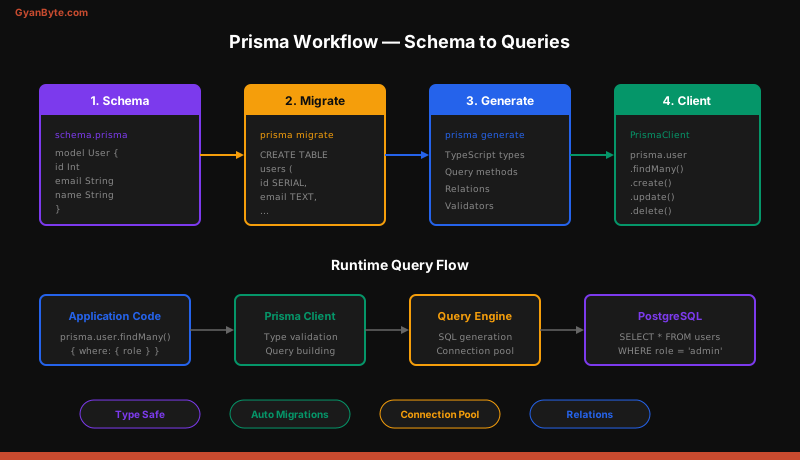
Prisma takes a schema-first approach. You define your data model in a .prisma file, and Prisma generates a type-safe client, handles migrations, and provides an intuitive query API.
Installation and Setup
npm install prisma @prisma/client
npx prisma init
This creates a prisma/schema.prisma file:
datasource db {
  provider = "postgresql"
  url      = env("DATABASE_URL")
}

generator client {
  provider = "prisma-client-js"
}

model User {
  id        Int      @id @default(autoincrement())
  email     String   @unique
  name      String
  orders    Order[]
  createdAt DateTime @default(now()) @map("created_at")
  updatedAt DateTime @updatedAt @map("updated_at")

  @@map("users")
}

model Order {
  id        Int         @id @default(autoincrement())
  user      User        @relation(fields: [userId], references: [id])
  userId    Int         @map("user_id")
  total     Decimal
  items     OrderItem[]
  createdAt DateTime    @default(now()) @map("created_at")

  @@map("orders")
}

model OrderItem {
  id        Int   @id @default(autoincrement())
  order     Order @relation(fields: [orderId], references: [id])
  orderId   Int   @map("order_id")
  productId Int   @map("product_id")
  qty       Int

  @@map("order_items")
}
Migrations and Client Generation
npx prisma migrate dev --name init    # create + apply migration
npx prisma generate                    # regenerate client after schema changes
Type-Safe Queries
import { PrismaClient } from "@prisma/client";

const prisma = new PrismaClient();

// Find with relations
const user = await prisma.user.findUnique({
  where: { email: "[email protected]" },
  include: {
    orders: {
      include: { items: true },
      orderBy: { createdAt: "desc" },
      take: 5,
    },
  },
});

// Create with nested writes
const order = await prisma.order.create({
  data: {
    user: { connect: { id: 1 } },
    total: 59.99,
    items: {
      create: [
        { productId: 42, qty: 2 },
        { productId: 17, qty: 1 },
      ],
    },
  },
  include: { items: true },
});

// Transaction
const [order, inventory] = await prisma.$transaction([
  prisma.order.create({ data: { userId: 1, total: 59.99 } }),
  prisma.inventory.update({
    where: { productId: 42 },
    data: { stock: { decrement: 2 } },
  }),
]);
Prisma’s $transaction accepts either an array of operations (executed in a single database transaction) or an interactive callback similar to Knex.
Error Handling Patterns
Database errors require specific handling. PostgreSQL returns error codes that tell you exactly what went wrong.
try {
  await prisma.user.create({
    data: { email: "[email protected]", name: "Alice" },
  });
} catch (err) {
  if (err.code === "P2002") {
    // Prisma unique constraint violation
    throw new ConflictError("Email already registered");
  }
  throw err;
}
With raw pg:
try {
  await pool.query(
    "INSERT INTO users (email, name) VALUES ($1, $2)",
    ["[email protected]", "Alice"]
  );
} catch (err) {
  if (err.code === "23505") {
    // PostgreSQL unique_violation
    throw new ConflictError("Email already registered");
  }
  throw err;
}
Common PostgreSQL error codes to handle: 23505 (unique violation), 23503 (foreign key violation), 23502 (not-null violation), 40P01 (deadlock detected), and 57014 (query canceled / statement timeout).
Migrations Workflow
Regardless of your tool choice, follow this workflow for schema changes in production:
- Never run
migrate devin production. Usemigrate deploy(Prisma) ormigrate:latest(Knex) which only applies pending migrations without resetting. - Make migrations backward-compatible. Add new columns as nullable or with defaults. Remove columns in a separate migration after the code stops reading them.
- Test migrations on a staging database that mirrors production schema.
- Keep migrations in version control. They are part of your application code.
pg vs Knex vs Prisma — When to Use What
| Feature | pg (raw) | Knex.js | Prisma |
|---|---|---|---|
| Learning curve | Low (just SQL) | Medium | Medium-High |
| Type safety | None | None (add-on) | Built-in |
| Query flexibility | Full SQL | SQL subset | ORM API |
| Migrations | Manual / third-party | Built-in | Built-in |
| Performance | Best (no overhead) | Minimal overhead | Slight overhead |
| Complex queries | Easy (raw SQL) | Possible | May need $queryRaw |
| Connection pooling | Built-in | Built-in | Built-in (via pg) |
| Best for | Performance-critical, complex SQL | Flexible projects, multi-DB | Rapid development, type-safe APIs |
Practical guidance:
- Use
pgwhen you need full SQL control — complex CTEs, window functions, advisory locks, orLISTEN/NOTIFY. - Use Knex when you want programmatic query building without the overhead of an ORM, or when you need to support multiple database engines.
- Use Prisma when you want fast development with type safety and do not need exotic SQL features. It is the most productive option for typical CRUD applications.
Many production applications combine approaches — Prisma for standard CRUD and prisma.$queryRaw for complex reports.
Connection Pooling Best Practices
Connection pooling is not optional in production. Here are the rules:
- Create one pool per process. Never create a pool per request.
- Set
maxbased on your deployment. Total connections across all instances must not exceed PostgreSQL’smax_connections. - Use PgBouncer for serverless. Serverless functions (Lambda, Vercel) create new processes per invocation. Place PgBouncer between your functions and PostgreSQL to multiplex connections.
- Monitor pool metrics. Track pool size, waiting queries, and idle connections. Alert when the pool is consistently above 80% utilization.
- Set statement timeouts. A single slow query can block a connection for minutes. Set
statement_timeoutat the database or connection level.
const pool = new Pool({
  connectionString: process.env.DATABASE_URL,
  max: 20,
  idleTimeoutMillis: 30000,
  connectionTimeoutMillis: 2000,
  statement_timeout: 10000, // 10 seconds
});
Summary
PostgreSQL is a battle-tested database that pairs well with Node.js through multiple integration layers. Start with pg to understand the fundamentals, graduate to Knex when you need programmatic query building, and adopt Prisma when type safety and developer velocity matter more than raw SQL flexibility. Regardless of the tool, always use connection pooling, parameterized queries, and transactions for related writes.